Are the types wrong runs one npm package through three module resolution modes
Tool for analyzing TypeScript types of npm packages
At a glance
- What is it?
- The arethetypeswrong project analyses npm package contents for TypeScript module resolution problems, checking node10, node16 and bundler resolution and reporting twelve distinct failure shapes, from resolution failure to a package masquerading as CJS. The website is one front end over a CLI and a core package you can run against a local directory.
- Who is it for?
- Adopt the CLI when you are publishing a TypeScript package with both entry points, because it will tell you which of your exports resolve in node16 and bundler modes before your users find out, and it costs one command on a local tarball. Do not expect it to review your types for correctness, since it analyses packaging and module resolution rather than the type graph itself.
- Can I use it commercially?
- Yes. MIT is a permissive licence: you can use, modify and sell software built on it, as long as you keep its copyright and licence notices.
- Is it still maintained?
- Yes. The repository last received commits 121 days ago.
- What is it written in?
- Mainly TypeScript, according to GitHub's language statistics.
Answers come from the project's GitHub data, last synced on November 7, 2026, and from our analysis. They are not legal advice.
Star history
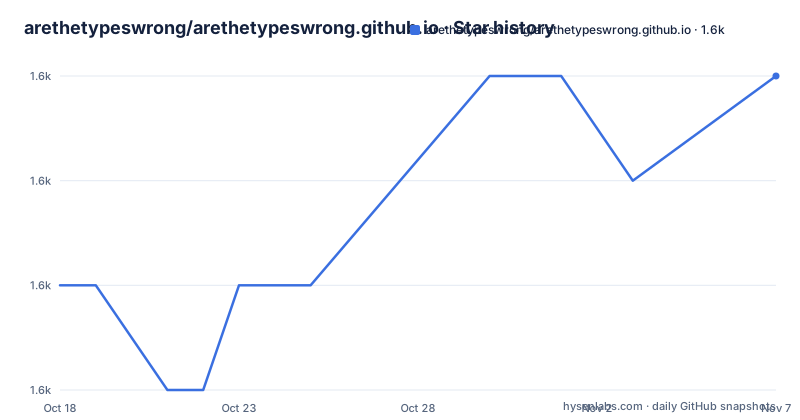
- arethetypeswrong/arethetypeswrong.github.io1,613 ★ · +2
| Repository | 2026-10-18 | 2026-11-07 |
|---|---|---|
| arethetypeswrong/arethetypeswrong.github.io | 1.6k | 1.6k |
2 Stars in the last 20 days, measured from the daily GitHub snapshot. Compare with other projects
Editorial analysis
The unit of analysis is the package, not the source
The project looks at what an npm package actually ships rather than what its repository contains, and that distinction drives everything it reports.
A package that compiles and type checks perfectly in its own repository can still be broken for every consumer, because the package manifest, the declared entry points, the export conditions and the distribution of declaration files are what Node and TypeScript resolve against. That is the layer this tool inspects.
The output is organised by resolution mode rather than by a single verdict. Three modes are checked: `node10`, which is the old node style resolution, `node16`, which honours the `exports` field the way modern Node does, and `bundler`, which is what a bundler such as one resolving for the browser does. A package can be fine in one and broken in another, and the interesting findings are exactly those cases.
The repository is a monorepo with a packages/ directory and a pnpm workspace, and the site is described as a private root package that orchestrates builds across the workspace. Two published packages are visible in the release history: `@arethetypeswrong/core` and `@arethetypeswrong/cli`, both at 0.18.3 as of 2026-05-29.
Twelve problem shapes, and two of them are the confusing ones
Each detected problem has its own document under docs/problems, and the names read like a taxonomy of packaging mistakes.
Resolution failed is the total one: nothing resolves. No types is when resolution succeeds but nothing types. Unexpected module syntax covers files that mix module and non module constructs in a way Node rejects.
Then there are the two masquerading cases, which are the reason this tool is worth more than a type check. Masquerading as CJS means the package appears to be CommonJS when its contents say otherwise. Masquerading as ESM is the reverse. Both install without complaint and then fail when a consumer imports them, and which direction fails depends on the consumer's settings rather than on anything in the package.
ESM (dynamic import only) is a warning rather than a failure: the package works if you reach it through dynamic import and not otherwise.
The remaining ones are export shape problems. A CJS default export, an incorrect default export, a missing `export =`, and named exports on a package that did not intend them. Used fallback condition means resolution succeeded only because TypeScript fell back to a condition that was not really satisfied, which is the kind of thing that changes the moment a field is added to the other side's tsconfig.
Checking a package on disk rather than trusting the registry
There are two ways in. The website lets you explore packages through a browser, which is the discovery path for people who did not know their dependency was broken. The CLI is the path for your own release process.
The CLI is `@arethetypeswrong/cli` on npm, and the README frames it as checking packages on disk. That phrasing is the important part: you point it at a directory or a packed tarball, so you can run it in CI before publishing, against exactly the artifact you are about to release, rather than against the registry entry that has not been updated yet.
The repository does not inline the CLI usage in the top-level README, it links to packages/cli/README.md instead. So the exact invocation, its flags and its exit codes are documented in the subpackage, and that is the file to read before wiring it into a pipeline.
The architecture supports the split: core holds the analysis, cli is the interface, and the site is the web front end. The root package.json has no published artifacts of its own, which is why the release tags name scoped packages inside the monorepo.
A pnpm workspace built on the TypeScript native preview
The build setup is worth noting because it is unusual. The root scripts drive `tsgo`, the TypeScript native preview, rather than the standard `tsc`. The dev dependency is pinned to a specific preview build, `@typescript/native-preview` at 7.0.0-dev.20260527.2, which means the toolchain follows the preview rather than a stable TypeScript.
Builds compose across the workspace: `build` runs the root compile and then a recursive build, `test` runs tests recursively per package, and `check-dts` runs a separate tsconfig, `tsconfig.check-dts.json`, which type checks the published declaration files. That last script exists because declaration files are the product here, so validating them is not optional.
Versioning runs through changesets. The `version` script runs changeset version and then refreshes the lockfile, and there is a `.changeset/` directory. That is the right release mechanism for a monorepo publishing multiple packages, since it lets one change bump only the packages it touches.
Runtime requirements are stated in the engines field as Node 22 or newer and pnpm 11 or newer, with pnpm pinned to an exact version and integrity hash as the package manager. There is also a patches/ directory, which for a workspace like this is normally where dependency patches are recorded.
What it will not tell you
It does not tell you whether your types are correct. A package can pass every check here and still have a type that describes a runtime value wrongly, a missing generic constraint, or a type that requires a consumer to use a stricter tsconfig than they do. This tool looks at packaging and resolution.
It also does not replace a type check in your own project. The two answer different questions: one asks whether consumers can resolve your package at all, the other asks whether your code is type correct against the library you import.
Third, a clean result is not a promise about every configuration. The analysis is per resolution mode, and modes are not exhaustive. If your consumers use a bundler with custom conditions, or a tsconfig with paths that redirects module resolution, the three modes checked here are the nearest available approximation rather than your configuration.
Finally, the analysis runs against a package's shipped files. A green result from a local directory does not prove the tarball you publish contains the same files, since the files list in package.json decides what ships. Run the check against the packed tarball for the result that matters.
Against importing the package yourself, and against a type test suite
The manual alternative is to create a scratch project, add the package as a dependency, and write an import for each entry point under each module setting, then see what fails. That is exactly the workflow this tool automates, and for one package in a hurry it may not be worth the setup.
The stronger alternative is a type test suite, where you write compile time assertions about your public API using something like expect-type or tsd. That catches a different class of problem, and the two are complements rather than competitors: the type test suite says your types describe what you meant, and this tool says consumers can load what you shipped.
Many teams do only the second and discover the packaging problem in an issue report from a consumer on a different tsconfig, which is exactly the slow path.
There is also a scope difference worth noting. This project deliberately analyses packages, including other people's packages, which is why the website exists as a public lookup and why it has a docs directory with one page per problem type. A type test suite only ever looks at your own package. If part of your job is choosing dependencies, or answering whether a library is safe to adopt under your module settings, only a package analyser answers it.
Editorial conclusion
Adopt the CLI when you are publishing a TypeScript package with both entry points, because it will tell you which of your exports resolve in node16 and bundler modes before your users find out, and it costs one command on a local tarball. Do not expect it to review your types for correctness, since it analyses packaging and module resolution rather than the type graph itself. Verify first the three resolution modes against the versions of TypeScript your consumers actually use, and read the Masquerading as CJS and Masquerading as ESM cases specifically, since those two produce a package that installs cleanly and then fails at runtime in one of your consumers.
Frequently asked questions
What problems does Are the types wrong detect?
It detects twelve named problems including resolution failed, no types, masquerading as CJS, masquerading as ESM, ESM dynamic import only, used fallback condition, CJS default export, incorrect default export, missing export =, unexpected module syntax, internal resolution error and named exports. Each has its own document under docs/problems.
Which module resolution modes does it check?
The node10, node16 and bundler modes. Each problem can apply in one mode and not another, which is why the tool reports per mode rather than giving a single verdict for a package.
How do I check my own package before publishing it?
Use @arethetypeswrong/cli from npm, which checks packages on disk. The README points at packages/cli/README.md for its usage, and running it against the packed tarball rather than a working directory is the check that matches what consumers install.
Does Are the types wrong check whether my types are correct?
No. It analyses the package contents and module resolution behaviour of the published artifact. Whether your type definitions describe your API correctly is a separate question, answered by a type test suite in your own project.
Official sources
Add this badge to your README
If you maintain this project, the badge below links readers to this analysis and shows its maintenance status from the daily GitHub snapshot. Paste the markdown into your README; add ?metric=license or ?metric=stars to the image URL for a different field.

[](https://hysenlabs.com/projects/arethetypeswrong-arethetypeswrong-github-io)Star history chart for your README
[](https://hysenlabs.com/projects/arethetypeswrong-arethetypeswrong-github-io)Was this useful?