git-branchless: a Rust workspace that treats Git commits as a graph to query
High-velocity, monorepo-scale workflow for Git
At a glance
- What is it?
- A suite of Git commands built around undo, a smartlog, speculative merges and in-memory rebases, written in Rust as a Cargo workspace of seventeen crates and benchmarked on the Linux kernel repository.
- Who is it for?
- git-branchless is at its best when you already keep several stacks of work open at once, because the commands assume that state rather than fight it. `git undo` and `git move` are the two that pay for the install on their own, and the performance work on the kernel repository is what makes the rest viable on a monorepo.
- Can I use it commercially?
- Yes. Apache-2.0 is a permissive licence: you can use, modify and sell software built on it, as long as you keep its copyright and licence notices.
- Is it still maintained?
- Yes. The repository last received commits 22 days ago.
- What is it written in?
- Mainly Rust, according to GitHub's language statistics.
Answers come from the project's GitHub data, last synced on October 23, 2026, and from our analysis. They are not legal advice.
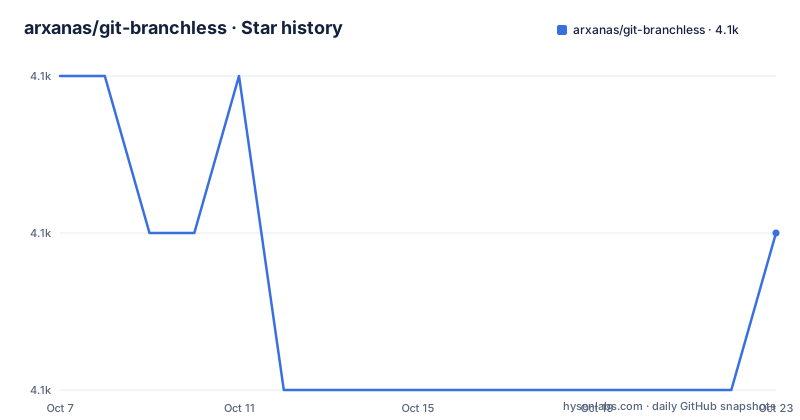
Star history
- arxanas/git-branchless4,132 ★ · -1
| Repository | 2026-10-07 | 2026-10-23 |
|---|---|---|
| arxanas/git-branchless | 4.1k | 4.1k |
-1 Stars in the last 16 days, measured from the daily GitHub snapshot. Compare with other projects
Editorial analysis
What the suite actually adds to a plain Git install
The README groups the additions under three claims, and the middle one is the most interesting. The first claim is that Git becomes easier to use, for novices and power users alike. The examples under it are `git undo` as a general purpose undo, the smartlog as a visualization tool, `git restack` for repairing broken commit graphs, and speculative merges so you are not surprised by a conflict later.
The second claim is added flexibility for power users, and this is where the workflow opinions live. Patch-stack workflows get strong support, the approach used by the Linux and Git projects and described in the README as the way Git was meant to be used. Divergent development covers prototyping and experiments. `git sync` rebases every local stack and branch without checking them out first. `git move` relocates subtrees rather than branch tips, cleaning up old branches without touching the working copy. Anonymous branching cuts the overhead of branching for throwaway work.
The third claim is speed on large repositories and monorepos. The README says performance was benchmarked on `torvalds/linux` at over a million commits and `mozilla/gecko-dev` at over 700,000, and that the project believes it provides the fastest rebase implementation among Git tools and UIs. Operations run in memory and avoid touching the working copy by default, which the README connects to avoiding the slow `git status` that follows a checkout and to build artifacts that go stale. That claim is a self-assessment rather than an independent benchmark, and the README is honest about saying it is a belief.
In-memory operations, sparse indexes and a commit graph you can query
The performance story rests on four concrete mechanisms rather than a general claim of being fast. Operations run in memory, so a move or rebase does not require checking commits out. There is a custom implementation of sparse indexes, which the README links to Git's own write-up on making a monorepo feel small, and that is the feature that keeps per-commit costs proportional to what changed rather than to the size of the tree.
The third mechanism is the one with the most interesting shape. A segmented changelog DAG exists for efficient queries on the commit graph, with the README giving merge-base calculation as the example: O(log n) instead of O(n). The dependency list shows what that means in practice, since the workspace pulls in `eden_dag` under its package name `sapling-dag` at version 0.1.0. That is the segment-changelog data structure from Meta's Sapling, and reusing it is why a Rust tool can answer graph questions quickly on a million commit history.
The fourth is mundane and effective. The project is written in Rust and compiled ahead of time, and work is distributed across cores where it helps. It also has a `scm-bisect` crate in the workspace, so bisecting is part of the suite rather than something you fall back on to plain Git for. Taken together, these are the reasons the rebase claim is at least plausible, though you would want to run your own repository through it before betting a workflow on the result.
A Cargo workspace of seventeen crates rather than one binary
The tree tells you this is a large project with a deliberate structure. `Cargo.toml` lists a workspace with a `default-members` entry for `git-branchless` and a `members` array naming `git-branchless-hook`, `git-branchless-init`, `git-branchless-invoke`, `git-branchless-lib`, `git-branchless-move`, `git-branchless-navigation`, `git-branchless-opts`, `git-branchless-query`, `git-branchless-record`, `git-branchless-revset`, `git-branchless-reword`, `git-branchless-smartlog`, `git-branchless-submit`, `git-branchless-test`, `git-branchless-undo`, plus the main crate and `scm-bisect`.
One crate per Git subcommand is an unusual amount of structure for a CLI, and the shared `git-branchless-lib` alongside a dependency on the `eden_dag` graph library shows that the commit graph logic lives somewhere central rather than being duplicated. `git-branchless-init` being its own crate is a clue to how installation works, since it is the command that hooks a repository.
The workspace dependencies are worth a glance for anyone tracking the toolchain. The CLI parsing is `clap` at 4.6.1 with `clap_mangen` for man pages, error handling is `anyhow` with `color-eyre` and `eyre`, terminal output goes through `console` and `concolor`, and the interactive terminal UI is `cursive` with a crossterm backend. Every internal crate is versioned in lockstep at 0.11.1, which is what you would expect from a suite that has to agree with itself. The `[workspace.metadata.release]` section sets `consolidate-commits` true and disables push and tag, so release tagging is done deliberately by a person.
git undo and why the README argues against the reflog
The repair demo is the clearest single feature. `git undo` covers commits, amended commits, merges and rebases including the case where a conflict was resolved wrongly, checkouts, and branch creations, updates and deletions. That is a much wider surface than the mechanism Git gives you for the same job.
The README explains the difference against `git reflog` in a collapsible section. Reflog views the previous position of a single reference such as `HEAD` and can be used to undo operations, but because it tracks only one reference, complicated operations such as rebases become tedious to recover from. That is the whole argument in one paragraph, and it is correct: after a rebase, the set of refs that moved is large, and the single-position history of HEAD is not a map of it.
This is also the feature most worth having on its own. Being able to say `git undo` and have it figure out what to move back, without reconstructing the pre-rebase graph from memory, removes the main reason people hesitate to rebase. The rest of the suite, the smartlog, `git move`, `git sync` and speculative merges, all build on the same idea that the commit graph is data you can edit rather than a side effect you have to live with.
Releases, platforms and how the project presents its own status
There are three tagged releases in the record, and the spacing between them tells you about the pace. v0.10.0 came out on 2024-10-14, then v0.11.0 and v0.11.1 both landed on 2026-05-21, the fixup release about nine hours after the feature one. The v0.11.1 notes are explicit that it includes no new features or behaviour changes, and that its single change was updating `scm-bisect` after that was missed in v0.11.0. A tool that ships fixups the same day is a tool with an active maintainer.
Those release notes also carry the install instructions, which is unusual placement but convenient: install or update with `cargo install --locked git-branchless`, then run `git branchless init` inside a repository. The `--locked` flag matters for a suite with seventeen interlocked crates, since it pins the dependency versions from the published lockfile.
Platform coverage is broad and visible in the README badge row: Linux, Windows, macOS and Nix on Linux all have their own build workflows. There is a Gitpod badge for a hosted dev environment, a `.devcontainer/` directory, a `.gitpod.yml` and a `flake.nix` with a `flake.lock`. The demos directory holds asciinema recordings for the repair, visualize and manipulate sections, which is the fastest way to see what the smartlog actually looks like before installing anything.
On status, the project points you at a User guide and a Design goals page in the wiki rather than restating them, and the topics are simply cli, git and workflow. The repository is not archived, with 4,127 stars, 116 forks and 95 open issues, dual licensed under `LICENSE-APACHE` and `LICENSE-MIT`.
Editorial conclusion
git-branchless is at its best when you already keep several stacks of work open at once, because the commands assume that state rather than fight it. `git undo` and `git move` are the two that pay for the install on their own, and the performance work on the kernel repository is what makes the rest viable on a monorepo. The tradeoff is that it wraps Git through hooks and aliases in a repository, so adopting it means agreeing to a workflow, not just adding a binary to your path, and the 95 open issues on a 4,127 star project suggest a real support surface. Releases are tagged and the last one, v0.11.1, was published on 2026-05-21, with the most recent push recorded as 2026-09-01. Read the Design goals page in the wiki before installing it into a repository other people share with you.
Frequently asked questions
What is git branchless?
It is a suite of extra Git commands written in Rust: `git undo`, a smartlog visualization, `git restack`, `git move`, `git sync` and speculative merges. The point is to treat commits as a graph you can edit in memory rather than as branches you check out, which makes stacked work and rebasing easier. It installs alongside Git and is described as fully compatible with branches.
How do I install git branchless?
Install it with Cargo using `cargo install --locked git-branchless`, then run `git branchless init` inside a repository to set up the hooks and aliases. Build workflows exist for Linux, Windows, macOS and Nix on Linux, and there is a Gitpod configuration if you would rather try it in a hosted environment first.
Why would I use git undo instead of the git reflog?
The reflog records the previous position of a single reference such as HEAD, so recovering from something that moved many refs at once, such as a rebase, means reconstructing the old graph by hand. `git undo` covers commits, amended commits, merges, rebases, checkouts and branch creations or deletions in one command, which is the case the README argues the reflog handles badly.
Official sources
Add this badge to your README
If you maintain this project, the badge below links readers to this analysis and shows its maintenance status from the daily GitHub snapshot. Paste the markdown into your README; add ?metric=license or ?metric=stars to the image URL for a different field.

[](https://hysenlabs.com/projects/arxanas-git-branchless)Star history chart for your README
[](https://hysenlabs.com/projects/arxanas-git-branchless)Was this useful?