AsahiLinux/docs: a documentation taxonomy that doubles as a risk register
Asahi Linux documentation
At a glance
- What is it?
- The documentation repository for a Linux distribution on Apple Silicon, where the top-level category list is the clearest statement of what the project has to contend with: vendor-controlled firmware, hardware that is not in the system on chip, and per-model device differences.
- Who is it for?
- Use this repository when you want to know where the project's difficulty lies, because the category list is a compact statement of the engineering problem: firmware that is vendor-controlled, hardware outside the system on chip, and per-model variation. Do not expect to find driver source or a patch set here, because this is a documentation tree built on every commit and served from a static host, so the code lives elsewhere.
- Can I use it commercially?
- Check first. The repository uses a licence we do not classify automatically, so read its LICENSE file before any commercial use.
- Is it still maintained?
- Yes. The repository last received commits 6 days ago.
- What is it written in?
- Mainly HTML, according to GitHub's language statistics.
Answers come from the project's GitHub data, last synced on November 22, 2026, and from our analysis. They are not legal advice.
Star history
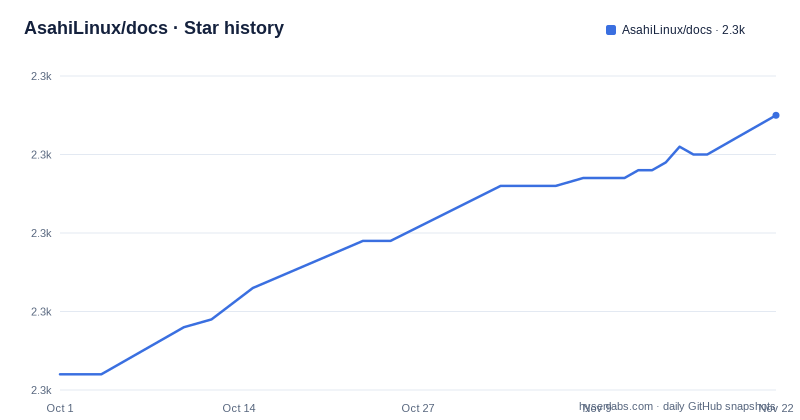
- AsahiLinux/docs2,335 ★ · +33
| Repository | 2026-10-01 | 2026-11-22 |
|---|---|---|
| AsahiLinux/docs | 2.3k | 2.3k |
33 Stars in the last 52 days, measured from the daily GitHub snapshot. Compare with other projects
Editorial analysis
Seven categories, and the one that explains the whole project
Read the documentation structure section as a list of things that are hard, because that is what it is. There are seven top-level categories. Software documentation is the expected one. Platform documentation is anything that applies across the hardware family rather than to one model. Project documentation is described in the readme as administration and material unrelated to hardware or software, which for a volunteer project is where governance lives. Alternative operating system support is its own category, which tells you the documentation serves people who are not running this distribution. Hardware has a sub-taxonomy of four. And then there is firmware, described as documentation on vendor-controlled firmware and firmware interfaces. Put that category next to the others and the structure explains itself. A category whose entire scope is firmware the vendor controls is not a documentation preference, it is an admission that part of the problem is defined by somebody else and cannot be fixed by writing better code. The rest of the taxonomy is the downstream consequence of the same thing: once you are dealing with hardware that was not designed to be replaceable, you need to be precise about which layer you are talking about, and four hardware subcategories is what precision costs.
Four ways to say where hardware lives
The hardware category is split four ways, and the definitions are precise enough to be worth quoting in full because they are the most reusable part of this repository for anyone writing a driver. One subcategory is the application processor. One is hardware blocks integrated into the system on chip itself, which is everything the chip contains. One is peripherals, defined as hardware found in the machines but not in the chip, which is an explicitly negative definition and the interesting one. And one is devices, defined as documentation relating to specific models. Consider what that classification buys you. A block inside the chip is one thing to describe for the whole family. A peripheral is a different story, because it is described as present in the machines generally rather than in the chip, which means it is attached to the chip and may be the same part across models or may not. A device is model-specific by definition, which is where a reader goes when the general documentation does not explain their machine. And the negative definition of peripherals is the tell that a line was drawn after ambiguity: if the boundary between the chip and the rest of the machine needed stating in the readme, people were putting documents in the wrong place. For a reader trying to contribute, the practical value of this taxonomy is that it tells you where a document about your hardware belongs before you know which model you are targeting, which is the question you cannot answer by asking the project.
An alternative-system category means the docs are not only for users
One category in the list has no counterpart in a typical distribution's documentation tree, and it is worth a paragraph of its own. The alternative operating system category is where support documentation for other systems and other distributions goes. A project that documents alternatives is making two statements at once. The first is that its users are not homogeneous, which is obvious for a distribution targeting hardware that other systems also run on, and less obvious for a distribution with its own installer. The second is that the project is a source of knowledge for people who will never install it, which happens when the hard part of the work is understanding hardware that anyone might want to run something else on. That changes who the documentation is written for. If the only audience were people running the distribution, the natural structure would be organised by task: how to install, how to update, how to troubleshoot. Organising by subject instead, hardware block by hardware block, means a document is written to be read by someone who has a specific piece of hardware and a specific question about it, whether or not they end up installing anything. That is the more demanding audience, because a task-oriented document can assume the reader has a running system, and a subject-oriented one cannot. It is also the reason the hardware subcategories matter more than they would otherwise, since a reader arriving with one device and one question has to find the right subcategory first.
Zensical, one TOML file, and a build that runs on every commit
The tooling section is three sentences and it tells you the whole publishing model. The site is generated by a static site generator distributed as a Python package, and the readme notes that if your distribution does not package it you can install it with the Python package installer. To build the documentation locally for testing you install it and run one command:
$ zensical serveThat is the entire local workflow, and it is a good sign. A documentation project that requires a Node toolchain, a plugin ecosystem and a service account to preview a change has lost most of its contributors, and one that needs a Python package and a serve command has kept them. The rest of the structure is consistent with a modern static site project. There is a single configuration file at the root in the TOML format, a directory of overrides which is the conventional place for theme templates when you need to change how a generator renders, and a separate artwork directory, which suggests images are managed as a set rather than scattered per page. The site is rebuilt by continuous integration on every commit and served from the platform's static hosting, so there is no separate deployment to run and no branch preview to configure. One entry in the root is more consequential than the others, and it is not mentioned in the readme. There is a gitmodules file, which means the documentation tree pulls content from other repositories. For a documentation project that is a significant architectural decision, because it lets a document live in the repository that owns the code it describes, and it also means the rendered site depends on the state of several repositories at once.
Documentation is not the project, and the readme is honest about where the rest is
A short note on scope, because the repository is easy to misjudge. This is the documentation source tree. It is not the installer, not the kernel configuration, not the driver source, and not the firmware analysis. The readme does not claim otherwise; it says in one line that this is the documentation repository and links the site, and everything after that is about how the documentation is organised and built. That is a helpful restraint, because a repository named for a project invites the assumption that it is where the project lives. What the repository does contain is worth taking seriously as an engineering artefact in its own right. A category for vendor-controlled firmware is a statement about where the hard boundary lies. A negative definition separating peripherals from the chip is a record of a classification problem that was actually resolved. An alternative-system category is a decision about audience. And a project category described in the readme as administration is an acknowledgement that a volunteer project's stability is a function of its process, not only of its code. None of that is visible in a list of documentation files, which is why the readme is worth more than it looks. It is ninety lines long and the structure section is the substance, and the tooling section is the confirmation that the tree is cheap to contribute to.
The one thing this repository does not tell you
The licence. The project records a licence that the hosting platform cannot classify, which in practice means it is not one of the identifiers automated tools recognise, and the readme contains no licence section at all. It is a small thing to notice and a real thing to resolve, because the artefact here is prose. Documentation is the content people most often want to reuse, quote and translate, and a text file in a repository with an unclassified licence is a question rather than an answer: may I republish this, may I quote it, does attribution suffice. The readme does not say, so the file is the only source. Compare that with the rest of this repository, which is unusually forthcoming. The category definitions are specific, including one phrased as a negative. The hardware split is broken down four ways rather than left to the author of each page. The local preview is one command. The alternative-system audience is named rather than implied. The project category is glossed in plain language, including the informal phrase about administration and material unrelated to hardware or software, which is the kind of sentence that tells you the person writing it is describing a real thing rather than filling a slot. So the gap is narrow and easily closed, and it should be closed before anyone builds on the documentation or quotes from it.
Editorial conclusion
Use this repository when you want to know where the project's difficulty lies, because the category list is a compact statement of the engineering problem: firmware that is vendor-controlled, hardware outside the system on chip, and per-model variation. Do not expect to find driver source or a patch set here, because this is a documentation tree built on every commit and served from a static host, so the code lives elsewhere. Two things to check before you reuse anything. Read the licence file, because the project records a custom licence that the hosting platform cannot classify and the readme says nothing about it, and for a documentation project the text is the artefact people want to reuse. And check which category a document belongs in before you write it, because a new page filed under the wrong heading is the main way a documentation tree of this shape degrades. If you are evaluating the distribution rather than contributing to it, the installation guidance is not in this repository and this is not where to start.
Frequently asked questions
What is in the AsahiLinux/docs repository?
The documentation source for Asahi Linux, organised into seven top-level categories: alternative system support, firmware and firmware interfaces, hardware, platform-wide documentation, project administration, and software. Hardware is further split into application processor, specific models, peripherals outside the system on chip, and blocks inside the chip.
How do I build the Asahi Linux documentation locally?
Install the Zensical static site generator, which is distributed as a Python package and available through pip if your distribution does not package it, then run zensical serve. The live site is rebuilt by continuous integration on every commit and served from GitHub Pages.
How is hardware documentation organised in AsahiLinux/docs?
Into application processor documentation, documentation for specific Mac models, peripherals defined as hardware in the machines but not in the system on chip, and hardware blocks integrated into the chip. A peripheral is defined negatively, which suggests the boundary was drawn after real ambiguity.
Which documentation category covers vendor-controlled firmware?
The firmware category, described as documentation on vendor-controlled firmware and firmware interfaces. It is one of seven top-level categories, and its existence reflects that part of the problem is defined by the hardware vendor rather than by the project.
Does the Asahi Linux documentation cover other Linux distributions?
Yes, there is a top-level category for alternative operating system and distribution support documentation, which means the documentation is written for readers who may not install Asahi Linux, and is organised by subject rather than by task.
Official sources
Add this badge to your README
If you maintain this project, the badge below links readers to this analysis and shows its maintenance status from the daily GitHub snapshot. Paste the markdown into your README; add ?metric=license or ?metric=stars to the image URL for a different field.

[](https://hysenlabs.com/projects/asahilinux-docs)Star history chart for your README
[](https://hysenlabs.com/projects/asahilinux-docs)Was this useful?