muvm: running a program from your system inside a microVM
muvm - run programs from your system in a microVM
At a glance
- What is it?
- muvm, from the Asahi Linux project, takes a command from your host and runs it inside a microVM created with libkrun, with the guest filesystem coming from a FEX rootfs image. It exists mainly so that programs built for 4K pages can run on systems with a different page size, but the isolation it provides is useful on its own.
- Who is it for?
- muvm is worth a look if you run an Arm Linux system whose page size differs from the one your software was built for, and it is a credible lightweight isolation boundary for running untrusted or mismatched binaries. It is not a container and not a full virtual machine manager, and the licensing is not stated in the repository listing, which you should check before shipping it.
- Can I use it commercially?
- Not without permission. GitHub finds no licence file in the repository, and without a licence all rights are reserved by default: you may read the code but not reuse it. Check the README, or ask the authors, before using it.
- Is it still maintained?
- Yes. The repository last received commits 26 days ago.
- What is it written in?
- Mainly Rust, according to GitHub's language statistics.
Answers come from the project's GitHub data, last synced on November 7, 2026, and from our analysis. They are not legal advice.
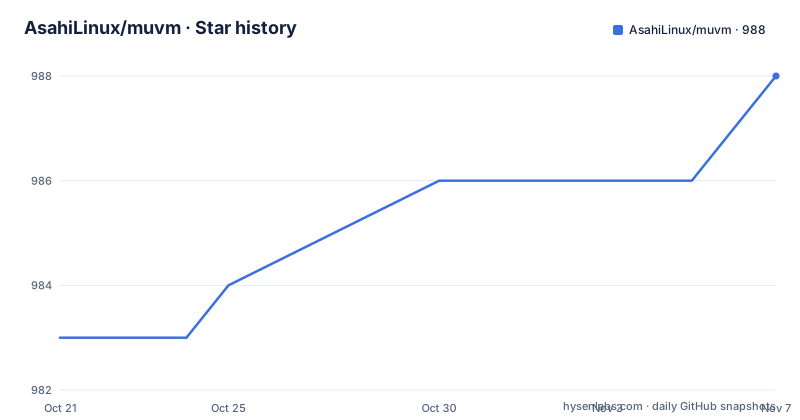
Star history
- AsahiLinux/muvm988 ★ · +5
| Repository | 2026-10-21 | 2026-11-07 |
|---|---|---|
| AsahiLinux/muvm | 983 | 988 |
5 Stars in the last 17 days, measured from the daily GitHub snapshot. Compare with other projects
Editorial analysis
Two programs, one boundary
muvm is small in concept and it is worth understanding the two halves before looking at the options. The project is made up of two programs.
The first is muvm itself, which links against libkrun to create the microVM. The second is muvm-guest, which acts as an entrypoint inside the microVM to set up the environment for running your program. muvm-guest spawns a server that listens for requests to run additional programs, and that is what allows multiple graphical applications to run inside the same microVM.
That second point is the design detail that makes the tool more than a one-shot wrapper. A single microVM start is not free, so a guest that can be asked to launch further programs amortises that cost across a session. You start one microVM, the guest server comes up inside it, and everything you run afterwards happens in that same guest.
The consequence is that the tool can run a graphical application, a server, or a sequence of commands, and the guest server is the component that decides what that means. It is also the component to read first if you want to know what a program inside the guest can reach.
What the microVM boundary does and does not give you
The important line in the option documentation is the one attached to the privileged flag. The option runs the command as root inside the VM, and the documentation immediately notes that this notably does not allow root access to the host filesystem.
That is the whole point of the design. Root inside the guest is a different thing from root on the host, and the flag is about the former. The host filesystem is not handed to the guest, so a program that decides to misbehave inside the microVM does not get the host's files with it.
The broader motivation section names a primary use case and three other potential ones. The primary one is running programs designed for 4K page systems on systems with a different page size, with Asahi Linux as the prime example. The others are software isolation, accessing privileged kernel features that the guest provides, and local testing.
So the tool is mainly a page size compatibility tool, with isolation among the other possible uses. If you have a mismatched binary and no other way to run it, muvm is a targeted answer. If you want a security boundary between untrusted code and your machine, the microVM model is a strong starting point.
The command line, and the memory model underneath it
The usage block is dense, and a few options carry the interesting behaviour.
Usage: muvm [-c=CPU_LIST]... [-e=ENV]... [--mem=MEM] [--vram=VRAM] [--passt-socket=PATH] [-f=
FEX_IMAGE]... [-m] [-i] [-t] [--privileged] [-p=<[[IP:][HOST_PORT]:]GUEST_PORT[/PROTOCOL]>]... [
--emu=EMU] [-x=COMMAND]... COMMAND [COMMAND_ARGS]...
The memory option is the one to read carefully. The amount of RAM is given in MiB, and the documentation explains that it is not reserved immediately: the memory is provided as the guest demands it, and both the guest and libkrun, acting as the virtual machine monitor, attempt to return as many pages as possible to the host. The default is 80 percent of total RAM. The video RAM option sets the amount reported by userspace drivers, and the userspace drivers report that number to clients running inside the microVM as a heap size. The default for it is 50 percent of total RAM.
The CPU list option binds the microVM to specific processors, taking a comma separated list that may include ranges, such as 0,5,8-11, and the default is all logical CPUs on the host, limited to performance cores where that concept applies.
--mem=MEM
--vram=VRAM
--passt-socket=PATH
--privileged
--emu=EMU
Publishing follows the syntax of podman and docker, so a guest port or range of ports can be exposed to the host, optionally bound to a host address and port and annotated with a protocol. The passt-socket option lets you attach to an existing passt socket instead of starting one, which is what you want when the network is already managed elsewhere.
FEX rootfs images and the x86 emulation question
The guest filesystem comes from a FEX rootfs, and the fex-image option mounts an erofs file as one, with the option repeatable so that a base image can be followed by overlays in order. There is also a merged-rootfs option for FEX, and it is marked experimental in the documentation.
That image is what the guest actually runs, which is the key architectural point. muvm does not copy your host filesystem into the VM, so the thing you execute is something you prepared. Whether that is a distribution image built for the target page size or a rootfs you assembled yourself, it is a deliberate input rather than an accident of the host.
Running x86 and x86_64 programs on an Arm64 host is handled by FEX-Emu. If FEX-Emu is installed on the system, muvm configures binfmt_misc inside the microVM so that those programs run transparently. The emulator option makes the choice explicit, with box and fex as the valid options, and the documented default behaviour is that muvm tries FEX and falls back to Box if FEX cannot be found.
That fallback is worth noting when you are debugging, because a run that behaves differently from the one you expected may be using the other emulator. If you care which one is in play, pass the option rather than relying on the fallback.
Graphical applications, X11 forwarding and GPU paths
Running a graphical program is the case the guest server was built for, and the graphics path has two halves.
The first is X11 forwarding. If the DISPLAY environment variable is set, muvm uses X11 forwarding so that graphical applications inside the microVM can draw on the host's display. That is a straightforward remote-style display path, and it means a program that believes it has a display has one, with the usual consequences for performance and for the fact that anything it draws is visible to whoever can see the display.
The second is GPU acceleration, which is enabled on systems supporting DRM native context, and the documentation names the drivers that qualify: freedreno, amdgpu and asahi. The last of those is the reason this project exists at all, since the asahi driver is the one for the Asahi devices whose page size is the problem muvm was built to solve.
The interaction between the two is worth thinking about. A graphical application that is accelerated by a native context is not doing its rendering in a software framebuffer, which is what makes the approach usable for anything interactive. Whether the passthrough works for your particular driver and your particular program is an empirical question, and the documentation gives you the condition under which it is attempted rather than a guarantee that it will work.
A young Rust project with an unstated licence
The engineering details are ordinary and good. The project is a Cargo workspace with the crates directory as the member glob, a Cargo.lock checked in, a rustfmt.toml, an editor configuration, a CODEOWNERS file, and a share directory at the top level. The primary language is Rust, the default branch is main, and the crate layout means the two programs are separate crates in one workspace with a shared dependency tree.
The release history shows the project is moving. muvm-0.5.1 came out on 2026-03-10, muvm-0.6.0 on 2026-05-14 and muvm-0.7.0 on 2026-10-13, with the last push on the same day. The repository is not archived, and the version numbers sit below 1.0, which usually means the command line and the file formats are still allowed to move.
The licence is the item to resolve yourself. No licence is stated for the repository, and for a tool whose whole purpose is to run code from your system inside a sandbox, the licence matters twice over, once for redistribution and once for the fact that the project sits inside the Asahi ecosystem, where the surrounding components have their own terms.
The README is short by design, since the project is a wrapper around libkrun and a guest binary, and the surrounding documentation for those two lives in their own repositories. The usage block is the reference, and it is worth reading in full rather than from the summary above, because several options interact and the semantics of the memory and video RAM defaults are not obvious.
Editorial conclusion
muvm is worth a look if you run an Arm Linux system whose page size differs from the one your software was built for, and it is a credible lightweight isolation boundary for running untrusted or mismatched binaries. It is not a container and not a full virtual machine manager, and the licensing is not stated in the repository listing, which you should check before shipping it. Before you build on it, verify that your host supports the DRM native context path you need for GPU access, pin down which emulator you want, since the default is FEX with a fallback to Box, and read the guest entry point to see what the guest server exposes.
Frequently asked questions
What is muvm and what is it for?
muvm runs programs from your system inside a microVM created with libkrun. Its main purpose is running software built for 4K page systems on hardware with a different page size, with Asahi Linux as the prime example, and other uses include software isolation and local testing.
Does muvm's privileged mode give root access to my host?
No. The privileged option runs the command as root inside the VM, and the documentation notes that this notably does not allow root access to the host filesystem. The guest filesystem comes from the FEX rootfs image you supply with the fex-image option.
How do I run x86 programs on an Arm64 machine with muvm?
Install FEX-Emu on the system, and muvm will configure binfmt_misc inside the microVM so that x86 and x86_64 programs run transparently. You can also select the emulator explicitly with the emu option, where the valid values are box and fex, and the default tries FEX and falls back to Box.
How much memory does a muvm microVM use?
The mem option sets the amount of RAM in MiB and defaults to 80 percent of total RAM, but the memory is not reserved immediately: it is provided as the guest demands it, and both the guest and libkrun try to return pages to the host. The vram option sets the amount reported to clients running inside the microVM, defaulting to 50 percent of total RAM.
Official sources
Add this badge to your README
If you maintain this project, the badge below links readers to this analysis and shows its maintenance status from the daily GitHub snapshot. Paste the markdown into your README; add ?metric=license or ?metric=stars to the image URL for a different field.

[](https://hysenlabs.com/projects/asahilinux-muvm)Star history chart for your README
[](https://hysenlabs.com/projects/asahilinux-muvm)Was this useful?