Jarvis Registry: An MCP and A2A Gateway for Governed Agent Access
Connect any AI copilot or autonomous agent to your enterprise tools — through a single, secure MCP/Agent gateway with built-in identity, access control, and full observability.
At a glance
- What is it?
- Jarvis Registry puts identity, per-tool access control and audit logging in front of MCP servers and A2A agents so copilots and autonomous agents reach internal tools through one authenticated endpoint. The trade-off is a multi-service stack with an identity provider dependency, and the README leaves the ACL model and upgrade path underspecified.
- Who is it for?
- Adopt Jarvis Registry if you already run Keycloak, Cognito or Entra ID and need one audited endpoint in front of many MCP servers and A2A agents, and you are willing to operate a multi-service Docker Compose or Kubernetes stack. Do not adopt it if you need a single stdio MCP server for one desktop client, or if you cannot run an identity provider alongside it.
- Can I use it commercially?
- Yes. Apache-2.0 is a permissive licence: you can use, modify and sell software built on it, as long as you keep its copyright and licence notices.
- Is it still maintained?
- Yes. The repository last received commits 1 day ago.
- What is it written in?
- Mainly Python, according to GitHub's language statistics.
Answers come from the project's GitHub data, last synced on November 15, 2026, and from our analysis. They are not legal advice.
Star history
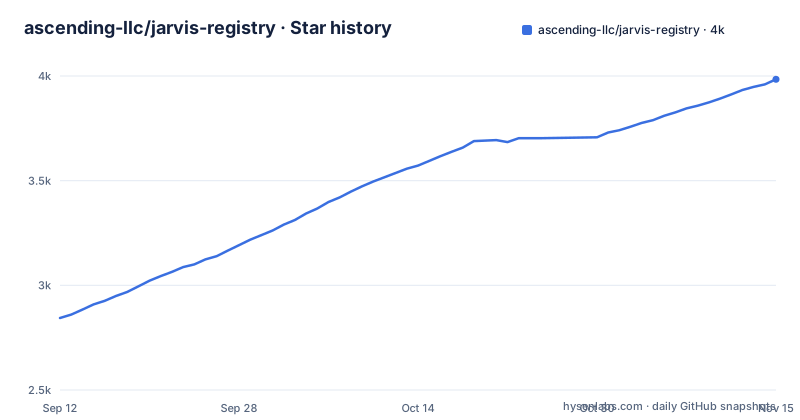
- ascending-llc/jarvis-registry3,984 ★ · +1,140
| Repository | 2026-09-12 | 2026-11-15 |
|---|---|---|
| ascending-llc/jarvis-registry | 2.8k | 4k |
1,140 Stars in the last 64 days, measured from the daily GitHub snapshot. Compare with other projects
Editorial analysis
The Integration Sprawl Problem Jarvis Registry Targets
The README frames the problem as giving copilots and autonomous agents secure, governed access to internal tools without fragmented integrations or security blind spots. That is a real pattern once more than a handful of MCP servers exist: each client holds its own credentials, each server enforces its own rules, and no single log shows which agent called which tool. Jarvis Registry's answer is to make itself the only endpoint an AI client talks to. The README describes it as a single authenticated entry point for all AI clients and agents using MCP over SSE or Streamable HTTP, with an ACL engine that enforces scope-based and role-based permissions down to the individual tool level. The intended audience is an enterprise platform or security team that has already decided agents will touch production systems and now needs the access decisions recorded somewhere central. It is not aimed at a developer wiring one MCP server into one desktop client.
Gateway, Registry and Orchestrator: The Three Roles in the Stack
The repository describes three roles that share one gateway. The MCP gateway and reverse proxy terminates client connections over SSE or Streamable HTTP and forwards them to registered MCP servers. The A2A side registers autonomous agents, and the README states that orchestrator agents coordinate worker agents through the same secure gateway, so agent-to-agent calls pass the same access checks as human-driven ones. Discovery is the third role: semantic search over skills, descriptions and tags lets an agent find the right MCP server or A2A agent at runtime rather than being hardcoded to one. Identity is delegated rather than implemented. The README names OAuth 2.0/OIDC with Keycloak, Amazon Cognito and Microsoft Entra ID, and claims no custom auth code is needed. Observability is listed as full request logging, OpenTelemetry tracing and Prometheus metrics. What the README does not give is the request path in detail: it does not say where tokens are validated relative to the reverse proxy, how a tool-level ACL is expressed, or how the semantic index is built and refreshed. Those answers are pointed to the design documentation on jarvisregistry.com.
Getting the Full Stack Up with Docker Compose
The README's quick start is short and assumes an identity provider already exists. It clones the repository, copies .env.example to .env and tells you to edit .env with your identity provider credentials, then runs uv sync --all-packages, activates .venv/bin/activate, and starts everything with docker compose --profile full up -d before opening http://localhost:80. Two details matter. First, the profile flag: the full profile is what the README invokes, implying other profiles exist for narrower subsets, though the README does not enumerate them. Second, uv is the package manager rather than pip, and the --all-packages flag suggests a multi-package workspace rather than a single Python project. The README also lists deployment guides for AWS EKS, Azure AKS, GCP GKE and Docker Compose, describing the local stack as under five minutes. That timing claim is the project's, not something verified here. The docs/quick-start.md file is referenced for detail, and the homepage carries the fuller Get Started guide.
Where the README Stops Short
The largest gap is the ACL engine. The README promises enforcement down to the individual tool level through scope-based and role-based permissions, but it never shows a policy file, a configuration key, or an example rule. Until you read the security design documentation, you cannot tell whether ACLs are declared in the registry UI, in a YAML file mounted into a container, or in the identity provider's claims. That matters because the ACL is the component a security reviewer will ask about first. The second gap is operational. The quick start starts a full Docker Compose profile, and the README gives no resource requirements, no statement about which services are mandatory, and no guidance on running the gateway without the UI or without the orchestrator. A team evaluating this for a constrained environment has no sizing information from the README alone. The third gap is versioning. Three CLI releases are listed, cli-v0.3.0, cli-v0.3.1 and cli-v0.4.0, all within roughly four days in September 2026, and the README says nothing about upgrade procedures or whether registry state survives a CLI upgrade. Rapid minor releases are not inherently a problem, but they do mean you should read the release notes before pinning a version.
When a Single MCP Server Is the Better Answer
The obvious alternative is running MCP servers directly and letting each client connect to them, which is how most MCP tooling works today. The difference is architectural, not cosmetic. A direct connection means each client holds credentials for each server, and access rules live inside each server. Jarvis Registry inverts that: clients authenticate once to the gateway, and the gateway decides which tools they may reach. You pay for the centralization with an extra network hop, a service to operate, and a dependency on an identity provider. There is also a lineage question worth noting. The README's acknowledgments state that Jarvis Registry builds on the agentic-community/mcp-gateway-registry project, crediting it with establishing the core MCP gateway patterns. If you are choosing between the two, the meaningful question is what the enterprise layer adds: the README names A2A orchestration, semantic skill discovery and the ACL engine as part of this project's scope, but it does not offer a side-by-side comparison, so treat the distinction as something to confirm in the documentation rather than assume.
Licence, Maintenance and Upgrade Cost
The project is Apache-2.0, which permits commercial use, modification and redistribution provided the licence and notices are preserved. That is a permissive choice consistent with enterprise adoption, and it means the gateway can be bundled into a commercial product without a separate agreement. It also means there is no copyleft obligation to publish your own modifications. None of this is legal advice; if you are redistributing the software, have counsel read the LICENSE file rather than this summary. On maintenance, the CLI has an active release cadence, with cli-v0.4.0 dated 2026-09-08 and the last repository push on 2026-09-10, and the repository is not archived. What the README does not show is a support policy, a compatibility matrix between CLI versions and the server components, or a stated deprecation window. For a gateway that sits in front of production tools, the absence of a documented upgrade path is the operational cost to weigh: every CLI bump is a change to the component that holds your registrations and policies, and you should verify state migration before applying one.
Who Should Run This, and What to Check First
The fit is narrow but clear. If your organization already operates Keycloak, Amazon Cognito or Microsoft Entra ID, has more than a few MCP servers and A2A agents, and needs a single audited endpoint with per-tool authorization and OpenTelemetry traces, Jarvis Registry is designed for exactly that shape. If you are a solo developer connecting one MCP server to Claude Desktop or Cursor over stdio, the gateway adds an identity provider dependency and a multi-service stack for no benefit. The same applies if you cannot run an IdP at all, since the README treats it as a prerequisite rather than an option. Before you commit, read the security design page at jarvisregistry.com/design/security-design/ and find the concrete ACL schema, because that is the piece the README describes only in prose. Then check the release notes for cli-v0.4.0 against cli-v0.3.x to see whether registrations survive an upgrade, and confirm which services the full Compose profile actually starts, since the README lists the command but not the contents.
Editorial conclusion
Adopt Jarvis Registry if you already run Keycloak, Cognito or Entra ID and need one audited endpoint in front of many MCP servers and A2A agents, and you are willing to operate a multi-service Docker Compose or Kubernetes stack. Do not adopt it if you need a single stdio MCP server for one desktop client, or if you cannot run an identity provider alongside it. Before committing, verify three things in the repository: the exact ACL policy schema, whether the documented upgrade path for the cli-v0.4.0 line preserves existing registrations, and whether the full Docker Compose profile is required for your deployment or a narrower subset suffices.
Frequently asked questions
What is Jarvis used for?
In this repository Jarvis Registry is described as an MCP and A2A agent gateway and workflow orchestration platform. Its stated purpose is to give AI copilots and autonomous agents governed access to internal tools and data through a single authenticated entry point, adding an access control engine that reaches the individual tool, semantic discovery over skills, and audit logging.
Is Jarvis AI free?
Nothing here addresses the assistant of that name. What this project states about itself is that it is open source under the Apache 2.0 licence, and that it builds on an earlier community gateway project whose patterns it credits in its acknowledgements section.
Who owns Jarvis AI?
The repository says the platform was built by ASCENDING Inc, and its documentation links and security contact address both sit on that company's domain. A licence file and a notice file are both present at the root of the repository.
How do I run the Jarvis Registry locally?
Clone the repository, copy the sample environment file and fill in your identity provider values, install the Python workspace into a virtual environment, then start the full compose profile. The readme says to open the interface on port 80, while the sample environment file sets the registry URL to port 7860 and the compose file defaults the internal registry URL to the same.
What identity providers does Jarvis Registry support?
The capability table names OAuth 2.0 and OIDC with Keycloak, Amazon Cognito, and Microsoft Entra ID, and states that no custom authentication code is needed. The workspace root also installs a command that generates its own signing keys, and the compose file's external registry tags default to two named external registries.
Official sources
Add this badge to your README
If you maintain this project, the badge below links readers to this analysis and shows its maintenance status from the daily GitHub snapshot. Paste the markdown into your README; add ?metric=license or ?metric=stars to the image URL for a different field.

[](https://hysenlabs.com/projects/ascending-llc-jarvis-registry)Star history chart for your README
[](https://hysenlabs.com/projects/ascending-llc-jarvis-registry)Was this useful?