unpic-img: responsive images from CDN URLs across 10 frontend frameworks, with no runtime JavaScript
Multi-framework responsive image component
At a glance
- What is it?
- unpic-img is an MIT-licensed multi-framework image component that uses your existing image CDN to generate responsive srcset attributes, outputs a single img tag with no wrappers, and handles all responsive resizing with CSS rather than JavaScript.
- Who is it for?
- Use unpic-img if your images are hosted on a supported CDN (Cloudinary, Shopify, Imgix, Vercel, Netlify, or one of the other 10 providers) and your frontend uses one of the 10 supported frameworks. The component handles srcset, sizes, lazy loading, and aspect-ratio CSS automatically; your CDN handles the actual resizing.
- Can I use it commercially?
- Not without permission. GitHub finds no licence file in the repository, and without a licence all rights are reserved by default: you may read the code but not reuse it. Check the README, or ask the authors, before using it.
- Is it still maintained?
- Yes. The repository last received commits 3 days ago.
- What is it written in?
- Mainly TypeScript, according to GitHub's language statistics.
Answers come from the project's GitHub data, last synced on October 20, 2026, and from our analysis. They are not legal advice.
Star history
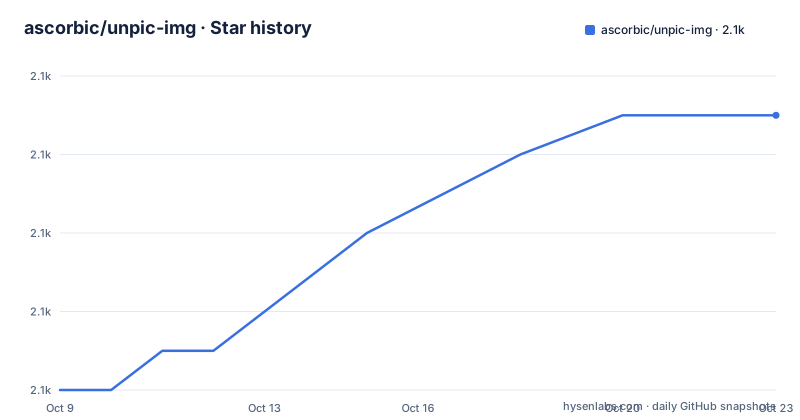
- ascorbic/unpic-img2,093 ★ · +7
| Repository | 2026-10-09 | 2026-10-20 |
|---|---|---|
| ascorbic/unpic-img | 2.1k | 2.1k |
7 Stars in the last 11 days, measured from the daily GitHub snapshot. Compare with other projects
Editorial analysis
unpic detects the CDN from the URL and uses that CDN's query parameters to build srcset entries
URL-based CDN detection is the core mechanism. Pass a Cloudinary, Imgix, Shopify, or Vercel URL to the Image component and unpic-img identifies the CDN from the URL structure, then rewrites that URL using each CDN's own query parameters to request each size in the srcset. No configuration is needed to specify which CDN you use; the library infers it.
Detection comes from a separate package called unpic (at unpic.pics/lib). Building on top of that library, the image component produces CDN-specific srcset entries: a Shopify URL in produces Shopify crop parameters out, and a Cloudinary URL in produces Cloudinary transformation parameters out.
This design puts resizing work on the CDN, where it was already happening for most production sites. Many framework-integrated image components take the opposite approach: they download the source image at build time or on the server and produce resized copies. That adds build time, server-side processing, and storage. unpic-img skips that and trusts the CDN to produce each size on demand at the edge.
For a CDN not in the supported list, no URL rewriting is possible. An image from a custom origin passes through as-is without gaining a responsive srcset. A list of supported CDNs lives at unpic.pics/lib and covers 15 providers.
A single img tag with no wrapper divs: CSS handles aspect ratio and responsive sizing
Most image component implementations add wrapper elements, padding divs, or spacer elements to hold space while images load and to prevent layout shift. unpic-img produces only a single img tag. Aspect ratio constraint and responsive sizing come from inline CSS applied directly to that element.
A constrained layout invocation with a 800x600 Shopify source image demonstrates what comes out. Pass this component:
<Image
  src="https://cdn.shopify.com/static/sample-images/bath_grande_crop_center.jpeg"
  layout="constrained"
  width={800}
  height={600}
  alt="Shopify"
/>
And you get a single img element with loading="lazy", decoding="async", a sizes attribute of "(min-width: 800px) 800px, 100vw", an 8-entry srcset ranging from 640w to 1600w with Shopify crop and dimension parameters in each URL, and an inline style that sets object-fit: cover, max-width: 800px, max-height: 600px, aspect-ratio: 1.33333 / 1, and width: 100%.
No wrapper elements appear in that output. Styling the image means targeting the img element directly. There is no wrapping div to override, no padding-bottom spacer to remove, and no additional CSS class to contend with.
Install the framework-specific @unpic package; usage instructions live at unpic.pics/img
Separate packages under the @unpic namespace exist for each supported framework. As of the latest tagged releases (all dated 2025-12-08), @unpic/[email protected], @unpic/[email protected] and @unpic/[email protected] are the most recent versioned releases. Angular, Astro, Lit, Preact, Qwik, SolidJS, Vue and WebC each have their own packages too, and example projects for all 10 frameworks live under examples/ in the repository.
[email protected] is the workspace package manager, with packages organized under packages/. Internally the packages use TypeScript ^5.7.3, and the workspace depends on unpic ^4.2.2 (the CDN detection library).
Detailed install and usage instructions per framework are at unpic.pics/img rather than in the README. React projects import from @unpic/react; Svelte projects from @unpic/svelte. Each framework's documentation page at unpic.pics/img/[framework] covers the specific props and configuration options for that framework.
Blurred placeholder support is available through an optional @unpic/placeholder package at unpic.pics/placeholder. Without it, the component can generate a low-resolution background image on its own. With it, more placeholder options are available, though the documentation does not enumerate them in the README.
3 layout modes: constrained clips to a max size, fixed is pixel-exact, full width expands to the container
3 image layouts handle different use cases, and each maps to a different CSS output and srcset strategy. Fixed produces an image at a specific pixel size and does not respond to viewport width changes. Constrained applies a maximum width and height but allows the image to shrink on smaller viewports, preserving aspect ratio by setting max-width, max-height and width: 100% in the inline style, which is the CSS pattern visible in the Shopify constrained example.
Full width is for images that should span the container regardless of viewport width. A full-width srcset gets entries across a wider range of sizes, since no maximum width caps the resize requests.
Layout also affects loading priority. Eager loading and high priority fetching are available for images above the fold, such as hero images that should load without delay. Lazy loading is the default for offscreen images, set through native browser attributes rather than a JavaScript-based lazy-loader. Priority and loading behavior are configured through the props documented at unpic.pics/img, not through direct loading attribute overrides.
15 CDN providers are supported through unpic lib; a custom origin server is outside the scope
15 CDN providers appear in the support list: Adobe Dynamic Media (Scene7), Builder.io, Bunny.net, Cloudflare, Contentful, Cloudinary, Directus, Imgix (covering Unsplash, DatoCMS, Sanity and Prismic as subdomains), Kontent.ai, Netlify, Shopify, Storyblok, Vercel and Next.js, and WordPress.com with Jetpack Site Accelerator.
Detection relies on URL structure to identify which CDN an image belongs to, then uses that CDN's URL transformation API to build resize parameters. Cloudinary uses transformation parameters in its URL path; Shopify uses query string parameters. Each pattern is encoded in the unpic detection library.
Images not hosted on any of those CDNs will not get a responsive srcset. A self-hosted image server without a URL-based resize API falls outside what unpic-img can do. Using an existing image CDN or CMS with no additional configuration is listed as a requirement, not an optional feature. For teams currently serving images from their own S3 bucket without a CDN in front, adding unpic-img does not automatically give them responsive images; routing those images through a supported CDN is a prerequisite.
No configuration path for adding a custom CDN outside the built-in list is documented in the README. Any such capability would be in the unpic lib documentation at unpic.pics/lib.
No build-time image optimization: the CDN resizes at request time, which changes who bears the latency
Framework-integrated image components like Next.js Image download source images at build time and generate resized copies that ship in the build output. Those resized copies are static assets on the same origin as the rest of the site, with predictable latency on every request.
unpic-img takes the opposite approach: no images are processed at build time. All resizing happens on the CDN on the first request for each size, and subsequent requests hit the CDN cache. For first-view users, latency depends on the CDN's cache warm-up time and geographic distribution, not on whether the build has run.
Removing the build step for images is listed as a feature in the README. For most production sites where CDN-served images are already the norm, that is accurate. For a site where images currently come from a pre-processed build pipeline, switching to unpic-img means giving up build-time guarantees and trusting the CDN to deliver each size promptly.
WebP and AVIF delivery is available when the browser reports support, conditional on the CDN also supporting those formats through its URL API. Which CDNs support each format is not specified in the README; checking the CDN's own documentation is a prerequisite before depending on those formats in production.
MIT licence, latest releases dated 2025-12-08, and last push on 2026-10-05
unpic-img is published under the MIT licence, attributed to Matt Kane in 2023. Licence text appears in the README, and the workspace package.json also specifies MIT.
3 tagged releases all dated 2025-12-08: @unpic/[email protected], @unpic/[email protected] and @unpic/[email protected] are the most recent versioned releases. Each framework has its own package and its own version number, so a project that uses @unpic/react and @unpic/svelte would update both independently.
Last push to the repository was on 2026-10-05. It is not archived.
@changesets/cli appears in the devDependencies and a .changeset/ directory exists at the root. That tooling manages versioning and release notes across a monorepo, so version increments for individual framework packages produce changeset entries rather than a single unified changelog.
For long-term maintenance cost, upgrades of unpic itself (at ^4.2.2 in package.json) are separate from upgrades of the framework components. Adding a new CDN to unpic lib may require bumping the unpic version in unpic-img before that CDN's detection works.
Editorial conclusion
Use unpic-img if your images are hosted on a supported CDN (Cloudinary, Shopify, Imgix, Vercel, Netlify, or one of the other 10 providers) and your frontend uses one of the 10 supported frameworks. The component handles srcset, sizes, lazy loading, and aspect-ratio CSS automatically; your CDN handles the actual resizing. Skip it if you host images on a custom origin with no CDN URL transformation API, or if you need a build-time image optimizer that bundles resized copies into your dist folder. Before adding it, verify that your CDN appears in the supported list at unpic.pics/lib, and check the framework-specific documentation at unpic.pics/img for the exact install path for your framework version.
Frequently asked questions
What is unpic-img?
unpic-img is a multi-framework image component that generates responsive img tags by detecting the image CDN from the source URL and using that CDN's API to build srcset entries. It outputs a single img element with no wrappers and handles responsive layout through CSS.
Which frontend frameworks does unpic-img support?
unpic-img supports React, Vue, SolidJS, Svelte, Astro, Preact, Qwik, WebC, Angular, and Lit. Each framework has its own package under the @unpic namespace, such as @unpic/react and @unpic/svelte.
Does unpic-img work with images that are not on a CDN?
No. The component detects the CDN from the image URL and uses that CDN's URL API to resize images. Images on a custom origin without a supported CDN URL transformation API will not get a responsive srcset.
Does unpic-img use runtime JavaScript?
By default it does not. The component generates a static img tag with CSS for responsive sizing, native lazy loading, and async decoding attributes. No client-side JavaScript runs to handle image behavior.
Which CDNs does unpic-img support?
The supported list includes Cloudinary, Imgix, Shopify, Vercel, Netlify, Cloudflare, Contentful, Bunny.net, Storyblok, Adobe Dynamic Media, Builder.io, Directus, Kontent.ai, WordPress.com with Jetpack, and several Imgix-based hosts such as Unsplash, Sanity and DatoCMS.
Official sources
Add this badge to your README
If you maintain this project, the badge below links readers to this analysis and shows its maintenance status from the daily GitHub snapshot. Paste the markdown into your README; add ?metric=license or ?metric=stars to the image URL for a different field.

[](https://hysenlabs.com/projects/ascorbic-unpic-img)Star history chart for your README
[](https://hysenlabs.com/projects/ascorbic-unpic-img)Was this useful?