astrocommunity: shared plugin specifications, not a plugin manager
A community repository of common plugin specifications
At a glance
- What is it?
- AstroNvim's community repository holds plugin specs that other configurations import, so an editor setup inherits a reviewed Lua table instead of cloning each plugin. What you override, and how, is where the friction lives.
- Who is it for?
- Adopt astrocommunity if you run AstroNvim through the template and want community-vetted plugin sets without assembling the specification table yourself. Do not adopt it if you are outside the AstroNvim ecosystem, since the specs are shaped around its plugins setup and lazy.nvim's import mechanism.
- Can I use it commercially?
- Yes, with conditions. GPL-3.0 is a copyleft licence: if you distribute software that includes it, you must release that software's source code under the same licence. Running it internally without distributing it does not trigger that obligation.
- Is it still maintained?
- Yes. The repository last received commits 19 days ago.
- What is it written in?
- Mainly Lua, according to GitHub's language statistics.
Answers come from the project's GitHub data, last synced on November 7, 2026, and from our analysis. They are not legal advice.
Star history
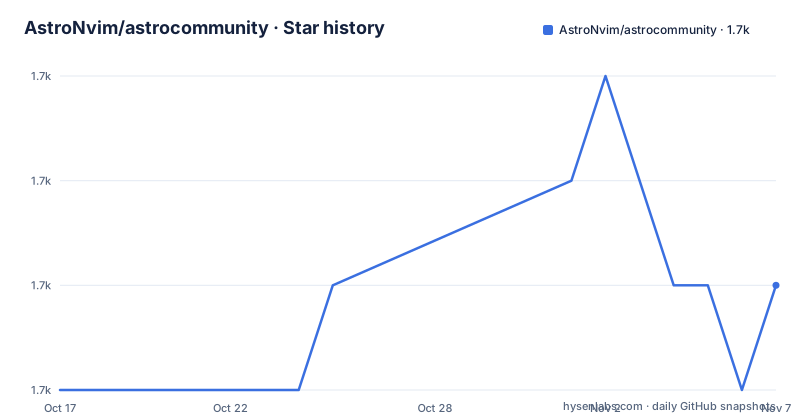
- AstroNvim/astrocommunity1,713 ★ · +1
| Repository | 2026-10-17 | 2026-11-07 |
|---|---|---|
| AstroNvim/astrocommunity | 1.7k | 1.7k |
1 Stars in the last 21 days, measured from the daily GitHub snapshot. Compare with other projects
Editorial analysis
It is a table of specs, not a collection of plugin code
The repository does not contain plugins. It contains plugin configuration specifications: Lua tables describing plugins that other configurations import. That framing matters because it tells you where responsibility sits. A plugin's behaviour still lives in the plugin's own repository and its upstream maintainer. This repository only decides which plugins a group of people think belong together and what a sensible default option set looks like.
The description is deliberately narrow. It is a community repository for AstroNvim, a NeoVim configuration, and its role is helping manage the variety of plugins used in AstroNvim. The distribution mechanism is import: a specification names plugins and their options, and the host configuration merges them into its own `plugins` setup.
Nothing here runs at startup on its own. If you never add an import, this repository has no effect on your editor at all.
Import order is load order, and it decides who wins
The integration step is a few lines in `lua/community.lua`, and the ordering advice is the part to follow exactly. The README asks you to add the community configurations to your `plugins` setup preferably before you import your own plugins, so that all AstroCommunity changes are loaded before your own overrides.
return {
  "AstroNvim/astrocommunity",
  { import = "astrocommunity.colorscheme.catppuccin" },
  -- ... import any community contributed plugins here
}
The first entry is the repository itself, and the `import` entries name a specific specification inside it. With the community table first, your own plugin definitions load afterwards and win on any field both tables set. Reverse that order and the community defaults quietly override your choices, which produces a configuration that looks like you edited it and does not behave that way.
If you started from the AstroNvim Template, `lua/community.lua` already exists and is the intended place for this. If you did not, the README points to the AstroNvim documentation on customizing plugins, which is the reference for how `plugins` setup is composed in the first place.
Overriding a spec means writing a second table
Once an import is in place, the community specification is not the end of the story. You adjust it from your own plugin definitions, typically in the `lua/plugins/` directory, by writing another table keyed on the plugin.
return {
  { -- further customize the options set by the community
    "catppuccin",
    opts = {
      integrations = {
        sandwich = false,
        noice = true,
        mini = true,
        leap = true,
        markdown = true,
        neotest = true,
        cmp = true,
        overseer = true,
        lsp_trouble = true,
        rainbow_delimiters = true,
      },
    },
  },
}
That example is a colorscheme spec whose integrations are individual booleans, so it happens to look self-explanatory. Not every spec is like that. The README is clear that you can override many aspects of community plugins including settings, dependencies, and versions, and it defers to the lazy.nvim documentation for the available options. In practice, override depth is limited by how much of the plugin's configuration the specification exposes in `opts`.
To turn an import off entirely rather than adjust it, set the `enabled` option to `false`.
Why the README insists on full import paths
There are two ways to name a plugin when you customize it: the full repository name, such as `m4xshen/smartcolumn.nvim`, or the module name, such as `catppuccin`. The README recommends the full import path and explicitly advises against the shorthand of just the repository name.
The stated reason for the caution is that the module name might differ from the folder name. That is the whole problem in one line. If you guess the wrong shorthand, the plugin name you wrote will not match the spec you imported, your override will apply to nothing, and the community default will stay in force. Nothing errors. You get the behaviour of the spec plus the settings you thought you replaced.
This is the single most likely way to lose an afternoon with this repository, and it is worth reading your `lua/plugins/` files once after the first import to confirm each override actually attaches to the plugin you meant.
What the repository actually holds
The top level entries describe a normal Lua project with the AstroNvim ecosystem bolted on. There is `lua/`, which is where the specifications live and the path the `astrocommunity.` prefix points into. There is a `docs/` directory and a `CHANGELOG.md`, so changes are tracked. `CONTRIBUTING.md` is the route for adding your own configuration.
Tooling is configured in the repository rather than left implicit: `.luarc.json` for the Lua language server, `.stylua.toml` for formatting, and `selene.toml` for the linter, which lines up with the `fmt` and `clippy`-style checks a Lua workspace would otherwise lack. The repository also includes `neovim.yml` and `.neoconf.json`. A `flake.nix` and `flake.lock` are present, so a Nix environment is supported.
The licence is GPL-3.0. That is a copyleft licence, and for a configuration repository whose output is Lua tables loaded into your editor, the practical question is whether you are distributing a derivative configuration. That is a question for your own review, not this page.
Stability is explicitly delegated to contributors
The contribution section is where the project's own risk statement lives. If you have written a plugin configuration and want it added, you follow the Contribution Guidelines in `CONTRIBUTING.md` and open a pull request, and you are asked to have rigorously tested your changes before submitting.
Then comes the sentence that should shape your expectations: this isn't an official repository, so its stability relies on community contributions. That is an unusual thing to find in a README and it is the most useful line in the file. You are importing specifications whose review standard is a set of contributors rather than a vendor. The upstream plugins can change their options and the specs will lag until someone notices.
The repository is not archived, and the last push was on 2026-10-15, so it is being worked on actively in the plain sense that commits are landing. That is a separate question from whether a given spec is one you can depend on for a year.
How this compares to writing the spec yourself
The alternative is to write the plugin table directly in `lua/plugins/` with no community import at all. What you give up is the review and the shared default; what you gain is that every plugin entry in your configuration is one you wrote, which makes the file self-explanatory years later.
A middle path exists. Import a spec for the parts you agree with and override the rest, which is exactly what the customization mechanism is for. That is what the Catppuccin example shows: the community sets an integration set, and you adjust individual booleans in your own file.
The trade is between inherited defaults and local legibility. Imported specs keep your plugin files short and give you a starting point that other users have already shaped. They also mean a change in the community repository can alter your editor's behaviour without a commit on your side. If that bothers you, the difference is one line in `lua/community.lua`.
Neovim plugin managers generally, and AstroNvim's own `plugins` composition, are documented elsewhere; this repository is one input to that composition, and the AstroNvim documentation on customizing plugins is the reference for the rest.
Editorial conclusion
Adopt astrocommunity if you run AstroNvim through the template and want community-vetted plugin sets without assembling the specification table yourself. Do not adopt it if you are outside the AstroNvim ecosystem, since the specs are shaped around its plugins setup and lazy.nvim's import mechanism. Verify first that your own plugin files use full import paths rather than bare repository names, because the module name and the folder name can differ and the shorthand will silently miss.
Frequently asked questions
How do I add AstroCommunity plugins to my AstroNvim configuration?
Add the repository and the imports you want to your `plugins` setup in `lua/community.lua`, placing them before your own plugin imports so that community changes load first and your own definitions override them. With the AstroNvim Template this file already exists.
How do I change the settings of a plugin I imported from astrocommunity?
Write a table for that plugin in your own `lua/plugins/` directory and set the keys you want under `opts`, or set `enabled` to `false` to disable the import entirely. You can override settings, dependencies, and versions, and the lazy.nvim documentation lists the available options.
Should I use the plugin name or the import path when overriding an astrocommunity spec?
Use the full import path, for example `m4xshen/smartcolumn.nvim`. The README recommends against the shorthand of just the repository name because the module name may differ from the folder name,.
Official sources
Add this badge to your README
If you maintain this project, the badge below links readers to this analysis and shows its maintenance status from the daily GitHub snapshot. Paste the markdown into your README; add ?metric=license or ?metric=stars to the image URL for a different field.

[](https://hysenlabs.com/projects/astronvim-astrocommunity)Star history chart for your README
[](https://hysenlabs.com/projects/astronvim-astrocommunity)Was this useful?