ccstory turns Claude Code session logs into a weekly narrative, and that is both its strength and its limit
Claude Code usage recap with narrative. ccusage tells you the bill, ccstory tells the story.
At a glance
- What is it?
- ccstory reads local coding-agent logs and writes a categorized recap with active hours, costs, and per-bucket prose. It is a sibling to ccusage, and it works offline if you want it to, but the narrative quality depends on your patience and your local narrator.
- Who is it for?
- Adopt ccstory if you use Claude Code, OpenAI Codex, or Google Antigravity and you want a weekly status without reading scrollback, and if you accept that the default narrative is a first/last-message fallback. Do not adopt it if you need polished prose without paying the LLM-narrative cost, or if you expect it to work without local git.
- Can I use it commercially?
- Yes. MIT is a permissive licence: you can use, modify and sell software built on it, as long as you keep its copyright and licence notices.
- Is it still maintained?
- Yes. The repository last received commits 28 days ago.
- What is it written in?
- Mainly Python, according to GitHub's language statistics.
Answers come from the project's GitHub data, last synced on October 22, 2026, and from our analysis. They are not legal advice.
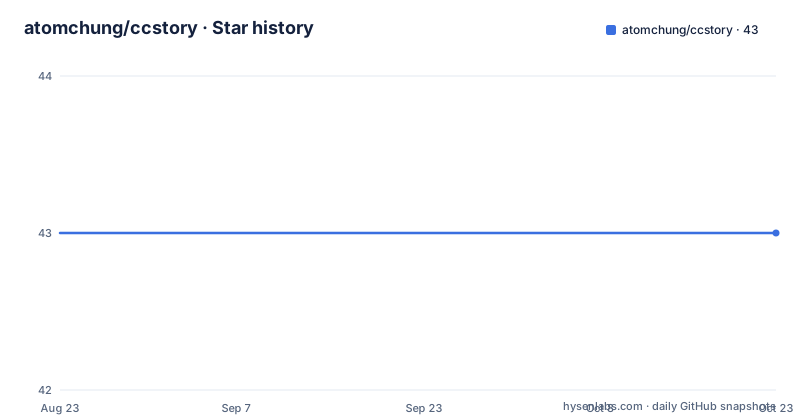
Star history
- atomchung/ccstory43 ★ · +0
| Repository | 2026-08-23 | 2026-10-22 |
|---|---|---|
| atomchung/ccstory | 43 | 43 |
0 Stars in the last 60 days, measured from the daily GitHub snapshot. Compare with other projects
Editorial analysis
What ccstory actually solves
ccstory addresses a specific pain: you look at a ccusage number and you know what you spent, but not what the tokens went to. The README puts it plainly: ccusage tells you how much you spent, ccstory tells you what on. The intended user is someone who writes a weekly status, or who does a Sunday-night reflection on what they shipped. The tool reads local coding-agent session logs and writes a categorized recap with active hours, costs, and a per-bucket narrative. That is a narrow job, and it does not try to be a general productivity tracker. It is for people who already use a coding agent and already have session logs on disk. If you do not use Claude Code, OpenAI Codex, or Google Antigravity, there is nothing for it to read.
The mechanism: local logs, local git, and a provider registry
The data flow starts with session logs in well-known local directories. For Claude Code it reads ~/.claude/projects, for OpenAI Codex it reads ~/.codex/sessions, and for Google Antigravity it reads ~/.gemini/antigravity/brain. The provider registry is designed so more agents can be added without changing the recap contract. The default Repo activity section always reads local git. When GitHub is connected, it enriches up to 10 active repos with GitHub metadata. That is a deliberate design choice: the core recap works offline, and network access is an optional enrichment layer. The categorization step, which the README calls auto-categorize, runs during ccstory init. It scans recent sessions and assigns them to buckets. The classification mode can be folder-name rules only, content-based via a configured narrator, or hybrid, which the README says is the default: user rule wins, else content, else the built-in keyword table. The output is a Rich terminal card in a real tty, or a Markdown report when stdout is not a tty or when CLAUDECODE=1. That auto-detect means you can ask Claude Code to show you your week and get a clean Markdown stream instead of ANSI codes.
Getting it running: init, week, and the offline path
The quick start is three commands: pipx install ccstory, then ccstory init, then ccstory week. The init step is one-time and scans recent sessions. The week command produces the recap, and the full report saves to ~/.ccstory/reports/recap-*.md. For a first run with no network access at all, the README gives a specific command: ccstory init --skip and ccstory week --minimal --classify folder --no-artifacts. The --no-artifacts flag disables GitHub and PyPI lookups while keeping the normal narrative flow. That is a useful escape hatch, because the default flow may invoke one of your configured local coding-agent CLIs, which could require network or a live agent. The window commands are straightforward: ccstory for the current month so far, ccstory week for the past 7 days, ccstory month for the current month, ccstory 2026-04 for a specific month, and ccstory trend for last 8 weeks of sparklines. The trend command accepts --weeks 12 or --months 6 for custom ranges. There is also ccstory all for the entire history. The README notes that the same --agent flag is accepted by ccstory trend, so a trend line and a week over the same range describe the same population.
The narrative depth trade-off: instant fallback versus LLM polish
The most honest part of the README is the narrative depth section. By default, per-session lines use an instant first/last-message fallback. That is fast, but it is not polished prose. If you want LLM-polished summaries, you run with --llm-narrative, and the README warns it is slow and opt-in. There is a caching mechanism: already-polished sessions are reused, so you do not re-burn tokens on them. But transcript growth is only detected on the next selected --llm-narrative run. If you want to force regeneration, you add --refresh. That is a real cost and a real limitation. The default output is a number-heavy card with a top focus line, active hours, sessions, output tokens, turns, cache rate, and cost. The Markdown report adds a header plus 2 to 4 bullet points per bucket, plus per-session one-liners. So the default is a structured summary, not a story. The story only appears when you pay the LLM cost. That trade-off is worth knowing before you adopt it.
Classification modes and the refresh mechanism
Session classification is a core feature, and the README gives three modes. --classify folder uses only folder-name rules: your [categories], else the built-in keyword table. --classify content makes the configured narrator read each session, with no folder rules at all. --classify hybrid is the default: user rule wins, else content, else the built-in keyword table. The category commands let you pin a project to a bucket: ccstory category set <bucket> <keyword>…, and ccstory category unset <bucket> <keyword>… to remove a keyword. You can list your custom bucket rules with ccstory category list. There is a project list command to discover observed project IDs for goal set --project, with --all including ephemeral or synthetic ones. The refresh mechanism is important because rule changes do not apply retroactively by default. --refresh re-does the current window's cached work, re-classifying after a rule edit, and with --llm-narrative it force-regenerates every per-session summary. --refresh-all wipes the entire content-classification cache, not just the window. That is a concrete operational detail: if you edit a rule and want the current week to reflect it, you must run --refresh. Otherwise you will see stale buckets.
A genuine limitation: the offline path is minimal, and multi-agent numbers blur
One limitation is that the offline path, while functional, is deliberately minimal. The README's example for no network uses --minimal, which means numbers only, no per-session lines. So if you want a narrative and you have no network, you get a sparse report. Another limitation is the multi-agent case. The README mentions that once more than one agent is in the window, you need to understand what the numbers mean. It does not explain how costs are aggregated across agents, and it does not claim that the per-agent breakdown is clean. The --agent flag lets you filter to a single provider, but the default is all bundled providers. If you use both Claude Code and Codex in the same week, the recap will mix their sessions, and the narrative may not clearly attribute work to the right agent. That is a real ambiguity. Also, the default Repo activity section always reads local git, so if you are not in a git repository, or if your git history is shallow, that section may be thin or misleading.
A real alternative: ccusage, the sibling tool
The most direct alternative is ccusage, the sibling project that the README references. ccusage tells you how much you spent, while ccstory tells you what on. The difference in approach is fundamental: ccusage is a cost and usage counter, likely with charts and aggregates, but it does not produce a narrative. ccstory adds the categorization and the per-bucket prose. If your only need is the bill, ccusage is the lighter tool. If you need a status report you can paste into a weekly update, ccstory is the one that adds the story. The README positions them as complementary, and that is accurate. There is no claim that ccstory replaces ccusage. The practical difference is that ccusage likely gives you a single number and maybe a breakdown, while ccstory gives you a structured Markdown file with buckets and bullet points. If you already use ccusage and you are happy with the numbers, ccstory may be redundant. If you want the narrative, it is the only tool in this pair that provides it.
Maintenance and license: MIT, active releases, and a cache to manage
The project is MIT licensed, which means you can use it, modify it, and redistribute it with attribution, but this is not legal advice. The repository shows recent releases: v0.8.5 on 2026-08-26, v0.8.4 on 2026-08-23, and v0.8.3 on 2026-08-23. That is three releases in a few days, which suggests active development, but the README does not include a changelog, so you cannot tell what changed between those versions. The maintenance cost is real: ccstory maintains a content-classification cache, and you need to understand when it refreshes. The README says transcript growth is detected on the next selected --llm-narrative run, and --refresh forces regeneration. If you change your narrator model policy, you may need --refresh to see the effect. The report files accumulate in ~/.ccstory/reports/, and the cache lives somewhere in ~/.ccstory as well. There is no mention of a cleanup command, so you may need to manage that directory yourself. The pipx install is straightforward, but upgrades will pull new versions that may change the cache format, so check the release notes before upgrading if you have a large history.
Editorial conclusion
Adopt ccstory if you use Claude Code, OpenAI Codex, or Google Antigravity and you want a weekly status without reading scrollback, and if you accept that the default narrative is a first/last-message fallback. Do not adopt it if you need polished prose without paying the LLM-narrative cost, or if you expect it to work without local git. Before you rely on it, verify that your sessions are in the expected directories (~/.claude/projects, ~/.codex/sessions, ~/.gemini/antigravity/brain), run ccstory init --skip and ccstory week --minimal --classify folder --no-artifacts for a first offline run, and check the generated ~/.ccstory/reports/recap-*.md to see whether the bucket classification matches your actual work.
Frequently asked questions
How do I install and run ccstory?
Run `pipx install ccstory`, then `ccstory init` as a one-time auto-categorize step over your recent sessions, then `ccstory week`. The full report is saved to ~/.ccstory/reports/recap-*.md, with trend runs written as trend-*.md.
Which coding agents does ccstory read sessions from?
This release bundles Claude Code under ~/.claude/projects, OpenAI Codex under ~/.codex/sessions, Google Antigravity under ~/.gemini/antigravity/brain, and the Grok CLI under $GROK_HOME/sessions, defaulting to ~/.grok/sessions. `--agent all` is the default and each provider can be selected alone.
What does the --classify flag change in ccstory?
`--classify folder` uses folder-name rules only, your [categories] section first and the built-in keyword table otherwise. `--classify content` has the configured narrator read each session with no folder rules. `--classify hybrid`, the default, prefers your rule, then content, then the built-in table.
Can ccstory produce a recap without network access?
Yes. Repo activity always reads local git, and the documented offline first run is `ccstory init --skip` followed by `ccstory week --minimal --classify folder --no-artifacts`, where --no-artifacts disables the GitHub and PyPI lookups while keeping the narrative flow.
Official sources
Add this badge to your README
If you maintain this project, the badge below links readers to this analysis and shows its maintenance status from the daily GitHub snapshot. Paste the markdown into your README; add ?metric=license or ?metric=stars to the image URL for a different field.

[](https://hysenlabs.com/projects/atomchung-ccstory)Star history chart for your README
[](https://hysenlabs.com/projects/atomchung-ccstory)