Aureus ERP: a Laravel and FilamentPHP ERP you install with one artisan command
Free and Open Source ERP platform
At a glance
- What is it?
- Aureus ERP is an MIT-licensed ERP built on Laravel 13 and FilamentPHP 5, installed through php artisan erp:install and extended through a plugin directory. Its modularity is real, but it inherits every operational demand of the PHP stack underneath it.
- Who is it for?
- Adopt Aureus ERP if your team already runs Laravel and wants accounting, inventory, HR and project modules behind one admin panel, with the plugin directory as the extension point. Do not adopt it if nobody on staff can operate a PHP application server, queue workers and database backups, or if you need a hosted product with a vendor contract.
- Can I use it commercially?
- Yes. MIT is a permissive licence: you can use, modify and sell software built on it, as long as you keep its copyright and licence notices.
- Is it still maintained?
- Yes. The repository last received commits 8 days ago.
- What is it written in?
- Mainly PHP, according to GitHub's language statistics.
Answers come from the project's GitHub data, last synced on November 13, 2026, and from our analysis. They are not legal advice.
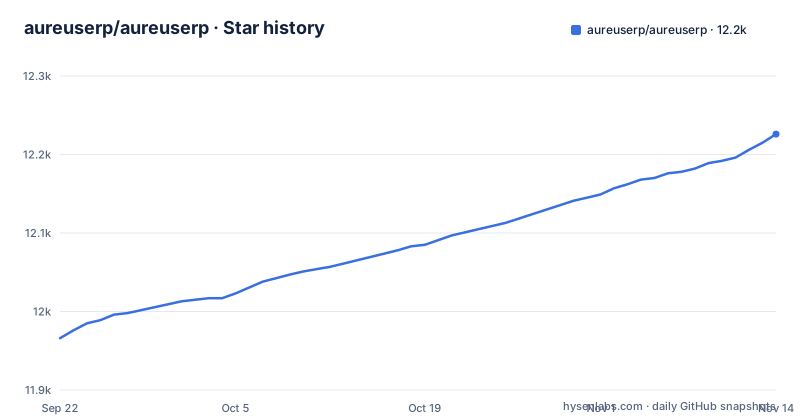
Star history
- aureuserp/aureuserp12,215 ★ · +249
| Repository | 2026-09-22 | 2026-11-13 |
|---|---|---|
| aureuserp/aureuserp | 12k | 12.2k |
249 Stars in the last 52 days, measured from the daily GitHub snapshot. Compare with other projects
Editorial analysis
What Aureus ERP covers, and which businesses it fits
Aureus ERP is an open-source Enterprise Resource Planning platform written in PHP and released under the MIT licence. The README describes it as aimed at small and medium enterprises as well as larger organisations, and the introduction names accounting, inventory, HR, CRM and projects as areas it covers. That spread matters. A team evaluating it is not choosing a single-purpose tool but a suite that expects to sit at the centre of back-office operations, with accounting and stock records sharing one database.
The people this suits are development teams that already work in the Laravel ecosystem. The stack is Laravel 13, FilamentPHP 5, Livewire 4 and TailwindCSS 4, and the admin interface is generated through Filament. If your engineers write Laravel daily, the codebase is legible to them on day one: routes, config, migrations, seeders and a plugins/ directory at the top level. If your organisation has no PHP developers, the calculus changes, because every customisation becomes an external contract rather than an internal task.
The MIT licence removes the vendor lock-in that commercial ERP suites impose. It also removes the vendor. There is no support agreement in the repository, and the README points to a community section rather than a service-level commitment.
How the Laravel and FilamentPHP architecture is put together
The stack is conventional Laravel, which is the most useful thing to understand about it. The repository root holds app/, bootstrap/, config/, database/, routes/, resources/, storage/, tests/ and artisan, so anyone who has worked on a Laravel application can find their way without a map. The front end builds through Vite: package.json defines only build and dev scripts and lists TailwindCSS 4, the Laravel Vite plugin and axios as dev dependencies.
The administrative surface comes from FilamentPHP 5, with Livewire 4 handling the dynamic behaviour. That combination means screens are defined in PHP rather than in a separate front-end codebase, and role-based access control is wired through Filament Shield, which the README names explicitly and which the installer is said to invoke when generating roles and permissions.
The extension mechanism is the plugins/ directory. The README gives it its own section and describes a modular plugin system where you install only the features you need, from accounting to project management. That is the architectural claim worth testing during evaluation: whether the modules you require ship as plugins in that directory or whether you would be writing them.
Configuration is environment-driven. The .env.example file carries APP_CURRENCY, APP_LOCALE, APP_TIMEZONE and a DB_CONNECTION defaulting to mysql, alongside standard Laravel keys for sessions, queues and cache. Queue and cache both default to the database driver, which keeps the dependency list short for a first install.
Installing Aureus ERP: from git clone to a running admin panel
The README lays out a four-step quick start. The first step clones the repository and moves into the directory:
composer installComposer pulls the PHP dependencies, including Laravel 13 and FilamentPHP 5. This is the step that will fail first if your PHP version is below 8.3, since the requirements section states PHP 8.3 or higher. Run it after the clone, from the repository root.
The third step is the project's own installer, which is where the database work happens:
php artisan erp:installThe README states that during this run the database migrations execute, core seeders populate initial data, roles and permissions are generated through Filament Shield, an admin account is created, and environment configuration is set up. That last point means you should have a reachable database before running it. The requirements list MySQL 8.0 or higher, MariaDB 10.6 or higher, or PostgreSQL 16 or higher.
Finally, the development server:
php artisan serveThe README says to visit http://localhost:8000 and log in with the admin credentials created during installation. For a production deployment you would replace this with Apache 2.4 or Nginx 1.18, both of which the requirements section names.
If you prefer containers, the repository ships a docker-compose.yml built on Laravel Sail. It defines the laravel.test application service, MySQL 8.0, Redis and Mailpit, with the application exposed on port 80 by default:
docker compose up -dThe compose file maps the app service to ${APP_PORT:-80} and the Vite dev server to ${VITE_PORT:-5173}, and mounts the project directory at /var/www/html. The build context points at ./vendor/laravel/sail/runtimes/8.4, so the Sail vendor files need to be present before the containers can build.
Where Aureus ERP will not carry you: hosting, operations and gaps
The honest limitation is that Aureus ERP is software you operate, not a service you consume. The README's own answer to that is AureusERP Cloud Hosting, described as a fully managed solution where the team sets up, secures and configures your instance. That is a commercial offering outside the repository, and the README does not describe its pricing, terms or what happens to your data if you stop paying. If self-hosting is not viable for your organisation, the open-source repository alone does not solve your problem.
Operationally, the defaults in .env.example assume a working Laravel deployment. Sessions, queues and cache all use the database driver, which means the database is not only your ERP data store but also your session store and job queue. Under real load that becomes a tuning exercise, and the Sail compose file already defines Redis.
The requirements are also not negotiable in the way a hosted product's are. PHP 8.3+, MySQL 8.0+ or PostgreSQL 16+, Node.js 18+ for the asset build. A shop running PHP 8.1 on a shared host cannot simply try it. And the version pairing is tight: Laravel 13 with FilamentPHP 5 and Livewire 4 leaves little room for mixing in packages pinned to older releases.
Finally, the README's feature claims are broad. It lists business intelligence, high performance and real-time updates, but its feature list gives no figures for them. Treat those as areas to verify against your own data volumes rather than as established properties.
Aureus ERP compared with ERPNext: PHP and Laravel against Python and Frappe
The natural comparison for an open-source ERP is ERPNext, and the difference is the platform, not the feature list. ERPNext is built on Frappe, a Python framework with its own document-oriented metadata layer and its own admin conventions. Aureus ERP is built on Laravel and FilamentPHP, so its extension model is Composer packages, service providers, Eloquent models and migrations.
That distinction decides most adoption questions. If your team writes PHP and Laravel, Aureus ERP's plugins/ directory is an extension point you can use immediately, and the Filament admin panel is something your developers already know how to customise. If your team writes Python, ERPNext's model will feel native and Aureus ERP will not. Neither is better in the abstract; the cost of the first custom module is what separates them in practice.
There is a maturity difference worth stating plainly. ERPNext has years of production deployments behind it and a large module catalogue. Aureus ERP's release history in the repository shows v1.5.0 on 2026-08-04, v1.6.0 on 2026-08-27 and v1.7.0 on 2026-10-23, with the last push on 2026-11-02. That is a fast release cadence on a young product. Fast cadence is good for fixing gaps and bad for upgrade stability.
The plugin architecture is the other axis. Aureus ERP's stated design is that you install only the modules you need. ERPNext takes a broader all-in-one approach with modules enabled through its own settings. If you want a small accounting and inventory footprint rather than a full suite, Aureus ERP's model is closer to that intent.
Licence, upgrades and the maintenance cost you are taking on
The licence is MIT, which is permissive: you can use, modify and redistribute the software, including in commercial settings, provided the copyright notice and permission notice are preserved. The README's own framing is that it is free to use, modify and extend with no vendor lock-in. This is not legal advice, and if you plan to redistribute a modified version or embed it in a product, have your own counsel read the LICENSE file at the repository root.
Upgrade cost is where the honest accounting sits. The repository carries a CHANGELOG.md, and releases arrive on a roughly monthly rhythm. Each release can move Laravel, FilamentPHP or Livewire versions. In practice that means your upgrade plan is a database backup plus a staging copy, and your plugin code is the thing most likely to break, since it binds to framework internals that move with the framework.
Maintenance is continuous rather than episodic. A self-hosted ERP needs PHP runtime updates, database maintenance, queue workers running, backups verified and security patches applied to the host. None of that is unique to Aureus ERP, but it is all real. Budget for it before you budget for customisation.
Editorial conclusion
Adopt Aureus ERP if your team already runs Laravel and wants accounting, inventory, HR and project modules behind one admin panel, with the plugin directory as the extension point. Do not adopt it if nobody on staff can operate a PHP application server, queue workers and database backups, or if you need a hosted product with a vendor contract. Before committing, verify the plugins/ directory layout for the modules you need, confirm the erp:install command completes against your target database version, and check whether the plugin you depend on is shipped in the repository or must be written.
Frequently asked questions
How do I install Aureus ERP?
Clone the repository, run composer install, then run php artisan erp:install, which executes migrations, seeds initial data, generates roles and permissions through Filament Shield and creates an admin account. Finish with php artisan serve and log in at http://localhost:8000.
How does Aureus ERP compare with ERPNext?
Aureus ERP is built on Laravel 13 and FilamentPHP 5 in PHP, while ERPNext is built on the Python-based Frappe framework. The practical difference is which stack your team can extend, since Aureus ERP's plugins/ directory is a Composer and Laravel extension point.
Can I run Aureus ERP with Docker?
Yes. The repository includes a docker-compose.yml based on Laravel Sail that defines the application service alongside MySQL 8.0, Redis and Mailpit, with the app exposed on port 80 by default. The build context expects the Sail vendor files to be installed first.
What are the server requirements for Aureus ERP?
PHP 8.3 or higher, MySQL 8.0 or higher, MariaDB 10.6 or higher, or PostgreSQL 16 or higher, with Apache 2.4 or Nginx 1.18 as the web server. Development also needs Composer 2.0 or later and Node.js 18 or higher for the asset build.
Is Aureus ERP free to use commercially?
The repository is licensed under MIT, which permits commercial use, modification and redistribution provided the copyright and permission notices are kept. The README frames it as free to use and extend with no vendor lock-in.
Official sources
Add this badge to your README
If you maintain this project, the badge below links readers to this analysis and shows its maintenance status from the daily GitHub snapshot. Paste the markdown into your README; add ?metric=license or ?metric=stars to the image URL for a different field.

[](https://hysenlabs.com/projects/aureuserp-aureuserp)Star history chart for your README
[](https://hysenlabs.com/projects/aureuserp-aureuserp)Was this useful?