Livewire 4.x: Dynamic Laravel UIs Without Leaving PHP
A full-stack framework for Laravel that takes the pain out of building dynamic UIs.
At a glance
- What is it?
- Livewire is a full-stack framework for Laravel that lets you build dynamic UI components in PHP. This review covers how it works, how to install it, and where it breaks down.
- Who is it for?
- Adopt Livewire if your team is Laravel-first and you want dynamic interfaces without maintaining a separate JavaScript front end. Do not adopt it if your UI needs heavy client-side state, offline behaviour or a non-Laravel backend, because the framework is tied to Laravel and the README points only to the Livewire documentation site.
- Can I use it commercially?
- Yes. MIT is a permissive licence: you can use, modify and sell software built on it, as long as you keep its copyright and licence notices.
- Is it still maintained?
- Yes. The repository last received commits 10 days ago.
- What is it written in?
- Mainly PHP, according to GitHub's language statistics.
Answers come from the project's GitHub data, last synced on November 13, 2026, and from our analysis. They are not legal advice.
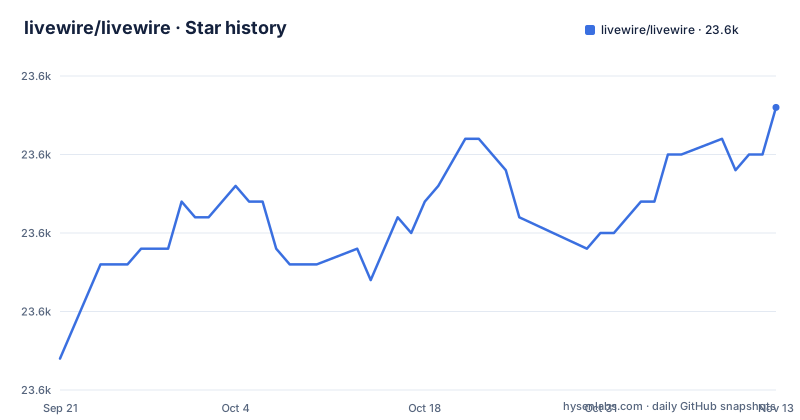
Star history
- livewire/livewire23,593 ★ · +16
| Repository | 2026-09-21 | 2026-11-13 |
|---|---|---|
| livewire/livewire | 23.6k | 23.6k |
16 Stars in the last 53 days, measured from the daily GitHub snapshot. Compare with other projects
Editorial analysis
What Livewire Solves, and Who It Is For
Livewire exists for Laravel developers who need interactive interfaces but do not want to build and maintain a separate JavaScript application. The README describes it plainly: a full-stack framework for Laravel that allows you to build dynamic UI components without leaving PHP. That is the whole pitch, and it is a narrow one by design.
The audience is therefore specific. If your backend is Laravel and your team writes PHP, Livewire keeps component logic in the same language as your controllers and models. If your backend is not Laravel, or your team is already fluent in a JavaScript framework, the value proposition mostly disappears. The README points to the Livewire documentation site for usage, and the repository itself is the framework source, not an application scaffold.
How Livewire Components Work
The mechanism is a PHP component class paired with a Blade template. State lives on the server. When something changes in the browser, the client sends the change back, the component re-renders in PHP, and the resulting HTML is patched into the page. The repository layout supports this reading: src/ holds the PHP framework code, js/ holds the browser-side code, and package.json points its main field at dist/livewire.js.
The JavaScript side is not written from scratch. package.json lists Alpine.js and a set of its official plugins (anchor, collapse, csp, focus, intersect, mask, morph, persist, resize, sort) as dependencies, alongside @vue/reactivity and nprogress. So the browser layer builds on Alpine's reactivity and morphing rather than replacing it. If you already use Alpine in a Laravel project, that is a compatibility argument in Livewire's favour, not a coincidence.
The repository also carries a PRD-wire-model-modifiers.md file at the top level, which suggests model modifiers are an area under design. Treat that as a signal about where the project is moving, not as documentation you can rely on.
Installing Livewire and Building a First Component
The README does not include end-user installation steps. It links to the Livewire website for official documentation and then documents local development of the framework itself. So the commands below are for working on Livewire, not for adding it to an application; for the latter, follow the linked documentation.
To get the framework source running locally, the README gives this clone-and-setup sequence. It installs PHP and JS dependencies and sets up ChromeDriver for browser tests:
git clone [email protected]:livewire/livewire.git && cd livewire
composer setup
Once that finishes, the README lists separate commands for unit tests, headless browser tests, and headed browser tests:
composer test:unit
composer test:browser
composer test:browser:headed
A single test can be targeted with a filter flag, which the README demonstrates with a CSP-related test name:
composer test:browser -- --filter="SupportCSP"If you change anything under js/, the README says to rebuild the assets with npm run build. The package.json confirms the underlying script is node ./scripts/build.js, with a watch variant available as npm run watch.
npm run buildThe repository also contains a legacy_tests/ directory alongside tests/, which is worth knowing before you go looking for a test and assume it is missing.
Where Livewire Is the Wrong Tool
The server round trip is the constraint. Every interaction that changes state goes back to PHP before the interface updates. For forms, tables, filters and dashboards this is usually fine. For anything that depends on instant local feedback, sustained client-side state, or working without a connection, the architecture fights you, and the Alpine dependencies in package.json mean you would be reaching for a second reactivity model to cover the gap.
There is also a version split to watch. The default branch is 4.x, and the recent releases list includes both v4.4.8 and v3.8.11 published on the same day. That tells you the 3.x line is still receiving releases, so documentation and examples you find may target either line. The README does not describe a migration path between them, and it does not document rollback procedures either. If you are upgrading, that silence is a real gap you should plan around rather than assume away.
Livewire Compared With Inertia and a Plain JavaScript SPA
The closest alternative in the Laravel world is Inertia, which also keeps Laravel as the backend but renders the front end with a JavaScript framework such as Vue or React. The difference in approach is where the component lives. With Livewire the component is a PHP class and the template is Blade, so state and rendering stay on the server. With Inertia the component is a JavaScript component, and Laravel supplies it with data through props and responses.
That difference decides most adoption questions. If your team writes PHP and you want to avoid a JavaScript build pipeline for application logic, Livewire keeps you in one language. If your team already has JavaScript skills and wants rich client-side behaviour, Inertia gives you the ecosystem those developers already know. Livewire's own dependency list shows it does not avoid JavaScript entirely; it leans on Alpine for the browser side.
A plain single-page application is the other route, and it is the most work: a separate front end, a separate deployment, and an API layer between them. Livewire's advantage over that is structural, not stylistic.
Maintenance, Releases and the MIT Licence
The repository is not archived, and the last push was on 2026-11-01. Recent releases include v4.4.8 and v3.8.11 on 2026-10-21, plus v4.4.7 on 2026-09-28. Both version lines are being published, which is the single most important fact for anyone planning an upgrade: you need to know which line you are on before you read any documentation.
Livewire is licensed under the MIT licence, per the README and the LICENSE.md file. That is a permissive licence, and it means you can use the framework in commercial and closed-source projects. This is a description of the licence text, not legal advice; if your organisation has specific compliance requirements, have someone review the licence file directly.
The upgrade cost is harder to pin down from the repository alone. The README does not describe a changelog process, a deprecation policy, or a rollback path, so the practical way to judge an upgrade is to read the release notes for the version you are moving to and run the test commands above against your own code.
Editorial conclusion
Adopt Livewire if your team is Laravel-first and you want dynamic interfaces without maintaining a separate JavaScript front end. Do not adopt it if your UI needs heavy client-side state, offline behaviour or a non-Laravel backend, because the framework is tied to Laravel and the README points only to the Livewire documentation site. Before committing, run the local test commands listed in the README on your own checkout, and verify which version line (4.x or 3.x) matches the documentation you are reading, because the repository ships both.
Frequently asked questions
What is Livewire used for?
It is a full-stack framework for Laravel that lets you build dynamic UI components without leaving PHP. The repository description says it takes the pain out of building dynamic UIs.
How do I install Livewire in Laravel?
The README does not give end-user installation steps; it points to the official documentation on the Livewire website. The install instructions in the README are for local development of the framework itself.
How do I use a Livewire component?
A component pairs a PHP class with a Blade template, with state held on the server and rendered HTML patched into the page. The README defers to the Livewire documentation site for the actual usage guide.
Is Livewire still maintained?
The repository is not archived, and the last push was on 2026-11-01. Recent releases include v4.4.8 and v3.8.11 on 2026-10-21, so both the 4.x and 3.x lines are receiving releases.
Official sources
Add this badge to your README
If you maintain this project, the badge below links readers to this analysis and shows its maintenance status from the daily GitHub snapshot. Paste the markdown into your README; add ?metric=license or ?metric=stars to the image URL for a different field.

[](https://hysenlabs.com/projects/livewire-livewire)Star history chart for your README
[](https://hysenlabs.com/projects/livewire-livewire)Was this useful?