node-jwks-rsa fetches signing keys so a JWT verifier has something to check
A library to retrieve RSA public keys from a JWKS (JSON Web Key Set) endpoint.
At a glance
- What is it?
- Auth0's node-jwks-rsa is a small JavaScript library that retrieves RSA public keys from a JWKS endpoint by key id, and it is the missing piece in many JWT verification setups. It hands you a key object and nothing else, and its dependency list shows the caching and rate limiting it does for you.
- Who is it for?
- Use node-jwks-rsa when your service verifies tokens issued against a JWKS endpoint and you want key retrieval, caching and request limiting handled by one dependency rather than by your own HTTP client and cache. Do not reach for it if you need the library to verify the token itself, since it stops at returning the key, and not if you are on a Node version below the range in the package.json engines field.
- Can I use it commercially?
- Yes. MIT is a permissive licence: you can use, modify and sell software built on it, as long as you keep its copyright and licence notices.
- Is it still maintained?
- Yes. The repository last received commits 24 days ago.
- What is it written in?
- Mainly JavaScript, according to GitHub's language statistics.
Answers come from the project's GitHub data, last synced on November 7, 2026, and from our analysis. They are not legal advice.
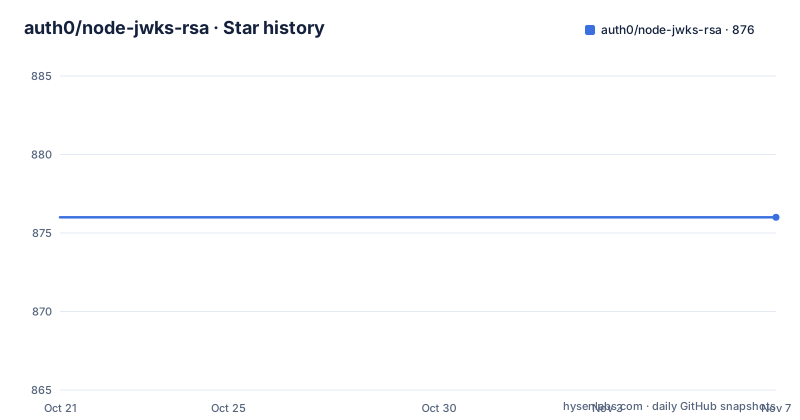
Star history
- auth0/node-jwks-rsa876 ★ · +0
| Repository | 2026-10-21 | 2026-11-07 |
|---|---|---|
| auth0/node-jwks-rsa | 876 | 876 |
0 Stars in the last 17 days, measured from the daily GitHub snapshot. Compare with other projects
Editorial analysis
A key retriever, deliberately short of a verifier
The project description is one sentence: a library to retrieve RSA public keys from a JWKS endpoint. Everything else follows from that narrow scope.
A JWT carries a key id, the `kid`, in its header. To check the signature you need the public key that matches that id, and the key changes over time as the issuer rotates its signing keys. The standard way to publish it is a JWKS endpoint, a JSON document listing the currently valid keys. This library is the piece that connects the `kid` in an incoming token to the key object in that document.
What it does not do is verify. It does not parse your token, it does not check the signature, and it does not validate claims. It resolves a key id to a key, and the README's own usage example stops at `key.getPublicKey()`, which returns the key for your verification library to consume.
That division is why the library is popular in stacks that already own a JWT library and only lack a way to fetch keys. The trade-off is that you still write the wiring between the two, and that wiring is where the interesting failure modes live.
The dependency list explains the caching behaviour
The `package.json` is more informative than the README on how the library behaves under load, because the dependency list shows the mechanism rather than the promise.
    "@types/jsonwebtoken": "^9.0.4",
    "debug": "^4.3.4",
    "jose": "^6.1.3",
    "limiter": "^1.1.5",
    "lru-cache": "^11.0.0",
    "lru-memoizer": "^3.0.0"
Two names do the interesting work. `lru-cache` and `lru-memoizer` are the caching layer, which means key lookups are memoized in memory rather than triggering an HTTP request to your identity provider on every token check. `limiter` is the request limiter, which is the piece that matters when a burst of traffic arrives with an unknown `kid`, because the naive behaviour is to fetch the JWKS document once per incoming token.
`jose` at version 6 is the cryptography dependency, and it is where the actual key handling happens. The README says the library supports all currently registered JWK types and JWS algorithms, and points at an issue in the jose repository for the details, which is worth reading before you assume the name tells you everything. The package is called `jwks-rsa` for historical reasons, but the README's claim is broader than RSA.
`debug` is there for tracing, and `@types/jsonwebtoken` is a type dependency, which tells you the library is designed to sit next to a token library that needs types.
Installing the package and creating a client
The install step is a single npm command run in the project directory, and the package name on the registry is `jwks-rsa`.
npm install --save jwks-rsaThen you create a client and point it at the JWKS URI. The README's configuration example shows the three options: the endpoint itself, an optional object for request headers, and a timeout that defaults to 30s.
const jwksClient = require('jwks-rsa');const client = jwksClient({
jwksUri: 'https://sandrino.auth0.com/.well-known/jwks.json',
requestHeaders: {}, // Optional
timeout: 30000 // Defaults to 30s
});The `requestHeaders` option is there for the practical case of an endpoint behind a gateway that needs an authorization header, and the timeout option matters more than it looks: a hanging identity provider should not hold your request thread open indefinitely, and the default of 30 seconds is generous for a key fetch that normally completes in milliseconds.
The entry point is CommonJS. The package manifest points `main` at `src/index.js` and ships TypeScript declarations separately.
  "main": "src/index.js",
  "types": "index.d.ts",
So a TypeScript project gets types without a separate types package, and a project using ES module syntax needs its own interop handling. The README does not show an ESM example, so that is worth checking in `EXAMPLES.md` before you commit to an import style.
getSigningKey resolves a kid and hands back a key object
The retrieval call is small. You pass the `kid` you read from the token header, await the result, and call `getPublicKey()` on it.
const kid = 'RkI5MjI5OUY5ODc1N0Q4QzM0OUYzNkVGMTJDOUEzQkFCOTU3NjE2Rg';
const key = await client.getSigningKey(kid);
const signingKey = key.getPublicKey();
The return value is a wrapper rather than a bare key, and `getPublicKey()` is what extracts the usable key from it. That shape exists because a key in a JWKS document can be a public key or a private key, and because the wrapper carries the metadata from the JWKS entry, such as the `alg` and `kid` fields, that a verification step needs in order to check that the algorithm in the token header matches the key you resolved.
This is also the point where the failure mode lives. If the `kid` in the token does not exist in the JWKS document, the lookup cannot succeed, and the common cause is not a broken library but a key rotation that the client has cached, or a token minted against a different issuer. The caching layer and the `limiter` both come into play here, since an unknown `kid` is exactly the case where a client is tempted to refetch the whole document for every request.
The README does not document the error type thrown for an unknown key id, so code that depends on the exact error shape should check the `EXAMPLES.md` file and the tests directory rather than infer it.
The Node version floor is the first upgrade decision
The package manifest states the supported runtimes, and the range is narrow.
  "engines": {
    "node": "^20.19.0 || ^22.12.0 || >= 23.0.0"
  },
Node 20, Node 22 and anything from 23 upward, each with a minimum patch level. There is no Node 18 in that range, so a service on an older long term support line cannot take this release without a runtime upgrade first. That is a real constraint in environments where the runtime is pinned by a platform team, and it is the kind of thing to check before the library, rather than after.
The version history shows how often this kind of change happens. v4.0.0 was published on 2026-02-27, v4.0.1 on 2026-03-02, and v4.1.0 on 2026-06-19. A major version every few months is the pattern here, and a major version for a library this small usually means a runtime floor moved or a dependency with a breaking change moved underneath it.
The repository is not archived, and the last push was on 2026-10-15, so the source is being worked on after the 4.1.0 release. The published version in the manifest is 4.1.0, which is the version npm resolves for a plain install.
Where the library stops and your own code takes over
There is a clear boundary, and it is worth being blunt about it. This library will fetch keys. It will not validate a token, it will not check expiry or audience, it will not decide whether your API should accept the token at all, and it will not tell you whether the issuer is who it claims to be. Those steps live in a JWT verification library, in this project's case one of the dev dependencies used in its own tests.
The same applies to the failure path. If the identity provider is unreachable, if the JWKS document is malformed, if a `kid` is unknown, the library cannot decide what your service should do. It surfaces the failure, and the retry, circuit breaking and fail-closed decision belong to the caller. In an authentication path, failing closed is a policy choice, and this library does not make it for you.
The `examples/` directory shows the four integration shapes the project documents: an express demo, a hapi demo, a koa demo and a passport demo. That list is a good map of the frameworks where teams reach for this, and it also shows that the library is deliberately framework agnostic, since it only exposes a client and a promise returning key lookup.
The alternative to writing that wiring yourself is to use a general purpose JOSE library that can both fetch keys and verify tokens in one call. The difference in approach is real: this library is smaller and keeps the token verification step in a library you already chose, while the combined approach keeps the whole flow in one dependency and one API. If your stack already standardizes on one of the JWT libraries, matching it is the cheaper path.
MIT licensing and a responsible disclosure path
The licence is MIT, and the README states it plainly along with a pointer to the `LICENSE` file in the repository root. The `CHANGELOG.md` and the `.version` file are present in the top-level entries, so version history and release notes live in the repository rather than only in the npm registry.
Two process details are worth knowing. The README asks that security vulnerabilities not be reported on the public GitHub issue tracker, and points to a Responsible Disclosure Program page for the procedure instead. That matters for anyone who intends to run a fork of this library or to patch it themselves, since the channel for reporting a problem in the library is not the same channel for reporting a problem in your application.
Contributions go through Auth0's general contribution guidelines and code of conduct documents, both hosted in the open-source-template repository, and the README asks for issues to be raised on the project issue tracker.
The repository also carries the usual automation for a package of this size: a `.eslintrc`, a `tsconfig.json`, an `index.d.ts`, a `codecov.yml` and an `.editorconfig`, plus test scripts that run the JavaScript and TypeScript suites separately.
"test:js": "NODE_ENV=test mocha --exit --timeout 5000 $(find ./tests -name *.tests.js)",So the library is developed against both its JavaScript and its TypeScript surfaces, which is a reasonable signal that the types are meant to be accurate rather than decorative.
Editorial conclusion
Use node-jwks-rsa when your service verifies tokens issued against a JWKS endpoint and you want key retrieval, caching and request limiting handled by one dependency rather than by your own HTTP client and cache. Do not reach for it if you need the library to verify the token itself, since it stops at returning the key, and not if you are on a Node version below the range in the package.json engines field. Before adopting, check that your issuer exposes a JWKS URI, confirm the `kid` in your tokens matches the keys the endpoint returns, and read the request options in EXAMPLES.md, since the README only documents the three options shown above.
Frequently asked questions
How do I install and use node-jwks-rsa to get a signing key?
Run `npm install --save jwks-rsa`, create a client with the `jwksUri` option, then call `getSigningKey(kid)` with the key id from the token header and call `getPublicKey()` on the result. The README notes the timeout option defaults to 30s and that request headers are optional.
Which Node.js versions does node-jwks-rsa support?
The package.json engines field lists `^20.19.0 || ^22.12.0 || >= 23.0.0`, so Node 20 and 22 with a recent patch level, or Node 23 and above. Node 18 is not in the supported range.
Does node-jwks-rsa verify JWT signatures itself?
No. The README's example ends with `key.getPublicKey()`, so the library retrieves the key and hands it back for verification, while token validation remains the job of a separate JWT library. The `EXAMPLES.md` file is where the project documents the options and samples for common scenarios.
Does node-jwks-rsa support key types other than RSA?
The README states that the library supports all currently registered JWK types and JWS algorithms, and points to an issue in the jose repository for more information. The package name refers to RSA, but the stated support is broader.
How does node-jwks-rsa avoid fetching the JWKS document on every request?
Its dependencies include `lru-cache` and `lru-memoizer` for caching and `limiter` for limiting requests, so key lookups are memoized in memory rather than issuing an HTTP request per token. The README does not document the configuration options for either mechanism.
Official sources
Add this badge to your README
If you maintain this project, the badge below links readers to this analysis and shows its maintenance status from the daily GitHub snapshot. Paste the markdown into your README; add ?metric=license or ?metric=stars to the image URL for a different field.

[](https://hysenlabs.com/projects/auth0-node-jwks-rsa)Star history chart for your README
[](https://hysenlabs.com/projects/auth0-node-jwks-rsa)Was this useful?