The qread backend, syncing a mobile reading app across devices
轻阅读一个全移动端可用的阅读应用,支持多端同步阅读进度,适配各种屏幕尺寸。 后端搭建视频教程:https://space.bilibili.com/517034064 ,麻烦一键三连下。
At a glance
- What is it?
- The autobcb/read repository is the server side of a mobile reading app whose whole purpose is multi-device progress sync, with a self-hosted Spring service, per-user permission flags and a proxy mode that moves HTTP requests from the server onto the phone. The README is blunt that book sources can call Java code, which is the security question to settle first.
- Who is it for?
- qread suits a self-hoster who wants a reading app that keeps progress in sync across phone, tablet, desktop and web, and who accepts running the server themselves. It does not suit anyone who wants a hosted service, since the developer provides no backend, and it does not suit a deployment where untrusted users can add book sources, because those scripts can call Java code on the server.
- Can I use it commercially?
- Yes. MIT is a permissive licence: you can use, modify and sell software built on it, as long as you keep its copyright and licence notices.
- Is it still maintained?
- Yes. The repository last received commits 177 days ago.
- What is it written in?
- Mainly JavaScript, according to GitHub's language statistics.
Answers come from the project's GitHub data, last synced on November 7, 2026, and from our analysis. They are not legal advice.
Star history
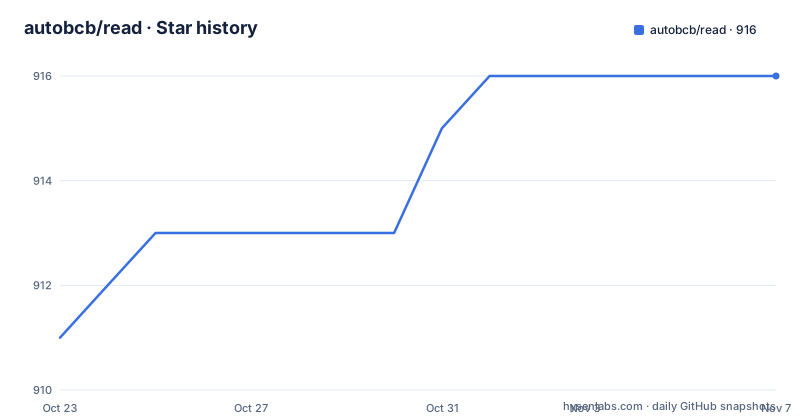
- autobcb/read916 ★ · +5
| Repository | 2026-10-23 | 2026-11-07 |
|---|---|---|
| autobcb/read | 911 | 916 |
5 Stars in the last 15 days, measured from the daily GitHub snapshot. Compare with other projects
Editorial analysis
The repository is the server, not the app
The autobcb/read repository holds the server side of a mobile reading app, and its stated purpose is progress sync across devices. The description calls it a fully mobile reading app whose interface adapts to phone and large screen, and explains the reasoning: the open source reading app it is compared with cannot sync this app's progress and is too complex to port to multiple platforms, so putting both clients on one backend gives a similar experience everywhere.
The official site is at www.qread.xyz. The backend exposes two web paths, an admin panel at /admin and the web reading interface at the root, both served from port 8080 in the documented setup.
The web client has real limits, and the README lists them plainly. The web version does not support saving cookies and does not support webview, and comics, images or audio book links cannot be displayed because the resource server blocks cross-origin requests. Cookie saving is an app-only capability. In other words, the web client is a thin reader, not a full substitute for the mobile app, and anyone evaluating this should know that before they plan around it.
The build is a Gradle project with build.gradle.kts, settings.gradle.kts and a wrapper, alongside src/, conf/, a book/ directory, a png/ directory and a set of bundled book source JSON files. The releases are versioned 3.4.6 and its beta builds, with 3.4.6b3 dated 2026-05-14, which is also the date of the last push to the repository.
Every backend is self-hosted by the user
Two facts in the README shape every deployment decision.
The first is that all backends are set up by users themselves and the developer provides no backend. If you want permissions enabled on an account, you contact the administrator of your own server. There is a public demo backend, hosted at qread.zeabur.app with an admin path at /admin, and it ships with the documented admin credentials. The README warns that the demo backend may be stopped or restored at any time and is for demonstration only, with no data to be stored there. That is a reasonable thing to point a new user at for a first look, and an unreasonable thing to point a production deployment at.
The second is the local book repository, which is the part of the system with the sharpest edges. You import your own local book sources, and then you have to edit the path inside the source file, changing the placeholder download path to the path on your own machine, or the path inside the container if you are using one. If your backend does not listen on port 8080, you also have to change the port in the source's 127.0.0.1 reference. And for safety the local book repository interface only allows local access.
That last constraint is the one to keep in mind. The local repository is a way to serve books from your own disk, and the README restricts it to local access precisely because it exposes files by path. A misconfigured reverse proxy in front of it turns a private feature into a public file server.
Book sources can call Java code on the server
The security warning in the README is one line and it is the most important line in the document: book sources can call Java code directly, so you must be careful when granting book source permissions.
A book source in this system is not a passive configuration file. It is a script that the server executes, and the scripts are granted access to a set of Java helper functions. The exclusive functions listed include java.qread(), which returns 1 permanently and is used to detect that the runtime is qread, java.getWebViewUANEW(), which returns the real device user agent for model detection, and java.startBrowserDp(url, title), an interface dedicated to a segment comment feature with an improved display.
The permission flags that control what a user may do therefore decide how much of the server a user can reach. USER_ALLOWCHANGE allows self-service permission changes, USER_ALLOWUPTXT allows uploading txt files, USER_ALLOWCACHE allows adding cached content, USER_ALLOWIMG enables image decryption, USER_ALLOWCHECK allows validating book sources, USER_SOURCE selects between not allowing source modification, allowing the backend to modify sources, and independent sources, USER_MAXSOURCE sets a maximum number of sources, and USER_TIMEOUT disables a source after a number of failed requests within ten minutes, with 0 meaning no limit. A later addition, USER_PROXYPNG, decides whether cover images are proxied as well.
The combination of a script execution surface and per-user toggles is the whole risk model, and it is why the README tells the administrator to think carefully before allowing any of it to a user whose sources they do not control.
The proxy mode moves requests from the server to the phone
The proxy feature is described as exclusive to qread, and it is the most unusual thing in the system. When it is enabled, HTTP requests such as get and post are sent from the phone rather than from the server.
The reason given is practical. A server's IP address and a phone's IP address are frequently different, and the difference causes blocking, the anti-scraping challenge pages that Chinese web services present to unexpected addresses. The proxy also lets a phone fetch resources that need a VPN on the phone's own connection.
There are two levels. A book source page can turn the proxy on globally for that source, and there are per-URL variants, including a form where the URL carries a usePhone flag inline, written as http://127.0.0.1 with a usePhone marker object, which asks for that single request to be routed through the phone.
The dedicated functions follow the same idea. java.getusePhone(urlStr, headers), java.headusePhone(urlStr, headers) and java.postusePhone(urlStr, body, headers) behave like their plain counterparts, java.get, java.head and java.post, except that they use the proxy.
The README is honest about the boundary of the feature: it only works when the book source calls the system functions, so a source that calls a Java class directly rather than the built-in helpers may not support it. That limitation also means the proxy cannot rescue every source, and a source written to bypass the helper functions is exactly the kind you should be careful about for other reasons.
Deployment is one Docker command or a compose file
The quick deployment path is documented as a short list. Upload the backend files to the root directory, making sure that root/read/read.jar and root/read/conf.yml exist, and conf.yml is where the admin account and password are changed. Then install Docker and run the container:
docker run -tid -e TZ=Asia/Shanghai --name read -v /root/read:/app --net=host --restart=always docker.1ms.run/openjdk:22-rc-oracle java -jar /app/read.jarA different port is set with a server.port property in front of the jar, and the /root/read path can be anything as long as read.jar and conf.yml sit in it. A proxy for the server itself is added with the standard JVM proxy properties:
java -Dhttp.proxyHost=127.0.0.1 -Dhttp.proxyPort=1080 -Dhttps.proxyHost=127.0.0.1 -Dhttps.proxyPort=1080 -jar /app/read.jarA Docker Compose route is also given, credited to a community-built image, with the qread service, a port mapping for 8080, an appdata volume and an environment block. The environment block is where the interesting settings live: the database type, where setting it to MySQL activates the JDBC URL, username and password, and where sqlite leaves those inactive; the admin username and password; the user permission flags listed earlier; SMTP settings for verification mail; the default TTS link and the default link purification rule; and the HTTP thread counts, with the core threads and max threads configurable.
One configuration item is worth flagging. ADMIN_CODE is described as the key generated in the app's admin backend, and the comment notes it relates to a 3.1.0 update. Any self-hosted deployment should set it rather than leave the documented default in place.
What the README covers and what it leaves out
The documentation is extensive on configuration and thin on several things an operator would want, and knowing which is which saves time.
Well covered are the deployment paths, the compose environment variables, the permission flags, the proxy behaviour, the exclusive Java functions, the list of functions that are not supported, and the hotkeys. The unsupported list is concrete: archive extraction and content helpers such as un7zFile, unrarFile, unArchiveFile, getRarStringContent, get7zStringContent, getRarByteArrayContent, get7zByteArrayContent, plus getGlideUrl and getMediaItem. The README says some of these call Android APIs and cannot be supported, that some seemed unnecessary to the author, and that for a source that works in qread 3 but not here, you should open an issue.
The hotkeys are documented per platform: escape returns, the arrow keys turn pages, F11 removes the border and F12 restores it on Windows only, F10 minimises and F9 shows the app on Windows and macOS.
Thin or absent are the database schema, the backup story, the upgrade path from one release to the next, and the resource requirements of the container. The release numbering suggests a fairly active project, with 3.4.6 released on 2026-04-08 followed by two beta builds in April and May 2026, but the last push was on 2026-05-14, so there has been no change to the repository in the five months since.
The custom package name feature is documented per platform as well, from editing the package.txt asset file on Windows and HarmonyOS to the more involved route on macOS, where the resource file is packed and needs specific software to unpack.
Editorial conclusion
qread suits a self-hoster who wants a reading app that keeps progress in sync across phone, tablet, desktop and web, and who accepts running the server themselves. It does not suit anyone who wants a hosted service, since the developer provides no backend, and it does not suit a deployment where untrusted users can add book sources, because those scripts can call Java code on the server. Before you run it, read the permission flags in the compose configuration, leave the admin credentials in the documentation defaults out of a public deployment, and understand that the content it surfaces belongs to third-party sites, which the project addresses with a written takedown process.
Frequently asked questions
What is the autobcb/read repository?
It is the server side of the qread reading app, a self-hosted service whose main purpose is to sync reading progress across phones, tablets, desktops and the web client. The web client is served at the root of the server and the admin panel at /admin.
Does the developer provide a hosted backend?
No. The README states that all backends are set up by users themselves and that the developer provides no backend, and that permission requests should go to the administrator of your own server. A public demo backend is offered for demonstration only and may be stopped at any time.
How do I deploy the qread backend with Docker?
Upload the backend files so that read.jar and conf.yml sit in the chosen directory, then run the documented docker run command with the openjdk image, the volume mounted to /app and the container started with host networking. conf.yml holds the admin account and password, and a different port can be set with the server.port property.
What is the proxy feature in qread?
It is a qread-specific mode that sends HTTP requests from the phone instead of from the server, which helps when the server and phone have different IP addresses and the resource server blocks the server. It can be enabled globally per source or per URL, and it only applies when the source calls the system helper functions rather than Java classes directly.
Why should I be careful with book source permissions?
Because book sources can call Java code directly on the server, as the README warns. The compose configuration exposes flags for self-service permission changes, uploading txt files, adding cached content, image decryption, source validation and source modification, and each of those widens what a user's scripts can reach.
Official sources
Add this badge to your README
If you maintain this project, the badge below links readers to this analysis and shows its maintenance status from the daily GitHub snapshot. Paste the markdown into your README; add ?metric=license or ?metric=stars to the image URL for a different field.

[](https://hysenlabs.com/projects/autobcb-read)Star history chart for your README
[](https://hysenlabs.com/projects/autobcb-read)Was this useful?