ShopXO: a ThinkPHP8 multi-vendor mall you install yourself
ShopXO is a free, open-source enterprise-grade e-commerce system with a visual drag-and-drop store builder, covering PC, H5, mini-programs (WeChat, Alipay, Baidu, Toutiao/Douyin, QQ, Kuaishou), app, multi-warehouse, multi-merchant, multi-store, IM customer service and inventory management; released under the MIT license and built on the ThinkPHP 8 framework.
At a glance
- What is it?
- ShopXO is an MIT-licensed Chinese e-commerce system built on ThinkPHP8, covering PC, H5, mini programs and apps. Here is what the repository actually gives you, how installation starts, and where it stops being the right tool.
- Who is it for?
- ShopXO fits teams that want a self-hosted Chinese e-commerce stack with multi-vendor, multi-store and ERP modules available as plugins, and that are comfortable working in PHP on ThinkPHP8.
- Can I use it commercially?
- Yes. MIT is a permissive licence: you can use, modify and sell software built on it, as long as you keep its copyright and licence notices.
- Is it still maintained?
- Yes. The repository last received commits 20 days ago.
- What is it written in?
- Mainly JavaScript, according to GitHub's language statistics.
Answers come from the project's GitHub data, last synced on November 23, 2026, and from our analysis. They are not legal advice.
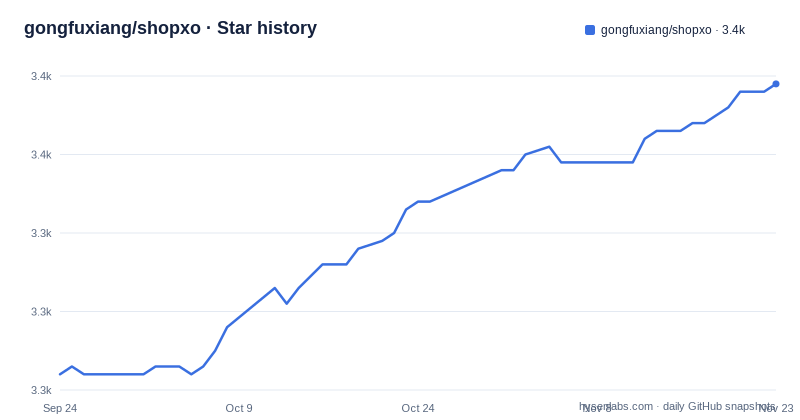
Star history
- gongfuxiang/shopxo3,359 ★ · +37
| Repository | 2026-09-24 | 2026-11-23 |
|---|---|---|
| gongfuxiang/shopxo | 3.3k | 3.4k |
37 Stars in the last 60 days, measured from the daily GitHub snapshot. Compare with other projects
Editorial analysis
What ShopXO solves, and who ends up using it
ShopXO targets a specific gap: a Chinese-language e-commerce platform that a company can host on its own servers, modify, and sell with, without paying a licence fee. The README states the project follows the MIT licence, needs no authorization, can be used commercially and can be modified. That combination is the selling point. Most hosted mall products in this space are SaaS, and the self-hosted alternatives often carry commercial restrictions.
The audience is narrow but real. It is a development team that already runs PHP and wants a mall with PC and mobile storefronts, WeChat and Alipay mini programs, an admin backend, and optional modules for multi-vendor marketplaces, physical stores, and inventory. The README lists distribution commissions, membership tiers, flash sales, coupons, live streaming, points, suppliers, wholesale pricing, customer service, purchase and sales inventory, bundled products, delivery riders, pre-sales, lotteries, group buying and bargaining. A team that would otherwise assemble six separate systems may prefer one codebase with plugins.
It is not for someone who wants a small, readable store. The feature list is the architecture: each capability is a surface area you inherit, whether or not you enable it.
How the code is laid out and how a request moves
The repository root tells most of the story. There are separate entry points: index.php for the storefront, admin.php for the backend, api.php for interfaces, and install.php for setup. Application code sits in app/, configuration in config/, extensions in extend/, front-end assets in public/ and resources/, and Composer dependencies in vendor/. A think file is present, which is the ThinkPHP console entry, and composer.json plus composer.lock pin the framework and libraries. The README names ThinkPHP8 as the framework.
That layout means one deployment serves several audiences from the same codebase. The storefront, the admin panel, and the API are different entry scripts over shared application code, so a change to a model or a service layer can affect all three. The rsakeys/ and runtime/ directories are also present at the top level, which tells you keys and generated files live beside the application rather than in a separate data volume by default. Plan your deployment around that: runtime/ is written to at run time, and rsakeys/ holds key material that should not be committed or served publicly.
The README also lists companion repositories. Mobile clients live in shopxo-uniapp, the drag-and-drop page builder in shopxo-diy, and the form designer in shopxo-form. Those are separate projects with their own Gitee, GitHub, Coding and GitCode mirrors, so a full deployment is more than one clone.
Installing ShopXO and reaching the admin panel
The README does not print install commands. It gives a link instead: the 安装教程 (installation tutorial) is at https://install.shopxo.net/, and the documentation is at https://doc.shopxo.net/. Follow those pages for the supported PHP version and the web server configuration, because the repository itself does not restate them.
What the repository does give you is the entry point and the environment template. Clone the project, then install dependencies with Composer:
composer installThe presence of composer.lock means this resolves to the versions the project locked, rather than the newest matching releases. Next, copy the environment template. The repository ships example.env at the top level:
cp example.env .envOpen .env and fill in the database and application values your host requires. The README does not list the individual keys, so read the file itself for the exact names. After that, point a browser at install.php on your domain. The installer is a web wizard, not a console command, and it is the step that writes the schema and the initial administrator account. Once it completes, the backend is reached through admin.php and the storefront through index.php.
If you are deploying the mobile clients, note that the uniapp source is a separate repository, shopxo-uniapp, and the README links it to Gitee, GitHub, Coding and the DCloud plugin page. The DIY page builder is likewise separate, in shopxo-diy.
Where ShopXO stops being the right choice
The documentation is Chinese-first. The README's installation, changelog, documentation and licence links all point to shopxo.net subdomains, and the repository text is in Chinese. An English-speaking team can still read the code, but the operational path (install guide, upgrade notes, plugin documentation) assumes a Chinese reader. That is a real cost, not a cosmetic one.
The second limit is scope. The README describes plugins for multi-vendor, multi-store, inventory, live streaming and distribution, and points to an application store at https://store.shopxo.net/ for more. It does not state which of those ship in this repository and which are separate downloads, nor does it state their terms. Anyone planning a multi-vendor marketplace should confirm module availability and cost before committing, because the repository alone does not answer it.
The third is the framework choice. ThinkPHP8 is widely used in China and less common elsewhere. Hiring, third-party library support, and general community answers are thinner outside that ecosystem than they would be for a Laravel or Symfony codebase. If your team has no ThinkPHP experience, budget for the learning curve.
Finally, the README does not document rollback, backup or upgrade procedures. The changelog link at https://log.shopxo.net/ is where release notes live, but the README itself is silent on how to move a live store between versions.
ShopXO against CRMEB and Niushop
The two names that come up in the same searches are CRMEB and Niushop, and the difference is mostly in framing. ShopXO presents itself as a general e-commerce system: the README's feature table covers physical goods, virtual goods, pickup, multi-warehouse inventory, wholesale tiers, and a purchase-and-sales module. It is trying to be the operations backend for a business, not only a storefront.
CRMEB is positioned around the same commercial territory in the Chinese market, and Niushop likewise. Without installing any of them, the honest comparison is limited to what each project states about itself and what its repository contains. ShopXO's distinguishing claims in this README are the MIT licence with commercial use, the ThinkPHP8 base, and the breadth of the plugin list. If those three things match your constraints, the comparison is settled quickly. If your constraint is a specific payment channel, a specific mini program platform, or an existing team skill set, read each project's own documentation and decide there.
One practical difference visible from the repository: ShopXO splits its mobile client, page builder and form designer into separate repositories. That is cleaner for maintenance but means more moving parts to track when you upgrade.
Licence, maintenance and what an upgrade costs you
The licence is MIT. The README states it plainly and links to https://license.shopxo.net/ for the terms. Practically, MIT permits commercial use and modification, and it requires that the copyright notice and permission notice travel with copies. It does not require you to publish your changes. That is the usual reading, not legal advice; if your organization has a compliance process, run the LICENSE.txt file at the repository root through it.
Maintenance is visible from the repository itself. The project is not archived, and the last push to the default branch was on 2026-09-22. That is recent activity, and the README also references a 2024 GitCode award, so the project is not dormant. The repository has no published GitHub releases, which means versioning may be tracked through the changelog page at https://log.shopxo.net/ rather than through tagged releases on the hosting platform.
The upgrade cost is the part to think about before you customize. Because the storefront, admin and API share one application tree, and because mobile, DIY and form tooling live in sibling repositories, an upgrade is a coordinated move across several codebases. The README does not describe a migration path, so treat the changelog as required reading and test on a copy first.
Editorial conclusion
ShopXO fits teams that want a self-hosted Chinese e-commerce stack with multi-vendor, multi-store and ERP modules available as plugins, and that are comfortable working in PHP on ThinkPHP8. It is a poor fit if you need documented English-language installation steps, a Western payment stack, or a codebase small enough to read in a week: the README links to Chinese documentation and the repository carries admin.php, api.php, index.php and install.php entry points plus a vendor directory. Before adopting, open install.shopxo.net and doc.shopxo.net and confirm the ThinkPHP8 and PHP version requirements match your host, check example.env against the environment variables your deployment actually needs, and decide whether the features you require live in the core or in the paid application store at store.shopxo.net.
Frequently asked questions
How do I install ShopXO?
The README points to the installation tutorial at https://install.shopxo.net/ rather than printing steps. The repository ships install.php as a web installer and example.env as the environment template, and dependencies are installed with composer install.
What licence does ShopXO use, and can I use it commercially?
The README states the project follows the MIT licence, needs no authorization, and can be used commercially and modified. The licence text is in LICENSE.txt at the repository root, and the README links to https://license.shopxo.net/.
Which platforms does ShopXO support?
The README lists PC with mobile adaptation, standalone H5, mini programs for Alipay, WeChat, Baidu, Toutiao and Douyin, QQ and Kuaishou, plus iOS and Android apps. The mobile client source is a separate repository, shopxo-uniapp.
Does ShopXO include multi-vendor and multi-store features?
The README describes multi-vendor, multi-store, multi-warehouse and purchase-and-sales modules and says plugins are plug-and-play, with more at https://store.shopxo.net/. It does not state which of these ship inside this repository and which are separate downloads.
Official sources
Add this badge to your README
If you maintain this project, the badge below links readers to this analysis and shows its maintenance status from the daily GitHub snapshot. Paste the markdown into your README; add ?metric=license or ?metric=stars to the image URL for a different field.

[](https://hysenlabs.com/projects/gongfuxiang-shopxo)Star history chart for your README
[](https://hysenlabs.com/projects/gongfuxiang-shopxo)Was this useful?