Calypso: WordPress.com's Single-Page Dashboard, Open Sourced
The JavaScript and API powered WordPress.com
At a glance
- What is it?
- Automattic's Calypso is the React and Redux based single-page front-end for WordPress.com, published under GPL-2.0. This review examines its architecture, local setup, and the trade-offs of adopting a codebase tied to a hosted platform.
- Who is it for?
- Adopt Calypso if you are building a React and Redux based dashboard that talks to the WordPress.com REST API and you want a large, real-world reference implementation. Do not adopt it if you need a self-hosted WordPress admin or a lightweight starting point, because it is tied to WordPress.com's API and requires Node, Yarn, and a hosts file entry.
- Can I use it commercially?
- Yes, with conditions. GPL-2.0 is a copyleft licence: if you distribute software that includes it, you must release that software's source code under the same licence. Running it internally without distributing it does not trigger that obligation.
- Is it still maintained?
- Yes. The repository received new commits within the last day.
- What is it written in?
- Mainly TypeScript, according to GitHub's language statistics.
Answers come from the project's GitHub data, last synced on November 14, 2026, and from our analysis. They are not legal advice.
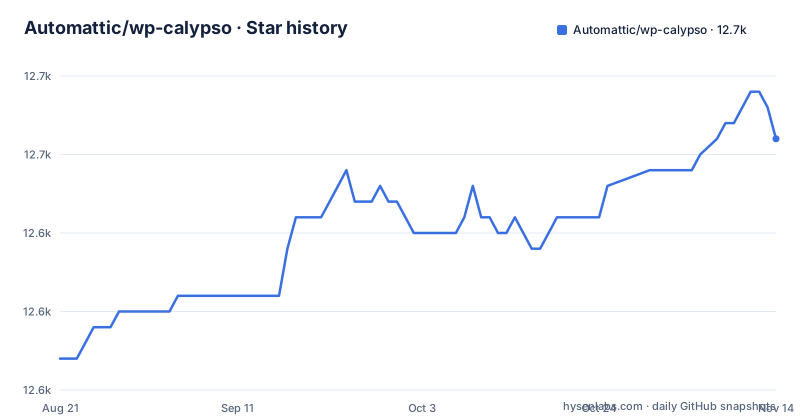
Star history
- Automattic/wp-calypso12,651 ★ · +14
| Repository | 2026-08-21 | 2026-11-14 |
|---|---|---|
| Automattic/wp-calypso | 12.6k | 12.7k |
14 Stars in the last 85 days, measured from the daily GitHub snapshot. Compare with other projects
Editorial analysis
What Calypso Actually Is
Calypso is the front-end for WordPress.com, redesigned as a single-page web application. The README calls it "the new WordPress.com front-end" and says it is built for reading, writing, and managing all of your WordPress sites in one place. The key point is that it is not a plugin or a theme. It is a standalone application that talks to the WordPress.com REST API. The repository is written primarily in TypeScript, which is a notable detail because the README's description mentions JavaScript, but the language stats show TypeScript dominates. This matters for adoption: you are not getting a PHP codebase; you are getting a Node-based client that expects a WordPress.com account or a compatible API endpoint. The project is licensed under GPL-2.0, which means derivative works must also be GPL-licensed, a fact to consider if you plan to embed parts of it in a proprietary product.
The Architecture: A Light Node Server and a Heavy Client
Calypso's architecture is a thin server plus a thick client. The README describes a "very light node plus express server" on the back end, with React and Redux on the front end. The data flow is centered on the WordPress.com REST API, with wpcom.js as the JavaScript client library. This means the UI state is managed by Redux, and the server is not a full application server; it is a bootstrap. The single-page nature means that once loaded, navigation between sections (like posts, stats, or settings) happens without full page reloads. The repository layout includes docs, client code, and server code, but the README does not detail the folder structure. What is clear is that the architecture is designed for a hosted service, not for offline or local-first use. If you expect a WordPress admin that works without network access, this is not it.
Running Calypso Locally: The Exact Steps
The README gives a precise setup procedure. You need git, node, and yarn installed. Then you clone the repository. A specific step is adding `127.0.0.1 calypso.localhost` to your hosts file. After that, you run `yarn` to install dependencies, then `yarn start` from the root. Finally, you open `calypso.localhost:3000` in your browser. The README points to `docs/install.md` for more detailed instructions. The use of `yarn` rather than `npm` is a practical constraint: you must have Yarn installed, and package.json's engines field asks for yarn ^4.0.0 and node ^v24.22.1. This is a straightforward but rigid setup. The hosts file step can be a hurdle on machines where you do not have admin rights.
The API Dependency: A Double-Edged Sword
Calypso is powered by the WordPress.com REST API, and that is its core dependency. The README says it is "powered by the WordPress.com REST API." This means the application is not useful without an API endpoint that implements that API. For WordPress.com users, this is seamless because the API is hosted. For self-hosted WordPress users, the WordPress.com REST API is different from the standard WordPress REST API. The documentation does not mention support for self-hosted Jetpack sites, though Jetpack can connect to WordPress.com. This is a limitation: if you want a dashboard for a standalone WordPress installation, Calypso is the wrong tool unless you also use Jetpack and a WordPress.com account. The upside is that the API is well-defined and documented on developer.wordpress.com, which is the homepage link. The trade-off is clear: you gain a polished UI but you are locked into Automattic's API ecosystem.
Browser Support and Security: The Constraints
The README states that Calypso supports "the latest two versions of all major browsers." This is a modern baseline, which means you cannot expect support for older browsers like Internet Explorer 11. This is a real constraint for organizations that must support legacy browsers. The security policy is handled through Automattic's security page and a HackerOne bounty program, which is a sign of mature practice. The SECURITY.md file exists. If your user base includes people on outdated browsers, you will need to add your own polyfills or modify the build, which is not documented in the README.
Maintenance and Upgrade Cost: The Last Push Speaks
The repository's last push was on 2026-11-02, so it is actively maintained. The newest listed GitHub release is v6.15.0 from 2021-06-02, a WP-Desktop release whose title mentions an "updater redirect to wp-desktop repository"; the root package.json is at version 18.13.0. The upgrade cost is non-trivial because the codebase is large (the repository has many files). Upgrading Calypso likely involves pulling in new React and Redux versions, which can break customizations. The GPL-2.0 license means you can fork and modify, but if you distribute it, you must do so under the GPL. The README encourages contributions and points to a CONTRIBUTING doc.
Alternatives: The WordPress Admin and Other React Dashboards
The most direct alternative is the standard WordPress admin, which is a PHP-based, server-rendered interface. It is not a single-page app, and it does not require Node or a custom hosts file. The difference is architectural: the WordPress admin is tightly coupled to the PHP runtime and works on any hosting environment, while Calypso is a JavaScript client that depends on a remote API. Another alternative is building a custom React dashboard using the WordPress.com REST API directly, without adopting Calypso's codebase. That gives you full control over the UI and avoids the maintenance burden of a large existing codebase, but you lose the ready-made components and design system. The choice hinges on whether you want a complete product or a starting point. Calypso is a complete product for WordPress.com, not a generic dashboard framework.
Who Should Adopt Calypso and Who Should Not
Calypso is for developers who want to contribute to WordPress.com's front-end or who need a reference implementation for a React and Redux application that consumes the WordPress.com REST API. It is also for those who want to run a local version of the WordPress.com dashboard for development or testing. If you are a self-hosted WordPress user looking for a modern admin, Calypso is not for you unless you are willing to rely on WordPress.com's API and possibly a Jetpack connection. The setup requires technical comfort: editing the hosts file, using Yarn, and running a Node server. The project's focus on WordPress.com means that any site management feature you need must be available in the API. You should verify the current state of the repository, check the open issues, and confirm that the API endpoints you depend on are stable. If you need a dashboard that works offline or on a private network, Calypso will fail you. It is a hosted-service client, and that boundary is the core of its identity.
Editorial conclusion
Adopt Calypso if you are building a React and Redux based dashboard that talks to the WordPress.com REST API and you want a large, real-world reference implementation. Do not adopt it if you need a self-hosted WordPress admin or a lightweight starting point, because it is tied to WordPress.com's API and requires Node, Yarn, and a hosts file entry. Before committing, verify that your target workflows (reading, writing, site management) are covered by the API and that you can tolerate the maintenance burden of a large TypeScript codebase with frequent updates. The project's last push was on 2026-11-02, so it is actively maintained.
Frequently asked questions
What is calypso used for?
Calypso is the WordPress.com front end, a single page web application rewrite of the WordPress dashboard powered by the WordPress.com REST API, built for reading, writing and managing WordPress sites in one place. Much of the logged in area on wordpress.com is Calypso, so you can see the user side before cloning anything.
What is the Calypso program?
In this repository, Calypso is Automattic's front end for WordPress.com, a TypeScript codebase published under GPL-2.0-or-later from the Automattic/wp-calypso repository. The root package.json is marked private, so there is no installable Calypso package and nothing is published to a package registry.
What are Calypso Technologies?
Nothing in this repository describes an organization by that name. What is defined here is Automattic's WordPress.com front end, licensed GPL-2.0-or-later, with security reports routed to automattic.com/security and a bug bounty at hackerone.com/automattic.
What is the latest version of Calypso?
It depends which number you mean. The root package.json says 18.13.0, the newest listed release tag is v6.15.0 for WP-Desktop dated 2021-06-02 with its message pointing the updater at the wp-desktop repository, and the last push to trunk was 2026-11-02.
Official sources
Add this badge to your README
If you maintain this project, the badge below links readers to this analysis and shows its maintenance status from the daily GitHub snapshot. Paste the markdown into your README; add ?metric=license or ?metric=stars to the image URL for a different field.

[](https://hysenlabs.com/projects/automattic-wp-calypso)Star history chart for your README
[](https://hysenlabs.com/projects/automattic-wp-calypso)Was this useful?