dry Wants to Be Your Docker Keyboard, Not Your Docker Dashboard
dry - A Docker manager for the terminal @
At a glance
- What is it?
- A Go terminal UI for containers, images, networks, volumes and Compose, where the interesting decisions are about which CLI behaviors it reproduces and which it deliberately changes.
- Who is it for?
- dry is at its best when you live in the terminal and want Docker CLI muscle memory to keep working, because the keymap follows that convention closely: numbers for resource types, Enter for the command menu, i to inspect, l for logs, Ctrl combinations for the destructive verbs.
- Can I use it commercially?
- Yes. MIT is a permissive licence: you can use, modify and sell software built on it, as long as you keep its copyright and licence notices.
- Is it still maintained?
- Yes. The repository last received commits 49 days ago.
- What is it written in?
- Mainly Go, according to GitHub's language statistics.
Answers come from the project's GitHub data, last synced on October 23, 2026, and from our analysis. They are not legal advice.
Star history
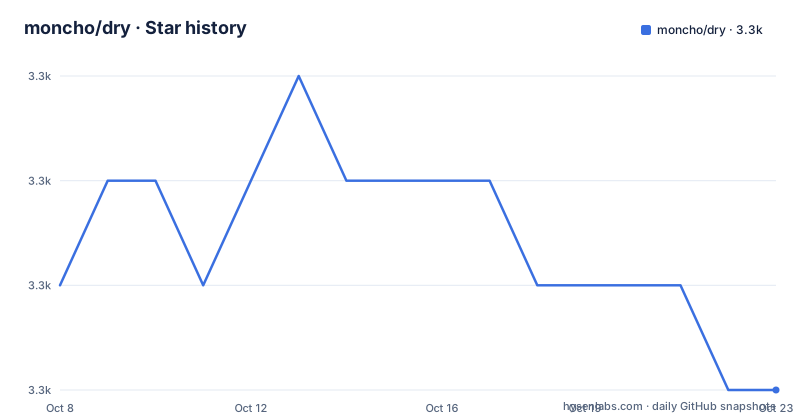
- moncho/dry3,282 ★ · -1
| Repository | 2026-10-08 | 2026-10-23 |
|---|---|---|
| moncho/dry | 3.3k | 3.3k |
-1 Stars in the last 15 days, measured from the daily GitHub snapshot. Compare with other projects
Editorial analysis
What kind of tool this actually is
dry is a terminal application for Docker and Docker Compose, written in Go, MIT licensed, with 3,279 stars and 104 forks at the time of this writing, 27 open issues, a master default branch and a last recorded push on 4 September 2026. The repository description is terse to the point of being a nickname, dry - A Docker manager for the terminal, and the topics are just docker, docker cli, docker engine, docker swarm and golang. The documentation site lives at moncho.github.io/dry.
The functional scope is broader than a container list. You browse containers, images, networks and volumes, and you manage Compose projects, bringing them up, taking them down, and seeing what has drifted from the compose file, all without leaving the terminal. It works against a local daemon or a remote one, which matters more than it sounds: the remote case is why ssh_config appears in the dependency list, since connection settings for a non local daemon are read from your SSH configuration rather than invented by the tool.
It is also usable as a monitoring tool, and when the daemon is running a Swarm cluster the same binary manages nodes, services and stacks. The claim in the README that most commands the official Docker CLI provides are available with the same behaviour is the project's core positioning, and it is the claim worth stress testing later in this piece, because the Compose section documents several places where the behavior is deliberately different.
The keymap is the interface
There is no mouse story here, so the keybinding tables are the documentation. Globally, digits select resource types: 1 containers, 2 images, 3 networks, 4 volumes, and on a Swarm daemon 5 nodes, 6 services and 7 stacks. Digit 8 was added later for Compose projects, which tells you where the project has been heading. Navigation is vi shaped with the usual j and k plus g and G for top and bottom. Percent filters the current list, F1 sorts, F5 refreshes, F7 toggles daemon information, F8 shows disk usage, F9 shows the last ten Docker events and F10 shows full docker info.
The verbs per resource type follow the same grammar. Enter opens a container command menu including attach for running containers, i inspects, l shows logs, e removes, s shows stats, and x execs a command into the selection with /bin/sh as the default. Ctrl combinations carry the heavier actions: Ctrl+e removes all stopped containers, Ctrl+k kills, Ctrl+r starts or restarts, Ctrl+t stops. Image and volume views use the same shape, with Ctrl+d removing dangling images, Ctrl+u removing unused images or volumes, and Ctrl+a removing all volumes.
Two global keys are worth calling out because they are quality of life features rather than resource actions. Space opens Quick Peek, a temporary panel showing recent logs or inspect output for the current selection, so you can look without losing your place in the list. Colon opens a command palette. And Ctrl+0 cycles the color theme between dark and light, which matters for a full screen TUI that people leave open all day.
Workspace mode is the current direction of travel
The newest release reworks the single pane layout. Version 0.13.0, published in March 2026, describes itself as changing the app from a single pane Docker browser into a workspace for active container operations, with navigation, context and activity visible together, plus an interactive exec flow that lets you jump into a running container without leaving dry.
The flag is dry --workspace, and the README describes it as the Phase 1 workspace shell. Three regions exist: Navigator for the list, Context as a passive pane, and Activity at the bottom. Tab and Shift+Tab move focus between them. With Context focused, the normal navigation keys scroll it, p and P pin or unpin the current preview, Space still opens Quick Peek, and f toggles follow mode in the activity pane. Existing primary keys keep their meaning rather than being remapped, so Enter still opens the container command menu and still inspects in views where Enter already meant inspect.
Two behaviors here are engineering decisions you can feel. Embedded activity logs start from a recent tail rather than replaying the full history, which keeps the activity pane responsive on a container that has been writing for hours. And on a narrow or short terminal the layout degrades to a compact single pane with Tab switching between navigator and activity, so the mode does not become unusable when a terminal is small. If you try the tool on a laptop terminal first, that fallback path is what you will actually see.
Compose projects are discovered, not configured
The Compose story is the most interesting part of the design. The v0.12.1 release notes describe first class support for Docker Compose projects with a view listing all projects, their services, health status, ports and container counts, and the key line is that all of it is derived from container labels, with no compose file needed.
That single design choice explains most of the Compose behavior described in the README. Because the tool reads labels rather than parsing your project file, a stack you started from a different directory, on a different machine, or with a different tool still appears as a project. The cost is that the tool is describing observed state, not declared intent, which is exactly why seeing what has drifted from the compose file is listed as a capability rather than an accident.
The Compose keybindings make the divergences from the Docker CLI explicit. Enter shows the services of a project. u brings the selected service up with no prompt, except on a project row where it asks first. d takes the project down from its own row and only behind a prompt, and the README states plainly why there is no per-service form of it: compose down removes the project networks too. c shows the project rendered compose configuration, l shows logs for the selected service or the whole project from its header, and Ctrl+t, Ctrl+r and Ctrl+e act on the selected service or on the project from its header. The README also notes that these keys name their target in a confirmation, which is the right way to make a dual-scope key safe.
Three places where the documentation and the repository disagree
The license badge at the top of the README is MIT, but the image it loads comes from a different project's shield endpoint, and the link it wraps points at a repository named dryblob rather than moncho/dry. The repository metadata says MIT, and a LICENSE file is present in the tree. Both facts stand: the license is MIT, and the badge renders from an unrelated account and links somewhere else. The practical consequence is that clicking the badge sends you to the wrong place, so check the LICENSE file in the repository root rather than the badge before you cite the license anywhere.
Two Dockerfiles carry different jobs. The tracked Dockerfile is explicitly labeled a multi stage build for local development, and it builds a static binary with CGO disabled from a golang alpine base and copies it into a plain alpine image with TERM set to xterm-256color and an exec form entrypoint. A separate Dockerfile.goreleaser exists for the published artifacts. The v0.12.2 release notes list a fix that sets TERM and uses a proper entrypoint in the Docker image, and those exact settings are visible in the development Dockerfile. What is not visible here is the goreleaser variant, which is the one most users pull. If you containerize dry, build against Dockerfile.goreleaser rather than assuming the checked in one is the published recipe, and verify the entrypoint is exec form so signal handling works.
The CLI equivalence claim and the documented behavior also pull in different directions. The README says most Docker CLI commands are available with the same behaviour, and then the Compose section specifies that bring up is promptless for a service while prompting on a project row, that there is no per service take down because project teardown also removes networks, and that embedded logs start from a recent tail instead of replaying full history. Those are not bugs, they are choices, but they mean muscle memory carries over with exceptions. Judge the claim per action: run the same subcommand in both tools on a throwaway project and compare the prompts and side effects.
A smaller housekeeping note: the tree contains a .travis.yml alongside GitHub Actions workflows referenced by the README badges, and the Makefile pins golangci-lint v2.10.1 and misspell v0.8.0 with a comment telling contributors to keep those in sync with the lint workflow. The build tooling is current and actively maintained; the leftover Travis file is just historical residue.
Building it, and what the dependency list reveals
The Makefile is conventional and useful. It populates a version from git describe with a dirty flag and falls back to dev, threads the version and commit into the binary through ldflags, and offers run, build, install, lint, fmt and test targets. The lint target runs golangci-lint, gofmt and misspell, downloading pinned versions when the tools are absent, and the test target skips vendor and mock packages.
The module file is where the stack becomes clear:
module github.com/moncho/dry

go 1.26.0

toolchain go1.26.6
The interface layer is the Charm stack at version 2, with bubbletea for the program loop, bubbles for components and lipgloss for styling, plus ntcharts v2 for the charts behind the stats and usage views. The Docker layer is the official client set, moby client and api at recent versions alongside the docker cli reference parser, go-units and distribution reference for image name handling. Command line parsing uses go-flags, logging uses logrus, and goleak is present, which means the project cares about goroutine leaks in tests.
Two consequences follow from those lines. The Go floor is high: go 1.26.0 with a toolchain line of go1.26.6 means a stock install on an older release cannot build this without fetching a newer toolchain. And the runtime image is deliberately bare, with the static binary dropped into plain alpine:
FROM alpine:latest
WORKDIR /app
ENV TERM=xterm-256color
COPY --from=builder /dry /app/dry

ENTRYPOINT ["/app/dry"]
For most people the packaging paths matter more than the build. The repository carries a snap directory and a snapcraft badge, a dryup.sh install script, goreleaser configuration and release workflows, so a snap install or a release binary is the low friction route, and building from source is the route to take when you want a specific commit.
Editorial conclusion
dry is at its best when you live in the terminal and want Docker CLI muscle memory to keep working, because the keymap follows that convention closely: numbers for resource types, Enter for the command menu, i to inspect, l for logs, Ctrl combinations for the destructive verbs. The Compose support is the part that changes the argument, since projects are read from container labels rather than from a compose file, which means a stack started elsewhere still shows up as a project. Read the divergences in the README before trusting equivalence with the CLI, because bring up is promptless for services, take down has no per-service form and removes networks, and embedded logs start from a recent tail. The release line is healthy at v0.13.0 with 27 open issues and a recent push, but the license badge points at an unrelated repository, two Dockerfiles carry different jobs, and go.mod asks for a Go 1.26 toolchain. Build from source with make, or take the snap, and check your Go version first.
Frequently asked questions
Which Docker manager is considered the best?
The answer depends on where you want to work. dry is the option here for people who want to stay in the terminal: it is a single Go binary with no external library requirements, it follows Docker CLI key conventions closely, and it works against local or remote daemons. Managers with a web interface suit shared or remote administration, and lighter single purpose tools suit only running containers. Comparing on the actions you perform most, browse, exec, logs, and Compose up or down, gives a more reliable answer than feature counts.
How do I install dry?
The repository ships a snap package and an install script, and release binaries are produced through goreleaser. From source, the Makefile provides a build target that threads a version and commit into the binary with ldflags, and an install target that runs go install. The module requires Go 1.26 or newer, so check your toolchain before building.
Does dry support Docker Compose projects?
Yes, since v0.12.1. Press 8 for the Compose projects view, which lists projects with their services, health status, ports and container counts. The data comes from container labels, so no compose file has to be present and stacks started elsewhere still appear. Enter drills into project services, c shows the rendered compose configuration, and u brings a service or project up.
Can dry manage a remote Docker daemon?
The README states that dry can be used with local or remote Docker daemons, and remote connections are configured through your SSH configuration, which the project reads with the kevinburke ssh_config library rather than maintaining its own connection settings. Swarm node, service and stack views, reachable with keys 5, 6 and 7, are the feature that depends most on a remote or cluster daemon.
What is workspace mode in dry?
Run dry --workspace to get a layout with a Navigator list, a passive Context pane and an Activity pane at the bottom, described in the README as the Phase 1 workspace shell and introduced as a headline feature of v0.13.0. Tab and Shift+Tab move focus, p pins a preview, f toggles follow in the activity pane, and the layout falls back to a compact single pane on small terminals.
Official sources
Add this badge to your README
If you maintain this project, the badge below links readers to this analysis and shows its maintenance status from the daily GitHub snapshot. Paste the markdown into your README; add ?metric=license or ?metric=stars to the image URL for a different field.

[](https://hysenlabs.com/projects/moncho-dry)Star history chart for your README
[](https://hysenlabs.com/projects/moncho-dry)Was this useful?