avwo/whistle: a Node.js HTTP, HTTP/2, HTTPS and WebSocket debugging proxy
HTTP, HTTP2, HTTPS, Websocket debugging proxy
At a glance
- What is it?
- Whistle is a Node.js capture-and-modify proxy for HTTP, HTTPS, HTTP/2, WebSocket and TCP traffic, driven by a rule file rather than a GUI wizard. It installs from npm as the w2 command and is aimed at engineers debugging traffic on machines they control.
- Who is it for?
- Adopt whistle if you need to capture and rewrite HTTP, HTTPS, HTTP/2, WebSocket or TCP traffic from a machine you control, and you are comfortable editing a rule file instead of clicking through a GUI. Do not adopt it if you cannot install a root certificate on the client, or if you need a hosted capture service.
- Can I use it commercially?
- Yes. MIT is a permissive licence: you can use, modify and sell software built on it, as long as you keep its copyright and licence notices.
- Is it still maintained?
- Yes. The repository last received commits 6 days ago.
- What is it written in?
- Mainly JavaScript, according to GitHub's language statistics.
Answers come from the project's GitHub data, last synced on November 14, 2026, and from our analysis. They are not legal advice.
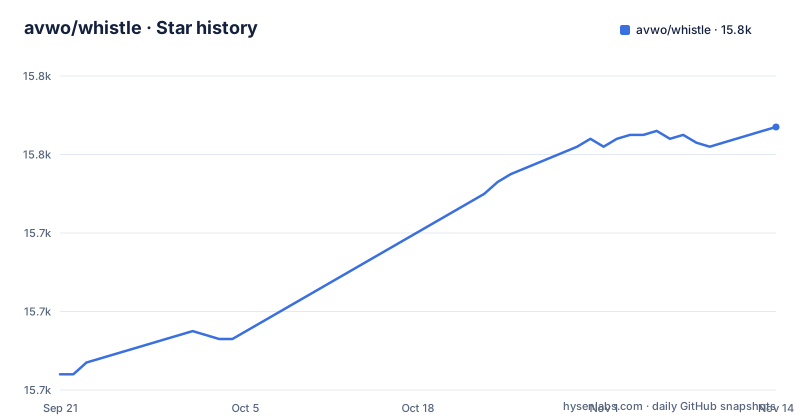
Star history
- avwo/whistle15,767 ★ · +63
| Repository | 2026-09-21 | 2026-11-14 |
|---|---|---|
| avwo/whistle | 15.7k | 15.8k |
63 Stars in the last 54 days, measured from the daily GitHub snapshot. Compare with other projects
Editorial analysis
What whistle solves, and who ends up using it
Whistle sits between a client and a server and lets you read and rewrite what passes through. The package description lists the protocols it handles: HTTP, HTTP2, HTTPS and Websocket, with TCP also named in the README's feature list. That combination is the reason it exists. A browser devtools panel shows you one browser's traffic; a proxy sees every client that points at it, including mobile apps, desktop binaries and command line tools.
The intended user is an engineer debugging a request that is hard to reproduce from inside the app: a header the server rejects, a response body that needs to be swapped for a fixture, a WebSocket frame sequence that only fails on a real device. The README frames the workflow around rule configuration, and the package keywords list api-mocking and mitm alongside fiddler-alternative and charles-alternative, so the author positions it against the desktop capture tools rather than against a logging library.
It is not a passive observability tool. Nothing here ships traffic to a dashboard for later analysis. You point a client at the proxy, watch the request list, and change behaviour while the request is in flight.
The rule file is the actual interface
Most of whistle's behaviour comes from rules rather than from menus. The README describes the management interface as one place for capture, rules, plugins, Weinre, Console and Composer, and says requests and responses are modified through rule configuration. That is the design decision worth understanding before you install anything: the GUI shows you traffic, but the rule text is where interception logic lives.
The repository layout supports that reading. There is a biz/ directory alongside lib/, bin/ and test/, and package.json defines a dev script that runs webpack against ./biz/webui/htdocs/src/webpack.config, so the web UI is built from source in that tree rather than being a static asset shipped separately. index.js and index.d.ts at the top level indicate the package is also meant to be required as a module, which matches the README's claim that it can be referenced inside a project.
Two other details from package.json shape how it runs. The dataDirname is .whistle, so state lives in a directory of that name, and the default port is 8899. The sockets value is 256 and timeout is 360000. Those are the numbers you will meet first when something does not connect.
Installing whistle and capturing a first request
The README recommends the desktop client for macOS, Windows and Linux users, pointing at the separate whistle-client repository because it removes most manual setup. The command line path below is the one the README documents for headless Linux and server environments, and it needs Node.js installed first.
Install the package globally. The README gives npm i -g whistle as the command, and notes Homebrew as an alternative.
npm i -g whistleStart the proxy. The binary exposes three names in package.json, whistle, w2 and wproxy, and the README's command list uses w2 throughout.
w2 startThe README's status command is the quickest way to confirm it came up, and the default port from package.json is 8899.
w2 statusHTTPS capture needs a root certificate. The README warns that the install step may require manual confirmation: on Windows you select Y at the end, and on macOS you may need your login password or Touch ID.
w2 caFinally, point the system at the proxy. With no argument the command sets the system proxy; the README also shows an explicit address and the way to turn it off again.
w2 proxy
w2 proxy "10.x.x.x:8888"
w2 proxy 0
After that, open the management interface and drive traffic from a client that respects the system proxy. The README points to https://wproxy.org/docs/getting-started.html for detailed usage guides and examples.
Where whistle gets awkward
Certificate installation is the first real obstacle. The README is explicit that w2 ca can require interactive confirmation on Windows and macOS. On a headless Linux box there is no such prompt, but the certificate still has to reach every client you intend to debug, and clients that pin certificates or ship their own trust store will refuse the connection no matter what you do on the proxy side. Whistle is the wrong tool for those clients.
The README also notes that some applications cannot be pointed at a proxy directly, and suggests Proxifier on Windows and macOS for those. That is an admission that coverage is not universal. If your target is a native binary with no proxy setting, you are adding a second tool before whistle sees anything.
The rule-driven model cuts both ways. Rules are compact and reviewable, which is why they work well in a bug report or a shared config. They are also a text format with its own syntax, and the README does not attempt to teach it, deferring to the documentation site. A team that wants a GUI-only workflow will find the learning curve sits in the wrong place.
One more boundary: the README says Node.js must be installed first. Whistle is a Node process, not a standalone binary, so an environment that cannot run Node cannot run whistle.
How it differs from Charles and Fiddler
The package keywords name charles-alternative and fiddler-alternative, so the comparison is the author's own framing. The difference is not protocol coverage, since all three intercept HTTP and HTTPS. It is the delivery model and the extension surface.
Charles and Fiddler are desktop applications you install and click through. Whistle is an npm package with a web UI, which means the same tool runs on a headless Linux server where no desktop exists. The README lists exactly that as a supported environment. If your debugging target is a container or a remote VM, a desktop capture tool is not an option and whistle is.
The second difference is extensibility. The README states that plugins can extend both rules and interface features, and that the package can be required as an NPM module. A desktop proxy is generally a closed surface with a scripting add-on; whistle is JavaScript all the way down, and index.js and index.d.ts exist so other code can import it. That matters if you want capture logic to live in your test suite rather than in a person's laptop.
If you want a polished desktop experience with no Node runtime and no rule syntax, the desktop tools remain the better fit. Whistle's advantage is portability and programmability, and you pay for both in setup steps.
Maintenance, licence and the cost of upgrading
The repository is not archived, and the last push was on 2026-10-27. That is the only maintenance signal; the repository has no published GitHub releases, so there is nothing to say about a version cadence beyond the package.json version of 2.10.13.
The licence is MIT, declared in package.json and in the README's License section, with the full text in the LICENSE file. MIT is permissive: it allows commercial and closed-source use, modification and redistribution, and it disclaims warranty. That is a description of the terms, not legal advice, and the certificate authority behaviour is worth thinking about separately. Whistle generates a root certificate so it can decrypt HTTPS traffic. Anyone who installs that certificate on a device is trusting the machine running whistle with the plaintext of that device's TLS sessions. That is true of every interception proxy, and it is the reason certificate installation is a deliberate, manual step on Windows and macOS.
Upgrade cost is low on the surface. npm i -g whistle replaces the global install, and the README's restart command is w2 restart. The real cost is the certificate: if an upgrade changes how the root certificate is generated, clients that already trust the old one may need w2 ca run again. The README does not document rollback, so treat certificate reinstallation as an unknown you should test on one client before rolling out to a fleet.
Editorial conclusion
Adopt whistle if you need to capture and rewrite HTTP, HTTPS, HTTP/2, WebSocket or TCP traffic from a machine you control, and you are comfortable editing a rule file instead of clicking through a GUI. Do not adopt it if you cannot install a root certificate on the client, or if you need a hosted capture service. Before committing, verify three things: that Node.js is present on the target host, that w2 ca completes on every client you plan to debug, and that the default port 8899 is free or can be changed.
Frequently asked questions
How do I install whistle?
The README recommends npm, with the command npm i -g whistle, and notes that Homebrew is also supported. Node.js must be installed first, and the README suggests the desktop client for macOS, Windows and Linux users who would rather skip manual setup.
How do I use whistle to capture HTTPS traffic?
Run w2 ca to install the root certificate, then set the system proxy with w2 proxy. The README notes that certificate installation can require manual confirmation on Windows and macOS.
Which protocols can whistle intercept?
The README lists HTTP, HTTPS, HTTP/2, WebSocket and TCP for capturing and modifying requests and responses. It also states that HTTP, HTTPS, Socks and reverse proxy modes are supported.
What port does whistle listen on by default?
package.json sets the port to 8899. The same file sets dataDirname to .whistle, which is where whistle keeps its data.
How do I turn off the system proxy after using whistle?
The README lists w2 proxy 0 as the command that disables the system proxy. The general form is w2 proxy [host:port], and w2 stop shuts down the proxy process itself.
Official sources
Add this badge to your README
If you maintain this project, the badge below links readers to this analysis and shows its maintenance status from the daily GitHub snapshot. Paste the markdown into your README; add ?metric=license or ?metric=stars to the image URL for a different field.

[](https://hysenlabs.com/projects/avwo-whistle)Star history chart for your README
[](https://hysenlabs.com/projects/avwo-whistle)Was this useful?