nodejs/node: the yearly Alpha, Current and LTS cycle, signed downloads, and the build tree behind the runtime
Node.js is an open-source, cross-platform JavaScript runtime environment governed openly under the OpenJS Foundation.
At a glance
- What is it?
- A close look at the nodejs/node repository: how the new release schedule starting with Node.js 27 decides which build you should run, how to check that a download is genuine, and what the source tree expects from anyone building it.
- Who is it for?
- Production users should run an LTS line such as 26.x Lithium or 24.x Krypton and verify SHASUMS256.txt.asc before installing; Alpha 27.x and nightly builds belong only in library CI. Before planning an upgrade, confirm which schedule your major version falls under, since lines up to Node.js 26 follow the old six-month rules.
- Can I use it commercially?
- Check first. The repository uses a licence we do not classify automatically, so read its LICENSE file before any commercial use.
- Is it still maintained?
- Yes. The repository received new commits within the last day.
- What is it written in?
- Mainly JavaScript, according to GitHub's language statistics.
Answers come from the project's GitHub data, last synced on November 13, 2026, and from our analysis. They are not legal advice.
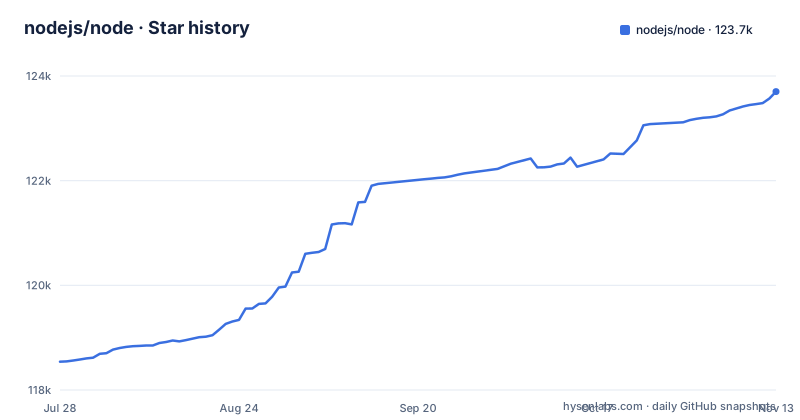
Star history
- nodejs/node123,701 ★ · +5,160
| Repository | 2026-07-28 | 2026-11-13 |
|---|---|---|
| nodejs/node | 118.5k | 123.7k |
5,160 Stars in the last 108 days, measured from the daily GitHub snapshot. Compare with other projects
Editorial analysis
Node.js 27 opens a yearly Alpha, Current and LTS cycle
Node.js is an open-source, cross-platform JavaScript runtime environment, and the nodejs/node repository on GitHub is where its source, tests, benchmarks and release tooling live. The project follows semantic versioning, and the most consequential recent change is to its release calendar.
Under the new schedule, each October a new release line branches off main. That line receives Alpha releases for six months, carrying version strings such as 27.0.0-alpha.0.0.0. Each April the line is promoted to Current, and a new major version ships once a year in that month. After six months as Current, in October, it converts to LTS. Every major version becomes LTS and receives 30 months of LTS support, for a total of 36 months from its first Current release to End-of-Life.
The repository is clearly in motion: the last push landed on 2026-11-02, and v27.0.0-alpha.0.0.0 was tagged on 2026-10-29 by RafaelGSS. That tag is the first Alpha of the first line built entirely under the new rules.
Node.js 26 and older keep the six-month, even-numbers-only rule
The new calendar does not apply retroactively. Release lines up to and including Node.js 26 follow the previous schedule, in which a new major version was released every six months and only even-numbered major versions became LTS. Odd-numbered lines from that era never received long term support.
The two most recent LTS releases show the old scheme in action. On 2026-10-28, v26.13.0 shipped as an LTS release with the code name Lithium, cut by richardlau, and v24.22.2 shipped the same day as an LTS release named Krypton, cut by aduh95. LTS lines carry alphabetically ordered code names that started with Node.js 4 Argon, so the name tells you roughly where a line sits in the sequence.
The practical consequence for teams maintaining support matrices is that two sets of rules coexist for a while. A policy written as "only even majors are supported" will be wrong from Node.js 27 onward, because every major now becomes LTS, while a policy that assumes 36 months for every line will be wrong for lines numbered 26 and below. The nodejs.org announcement on evolving the release schedule and the Release README in nodejs/Release hold the details.
Alpha and Current builds can change their ABI under you
Both Alpha and Current releases are labelled as intended for library authors and CI pipelines, not for production use. The reasons differ slightly. Alpha is where semver-major changes are still allowed: each Alpha release is signed, tagged and tested through CITGM, but its API and ABI may change between releases. Current forbids semver-major changes, yet its ABI may still change between releases.
For a reader, the cost of ignoring this is concrete. Code that compiles against the runtime's binary interface is not guaranteed to keep working when you move from one Alpha or Current release to the next, and JavaScript written against an Alpha API can break when that API is reshaped before the line reaches Current. Running an Alpha line in production means accepting that a routine patch upgrade can turn into a migration.
The LTS line is where stability is the stated priority. Only changes that have spent two weeks on an Alpha or Current release can be backported to an LTS release, which gives every fix a soak period before it reaches long-term users.
Nightly builds from main skip testing entirely
Below Alpha sits the nightly channel. Code from the main branch is built every 24 hours when there are changes, and the results are published at https://nodejs.org/download/nightly/. Unlike Alpha releases, nightly builds are automated and untested, and the project's own guidance is to use them with caution.
Each nightly directory and filename encodes three things: the version, the UTC date and the short commit SHA of the HEAD of the release. A full directory name looks like v22.0.0-nightly20240424ddd0a9e494, which reads as version v22.0.0, built on April 24, 2024, from commit ddd0a9e494. That naming is useful when a regression appears: you can bisect across nightly directories by date and pin the exact commit range before opening an issue.
What nightlies cannot give you is any assurance that the build works. They are not put through CITGM the way Alpha releases are, so a nightly that installs cleanly may still fail your test suite for reasons unrelated to your code. Treat a nightly result as a signal to investigate, not as evidence about the next release.
The latest and latest-codename aliases decide what you fetch
Binaries, installers and source tarballs for every release are published under https://nodejs.org/en/download/, with the raw directory tree for Current and LTS releases at https://nodejs.org/download/release/. Two kinds of alias directories sit inside that tree, and picking the wrong one is an easy way to install a line you did not intend.
The latest directory is an alias for the latest Current release, not the latest LTS. A script that downloads from latest therefore follows the line that is still allowed to change its ABI. For LTS lines, each code name has its own alias: latest-codename points to the newest release in that LTS line. For example, latest-hydrogen contains the newest Hydrogen release, which is Node.js 18, so anyone looking for a Node.js 18 download should go there rather than to latest.
API documentation follows a similar split. The docs at https://nodejs.org/api/ track the latest Current release, while version-specific documentation is shipped in a docs subdirectory inside each release directory and is also collected at https://nodejs.org/download/docs/. If you run an LTS line, read the docs that match it.
SHASUMS256.txt.asc puts signature checking in your hands
Every download directory contains a SHASUMS256.txt.asc file holding SHA checksums for the files in that directory along with the releaser's PGP signature. Nothing in the download flow checks it for you; if you skip this step, a tampered or corrupted binary installs just as smoothly as a genuine one.
The first step is a trusted keyring. One way to get it is to fetch the keyring published in the nodejs/release-keys repository:
curl -fsLo "/path/to/nodejs-keyring.kbx" "https://github.com/nodejs/release-keys/raw/HEAD/gpg/pubring.kbx"The alternative is to import the individual releaser keys into your default keyring, using the commands in the Release keys section of the repository README. With a keyring in place, download the signed checksum file for the version you want, verify the signature with gpgv, and then check your local files against the checksums:
curl -fsO "https://nodejs.org/dist/${VERSION}/SHASUMS256.txt.asc" \
&& gpgv --keyring="/path/to/nodejs-keyring.kbx" --output SHASUMS256.txt < SHASUMS256.txt.asc \
&& shasum --check SHASUMS256.txt --ignore-missing
If you imported keys into your default keyring instead, pass --keyring="${GNUPGHOME:-~/.gnupg}/pubring.kbx" to gpgv. Run all three steps as one chain, as above, so that a failed signature check stops the checksum step from running.
Building from source runs through configure and an overridable Makefile
The README does not carry build steps itself; it sends readers to BUILDING.md, which holds the instructions for building from source and the list of supported platforms. Check that list before assuming your platform is covered. The top level of the repository shows how many entry points the build has: configure and configure.py, a Makefile and a BSDmakefile, vcbuild.bat, node.gyp with common.gypi and node.gypi, GN files (BUILD.gn, node.gni, unofficial.gni), android-configure with an android-patches directory, plus shell.nix, a .devcontainer directory and a .gitpod.yml for prepared environments. Bundled dependencies live in deps, the JavaScript library in lib, native code in src, and tests in test.
The Makefile opens with defaults that can be overridden from the command line or from an included config.mk:
BUILDTYPE ?= Release
PYTHON ?= python3
PREFIX defaults to /usr/local, so an install without overrides writes there. Parallelism is opt-in: only when JOBS is set does the Makefile pass -j with that value. FLAKY_TESTS defaults to run, GTEST_FILTER defaults to *, and setting ENABLE_V8_TAP makes V8 test runs emit JUnit XML files. The Python tooling is linted with Ruff targeting py310 with a 172-character line limit, so the repository's own Python scripts are written for Python 3.10.
A TSC under the OpenJS Foundation governs who can contribute
Node.js runs on an open governance model set out in GOVERNANCE.md, with support from the OpenJS Foundation. Decisions sit with the Technical Steering Committee, whose voting members are named in the README; the current list includes Antoine du Hamel, Yagiz Nizipli, Benjamin Gruenbaum, Ruben Bridgewater, Gireesh Punathil, James M Snell and Joyee Cheung, among others. Beneath the TSC are collaborators and triagers, and the people who sign releases are listed under Release keys.
The project has a Code of Conduct, and the TSC reserves the right to limit or block contributors who repeatedly discourage, exhaust or otherwise negatively affect other participants. Contributors are expected to argue constructively and accept compromise.
Two practical routes matter for outsiders. Security vulnerabilities go through the process in SECURITY.md rather than public issues, and general help requests go through the instructions in .github/SUPPORT.md.
One gap to note for compliance work: GitHub's license detection reports NOASSERTION for this repository. A LICENSE file exists at the top level, and that file, not the detected label, is what your legal review needs to read.
Editorial conclusion
Production users should run an LTS line such as 26.x Lithium or 24.x Krypton and verify SHASUMS256.txt.asc before installing; Alpha 27.x and nightly builds belong only in library CI. Before planning an upgrade, confirm which schedule your major version falls under, since lines up to Node.js 26 follow the old six-month rules.
Frequently asked questions
What is node in nodejs?
Node.js is an open-source, cross-platform JavaScript runtime environment. Its source is developed in the nodejs/node repository on GitHub, with releases published at nodejs.org.
Is node the same as nodejs?
Yes. The Node.js runtime is developed in a GitHub repository named node inside the nodejs organization, which is why both names point to the same project.
What is the main purpose of NodeJS?
Node.js is a runtime environment that runs JavaScript across platforms. Production users are steered to LTS releases, which focus on stability and security and receive 30 months of LTS support from Node.js 27 onward.
Official sources
Where developers are discussing it
Posts on Hacker News, dev.to and Lobsters that link to this repository, found by our scan of those communities. 3 in the last 30 days; newest first.
- Node.js Isn't Single-Threaded. How libuv and the OS Kernel Actually Run Your Code.dev.to · Oct 26, 2026 · 17 points · 1 comments
- Node.js October 2026 Security Release: Finding Every Node You Actually Rundev.to · Oct 22, 2026 · 5 points · 0 comments
- Certificate authority keys: eMudhra's browser and runtime trust gapdev.to · Oct 21, 2026 · 2 points · 1 comments
Add this badge to your README
If you maintain this project, the badge below links readers to this analysis and shows its maintenance status from the daily GitHub snapshot. Paste the markdown into your README; add ?metric=license or ?metric=stars to the image URL for a different field.

[](https://hysenlabs.com/projects/nodejs-node)Star history chart for your README
[](https://hysenlabs.com/projects/nodejs-node)Was this useful?