Awaitility: a Java DSL for waiting on asynchronous state instead of sleeping
Awaitility is a small Java DSL for synchronizing asynchronous operations
At a glance
- What is it?
- A small library that replaces Thread.sleep in tests with a declarative wait, available on Maven Central and ported to Kotlin, Groovy and Scala.
- Who is it for?
- Awaitility is worth adding to a Java test suite the first time a flaky test comes from a fixed sleep rather than from a real defect. The library is small, sits on Maven Central, and the waiting logic lives in a DSL that reads like the assertion you meant to write all along.
- Can I use it commercially?
- Yes. Apache-2.0 is a permissive licence: you can use, modify and sell software built on it, as long as you keep its copyright and licence notices.
- Is it still maintained?
- Activity is slowing. The repository last received commits 6 months ago.
- What is it written in?
- Mainly Java, according to GitHub's language statistics.
Answers come from the project's GitHub data, last synced on October 23, 2026, and from our analysis. They are not legal advice.
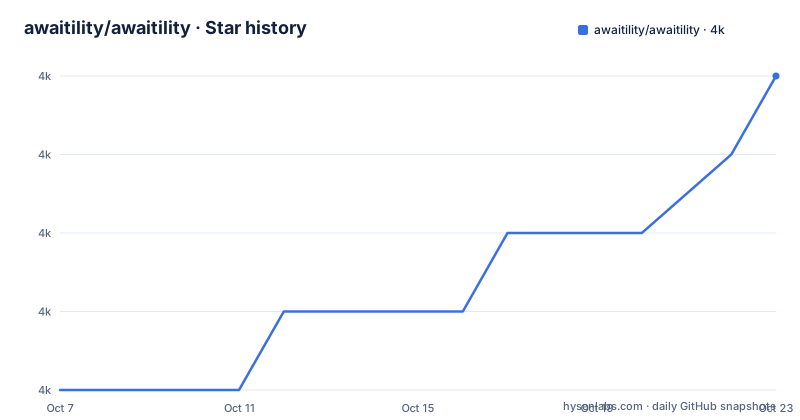
Star history
- awaitility/awaitility4,032 ★ · +4
| Repository | 2026-10-07 | 2026-10-23 |
|---|---|---|
| awaitility/awaitility | 4k | 4k |
4 Stars in the last 16 days, measured from the daily GitHub snapshot. Compare with other projects
Editorial analysis
The problem it solves is test intent, not timing
The README states the motivation in one line: testing asynchronous systems is hard because it requires handling threads, timeouts and concurrency, and all of that detail obscures the intent of the test. Awaitility's answer is a domain-specific language that expresses the expectation directly and handles the waiting underneath.
The example in the README is a status update published to a message broker, then asserted on:
@Test
public void updatesCustomerStatus() {
    // Publish an asynchronous message to a broker (e.g. RabbitMQ):
    messageBroker.publishMessage(updateCustomerStatusMessage);
    // Awaitility lets you wait until the asynchronous operation completes:
    await().atMost(Duration.ofSeconds(5)).until(customerStatusIsUpdated());
    ...
}
The interesting part is what disappeared. There is no sleep, no retry loop, no try and catch around a timing exception, and no polling interval chosen by hand. The test says how long it is prepared to wait and what should be true by the end, and the library handles the rest. That is a different kind of improvement from making a wait faster: it makes the test say what a reader already wanted to know.
One library, several language front ends
The repository tree shows a multi-module Maven project rather than a single artifact. Alongside the core `awaitility/` module sit `awaitility-kotlin/`, `awaitility-groovy/` and `awaitility-scala/`, which means the same waiting model is available to JVM codebases that are not written in Java. There are also `awaitility-java8-test/` and `awaitility-osgi-test/` modules, the latter existing to verify the library loads correctly in an OSGi container, which is a detail worth noting for anyone deploying into an application server.
`awaitility-test-support/` is the module that lets other projects build on top of Awaitility's condition and poll mechanisms. It is not the module application developers depend on directly.
For a Java project the dependency is a single coordinate, published to Maven Central under the `org.awaitility` group. The README carries the Maven Central badge for that group and links the search query, so the artifact is discoverable through the ordinary path rather than requiring a custom repository.
Releases, activity and the 4.3.x line
The README keeps a short news section rather than a long history. Version 4.3.1 is dated 2026-04-17 and adds configurable default timeout and poll settings through system properties, along with documentation updates and dependency and build improvements. Version 4.3.0 from 2025-02-21 brought better Kotlin time support and a new way of using `untilAsserted`, and 4.2.2 from 2024-08-07 added support for early access JVM versions.
That last entry is a reasonable signal about how the maintainers handle new Java releases. Awaiting a JDK release means your test suite fails to build until a compatible version ships, and a library whose whole job is polling asynchronous state needs to run on the JVM you just upgraded to.
The repository was last pushed on 2026-04-17, the same day as the 4.3.1 release, and carries the Apache 2.0 licence. It has 88 open issues and 269 forks. Older releases are listed on a separate wiki page, and the full changelog lives in `changelog.txt` at the repository root rather than in release notes on the releases page, which is an older convention but one that keeps the history in version control.
Defaults are now settable, which matters for shared suites
The 4.3.1 change that most affects a team is the one that sounds least dramatic: default timeout and poll settings are configurable through system properties. Before that, a large test suite with a mix of fast and slow integration tests had to set its timeouts explicitly at every call site, which is exactly the kind of repetition that leads to one call site being missed.
The defaults live on the wiki Usage page, and the README links directly to that section. This is the pattern to look for in a waiting library: what the timeout is, what the polling interval is, and whether those can be changed without touching call sites.
System properties also give you a way to tighten the settings in CI, where a suite that passes locally on a fast laptop can still flake because the default timeout was tuned for a developer machine. Being able to adjust that from the build configuration rather than from code is a real advantage at scale.
What the documentation does and does not settle
The README is a short advertisement that points at three places: a Getting started guide, a Usage guide, and the Javadoc for version 4.3.1 hosted on javadoc.io. The mailing list is offered for questions, and there is a Buy Me a Coffee link, which is how the maintainer funds the work.
The Usage guide is where the real decisions live. It is linked from the release notes specifically for the `untilAsserted` section, which tells you that page is the reference for the assertion styles rather than a getting-started walkthrough. The same page is the destination for the defaults documentation added in 4.3.1.
What the README does not settle is what happens when a condition never becomes true. A timeout produces a failure, and the library does not attempt to explain whether the system under test was slow, misconfigured, or genuinely broken. Awaitility is a waiting mechanism, not a diagnostic tool, and the debugging work after a timeout still belongs to you. Reading it that way keeps expectations realistic: it removes flakiness caused by arbitrary sleeps, not flakiness caused by real races in the code being tested.
Where it sits among the testing options
The common alternative to a waiting library is a hand-rolled retry loop, usually a private helper method in a test base class. That approach works and it has one advantage over Awaitility: no dependency. In exchange, the timeout and poll settings live in one place in your own codebase rather than being documented on a wiki page maintained by someone else, and the condition syntax tends to be less flexible than a real DSL.
Other libraries cover adjacent ground. Mockito's argument captors and verification helpers solve a different problem, and they compose with Awaitility rather than replacing it. Spring Boot users sometimes reach for the testing support that ships with the framework instead, which is reasonable when the whole suite already assumes Spring.
The deciding question is narrow. If your failures are timeouts caused by a sleep that is either too short or too long, Awaitility replaces that guesswork with a declared expectation and a retry loop that polls rather than waits. If your failures are assertion mismatches, no waiting library will help, and the fix is in the code under test.
Editorial conclusion
Awaitility is worth adding to a Java test suite the first time a flaky test comes from a fixed sleep rather than from a real defect. The library is small, sits on Maven Central, and the waiting logic lives in a DSL that reads like the assertion you meant to write all along. What it does not do is diagnose why the condition never arrives, which means a test that times out under Awaitility still needs a human to work out whether the system under test is slow or broken. Version 4.3.1 shipped on 2026-04-17 with default timeout and poll settings configurable through system properties, and the last push to master was the same day, so the version line is still active. For a team deciding whether to adopt it, the Getting started page in the wiki is the fastest route to a working example.
Frequently asked questions
What is Awaitility used for in Java tests?
It replaces fixed sleeps in tests of asynchronous code with a declared wait for a condition. Instead of sleeping a guessed number of milliseconds and hoping the work finished, the test states how long it can wait and what should be true, and the library polls until the condition holds or the timeout expires.
How do I add Awaitility to a Maven project?
It is published to Maven Central under the org.awaitility group, so a normal dependency declaration resolves it without any custom repository. The README links the Maven Central search for that group. A team wanting Kotlin, Groovy or Scala syntax can use the matching module from the same project.
How do I set the default timeout and polling interval?
Since version 4.3.1 the defaults are configurable through system properties rather than needing to be set at every call site. That lets a CI job tighten the settings without editing test code. The defaults themselves are documented on the Usage page in the project wiki.
Does Awaitility work with Spring Boot tests?
Awaitility is independent of Spring, so it works alongside Spring Boot tests, and Spring's own testing support offers comparable waiting behaviour. Pick one per suite rather than mixing, since two mechanisms polling the same condition with different timeouts is its own source of confusion.
Official sources
Add this badge to your README
If you maintain this project, the badge below links readers to this analysis and shows its maintenance status from the daily GitHub snapshot. Paste the markdown into your README; add ?metric=license or ?metric=stars to the image URL for a different field.

[](https://hysenlabs.com/projects/awaitility-awaitility)Star history chart for your README
[](https://hysenlabs.com/projects/awaitility-awaitility)Was this useful?