typesafe-computer-use: a $0.0002 loop that drives your Mac
Computer use for about $0.0002 a step: OCR the screen, classify the next action with TypeSafe, click. macOS.
At a glance
- What is it?
- typesafe-computer-use splits one step of computer use three ways: deterministic screen reading, a small decision model for the choice, and a writing model only when free text is genuinely needed. The project's own table puts a decision at about $0.0002 against $0.032 for a frontier model on the same screenshot, and prints the caveat that the expensive model reasoned about dates for free.
- Who is it for?
- Adopt typesafe-computer-use if you automate a Mac application repeatedly and can accept that the facts are computed by hand-written code rather than inferred by a model. Do not point it at a machine you cannot rebuild, and take the dry-run path first: `uv run clicker "open the Playground"` without `--act` prints one step and stops, and `--handoffs 0` keeps the writer out of the loop entirely.
- Can I use it commercially?
- Yes. MIT is a permissive licence: you can use, modify and sell software built on it, as long as you keep its copyright and licence notices.
- Is it still maintained?
- Yes. The repository last received commits 54 days ago.
- What is it written in?
- Mainly Python, according to GitHub's language statistics.
Answers come from the project's GitHub data, last synced on November 22, 2026, and from our analysis. They are not legal advice.
Star history
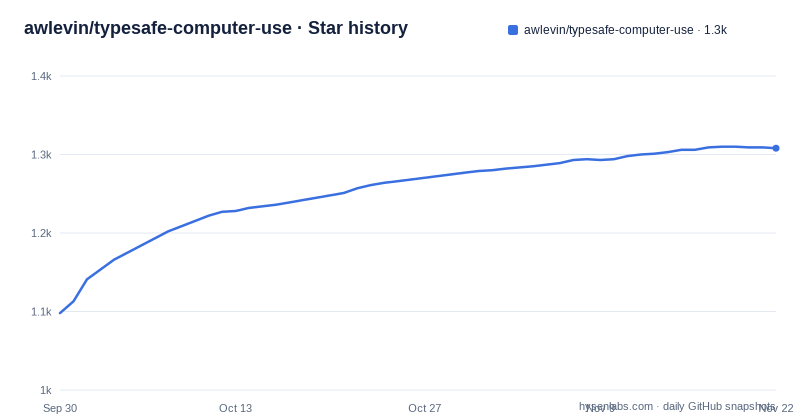
- awlevin/typesafe-computer-use1,308 ★ · +210
| Repository | 2026-09-30 | 2026-11-22 |
|---|---|---|
| awlevin/typesafe-computer-use | 1.1k | 1.3k |
210 Stars in the last 53 days, measured from the daily GitHub snapshot. Compare with other projects
Editorial analysis
Classifier picks, code decides facts, writer writes free text
The design is easier to state as a division of labour than as an architecture. A small classifier picks which action comes next. Ordinary code works out anything a model would otherwise have to reason about: the date on a block and how far off it is, whether a field is focused, whether a URL is clean. A larger writing model is called only when a text field genuinely needs prose, or when the classifier has stopped and the screen has to be read to produce an answer. The project's own summary of that split is that the classifier picks, code decides facts, and the writer only writes free text.
The target is a Mac driven from a goal typed in plain English, at a stated cost of about a fiftieth of a cent per step. A goal looks like sending it to a checkout page for the cheapest tickets to a site's next event, which is a chain of navigations, a comparison of dates, and one piece of free text at the end.
Two things follow from the division. The classifier can be gated on a confidence number, so a low-confidence step stops the run instead of clicking the wrong thing. And the writer never picks an action: when the classifier stops, the writer reads the screen and either answers, or hands the run back with a focus (one move) or a question for you. That single rule is the difference between an assistant and an agent that clicks, and it is worth checking for in any tool of this shape.
The cost table and the caveat printed underneath it
The README compares itself to a frontier model on one screenshot and one goal, one decision each, and the table is the main selling point. Input tokens are effectively identical, 4,882 against 4,785. Cost per decision is $0.0002 against $0.032. With a realistic loop that carries history, $0.0002 against $0.035 to $0.08. A twelve-step task costs $0.003 against $0.40 to $0.90. Model latency is 0.13 to 0.38 seconds against 5.2 seconds, and end to end with capture and OCR about 1.5 seconds against about 5.5.
The caveat printed under the table is more interesting than the table. The big model read the event dates off the pixels and compared them unaided. The classifier could not: it needed the date parsing written out as code, with the date and its offset from today handed over as state. In the project's phrase, every piece of reasoning the frontier model does for free has to be rebuilt here as deterministic state.
So the multiplier is not a property of the decision model. It is the ratio between a system that ships a screenshot to something smart enough to think, and a system that ships a smaller question to something that can only choose. The cost is engineering: every shortcut the big model takes silently is a function someone has to write, and that function set grows with the messiness of the applications you automate.
What one step actually does
The loop is documented as five steps, and each one is narrow on purpose.
First, the screen is read deterministically. Vision OCR runs on a crop of the frontmost window rather than the whole desktop, and the accessibility tree contributes labelled controls, which is how it sees icon-only buttons that OCR cannot read at all. Second, code adds the facts: the date on any block and how far off it is, the row of a repeated label, the focused field, the app and URL, and the actions already tried on this screen. That last item is a memory of failures, which is how the loop avoids repeating a click that did nothing.
Third, one request to the classifier answers three `Choice` values at once: which kind of action, which item, which site. TypeSafe returns a `Choice` over up to 255 options with a full probability distribution and a calibrated confidence, which is what makes a threshold possible. Fourth, the action runs deterministically, the loop waits, and the next capture is the only evidence of what happened. Nothing is asserted between steps.
That fourth point is the real design decision. There is no model narrating the outcome and no retry policy hidden in prose; the next screenshot is the witness. It also means a step that appears to succeed but did not will look like a new state, and the loop has to cope with that through the tried-actions list rather than through reflection.
Install, keys, and the two permissions that gate everything
The requirements are macOS 14 or newer, Python 3.12 or newer, and uv. Windows 10 and 11 are experimental and have their own document.
git clone https://github.com/awlevin/typesafe-computer-use
cd typesafe-computer-use
uv sync
cp .env.example .env     # fill in the keys
The environment file is small, and only one key is mandatory:
TYPESAFE_API_KEY=
ANTHROPIC_API_KEY=
CLICKER_EMAIL=
`TYPESAFE_API_KEY` is required because every decision goes through it. `ANTHROPIC_API_KEY` is optional and covers `type_text`, writer-proposed URLs and the final answer. `CLICKER_EMAIL` is optional and exists only to enable the `type_email` action. A fourth variable, `CLICKER_BROWSER`, defaults to Google Chrome.
Then the two permissions that decide whether anything works. Your terminal needs Screen Recording and Accessibility under Privacy and Security, and the failure modes are asymmetric in a way worth memorising: without Screen Recording the captures come back as wallpaper, so the loop runs and sees nothing useful, while without Accessibility synthetic clicks are silently dropped and `--act` refuses to start at all. Only the second one fails loudly.
For a first run, start with the dry path and work up:
uv run clicker "open the Playground"                 # dry run: one step, prints what it would do
uv run clicker "open the Playground" --act           # drives the machine, up to 100 steps
uv run clicker "log in" --act --steps 20 --delay 3   # longer and slower
uv run clicker "log in" --act --handoffs 0           # the classifier alone: its first stop ends the run
uv run clicker-inspect "any goal"                    # 3-2-1, capture, open the annotated screen + payload
Clear the terminal before you start, because its own text is on screen and therefore OCR input. To stop a live run, Ctrl-C in the terminal or slam the mouse into the top-left corner of the display. The loop also stops itself on done, on low confidence, on a stall, or at the step limit, and the writer then reads the screen and prints the answer.
Exact pins, platform markers, and a sandbox bound to localhost
The dependency list is pinned with equals signs rather than ranges, which tells you what kind of project this is. The shared surface is small:
anthropic==1.6.0
openai==2.54.0
typesafe-sdk==0.6.0
ocrmac==1.0.1; sys_platform == 'darwin'
Everything else is attached to a platform. On macOS the app leans on pyobjc bindings for ApplicationServices and Quartz, which is where the accessibility tree comes from. On Windows it pulls in psutil, pywin32, uiautomation and winocr. Linux gets neither, which is why OCR there comes from an optional extra, rapidocr with onnxruntime, kept optional so a Mac that stays on Vision never installs it.
The dev sandbox is a Compose file worth reading before you build anything: the source is mounted live into the container, the Linux virtual environment is a named volume apart from the host one, the uv cache is a volume so `uv sync` stays fast, `/tmp` is a tmpfs so browser profiles never touch a disk, shared memory is raised to 2gb because Chromium draws through it, and the noVNC port is published as `127.0.0.1:6080:6080` so the sandbox's screen is reachable from that machine only.
That last detail is the one to copy. It is the difference between a scratch desktop for an agent and an exposed remote desktop, and it costs one line of configuration.
OSWorld's own GPT agent is the comparison worth reading
The project benchmarks itself in OSWorld, a benchmark of real desktop tasks, running as an agent beside OSWorld's own GPT agent on the same task. Setup and execution are two scripts:
scripts/osworld setup
scripts/osworld run-jev chrome/<task id> --ocr rapidocr
Both need a Linux host with KVM, which is worth noting on its own: the benchmark that would validate this loop cannot run on the macOS machine the tool is built for, so the two halves of the project live on different operating systems.
The comparison with a GPT agent is the honest alternative, and the difference is not quality but where the thinking happens. An end-to-end agent ships a screenshot, reasons about it in one pass, and emits an action, which means each step pays for the whole reasoning stack and inherits every implicit shortcut the model takes, including shortcuts you cannot audit. This loop ships a question with the facts already computed, so the decision is auditable and cheap, and the reasoning is code you can read and test.
What you give up is generality. A frontier agent will attempt a screen it has never seen because it can look at it. This loop only chooses from what the OCR and the accessibility tree surfaced, so an interface it cannot read is not a hard case, it is an invisible one. The project is honest about the same thing in its own comparison of costs.
It drives your real mouse, and the project says so
Read the beta notice before anything else, because it changes how you should evaluate the tool. The README says this is under heavy development, expects rough edges, and expects settings and behaviour to change between 0.x releases. It drives your real mouse and keyboard, and it tells you to start with a dry run.
That is not boilerplate. The tool needs Accessibility permission, which is also the permission that lets it click anything on your screen, and it needs Screen Recording, which means it can see whatever is on it, including terminals, password managers and chat windows. A mis-written click is a real click in a real application at whatever moment you left it.
The mitigations in the design are worth naming because they are specific rather than reassuring. A dry run prints one step and stops. `--handoffs 0` removes the writer from the loop so the first stop ends the run. The default step limit is 100. The loop halts on low confidence rather than guessing. And every run writes to `runs/<timestamp>/`, so a stall can be replayed offline instead of being re-run against a live machine.
Two smaller limits. The Windows path is experimental and the macOS path is the tested one. And the writer can be pointed away from a hosted model entirely: the environment file documents LM Studio, Ollama and any OpenAI-compatible server, with a variable for the base URL, the model, and a flag for an answer model that reads text only, and the key for that endpoint is never mixed with the Anthropic key.
MIT, one beta tag, and a repository built for coding agents
The licence is MIT and the version is 0.2.0, tagged on 2026-09-22 with beta in the release name, matching the `Development Status :: 4 - Beta` classifier in pyproject.toml. Python 3.12 and 3.13 are the supported versions and 3.12 or newer is required. The last push was on 2026-09-28 and the repository is not archived, so this is a young project moving quickly rather than a stable one.
`uv.lock` is committed, which is what makes the exact pins in pyproject.toml reproducible. That combination, exact pins plus a lock file, means an upgrade is deliberate rather than accidental, and it also means a broken transitive release is your problem until you change the number yourself.
The top-level layout explains how the project is worked on. `AGENTS.md` and `CLAUDE.md` sit at the root, so the repository ships its own instructions for coding agents, which is consistent with a tool that spends its budget on model calls. `docs/` holds the long-form explanations the README defers to, including how a step works and the run folder format. `tests/` and `bench/` and `benchmarks/` and `osworld_overlay/` and `infra/` and `scripts/` are separate concerns: the benchmark harness, the OSWorld integration and the Compose sandbox are versioned separately from the package itself.
The practical upgrade advice follows from that. With one tagged release and a warning about behaviour changes between 0.x versions, pin the tag you tested rather than tracking the default branch.
Editorial conclusion
Adopt typesafe-computer-use if you automate a Mac application repeatedly and can accept that the facts are computed by hand-written code rather than inferred by a model. Do not point it at a machine you cannot rebuild, and take the dry-run path first: `uv run clicker "open the Playground"` without `--act` prints one step and stops, and `--handoffs 0` keeps the writer out of the loop entirely. Read the pins in pyproject.toml, including `typesafe-sdk==0.6.0`, before committing to them, since the project sits at v0.2.0 and its README warns that settings and behaviour change between 0.x releases.
Frequently asked questions
How much does a typesafe-computer-use step cost?
The README's table puts one decision at $0.0002 against $0.032 for a frontier model on the same screenshot and goal, and a twelve-step task at $0.003 against $0.40 to $0.90. Model latency is 0.13 to 0.38 seconds against 5.2 seconds, and an end-to-end step with capture and OCR is about 1.5 seconds against about 5.5.
What permissions does typesafe-computer-use need on macOS?
Your terminal needs Screen Recording and Accessibility under Privacy and Security. Without Screen Recording the captures come back as wallpaper, so the loop sees nothing useful, and without Accessibility synthetic clicks are silently dropped while --act refuses to start.
Can I run typesafe-computer-use without sending text to Anthropic?
Yes. ANTHROPIC_API_KEY is optional, and the writer endpoint can be pointed at LM Studio, Ollama or any OpenAI-compatible server with CLICKER_WRITER_API, CLICKER_WRITER_BASE_URL, CLICKER_WRITER_API_KEY and CLICKER_WRITER_MODEL. CLICKER_WRITER_VISION=false selects an answer model that reads text only, and the writer's own key is never sent anywhere else.
Does typesafe-computer-use run on Windows and Linux?
Windows 10 and 11 are experimental, with psutil, pywin32, uiautomation and winocr attached to that platform in the dependencies. Linux has no macOS Vision framework, so OCR comes from the optional rapidocr extra with onnxruntime, which is what the OSWorld benchmark uses through --ocr rapidocr.
How do I stop a running typesafe-computer-use loop?
Press Ctrl-C in the terminal or slam the mouse into the top-left corner of the screen. The loop also stops by itself on done, on low confidence, on a stall, or at the step limit, and the writer then reads the screen and prints the answer.
How do I debug a typesafe-computer-use run that stalled?
Every run writes to runs/<timestamp>/, and a stall can be replayed offline from that folder. For inspecting perception rather than a past run, uv run clicker-inspect does a three-second countdown, captures the screen and opens the annotated capture together with the classifier payload.
Official sources
Where developers are discussing it
Posts on Hacker News, dev.to and Lobsters that link to this repository, found by our scan of those communities. 0 in the last 30 days; newest first.
- Typesafe-computer-use drives a Mac toward a goal for 1/50th of a cent per stepHacker News · Sep 16, 2026 · 82 points · 60 comments
Add this badge to your README
If you maintain this project, the badge below links readers to this analysis and shows its maintenance status from the daily GitHub snapshot. Paste the markdown into your README; add ?metric=license or ?metric=stars to the image URL for a different field.

[](https://hysenlabs.com/projects/awlevin-typesafe-computer-use)Star history chart for your README
[](https://hysenlabs.com/projects/awlevin-typesafe-computer-use)Was this useful?