wshobson/agents: one Markdown source, two different harness lists, and a symlinked install
Marketplace of 94 agentic plugins, 203 agents, 175 skills, and 109 commands kept in one Markdown source and consumed natively by Claude Code, Codex CLI, and Cursor.
At a glance
- What is it?
- A multi-harness agentic plugin marketplace publishing 94 plugins, 202 agents, 185 skills and 105 commands from a single source tree, with generated adapters for Claude Code, Codex, Cursor, OpenCode, Antigravity, Copilot and Pi. The adapter layer is where the real design lives, and it is not consistent about what a plugin becomes on the far side.
- Who is it for?
- This marketplace fits someone who writes agents and wants one authored source that reaches several coding tools, with per-harness output that respects each tool's limits rather than flattening them.
- Can I use it commercially?
- Yes. MIT is a permissive licence: you can use, modify and sell software built on it, as long as you keep its copyright and licence notices.
- Is it still maintained?
- Yes. The repository last received commits 5 days ago.
- What is it written in?
- Mainly Python, according to GitHub's language statistics.
Answers come from the project's GitHub data, last synced on November 13, 2026, and from our analysis. They are not legal advice.
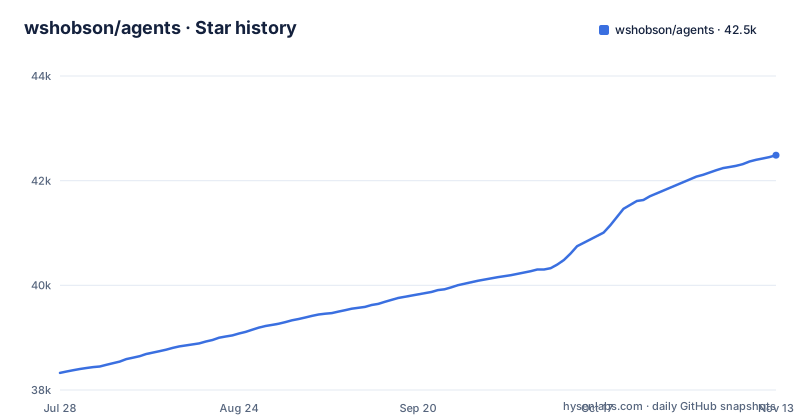
Star history
- wshobson/agents42,486 ★ · +4,159
| Repository | 2026-07-28 | 2026-11-13 |
|---|---|---|
| wshobson/agents | 38.3k | 42.5k |
4,159 Stars in the last 108 days, measured from the daily GitHub snapshot. Compare with other projects
Editorial analysis
The harness count is stated three different ways and Gemini is in one of them
The repository description and the README give different answers about which harnesses are supported. The repository description names six: Claude Code, Codex CLI, Cursor, OpenCode, GitHub Copilot and Gemini CLI. The README's multi-harness table lists seven rows: Claude Code, Codex CLI, Cursor, OpenCode, Antigravity CLI, Copilot and Pi. Gemini CLI appears in the description and nowhere in the table, while Antigravity CLI and Pi appear in the table and nowhere in the description. If you are on Gemini CLI there is no row for you and no install command, and if you are counting generators to work out whether your tool is covered, the README does not settle it. The capability matrix in docs/harnesses.md is the file to read rather than the counts.
Two harnesses install from committed registries and three need a clone plus a build step
Installation is not one mechanism, it is two, and the split is stated explicitly. Codex and Cursor install natively from committed registries that point at the source plugins directory, so a single add command and then individual plugin installs is the whole flow:
codex plugin marketplace add wshobson/agents                   # Codex
codex plugin add python-development@claude-code-workflows
# Cursor: follow the setup instructions in docs/harnesses.md (uses .cursor-plugin/marketplace.json)
Antigravity, OpenCode, Copilot and Pi are different. They install via clone plus a make target, and the transformed trees are gitignored, so they do not exist until you build them:
gh repo clone wshobson/agents ~/agents && cd ~/agents
make install-antigravity                                       # Antigravity
make install-opencode                                          # OpenCode (runs generate + symlinks)
make install-pi                                                # Pi
The consequence is that for four of these tools there is no versioned artefact to install. You are generating adapter files from whatever checkout you cloned, which means the adapter format tracks the branch rather than a release, and this repository publishes no GitHub releases at all. The last push on main was on 2026-11-02, so the branch is the unit of currency.
OpenCode installs by symlink, which turns your checkout into part of the runtime
The README says each install target generates the artifacts and links all local plugins into that tool's user configuration. With symlinks, the agent's files in .opencode point into your clone, so editing a skill in the checkout changes your agent's behaviour on the next read with no reinstall, and deleting or moving the checkout leaves dangling links in your configuration directory. There is no version marker on what you are running beyond whatever the generator wrote, and there is no way to ask which upstream commit produced a given behaviour once the checkout moves on. The Makefile anticipates this. Its phony list pairs every install with an uninstall, install-opencode with uninstall-opencode, install-copilot with uninstall-copilot, install-antigravity with uninstall-antigravity, install-pi with uninstall-pi, plus a clean-generated target for the gitignored trees. There is no umbrella install for all harnesses and no umbrella uninstall, so cleaning up means naming each one.
The model tier is a hard-coded policy inside every agent definition
Every agent in this marketplace ships with a model tier, and the tiers are assigned by role rather than chosen per user. The table has five. Tier 0 is Fable 5, for longest-horizon autonomous work such as large migrations and multi-hour runs, and it is marked opt-in with a premium cost. Tier 1 is Opus, for architecture, security, code review and production-critical work. Tier 2 is inherit, which defers to whatever the user picked, for backend, frontend, AI/ML and specialised roles. Tier 3 is Sonnet for docs, testing, debugging and API references. Tier 4 is Haiku for fast operational tasks, SEO, deployment and content. Across 202 agents that is 202 baked-in routing decisions made by the author. Then the adapters remap them. The Antigravity adapter converts tiers to its own aliases of inherit, flash and pro, and the Copilot adapter maps the model to native Claude models. So the same plugin is not the same agent on every harness, and the tier that reads as premium on one tool may be a mid-range model on another. If model choice matters to you, the tier column is the thing to review before you install, not after.
Two of the three quality layers are labelled experimental and unvalidated
The repository ships its own scoring tool, plugin-eval, and describes it honestly in three layers. The static layer is a deterministic lint of structure, covering frontmatter, headings and links, and it makes no model calls. That layer is a real check with a reproducible answer. Above it sit two that are marked experimental. The LLM judge has Haiku and Sonnet rate a skill on four dimensions, and the page says plainly that it is not validated against human labels. The Monte Carlo layer runs a skill 50 or 100 times on generated prompts, and carries the same disclaimer. The commands are:
uv run plugin-eval score path/to/skill --depth quick
uv run plugin-eval certify path/to/skill
So a score can rest on a model rating that nobody has checked against a human, and on synthetic prompts that a real user will never type. Both of those layers cost model calls, so the number is neither free nor reproducible. Treat plugin-eval as a lint with opinions attached, and let the static layer be the part you gate on.
A plugin loads only its own components, which is the reason to install narrow units
The context story is the strongest argument for the design. Agents, commands and skills are auto-discovered from directory structure, and installing a plugin loads only that plugin's components into context rather than the whole marketplace. The example given is a single plugin laid out as a directory tree with a .claude-plugin/plugin.json manifest, an agents directory holding three Python agents named python-pro, django-pro and fastapi-pro, a commands directory with one scaffolding command, and a skills directory with sixteen specialised skills covering async, testing, packaging and more. Ninety-four such plugins, 202 agents, 185 skills, 105 commands and 16 orchestrators for multi-agent coordination sit behind that boundary. One wrinkle is in the count. The plugins figure is given as 92 local plus 2 external via git-subdir, so two of the 94 units are not authored in this repository. You are installing them from someone else's tree, and updating them is not a decision this marketplace's make targets make for you.
The same 105 commands become skills on Codex and prompt templates on Pi
Read the Notes column of the harness table and the portability claim gets more precise. The Codex adapter respects an 8 KB skill cap and converts commands into skills, so on Codex a slash command is a skill file, subject to a size limit that does not exist on Claude Code. Cursor uses the committed plugin marketplace registry, exposes source agents, skills and commands, and adds curated project rules. The Pi adapter turns commands into prompt templates, writes agents in a reference subagent-extension format, discovers skills recursively, and is careful about ownership: the generator owns only three subdirectories under .pi, so your own files elsewhere under .pi are left alone. That last property is worth having, and it is the kind of detail that only shows up in a table. The overall picture is that portability here means the instructions reach the tool, not that the behaviour is identical. A 105-command workflow that relies on a command taking an argument in a particular shape needs checking on each harness separately.
The build is uv-only, and the type checker covers a hand-listed set of scripts
The Makefile states its tooling policy in the first comment: all Python tooling runs through uv, with no pip and no requirements.txt. There are two uv-managed projects inside the repository, plugins/plugin-eval as the adapter framework and eval suite, with an extra-paths configuration that makes tools/adapters importable, and tools/yt-design-extractor, described as a standalone YouTube extractor that is heavy and optional. The type-check variable is a hand-written list rather than a directory glob, and it enumerates the generator, the validator, the doc gardener, four separate install scripts for opencode, copilot, antigravity and pi, and a script for checking agent name collisions, alongside the tests and the package source. One entry is excluded on purpose, since ty skips the YouTube extractor because it imports optional OCR dependencies that only exist after make install-ocr. The consequence for contributors is that adding a new tooling script does not get it type-checked until someone edits that variable, and that a repository about agents also carries an unrelated optional tool with its own heavy dependency chain.
Editorial conclusion
This marketplace fits someone who writes agents and wants one authored source that reaches several coding tools, with per-harness output that respects each tool's limits rather than flattening them. It does not fit someone who needs identical behaviour across tools, because the adapters deliberately change what a command becomes, and it does not fit anyone treating its quality scores as evidence, since two of the three evaluation layers are labelled experimental and unvalidated. Before you install, read the capability matrix in docs/harnesses.md for your harness specifically, count what a symlinked install will leave behind, and treat the model tier assignments as policy you will need to review rather than defaults.
Frequently asked questions
how do I install agents in claude code
Add the marketplace and then install a plugin by name, with two commands: /plugin marketplace add wshobson/agents, then /plugin install python-development@claude-code-workflows, or any of the 94 plugins. Installing a plugin loads only that plugin's agents, commands and skills into context, since they are auto-discovered from the directory structure.
how to use agents in codex
Codex installs natively with codex plugin marketplace add wshobson/agents, then codex plugin add python-development@claude-code-workflows installs an individual plugin. Its adapter writes .agents/plugins/marketplace.json and per-plugin .codex-plugin manifests, respects an 8 KB skill cap, and maps commands onto skills, so a slash command is a skill file on Codex.
how to use agents in github copilot
The Copilot adapter generates .copilot/agents, .copilot/skills and .copilot/commands as markdown agent profiles, SKILL.md skills and commands-as-skills, and maps the model tier onto native Claude models. Installation is through the clone plus make route with make install-copilot, and there is a matching uninstall target.
how to use agents in gemini
Gemini CLI is named in the repository description but has no row in the harness table, which covers Claude Code, Codex CLI, Cursor, OpenCode, Antigravity CLI, Copilot and Pi, and no install command on the page. The README body lists seven harnesses while the repository description lists six, so the capability matrix in docs/harnesses.md is where to confirm coverage.
how to use agents.md
The repository has an AGENTS.md file and a .agents directory, alongside ARCHITECTURE.md, CLAUDE.md and CONTRIBUTING.md. Those are instructions for working on the repository itself, which is separate from the agents it publishes, since those live in an agents directory inside each plugin as harness subagent definitions discovered from directory structure.
Official sources
Add this badge to your README
If you maintain this project, the badge below links readers to this analysis and shows its maintenance status from the daily GitHub snapshot. Paste the markdown into your README; add ?metric=license or ?metric=stars to the image URL for a different field.

[](https://hysenlabs.com/projects/wshobson-agents)Star history chart for your README
[](https://hysenlabs.com/projects/wshobson-agents)Was this useful?