Discordo: a Discord TUI client in Go, and what it refuses to do
A lightweight, secure, and feature-rich Discord terminal (TUI) client.
At a glance
- What is it?
- Discordo is a terminal Discord client written in Go, distributed as prebuilt binaries and through several package managers. The README is candid that self-bot use breaks Discord's Terms of Service.
- Who is it for?
- Adopt Discordo if you want Discord inside a terminal and can track a project with no tagged GitHub releases. Do not adopt it for unattended automation or for any account you cannot afford to lose, because the README states automated user accounts are against Discord's Terms of Service.
- Can I use it commercially?
- Yes, with conditions. GPL-3.0 is a copyleft licence: if you distribute software that includes it, you must release that software's source code under the same licence. Running it internally without distributing it does not trigger that obligation.
- Is it still maintained?
- Yes. The repository last received commits 1 day ago.
- What is it written in?
- Mainly Go, according to GitHub's language statistics.
Answers come from the project's GitHub data, last synced on November 14, 2026, and from our analysis. They are not legal advice.
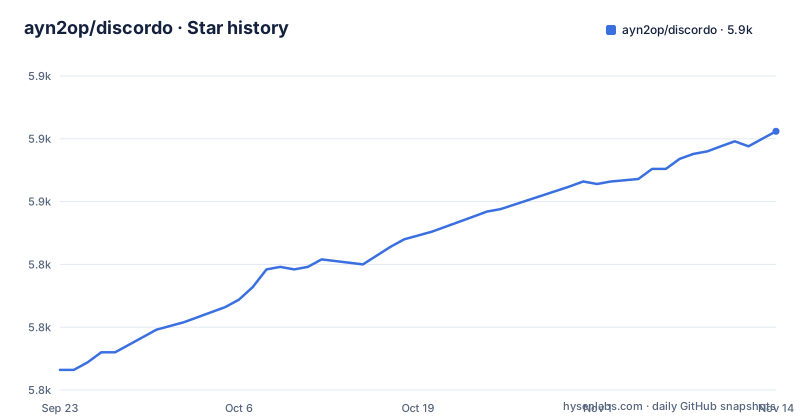
Star history
- ayn2op/discordo5,878 ★ · +95
| Repository | 2026-09-23 | 2026-11-14 |
|---|---|---|
| ayn2op/discordo | 5.8k | 5.9k |
95 Stars in the last 52 days, measured from the daily GitHub snapshot. Compare with other projects
Editorial analysis
The problem Discordo solves, and who it is actually for
Discord ships a desktop client and a web client. Neither runs in a terminal. Discordo is a TUI client written in Go that puts Discord into a terminal window, which matters if you work over SSH, live in tmux, or simply do not want an Electron application resident on the machine. The README describes it as a lightweight, secure, and feature-rich Discord terminal client.
The audience is narrow and specific. Someone who already keeps a terminal multiplexer open all day and wants guild channels in a pane next to their editor. Someone on a remote box where installing a graphical client is not an option. Voice support is built in unless you build with the no_voice tag, and needs a C compiler, plus libpulse or libasound on Linux.
What the Go module graph says about how Discordo is built
The go.mod file is the clearest view of the architecture available without running anything. Discordo depends on github.com/ayn2op/arikawa/v3 and github.com/ayn2op/ningen/v3, both forks maintained under the same author's namespace. Arikawa supplies the Discord API layer and gateway websocket handling; ningen sits on top of it. The gorilla/websocket dependency plus a separate bogdanfinn/websocket fork suggests the gateway connection and the TLS-fingerprinting path are not the same code path.
The UI layer is github.com/ayn2op/tview, another fork, built on gdamore/tcell/v3. That is a deliberate choice: tview is a mature Go TUI toolkit, and forking it lets Discordo carry patches without waiting upstream. The cost is that Discordo tracks three forks of its own, so a bug in the terminal renderer or the API layer has to be fixed in a repository that only this project exercises.
Several dependencies point at specific features. github.com/skip2/go-qrcode and the QR login flow line up. github.com/zalando/go-keyring and github.com/danieljoos/wincred suggest credentials can be stored in the OS keyring rather than a plaintext file. github.com/yuin/goldmark plus github.com/alecthomas/chroma/v2 indicate markdown rendering with syntax highlighting inside the message view. github.com/sahilm/fuzzy backs a fuzzy picker. github.com/bogdanfinn/tls-client is the interesting one: a TLS client with configurable fingerprints is typically used to make automated traffic resemble a browser or official client. The README mentions it only through the no_spoof_tls_fingerprint build tag, which builds without TLS fingerprint spoofing, and given the self-bot disclaimer at the end of the file, it is worth noticing.
Installing Discordo and logging in for the first time
There are three installation routes. Prebuilt binaries for Windows, macOS and Linux are linked from the README through a nightly.link URL pointing at the CI workflow on the main branch. Package managers cover Arch, Gentoo, FreeBSD, Nix and Scoop on Windows. Building from source needs a Go toolchain matching the go directive in go.mod.
The source build is the shortest path to a working binary:
git clone https://github.com/ayn2op/discordo
cd discordo
go build .
That produces a discordo executable in the repository root. On Windows with Scoop, the README gives a bucket that is not the project's own:
scoop bucket add vvxrtues https://github.com/vvirtues/bucket
scoop install discordo
Once installed, run the executable with no arguments. The README describes three login paths through the UI. The Password tab takes an email address or an E.164-formatted phone number plus a password. The Login with QR button opens a QR login screen and the README says to follow the instructions shown there. The Token path takes a token directly.
For scripted or repeated launches, the token can come from an environment variable instead:
DISCORDO_TOKEN="OTI2MDU5NTQxNDE2Nzc5ODA2.Yc2KKA.2iZ-5JxgxG-9Ub8GHzBSn-NJjNg" discordoThe token in the README is an example placeholder, not a working credential.
Configuration lives in a TOML file at a platform-specific path. On Unix it is $XDG_CONFIG_HOME/discordo/config.toml or $HOME/.config/discordo/config.toml. On macOS it is $HOME/Library/Application Support/discordo/config.toml. On Windows it is %AppData%/discordo/config.toml. The README is explicit that Discordo falls back to a built-in default when no file exists at that path, and that it does not write the default file out for you. To customize keybindings or theme you have to create the file yourself, using docs/config.md, which the README links as the configuration reference.
The self-bot disclaimer is the real constraint
The README closes with an important notice: automated user accounts, or self-bots, are against Discord's Terms of Service, and the author states he is not responsible for any loss caused by using self-bots or Discordo. That is not boilerplate. Discordo logs in as a user account, not as a bot account with a bot token. Every login method the README documents (password, QR, user token, DISCORDO_TOKEN) authenticates a human account.
The practical consequence is that the account you log in with carries the risk. A bot account registered through Discord's developer portal is the sanctioned way to automate a Discord presence, and Discordo is not that. If you need a long-running process that reacts to messages, posts on a schedule, or survives without a human at the keyboard, Discordo is the wrong tool and the README's disclaimer says so.
The second limitation is release management. The repository has no published GitHub releases, which is consistent with distribution through CI artifacts and package manager live builds rather than tagged versions. If you install discordo-git on Arch or the Gentoo live ebuild, you are tracking the main branch and a breaking change can arrive on any update. There is no documented rollback path in the README.
Discordo against a bot framework, and why the comparison matters
The obvious alternative for terminal Discord access is a bot built on a Discord API library, such as the upstream arikawa or ningen packages that Discordo itself depends on, or any of the other Go Discord libraries. The difference in approach is not cosmetic. A bot framework gives you a program that authenticates as a bot, joins guilds through an invite, and runs headless. Discordo gives you an interactive interface that authenticates as you.
That flips the trade-offs. A bot cannot read your direct messages, cannot see channels it was not invited to, and cannot act as you in a conversation. Discordo can, because it is you. A bot can run on a server indefinitely without a session expiring or a human present. Discordo is a TUI, so it needs a terminal attached and a person in front of it. A bot is sanctioned by Discord's platform rules. Discordo's README says the opposite about its own login model.
If your goal is reading and replying to messages while sitting at a terminal, Discordo is the direct fit and a bot framework is a detour. If your goal is automation, a bot framework is the only one of the two that the README's own disclaimer leaves standing. Choosing between them is really choosing whether a human is present.
Licence and the cost of tracking a fast-moving Go project
Discordo is licensed under GPL-3.0, copyright (C) 2025-present ayn2op. For an end user running the binary, that is unremarkable. For anyone who wants to embed Discordo's code in another application, GPL-3.0 is a copyleft licence and derivative works distributed to others generally have to be licensed under the same terms. The repository's LICENSE file holds the full text, and questions about a specific use belong with a lawyer rather than with this article.
Upgrade cost is the more immediate concern. The project depends on three forks under the ayn2op namespace, and go.mod carries commented-out replace directives for tview, arikawa and ningen pointing at local sibling directories. Those are development conveniences, but they show that the maintainer regularly works against unreleased versions of all three. A user building from source gets whatever the pinned pseudo-versions resolve to. A user on discordo-git or the Gentoo live ebuild gets whatever is on main at the moment of the update.
The last push to the repository was on 2026-10-26, and the repository is not archived. That tells you the code is moving. It does not tell you the interface is stable. Budget for reading the config file after an update if you have customized keybindings, because the configuration reference in docs/config.md can change.
Editorial conclusion
Adopt Discordo if you want Discord inside a terminal and can track a project with no tagged GitHub releases. Do not adopt it for unattended automation or for any account you cannot afford to lose, because the README states automated user accounts are against Discord's Terms of Service. Verify first that your platform has a package path (Arch, Gentoo, FreeBSD, Nix, Scoop, or a prebuilt binary), and read the configuration reference in docs/config.md before writing your own config, since the default file is not written to disk for you.
Frequently asked questions
What is Discordo?
Discordo is a terminal user interface client for Discord, written in Go and licensed under GPL-3.0. The README describes it as a lightweight, secure, and feature-rich Discord terminal client.
How do I install Discordo on Windows, macOS or Linux?
The README points to prebuilt binaries for all three platforms through a nightly.link URL tied to the CI workflow. Package managers are also listed for Arch, Gentoo, FreeBSD, Nix and, on Windows, Scoop.
Where does Discordo store its configuration file?
On Unix it is $XDG_CONFIG_HOME/discordo/config.toml or $HOME/.config/discordo/config.toml, on macOS it is $HOME/Library/Application Support/discordo/config.toml, and on Windows it is %AppData%/discordo/config.toml. The README notes that the default configuration is used when no file is found, but is not written to that path.
Does Discordo work with a bot token?
The README documents password, QR and user token login, plus the DISCORDO_TOKEN environment variable, all of which authenticate a user account. It closes with a notice that automated user accounts or self-bots are against Discord's Terms of Service.
How do I log in to Discordo without typing a password?
The README documents a Login with QR button in the UI that opens a QR login screen, and the instructions on that screen should be followed. A token can also be supplied through the DISCORDO_TOKEN environment variable.
Official sources
Add this badge to your README
If you maintain this project, the badge below links readers to this analysis and shows its maintenance status from the daily GitHub snapshot. Paste the markdown into your README; add ?metric=license or ?metric=stars to the image URL for a different field.

[](https://hysenlabs.com/projects/ayn2op-discordo)Star history chart for your README
[](https://hysenlabs.com/projects/ayn2op-discordo)Was this useful?