react-pro-sidebar v2 drops the hook API and still ships as an alpha
React Pro Sidebar provides a set of components for creating high level and customizable side navigation
At a glance
- What is it?
- react-pro-sidebar is a TypeScript component library for dashboard side navigation with nested SubMenu trees and router integration; v2 is an alpha whose stable predecessor is the 2024 release, and v2 removed the hook-based collapsed state.
- Who is it for?
- Adopt react-pro-sidebar when you need a nested, collapsible dashboard menu quickly and you can hold the collapsed and toggled state yourself, because v2 makes that state controlled and lets you drive it from your own layout code. Do not start a new project on v2.0.0-alpha.1 unless your team is comfortable pinning an alpha published on 2026-05-26, and prefer the v1.x branch if you are shipping this quarter.
- Can I use it commercially?
- Yes. MIT is a permissive licence: you can use, modify and sell software built on it, as long as you keep its copyright and licence notices.
- Is it still maintained?
- Yes. The repository last received commits 2 days ago.
- What is it written in?
- Mainly TypeScript, according to GitHub's language statistics.
Answers come from the project's GitHub data, last synced on October 23, 2026, and from our analysis. They are not legal advice.
Star history
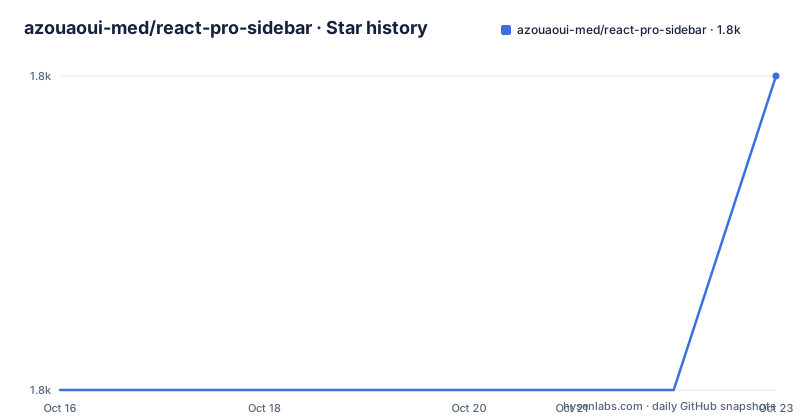
- azouaoui-med/react-pro-sidebar1,794 ★ · +1
| Repository | 2026-10-16 | 2026-10-23 |
|---|---|---|
| azouaoui-med/react-pro-sidebar | 1.8k | 1.8k |
1 Stars in the last 7 days, measured from the daily GitHub snapshot. Compare with other projects
Editorial analysis
The four components that make up a menu
A sidebar in this library is four components imported from one package: Sidebar, Menu, MenuItem and SubMenu. SubMenu nests, so a menu is a tree rather than a flat list.
import { Sidebar, Menu, MenuItem, SubMenu } from 'react-pro-sidebar';

<Sidebar>
  <Menu>
    <SubMenu label="Charts">
      <MenuItem> Pie charts </MenuItem>
      <MenuItem> Line charts </MenuItem>
    </SubMenu>
    <MenuItem> Documentation </MenuItem>
    <MenuItem> Calendar </MenuItem>
  </Menu>
</Sidebar>;
The import style in that example, an ES import from 'react-pro-sidebar', is what v2 expects. It is worth noting what is absent: no provider, no hook call, no theme object passed at the root. The library renders from props, which is the main structural difference from v1.
MenuItem takes children as its content rather than a label prop, while SubMenu takes a label. That asymmetry catches people converting old code, since the v1 API used label on both.
Collapsed and toggled are controlled props in v2
The migration notes are the most useful part of the README because the change is breaking. v2 removes the legacy hook API, meaning useProSidebar and ProSidebarProvider are gone. It also removes the defaultCollapsed prop and the breakPoint="always" value, and it requires React 18 or newer.
In its place, the Sidebar component takes collapsed and toggled as boolean props. The API table gives their defaults as false, so an uncontrolled sidebar renders expanded and untouched until something changes the props. Sidebar also takes width with a default of 250px, collapsedWidth defaulting to 80px, backgroundColor defaulting to rgb(249, 249, 249, 0.7), transitionDuration in milliseconds defaulting to 300, and rtl defaulting to false.
The practical consequence is that the collapse button is no longer a piece of internal state you can reach into. You own collapsed in your component and pass it down. That is cleaner for a dashboard whose layout needs to know whether the sidebar is narrow, and it is more work if you were relying on the provider to keep that state for you.
Styling hooks: rootStyles, menuItemStyles and the class name maps
Customization goes through style props, and the pattern is specific enough to be worth learning once. Every component accepts rootStyles. The recommended way to select a descendant is to key the style object on the generated class name rather than guessing your own markup.
<Sidebar
  rootStyles={{
    [`.${sidebarClasses.container}`]: {
      backgroundColor: 'red',
    },
  }}
>
  // ...
</Sidebar>
Menu adds menuItemStyles, which applies to every MenuItem and SubMenu including their children. Its shape is a fixed set of slots: root, button, label, prefix, suffix, icon, subMenuContent and SubMenuExpandIcon. Each slot is a CSSObject or a function of parameters.
interface MenuItemStyles {
  root?: ElementStyles;
  button?: ElementStyles;
  label?: ElementStyles;
  prefix?: ElementStyles;
  suffix?: ElementStyles;
  icon?: ElementStyles;
  subMenuContent?: ElementStyles;
  SubMenuExpandIcon?: ElementStyles;
}
The function form receives level, active and disabled, which is how you style by depth and state without writing selectors. The README's example applies color only when level is zero, which keeps deep nested items from inheriting a top-level highlight.
Router integration through the component prop
Active highlighting is not built in. Instead of tracking the current route itself, the library lets you pass a component to render, so a routing library owns the state and the sidebar reflects it.
<MenuItem component={<NavLink to="/documentation" />}> Documentation</MenuItem>
<MenuItem component={<NavLink to="/calendar" />}> Calendar</MenuItem>
NavLink adds an active class automatically, and menuItemStyles then targets it. The README demonstrates this by styling the button slot with an [&.active] selector inside menuItemStyles, setting backgroundColor to #13395e and color to #b6c8d9.
This is a sensible division of labour and it also means you are coupled to React Router's class name behaviour. If your router uses a different attribute, or you use no router at all, the active styling has to come from somewhere else.
Breakpoints decide when collapse triggers, and the old always value is gone
The Sidebar breakPoint prop is the responsiveness switch and its accepted values are wide: xs, sm, md, lg, xl, xxl, all, or any custom CSS value such as 450px. It has no documented default in the API table, so an unset value leaves responsive triggering to you.
Removing breakPoint="always" in v2 matters more than it looks. That value was the way to say the sidebar should always follow responsive behaviour, and code that passes it will now be passing a value the migration guide says is gone. If you keep it, the honest assumption is that the prop is ignored rather than that it degrades gracefully, and the fix is to read MIGRATION.md for the replacement.
The image prop is also easy to misread. It takes a URL for a sidebar background image, and the documentation for it notes that you need to apply transparency to the background colour for the image to show through, since the default background colour carries an alpha channel of 0.7.
An alpha on npm, a stable release from 2024
The repository's package.json declares version 2.0.0-alpha.1, and that matches the published tag dated 2026-05-26, preceded by V2.0.0-alpha.0 on 2026-05-25. The last stable line is V1.1.0 from 2024-02-03, which is what npm installs if you ask for the package without a tag while the alpha is not marked as latest.
That gap is the main adoption risk. Between a February 2024 stable and a May 2026 alpha with a breaking API, the alpha has had time to settle in the repository but the ecosystem around it has not necessarily caught up.
For teams still on the older API, the README keeps dedicated branches rather than asking you to migrate: a v1.x branch and a v0.x branch. Those are where bug fixes for the old component model live, and they are the right pin for a project that cannot absorb the hook removal this quarter.
The build and test stack behind the package is conventional: tsup for the build, Vitest for tests, Storybook for the component catalogue, ESLint with flat config, Prettier, and Changesets driving version bumps and publishing. .size-limit.json is present, which means bundle size is tracked deliberately rather than by accident.
Where this library is the wrong pick
It is a rendering library with a controlled state model and no application state, no auth, no permissions and no data fetching. If your navigation depends on which role a user has or which routes exist at runtime, that logic stays in your code and you only get the visual tree.
It is also React only. The package declares react and react-dom as peerDependencies with a range of >=18, and the README states React 19 is supported. React 17 and below, and any framework that is not React, are out of scope by construction.
The fourth boundary is documentation placement. The README itself is thin on the API beyond the first rows of the table; the full documentation, guides and live examples live at react-pro-sidebar.netlify.app, with a playground and a published Storybook. If you need offline reference or you are working behind a firewall, the checkout is not enough, and for an alpha that is a genuine risk rather than a nitpick.
Editorial conclusion
Adopt react-pro-sidebar when you need a nested, collapsible dashboard menu quickly and you can hold the collapsed and toggled state yourself, because v2 makes that state controlled and lets you drive it from your own layout code. Do not start a new project on v2.0.0-alpha.1 unless your team is comfortable pinning an alpha published on 2026-05-26, and prefer the v1.x branch if you are shipping this quarter. Verify first that MIGRATION.md covers your usage, that your React version is 18 or newer since react and react-dom are peer dependencies, and that the v1.x and v0.x branches are still reachable when you need to pin. MIT licensing leaves no obstacle to any of that.
Frequently asked questions
How do I install react-pro-sidebar?
Add it with yarn add react-pro-sidebar or npm install react-pro-sidebar. React 18 or newer is required, with react and react-dom declared as peer dependencies.
What changed when I upgrade react-pro-sidebar to v2?
v2 removes the legacy hook API, so useProSidebar and ProSidebarProvider are gone, along with the defaultCollapsed prop and the breakPoint="always" value, and React 18+ is required. Collapsed and toggled are now boolean props on Sidebar. The README points to MIGRATION.md for the upgrade steps.
How do I highlight the active route in react-pro-sidebar?
Pass a component to the component prop, such as a NavLink from react-router-dom, and style the active class through the menuItemStyles button slot. The router owns the active state and the sidebar reflects it.
Is react-pro-sidebar still on version 1?
Yes, v1.x and v0.x branches are kept in the repository, and the last stable release on npm is V1.1.0 from 2024-02-03. The v2 line is published as 2.0.0-alpha.1, dated 2026-05-26.
Official sources
Add this badge to your README
If you maintain this project, the badge below links readers to this analysis and shows its maintenance status from the daily GitHub snapshot. Paste the markdown into your README; add ?metric=license or ?metric=stars to the image URL for a different field.

[](https://hysenlabs.com/projects/azouaoui-med-react-pro-sidebar)Star history chart for your README
[](https://hysenlabs.com/projects/azouaoui-med-react-pro-sidebar)Was this useful?