ibus-bamboo's own README tells you it may be abandoned, and points at fcitx5-unikey
Bộ gõ tiếng Việt cho Linux
At a glance
- What is it?
- ibus-bamboo is a Vietnamese input method written in Go for IBus on Linux and BSD. Its feature set is wide, its packages ship for most distributions, and the project carries a notice that it has stalled and may not be maintained, recommending fcitx5-unikey instead.
- Who is it for?
- Pick ibus-bamboo when your session runs IBus on Xorg and you want its input styles, spell checking with a syllable dictionary, mixed legacy encodings and 2666 emoji in one engine. Do not pick it for a new Wayland workstation, because the README says Wayland support in IBus is not good yet and recommends Xorg, and the project recommends fcitx5-unikey for that case.
- Can I use it commercially?
- Yes, with conditions. GPL-3.0 is a copyleft licence: if you distribute software that includes it, you must release that software's source code under the same licence. Running it internally without distributing it does not trigger that obligation.
- Is it still maintained?
- Yes. The repository last received commits 128 days ago.
- What is it written in?
- Mainly Go, according to GitHub's language statistics.
Answers come from the project's GitHub data, last synced on November 6, 2026, and from our analysis. They are not legal advice.
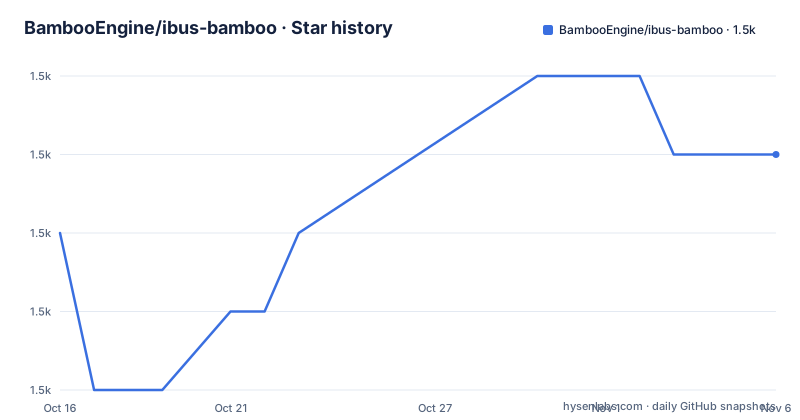
Star history
- BambooEngine/ibus-bamboo1,508 ★ · +1
| Repository | 2026-10-16 | 2026-11-06 |
|---|---|---|
| BambooEngine/ibus-bamboo | 1.5k | 1.5k |
1 Stars in the last 21 days, measured from the daily GitHub snapshot. Compare with other projects
Editorial analysis
What the engine actually covers, beyond the usual Telex
The feature list is wider than a typical Vietnamese input method, and the width is where this project differentiates. Character encoding support covers the common legacy sets: Unicode, TCVN (ABC), VIQR, VNI, VPS, VISCII, BK HCM1 and BK HCM2, plus Unicode UTF-8 and Unicode NCR for web editors. That list is not decoration. Documents and databases in Vietnam still hold text in those encodings, and a converter that only reads modern Unicode loses it.
Input styles cover Telex, Telex W, Telex 2 and the combined Telex plus VNI plus VIQR, as well as VNI, VIQR and a Microsoft layout. The README draws an explicit distinction between a typing mode, one underlined mode and five non-underlined ones, and a typing style such as telex or vni, which is a distinction most users never have to think about until a mode switch goes wrong.
The utility features include spell checking built on a dictionary and syllable composition rules, standard tone marks and new style tone marks, free tone removal and shorthand typing, and 2666 emoji taken from emojiOne. The repository confirms the emoji claim structurally: emoji.go and engine_emoji.go sit alongside the engine files, and the emoji data is in the data/ directory.
The one control worth memorising is Shift plus the tilde. It excludes an application from the engine so you can type plain Latin there, and it switches between modes, opening a numbered list you pick from. The README also notes that pressing Shift plus tilde twice types a literal tilde.
Modes are remembered per application, which explains most complaints
The usage section documents four behaviours that account for the majority of user problems. An application can work well in one mode and badly in another. Modes are saved separately for each piece of software, so Firefox may be on mode 3 while LibreOffice is on mode 2. There is a mode called Add to exclude list, which disables Vietnamese input in a given program. And typing a literal tilde needs Shift plus tilde pressed twice.
Per-application mode memory is the design decision with the widest consequences. It is useful, because switching to a terminal once should not change how your word processor behaves. It is also the reason a user who changes a mode and cannot find it changed anything: the setting applied to a different application. Anyone debugging a mode problem should check the current application before suspecting the engine.
The fifth note is the one that decides whether this project is right for you today: Wayland support in IBus is not good, and the README recommends using Xorg for a better typing experience. That is not a defect in the engine, it is a statement about the surrounding desktop stack, and it is the reason the project's own notice points elsewhere.
Installing on Ubuntu, and the step that actually makes it the default
The Ubuntu and similar distribution path uses a personal package archive, then installs IBus itself alongside the engine and restarts the bus:
sudo add-apt-repository ppa:bamboo-engine/ibus-bamboo
sudo apt-get update
sudo apt-get install ibus ibus-bamboo --install-recommends
ibus restart
What you should see after that is an engine available to IBus. Making it the default is a separate step, and the README gives the exact commands for both dconf and gsettings rather than leaving you to find them:
env DCONF_PROFILE=ibus dconf write /desktop/ibus/general/preload-engines "['BambooUs', 'Bamboo']" && gsettings set org.gnome.desktop.input-sources sources "[('xkb', 'us'), ('ibus', 'Bamboo')]"The two array literals are the whole configuration. BambooUs is the unaccented mode and Bamboo is the main engine, and the gsettings call also keeps the xkb us layout in the source list so you can switch back to plain Latin without reconfiguring anything.
Other distributions are simpler because the package is already in the official repositories. Void Linux installs it with `sudo xbps-install -S ibus-bamboo`, NixOS pulls it from Nixpkgs through the i18n.inputMethod block with ibus.engines set to bamboo, and NixOS users who want the newest code can add the project as a flake input instead. Arch users are pointed at the AUR, and the README asks them to vote the package up so it can move into the official repository.
The Go code, the cgo surface, and what is vendored
The source layout explains why this engine needs a C compiler. The engine itself is Go, with the expected split: engine.go for the core, separate files for backspace handling, emoji insertion, hexadecimal input and pre-edit state, and prop.go, utils.go, mactab.go and trie.go for properties, helpers, the machine translation table and the syllable trie. client.go and main.go are the IBus client and entry point. Test files sit next to the code rather than in one directory, and fake_engine.go exists for tests.
What is interesting is the platform layer. There are three introspector files, wl_introspector.go, gnome_introspector.go and x11.go, plus C sources: x11_clipboard.c, x11_introspector.c and x11_keyboard.c. So the Go code is talking to the display server through cgo, and it carries separate paths for X11, for Wayland through github.com/dkolbly/wl and for GNOME introspection over D-Bus through github.com/godbus/dbus/v5. The Makefile sets CC=cc and passes GOLDFLAGS with the version stamped into main.Version, which is why version.go exists.
The module file is modest. It declares go 1.13, depends on two sibling projects from the same organisation, bamboo-core and goibus, and pulls golang.org/x/net.
Contributors are pointed at docs/HACKING.adoc, and the Makefile delegates the actual work to scripts/build and scripts/test, so the entry points are two shell scripts rather than a long list of compiler invocations.
The maintenance notice, and the numbers behind it
The README opens with a notice that translates roughly as follows: the project has been stalled for a long time and may not be maintained in the future, and you can use fcitx5-unikey as an alternative, described as nearly feature complete and better at supporting Wayland. A specific issue, number 590, is offered as the place to discuss reviving the project or its future.
The release history is consistent with that warning and gives it a shape. v0.8.5 was released on 2026-05-19, v0.8.4-RC1 on 2024-05-19 and v0.8.1-RC1 on 2022-02-12. Two of those three are release candidates rather than finals, so the version a distribution actually ships has not been moving in a straight line.
The repository is not archived and the last push was on 2026-07-03, so code is still arriving after the 0.8.5 tag. The honest reading is a project receiving occasional work rather than one running on a release cadence, which is a materially different risk from a stalled repository and a very different risk from an active one. For a user, that means package updates may lag behind commits and that a regression you hit has an uncertain fix window.
The licence is GPL-3.0, stated in the README and matched by the LICENSE file at the root. No legal advice is implied. For a desktop component installed from distribution repositories, the practical licensing question is small; the practical maintenance question is the one above.
When fcitx5-unikey is the better answer
The alternative the project itself names is fcitx5-unikey, and the difference in approach is the input method framework, not the Vietnamese language support. ibus-bamboo is a Go engine speaking the IBus protocol over D-Bus and, in part, through cgo into X11. Switching to fcitx5-unikey means adopting Fcitx as the session input method and taking its engine instead, which is what the README recommends specifically for Wayland.
The consequence for a user is a migration, not a setting change. For a team standardising desktops, that is a real cost, and it is the reason to think carefully before adopting ibus-bamboo as a standard rather than as an individual preference.
The case where ibus-bamboo remains the right answer is a stable IBus desktop on Xorg where the encodings, the input styles and the emoji table are the deciding factors. The README describes fcitx5-unikey as nearly feature complete, which implies feature parity on the core, so the tie-breaker in practice is the framework, and on a Wayland session that framework decision has already been made for you.
Editorial conclusion
Pick ibus-bamboo when your session runs IBus on Xorg and you want its input styles, spell checking with a syllable dictionary, mixed legacy encodings and 2666 emoji in one engine. Do not pick it for a new Wayland workstation, because the README says Wayland support in IBus is not good yet and recommends Xorg, and the project recommends fcitx5-unikey for that case. Verify first what your distribution ships, because the package exists in Nixpkgs, the Void repository, OpenBuildService and the AUR, while Ubuntu needs a personal package archive and Arch has not accepted it into the official repository.
Frequently asked questions
How do I install ibus-bamboo on Ubuntu?
Add the project's personal package archive with `sudo add-apt-repository ppa:bamboo-engine/ibus-bamboo`, run `sudo apt-get update`, then `sudo apt-get install ibus ibus-bamboo --install-recommends` and `ibus restart`. Setting it as the default input method needs a separate dconf and gsettings step.
How do I switch between typing modes in ibus-bamboo?
Click into a text field and press Shift plus the tilde, which opens a numbered list of the available modes. Pressing Shift plus tilde twice types a literal tilde, and the exclude list mode lets you turn Vietnamese input off in one application.
Does ibus-bamboo work on Wayland?
The README says Wayland support in IBus is not good yet and recommends using Xorg for a better experience. It is the reason the project's own notice suggests fcitx5-unikey as an alternative with better Wayland support.
Is ibus-bamboo still maintained?
The README carries a notice that the project has been stalled for a long time and may not be maintained in the future. The repository is not archived and the last push was on 2026-07-03, with v0.8.5 released on 2026-05-19.
Official sources
Add this badge to your README
If you maintain this project, the badge below links readers to this analysis and shows its maintenance status from the daily GitHub snapshot. Paste the markdown into your README; add ?metric=license or ?metric=stars to the image URL for a different field.

[](https://hysenlabs.com/projects/bambooengine-ibus-bamboo)Star history chart for your README
[](https://hysenlabs.com/projects/bambooengine-ibus-bamboo)Was this useful?