infinite-canvas: a node-based AI image workbench that calls your own OpenAI-compatible API from the browser
AI AI Agent Agent OpenAI chatgpt2api grok2api flow2api newapi .
At a glance
- What is it?
- basketikun/infinite-canvas lays out image generation, reference edits and chat as connected nodes on a canvas, served as a static nginx bundle. The design keeps the server out of the request path, and the project warns that its local storage formats can change without migration.
- Who is it for?
- infinite-canvas suits someone who already has an OpenAI-compatible image endpoint and wants to iterate on visuals as connected nodes, or wants Codex or Claude Code to edit a canvas over MCP. It does not suit anyone looking for a note-taking or drawing app, or anyone who cannot afford to lose canvases when a release changes the storage format.
- Can I use it commercially?
- Yes. MIT is a permissive licence: you can use, modify and sell software built on it, as long as you keep its copyright and licence notices.
- Is it still maintained?
- Yes. The repository last received commits 21 days ago.
- What is it written in?
- Mainly TypeScript, according to GitHub's language statistics.
Answers come from the project's GitHub data, last synced on November 15, 2026, and from our analysis. They are not legal advice.
Star history
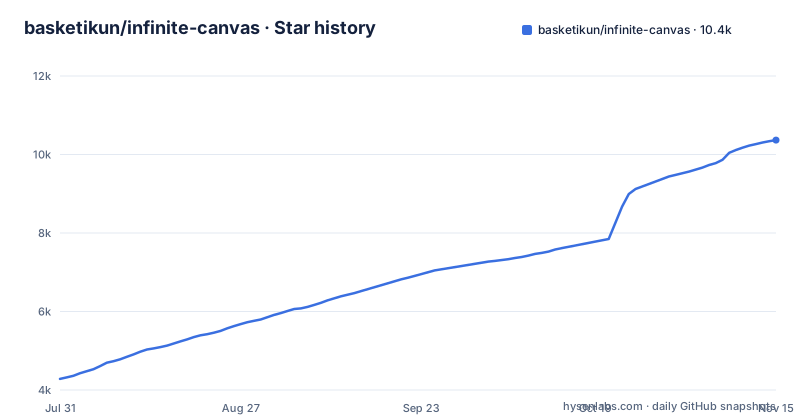
- basketikun/infinite-canvas10,367 ★ · +6,085
| Repository | 2026-07-31 | 2026-11-15 |
|---|---|---|
| basketikun/infinite-canvas | 4.3k | 10.4k |
6,085 Stars in the last 107 days, measured from the daily GitHub snapshot. Compare with other projects
Editorial analysis
Image generation laid out as connected nodes
infinite-canvas is a workbench for image creation, not a whiteboard. Its README describes one interface that combines canvas layout, AI image generation, reference-image editing, a chat assistant, a prompt library and an asset collection, aimed at exploring visual directions and iterating on results.
The canvas itself supports multiple canvas projects, dragging and zooming nodes, connecting them, a minimap, undo and redo, and import and export. Connections are what make it more than a gallery. The canvas assistant works on the selected node and its upstream nodes: you chat or generate around that chain, and the result is inserted back onto the canvas as a new node. A reference image upstream of a prompt becomes context for the next generation instead of something you re-upload.
The AI side covers text-to-image, image-to-image, reference-image editing, text Q&A, and audio and video generation, all through an OpenAI-compatible endpoint you configure. The repository description names chatgpt2api, grok2api, flow2api and newapi alongside OpenAI as the kinds of endpoints it is meant to sit in front of.
The Docker image is only nginx and a static bundle
The Dockerfile makes the architecture plain. A first stage on oven/bun:1.3.13 installs dependencies from web/package.json and web/bun.lock and runs the Vite build. The runtime stage is nginx:1.27-alpine serving the built files from web/dist, plus nginx.conf and an entrypoint script, web/docker-entrypoint.sh, that writes runtime configuration at container start. A comment in the Dockerfile states the intent: the image only serves the static front end, and AI requests go directly from the browser to the user's own endpoint.
That has two consequences. With the stock image, the container is not in the request path for generations, which suits a shared deployment where each person brings their own key. The flip side is that the key is configured in, and used from, the browser of whoever is at the canvas. A team that wants one central key hidden from users gets no help from this image.
The same static build explains why vercel.json and render.yaml sit at the repository root next to the Dockerfile. Render has a one-click deploy button in the README.
Running the GHCR image on port 3000
The quickest self-hosted route is the published image. docker-compose.yml at the repository root pulls ghcr.io/basketikun/infinite-canvas:latest and maps port 3000:
services:
  app:
    image: ghcr.io/basketikun/infinite-canvas:latest
    container_name: infinite-canvas
    ports:
      - "3000:3000"
    restart: unless-stopped
Bring it up with Docker Compose and open port 3000 on the host. From there you configure your OpenAI-compatible endpoint in the app and start a canvas. The repository also carries docker-compose.local.yml for local builds, and the documentation under docs/content/docs/overview/ has separate quick-start, Docker and Render guides.
Analytics are off by default. The compose file shows two optional environment variables, ANALYTICS_GA4_ID for Google Analytics 4 and ANALYTICS_BAIDU_ID for Baidu Tongji. Each provider has its own variable, any one you fill in is enabled, and both can run at once. Leave them commented out and the deployment sends nothing to either.
One caution about the image tag: latest moves with every release, and releases have been frequent (v0.18.0 on 2026-09-07, v0.19.0 on 2026-09-16, v0.20.0 on 2026-10-10). Given the storage warning in the next section, pin a version tag once you have a working setup.
Local storage formats can change between releases
The most important line in the README is a caution box. The project is in development and does not guarantee compatibility with historical data. Local storage formats of every kind may be changed directly. The maintainer's advice for anyone who needs a stable line is to fork and develop independently.
Read that literally. Projects are kept in local storage, and an upgrade is allowed to change how they are stored without a migration path. Combined with the latest tag in docker-compose.yml and a release roughly every few weeks, a routine image pull can leave older work unreadable. The project is still on 0.x versions, which fits the warning.
The defence is the export feature on the canvas. Export before every upgrade, and test that the exported file imports on the new version before deleting anything. For a team planning to build on infinite-canvas for months, the fork the README recommends is the realistic option, with the cost that upstream fixes then have to be merged in by hand.
Canvas Agent and the Codex app plugin drive the canvas over MCP
infinite-canvas can be operated by a coding agent as well as by hand. The canvas-agent/ directory holds a local Canvas Agent that connects Codex or Claude Code, letting the agent operate the current canvas through MCP. The plugins/infinite-canvas directory is a Codex app plugin which, once installed, registers the MCP server automatically and tries to start the local agent.
This is the most distinctive part of the project. An agent can arrange nodes and trigger generations on the canvas you have open, so a batch of variations or a reorganisation of a crowded board becomes an instruction rather than a sequence of drags.
The word to note is tries. The Codex plugin attempts to launch the local agent, which means it can also fail to, and the Canvas Agent is a local process on your own machine. Setup details are in canvas-agent/README.md. A cloud-hosted deployment of the static site does not remove the need for that local process.
Attribution terms and a README led by API resellers
The license is MIT, but the README adds a request on top: secondary development and pull requests should keep the original author information and the front-end page branding. MIT itself requires keeping the copyright and license notice. The branding request goes further than that notice, so anyone planning to reskin the interface for a product should read the LICENSE file and the README request together and decide how to handle the difference.
The sponsor table at the top of the README is made up of API providers and relay services, several offering registration links with bonus credit. Since the app works with any OpenAI-compatible endpoint, none of them is required. Treat that table as advertising rather than a list of tested or recommended backends, and choose an endpoint on your own terms.
Security reports go through SECURITY.md. The last push was on 2026-10-25. CHANGELOG.md and VERSION at the root are both copied into the build stage, and CHANGELOG.md is the place to check for storage changes before each upgrade.
An infinite canvas app for image work, not for notes or drawing
Many people searching for an infinite canvas app want a note-taking surface, a drawing app on an iPad, or a student tool. infinite-canvas is a different thing. Its feature list centres on generating and editing images through a model endpoint, with chat and a prompt library around that. Without an API endpoint configured, the generation features that define it have nothing to call.
It also runs as a web page, built with Vite and React Router, served from your own container or a host such as Render or Vercel. Nothing in the repository layout points to an Android or iPad build. If what you want is handwriting, lecture notes or freehand sketching on an endless page, look elsewhere. If you want a board where generated images stay connected to the prompts and references upstream of them, this is closer to the point.
Editorial conclusion
infinite-canvas suits someone who already has an OpenAI-compatible image endpoint and wants to iterate on visuals as connected nodes, or wants Codex or Claude Code to edit a canvas over MCP. It does not suit anyone looking for a note-taking or drawing app, or anyone who cannot afford to lose canvases when a release changes the storage format. Before putting real work into it, export your canvases and confirm that import works on the version you are running.
Frequently asked questions
Does infinite-canvas send my API key to its own server?
The Docker image only serves the static front end through nginx, and the Dockerfile states that AI requests go directly from the browser to the endpoint you configure.
Will my infinite-canvas projects survive an upgrade?
Not guaranteed. The README warns that the project is in development, that historical data compatibility is not guaranteed and that local storage formats may change directly, so export canvases before upgrading.
Can Codex or Claude Code control infinite-canvas?
Yes, through the local Canvas Agent, which connects Codex or Claude Code so the agent can operate the current canvas over MCP. A Codex app plugin registers the MCP server automatically and tries to start the local agent.
What port does the infinite-canvas Docker image use?
docker-compose.yml runs ghcr.io/basketikun/infinite-canvas:latest and maps port 3000 on the host to port 3000 in the container.
Official sources
Add this badge to your README
If you maintain this project, the badge below links readers to this analysis and shows its maintenance status from the daily GitHub snapshot. Paste the markdown into your README; add ?metric=license or ?metric=stars to the image URL for a different field.

[](https://hysenlabs.com/projects/basketikun-infinite-canvas)Star history chart for your README
[](https://hysenlabs.com/projects/basketikun-infinite-canvas)Was this useful?