Meteocons ships weather icons as files, with a Figma pipeline behind every animation
Beautiful, hand-crafted animated weather icons that feel alive.
At a glance
- What is it?
- Meteocons is a set of 475+ animated weather icons published as three npm packages in four visual styles, generated from a Figma source through an export pipeline run with Bun. Consumers only take the SVG or Lottie files, while the animation definitions live in JSON configs in the repository.
- Who is it for?
- Take Meteocons when a product needs weather conditions to read as an animation rather than a glyph, and when shipping a dependency per format is acceptable, since animated SVG and Lottie are separate packages. Do not expect new icons to appear quickly: the last push was on 2026-04-12 and the three most recent releases are all 3.0.0 prereleases from that same day, so the stable line you depend on may lag the pipeline.
- Can I use it commercially?
- Yes. MIT is a permissive licence: you can use, modify and sell software built on it, as long as you keep its copyright and licence notices.
- Is it still maintained?
- Activity is slowing. The repository last received commits 6 months ago.
- What is it written in?
- Mainly TypeScript, according to GitHub's language statistics.
Answers come from the project's GitHub data, last synced on November 6, 2026, and from our analysis. They are not legal advice.
Star history
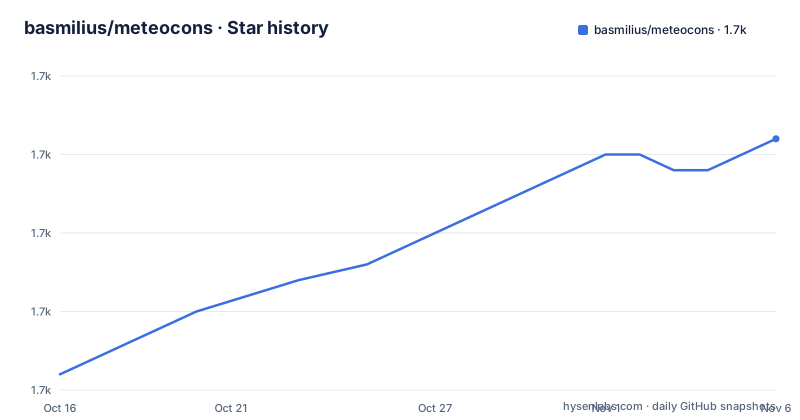
- basmilius/meteocons1,686 ★ · +15
| Repository | 2026-10-16 | 2026-11-06 |
|---|---|---|
| basmilius/meteocons | 1.7k | 1.7k |
15 Stars in the last 21 days, measured from the daily GitHub snapshot. Compare with other projects
Editorial analysis
Three packages because SVG animation and Lottie are different problems
The consumer facing decision is which format your runtime can play, and Meteocons splits on exactly that axis. Three packages are published: @meteocons/svg for animated SVG icons, @meteocons/svg-static for static SVG without SMIL animation, and @meteocons/lottie for Lottie JSON animations. Nothing else in the set is aimed at application developers.
Adding the right one is a single command, and Bun is what the documentation uses:
bun add @meteocons/svg
bun add @meteocons/svg-static
bun add @meteocons/lottie
The package contents follow the same three shapes. If you have chosen the animated SVG package, an icon resolves by style and name in the import path, so a file reference looks like this in markup:
<img
    src="@meteocons/svg/fill/clear-day.svg"
    alt="Clear day"/>
That style-first, icon-second path layout is the convention that runs through every example and through the CDN layout as well, so a reader who learns it once can move between formats without relearning.
Four styles, one icon name, and why monochrome is not a fifth colour
Every icon exists in four styles: Fill for solid icons with rich colour, Flat for flat design without gradients, Line for a clean outline, and Monochrome for a single colour icon. The count is fixed across the set rather than per icon, which is what makes an icon name such as clear-day usable as a stable key in application code.
The README gives the total as 475+ hand-crafted icons, and the repository topics list figma alongside svg, lottie and icon pack, which reflects where the assets originate rather than how they ship.
Lottie is a JSON import and a lottie-web container, not an SVG
Lottie is the heavier of the two animation routes and the README shows the whole shape of the integration. You import the JSON with the same style-first path convention and hand it to a player:
<script>
    import lottie from 'lottie-web';
    import clearDay from '@meteocons/lottie/fill/clear-day.json';

    lottie.loadAnimation({
        container: document.getElementById('icon'),
        animationData: clearDay,
        loop: true,
        autoplay: true,
    });
</script>
Three consequences follow from that snippet. The animation JSON is a build artifact you bundle, so it counts toward your bundle size rather than being lazily fetched unless you fetch it yourself. The lottie-web runtime is a separate dependency the README assumes you already have. And the player, not the file, decides playback, so loop and autoplay are your call rather than the icon author's.
A CDN is also offered at cdn.meteocons.com, with versioned paths per format and per style, and the README points to the documentation site for that rather than spelling out the path structure. Plan for a version segment in that URL if you pin releases there, because the endpoint is versioned rather than a moving latest.
The Bun pipeline fetches from Figma, validates, then publishes
Behind the published files sits a pipeline that anyone can run, and it is documented well enough to be the interesting part of the project. Prerequisites are Bun 1.0 or higher and a Figma personal access token, which you create in Figma under Settings and Security, choosing the file_content:read scope. Setup is a clone, an install, and copying the environment template.
The commands map onto distinct stages:
bun run fetch
bun run fetch --force
bun run export
bun run export --frame X
bun run validate
bun run publish-icons
bun run docs:dev
fetch pulls SVGs from Figma and uses a cache, with --force for a clean re-download. export produces every icon in both SVG and Lottie form, and can be narrowed to a single icon with --frame. validate checks layer names and coverage, which is the step that catches an icon whose internal layer naming drifted away from what the animations expect. publish-icons then copies the output into the three npm packages, and docs:dev starts the documentation site.
The root package.json shows the fetch, export, validate and publish-icons scripts are thin wrappers over files in packages/exporter/src/, which is where the real logic lives, and shows an additional animate script that chains export, publish-icons and a docs prepare-icons step.
Animations are declared as data, and partials keep icons consistent
A hand drawn icon set usually rots when animation is hand coded per file. Meteocons takes the opposite route: animations are JSON config files under animations/configs/, and each config names which icons it applies to through targets and which layers it moves through layers.
Reusable pieces live alongside them in animations/partials/ and are pulled in with an includes key, so a motion shared by several icons is defined once. The practical effect for a designer is that adding animation to a new icon means writing a config, not editing generated code, and validate exists to verify the layer names those configs reference still exist in the Figma source.
Display order is a separate axis again. packages/exporter/categories.json decides the order of categories and icons on the website and in the manifest, so reordering the catalogue is a data edit rather than a rename. Taken together, the repository separates four concerns that a naive asset pipeline would mix: source files in Figma, layer naming conventions, animation timing data, and publication order.
Prerelease versions and a push date that shapes your upgrade plan
The version list is the part worth reading closely. The three most recent releases are 3.0.0-next.8, 3.0.0-next.9 and 3.0.0-next.10, all published on 2026-04-12, and the last push to the repository was on 2026-04-12 as well. That means the visible work on the 3.0 line consists of prerelease tags rather than a stable 3.0.0.
Whether a consumer can install the next tags is not something the README addresses, but pinning an exact version in a lockfile is a safe way to hold a fixed set of assets. For a weather widget the practical risk is low, since an icon that fails to load degrades to a missing image rather than a broken app, but a team that wants reproducibility should record the exact version in its lockfile.
Licensing is MIT, credited to Bas Milius, with the licence file at the repository root. The root package.json is marked private, since the published artifacts are the per-format packages rather than the monorepo, and the repository field points at a meteocons-poc remote, a detail that suggests the working repository and the published package source are not described identically here.
Editorial conclusion
Take Meteocons when a product needs weather conditions to read as an animation rather than a glyph, and when shipping a dependency per format is acceptable, since animated SVG and Lottie are separate packages. Do not expect new icons to appear quickly: the last push was on 2026-04-12 and the three most recent releases are all 3.0.0 prereleases from that same day, so the stable line you depend on may lag the pipeline. Verify first that your renderer handles SMIL, since @meteocons/svg animates in the browser while @meteocons/svg-static deliberately does not.
Frequently asked questions
How do I install Meteocons icons?
The README uses Bun: bun add @meteocons/svg for animated SVG, bun add @meteocons/svg-static for static SVG without SMIL, and bun add @meteocons/lottie for Lottie JSON animations.
What styles do Meteocons icons come in?
Each icon is available in four styles: Fill, Flat, Line and Monochrome. The style is part of the file path, as in @meteocons/svg/fill/clear-day.svg.
Can I load Meteocons icons from a CDN instead of npm?
Yes. The README states that all icons are available at cdn.meteocons.com with versioned paths per format and style, and points to the CDN documentation page for the details.
Do I need Figma to use Meteocons icons?
No. Figma and a personal access token with the file_content:read scope are only needed to run the export pipeline that regenerates the icons, not to consume the published SVG or Lottie files.
How are Meteocons animations defined?
As JSON config files in animations/configs/, each listing the icons it applies to through targets and the layers to animate through layers, with reusable building blocks in animations/partials/ merged via includes.
Official sources
Add this badge to your README
If you maintain this project, the badge below links readers to this analysis and shows its maintenance status from the daily GitHub snapshot. Paste the markdown into your README; add ?metric=license or ?metric=stars to the image URL for a different field.

[](https://hysenlabs.com/projects/basmilius-meteocons)Star history chart for your README
[](https://hysenlabs.com/projects/basmilius-meteocons)Was this useful?