dropbar.nvim: breadcrumbs that need no lspconfig and no treesitter plugin
IDE-like breadcrumbs, out of the box
At a glance
- What is it?
- dropbar.nvim is a Neovim winbar with drop-down menus and five symbol sources, and its distinguishing claim is zero configuration and zero dependency: it talks to Neovim's built-in LSP and tree-sitter integrations directly rather than through nvim-lspconfig or nvim-treesitter. It requires Neovim 0.11.0 or later.
- Who is it for?
- Adopt dropbar.nvim if you already run Neovim 0.11.0 or later and your language servers and tree-sitter parsers work through Neovim's own integrations, because the plugin's own claim is that it needs no nvim-lspconfig and no nvim-treesitter, and that difference removes a whole class of version-mismatch problems.
- Can I use it commercially?
- Yes, with conditions. GPL-3.0 is a copyleft licence: if you distribute software that includes it, you must release that software's source code under the same licence. Running it internally without distributing it does not trigger that obligation.
- Is it still maintained?
- Yes. The repository last received commits 43 days ago.
- What is it written in?
- Mainly Lua, according to GitHub's language statistics.
Answers come from the project's GitHub data, last synced on November 7, 2026, and from our analysis. They are not legal advice.
Star history
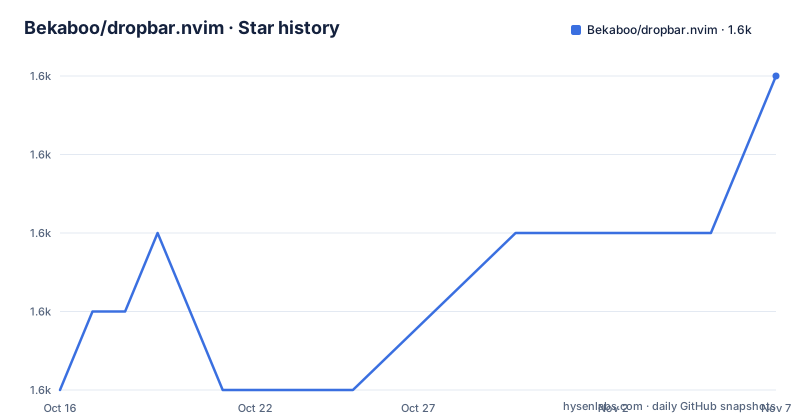
- Bekaboo/dropbar.nvim1,610 ★ · +4
| Repository | 2026-10-16 | 2026-11-07 |
|---|---|---|
| Bekaboo/dropbar.nvim | 1.6k | 1.6k |
4 Stars in the last 22 days, measured from the daily GitHub snapshot. Compare with other projects
Editorial analysis
Zero dependency means bypassing the plugin ecosystem, not avoiding work
The feature that distinguishes this plugin is stated as zero config and zero dependency.
The claim is specific: dropbar.nvim does not require nvim-lspconfig, nvim-treesitter, or any third-party UI library to work. The stated condition is that as long as the language server or the tree-sitter parser is installed, it should work fine.
That is a real architectural decision rather than a convenience claim, and it cuts both ways. In one direction it removes two heavily versioned plugins from the dependency chain, which in the Neovim ecosystem is where version conflicts usually originate. It obtains symbols through Neovim's builtin LSP framework and builtin tree-sitter integration, so servers configured through nvim-lspconfig may still provide symbols to dropbar when they are attached to Neovim's LSP client.
So the requirement that matters is Neovim >= 0.11.0, which is what makes those builtin integrations usable rather than an afterthought. Optional extras sit on top: `nvim-web-devicons` for filetype icons, `telescope-fzf-native` for fuzzy search, a working language server installation for the lsp source, and a working tree-sitter parser for the treesitter source.
The documentation is a vimdoc help file, `doc/dropbar.txt`, reachable with `:h dropbar`, and the README badges link to it as the docs source and to a LuaRocks module page.
The repository layout matches a plugin with a real development process: `lua/`, `plugin/`, `doc/`, `tests/`, `scripts/`, a `Makefile`, `CHANGELOG.md`, `.luacheckrc`, `.luarc.json`, `.stylua.toml` and `.projections.json`.
Five symbol sources, with fall-back between them
Five sources ship in the box, and the source files are named in the README:
* `lua/dropbar/sources/lsp.lua`, which gets symbols from language servers using Neovim's builtin LSP framework * `lua/dropbar/sources/markdown.lua`, a custom incremental parser that gets symbol information about markdown headings * `lua/dropbar/sources/path.lua`, which gets the current file path * `lua/dropbar/sources/treesitter.lua`, which gets symbols from tree-sitter parsers using Neovim's builtin tree-sitter integration * `lua/dropbar/sources/terminal.lua`, which lets you switch terminal buffers using the drop-down menu
The set tells you what the plugin considers a navigable context. Path covers every file including ones with no parser. Tree-sitter covers parsed code. LSP covers semantic symbols from a running server. Markdown covers headings, which is a case LSP and tree-sitter both handle poorly. Terminal is the odd one out and the most useful in practice for a bar that is always visible.
Fall-back support is a documented feature rather than an accident: multiple backends support fall-backs, configured through the bar options, and making your own source is a documented process.
Automatic truncation handles the case where the content does not fit. Long components are truncated, and the README notes better truncation when the winbar is still too long after shortening all components. A scrollbar appears in the drop-down menu when the symbol list is too long.
Preview behaviour is described in two parts: symbols are previewed in their source windows when you hover over them in the menu, and the source window is reoriented on previewing or after jumping to a symbol.
Installation is three lines and lazy-loading is already handled
The lazy.nvim configuration shows the intended minimal setup, and it also shows what is genuinely required versus optional.
require('lazy').setup({
  {
    'Bekaboo/dropbar.nvim',
    -- optional, but required for fuzzy finder support
    dependencies = {
      'nvim-telescope/telescope-fzf-native.nvim',
      build = 'make'
    },
    config = function()
      local dropbar_api = require('dropbar.api')
      vim.keymap.set('n', '<Leader>;', dropbar_api.pick, { desc = 'Pick symbols in winbar' })
      vim.keymap.set('n', '[;', dropbar_api.goto_context_start, { desc = 'Go to start of current context' })
      vim.keymap.set('n', '];', dropbar_api.select_next_context, { desc = 'Select next context' })
    end
  }
})
The comment is important: the telescope dependency is optional and required only for fuzzy finder support. The plugin itself is the single entry.
The packer.nvim variant is the same shape with `requires` and `run = 'make'` instead of `dependencies` and `build`.
For people not using a plugin manager at all, a git clone into the packages directory:
mkdir -p ~/.local/share/nvim/site/pack/packages/
git clone https://github.com/Bekaboo/dropbar.nvim ~/.local/share/nvim/site/pack/packages/start/dropbar.nvim
And then the note that saves you a common mistake: lazy-loading is unneeded because it is already done in `plugin/dropbar.lua`.
The three keymaps in the example are the plugin's most-used API. `dropbar_api.pick` opens pick mode, `dropbar_api.goto_context_start` jumps to the start of the current context, and `dropbar_api.select_next_context` selects the next one. Bind them to whatever you already use; the defaults shown are the author's preference, not a requirement.
Mouse and pick mode, with one requirement you must enable
The interaction model has three layers and one precondition.
The precondition is the one that trips people up. Drop-down menu components and winbar symbols that respond to mouse or cursor hovering require `:h mousemoveevent` to be enabled. That is a Neovim-level setting rather than something this plugin configures for you, and without it the hover and preview features silently do nothing.
With it enabled, the mouse layer has three verbs. Clicking a component in the winbar opens a drop-down menu of its siblings. Clicking an entry in the drop-down menu goes to its location. Clicking the indicator in the menu opens a sub-menu of its children.
Pick mode is the keyboard layer. `require('dropbar.api').pick()` enters interactive pick mode, and `require('dropbar.api').pick(<idx>)` directly selects a component at that index. Inside interactive pick mode you press the corresponding pivot shown before each component to select it, which is a menu-driven approach rather than a jump-list with counts.
The drop-down menu has its own default keymaps, and the README documents each one:
* `<LeftMouse>` calls the `on_click` callback of the symbol at the click * `<CR>` finds the first clickable symbol in the current drop-down menu entry and calls its `on_click` * `i` enters fzf mode from the menu * `q` or `<Esc>` closes the current menu
Remapping, disabling or extending them is done through the menu options.
The fuzzy finder has its own bindings once open via `dropbar_menu_t:fuzzy_find_open()`: `<Esc>` exits, `<Up>` and `<Down>` move the cursor, and `<CR>` calls the `on_click` callback of the symbol under the cursor.
There is also documented integration with `vim.ui.select`, which lets the plugin be used as a dropdown rather than a winbar, which is the part worth knowing if you want the same navigation without permanently occupying a line of screen.
The Makefile runs docs generation, tests and formatting in one target
The build system is a Makefile whose default target is the interesting part:
all: format-check lint test docsFour things run before you push: `stylua --check` for formatting, `luacheck` for linting, the test suite, and vimdoc generation. Each has its own target too, with `format` applying `stylua .` where `format-check` only verifies.
Tests are Plenary-based and run headless:
test: | deps/plenary.nvim deps/telescope-fzf-native.nvim
	nvim --clean --headless -u tests/minimal_init.lua \
		+"PlenaryBustedDirectory tests { minimal_init = 'tests/minimal_init.lua' }" \
		+qa!
Notice that telescope-fzf-native is a test dependency, not just an optional feature, and the Makefile clones it with `--depth=1 --filter=blob:none` and runs `make` in it. `plenary.nvim` is cloned the same shallow way. Two more clones are pulled in for documentation only, `gen-vimdoc.nvim` and `ts-vimdoc.nvim`, and the doc target generates `doc/dropbar.txt` from the README and from source comments using `nvim --clean --headless` with a minimal init.
The generated help file is then cleaned up: `sed` removes the modeline from the README-derived output, a second generation step runs for source, and trailing whitespace is stripped. Small detail, but it means `doc/dropbar.txt` is generated and committed rather than hand-written, so a stale help file is a build artefact problem rather than an editing one.
There is also a pattern rule for running a single spec file, `test-file-%`, with comments giving `test-file-bar` and `test-file-sources:lsp` as the examples, where the colon is translated to a path separator.
The `clean` target removes `deps/` and `doc/`, which is a hint that a fresh checkout needs the dependencies fetched before any of this works.
Editorial conclusion
Adopt dropbar.nvim if you already run Neovim 0.11.0 or later and your language servers and tree-sitter parsers work through Neovim's own integrations, because the plugin's own claim is that it needs no nvim-lspconfig and no nvim-treesitter, and that difference removes a whole class of version-mismatch problems. If your server configuration lives in nvim-lspconfig, verify that those servers are attached to Neovim's builtin LSP client, because dropbar reads symbols through that client rather than directly through nvim-lspconfig. Verify three things before installing: that `:h mousemoveevent` is enabled, because the README states hover responses in the winbar and menus require it; that your Neovim version is 0.11.0 or higher, which is a hard requirement rather than a recommendation; and whether you want fuzzy search, which needs `telescope-fzf-native` built with `make`. The license is GPL-3.0, the last push was on 2026-09-25, and the most recent tag is v14.2.1 from 2025-08-02.
Frequently asked questions
What are the requirements for dropbar.nvim?
Neovim >= 0.11.0. Optional extras are nvim-web-devicons for filetype icons, telescope-fzf-native for fuzzy search, a working language server for the lsp source and a working tree-sitter parser for the treesitter source.
Does dropbar.nvim need nvim-lspconfig or nvim-treesitter?
No. The README states it does not require nvim-lspconfig, nvim-treesitter or any third-party UI library, because it uses Neovim's builtin LSP framework and builtin tree-sitter integration. As long as the language server or parser is installed, it should work.
What sources does dropbar.nvim use for symbols?
Five built-in sources: lsp for language server symbols, markdown for headings through a custom incremental parser, path for the current file, treesitter for parser symbols, and terminal for switching terminal buffers. Sources support fall-backs configured through the bar options.
Why is hover not working in dropbar.nvim?
Hover responses on winbar symbols and drop-down menu components require `:h mousemoveevent` to be enabled. The README calls this out as a requirement for the feature.
How do I install dropbar.nvim without a plugin manager?
Run `mkdir -p ~/.local/share/nvim/site/pack/packages/` and clone the repository into `~/.local/share/nvim/site/pack/packages/start/dropbar.nvim`. Lazy-loading is not needed because it is already handled in plugin/dropbar.lua.
What keymaps does dropbar.nvim use inside a drop-down menu?
`<LeftMouse>` calls the on_click callback of the symbol clicked, `<CR>` finds the first clickable symbol in the current entry and calls its on_click, `i` enters fzf mode, and `q` or `<Esc>` closes the menu. Remapping is done through the menu options.
Official sources
Add this badge to your README
If you maintain this project, the badge below links readers to this analysis and shows its maintenance status from the daily GitHub snapshot. Paste the markdown into your README; add ?metric=license or ?metric=stars to the image URL for a different field.

[](https://hysenlabs.com/projects/bekaboo-dropbar-nvim)Star history chart for your README
[](https://hysenlabs.com/projects/bekaboo-dropbar-nvim)Was this useful?