multiple-entity-row: several entities on one Home Assistant row
Show multiple entity states and attributes on entity rows in Home Assistant's Lovelace UI
At a glance
- What is it?
- multiple-entity-row is a Lovelace row element for Home Assistant that puts the state of several entities on a single line, with a visual editor for most options and YAML for the rest, and it requires Home Assistant 2024.4 or newer.
- Who is it for?
- Adopt multiple-entity-row if your Home Assistant dashboards are limited by the one entity per row model of the stock entities card, since this row element adds additional entities, attributes and icons with an icon and colour map per state and a visual editor for most of it. Do not adopt it if you are on Home Assistant older than 2024.4, or if you need the row to be a card of its own, since it must be configured as an entity inside an entities card.
- Can I use it commercially?
- Yes. MIT is a permissive licence: you can use, modify and sell software built on it, as long as you keep its copyright and licence notices.
- Is it still maintained?
- Yes. The repository last received commits 12 days ago.
- What is it written in?
- Mainly JavaScript, according to GitHub's language statistics.
Answers come from the project's GitHub data, last synced on November 7, 2026, and from our analysis. They are not legal advice.
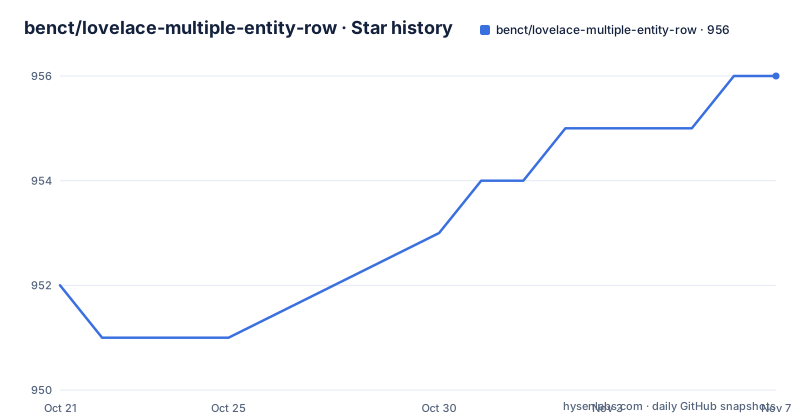
Star history
- benct/lovelace-multiple-entity-row956 ★ · +4
| Repository | 2026-10-21 | 2026-11-07 |
|---|---|---|
| benct/lovelace-multiple-entity-row | 952 | 956 |
4 Stars in the last 17 days, measured from the daily GitHub snapshot. Compare with other projects
Editorial analysis
A row element inside the entities card, not a card of its own
The first thing to understand about this project is what it is not. The README states it plainly: this is not a standalone Lovelace card, but a row element for the entities card. It produces an entity-row, and it must therefore be configured as an entity inside an entities card.
That constraint defines both the use case and the audience. The stock entities card gives one entity per row, which is fine for a list of switches and unhelpful when you want a thermostat, its battery sensor and its current mode side by side. This is a Home Assistant user with a dense dashboard, on Home Assistant 2024.4 or newer, who wants to compress that.
The configuration table makes the shape clear. Two fields are marked required: type, whose value is custom:multiple-entity-row, and entity, the entity ID in domain.my_entity_id form. Everything else is optional, and the list of what is optional is long.
The row supports additional entities through an entities list, which accepts either plain entity ID strings or entity objects with more customization, mirroring how the default entities card works. It can also override the unit of measurement, the icon, or use an image instead of an icon, and it can swap the state value for a toggle where the entity supports one.
State driven icons and colours are the reason to use it
Most of the option table exists to let one row say different things in different conditions, which is where the stock row cannot help.
The state_icon option is a map from state value to an icon override, and icon_color is a CSS colour for the entity icon. The color option takes the literal value state, which ties the text colour to the entity state, or none, or a theme colour, or any CSS colour. A separate state_color option maps a state value to a colour, and the table notes that the boolean form of that option is deprecated.
There is also a name option that accepts a string, a list, or false, where false frees the space the name occupied, and the table notes that structured names require Home Assistant 2026.4 or newer. So the row can hold more than one entity without the labels fighting for space.
Layout control follows the same logic. column switches from a row to a column, wrap allows the content to flow onto multiple lines instead of overflowing, align takes top, center or bottom, and reserve_header keeps values without a header level with the ones that have one. The show_state_first option puts the main entity's state ahead of the additional entities, and show_state can be set to false to hide the main entity entirely.
Then there is the state_header option, a piece of text above the main entity state, and a default option that supplies a value to display when the state itself is hidden. hide_unavailable hides the value when the entity is unavailable.
A visual editor that stops short of the YAML options
Editing a Lovelace row by hand in YAML gets old quickly, so the card ships a visual editor. The README describes it as form based, with tabs for the main entity and for each additional entity, where you can add, reorder, copy, paste and delete entities, plus sections for secondary info, state-based icons, per-entity custom CSS and the tap, hold and double-tap actions.
The interesting part is where the editor stops. A few advanced options are YAML only: hide_if, state_color maps, digit-suffixed formats such as precision5, and templating. The editor detects a configuration that contains templates and opens it directly in the code editor instead of the form, which is a sensible fallback since a templated row cannot be sensibly represented as a form.
The templating options are worth isolating, because they are the ones that change what the row is. The template option replaces the state value with the result of a template, and vars provides named values reusable in that scope's templates. The format option formats the main state or attribute value.
One more thing the visual editor does not replace: the card has to exist in your configuration before the editor can open it. The editor is reached by editing a custom:multiple-entity-row row through the entities card's UI editor.
Installation means declaring a Lovelace resource
Installation is via HACS, which the README recommends, and the card is registered with HACS through hacs.json in the repository root. The catch is that a Lovelace card has to be declared as a resource before the dashboard will load it.
If you are in YAML mode, the README says to add the resource explicitly:
lovelace:
  resources:
    - url: /hacsfiles/lovelace-multiple-entity-row/multiple-entity-row.js
      type: module
If you are not using YAML, the same configuration can be managed in the Configuration, Dashboards, Resources panel, which is the path most people take.
There is also a manual route for people who do not want HACS in the loop. Download multiple-entity-row.js from the latest release, put it in your <config>/www/ folder, and declare it yourself:
lovelace:
  resources:
    - url: /local/multiple-entity-row.js?v=4.7.0
      type: module
Note that the version query string in the documented snippet is 4.7.0 while the current package version is 4.13.1-beta.1, so the query parameter is a cache-busting value you are expected to edit rather than a version the project keeps current. That is a small trap: a stale query string is a common reason a card appears not to update.
A Docker testbed that mounts the built bundle straight in
The repository ships a Home Assistant instance for testing, and the arrangement is neat enough to be worth describing.
The docker-compose.yml runs the official image with a configurable tag, exposes port 8130 on the host mapped to 8123 in the container, and bind mounts the built multiple-entity-row.js read-only into the Home Assistant www directory under community/multiple-entity-row/. The config directory is bind mounted from .dev/ha-config, and the container is named mer-ha.
image: ghcr.io/home-assistant/home-assistant:${HA_VERSION:-stable}
container_name: mer-ha
ports:
  - "8130:8123"
The HA_VERSION variable defaults to stable and the comment explains what it is for: you can point it at beta to check a frontend change before it lands, or pin a specific tag such as 2026.7.4. That is a real advantage for a card that depends on Home Assistant frontend behaviour.
Because the bundle is mounted rather than copied, the workflow is a build, a hard refresh of the browser with Cmd-Shift-R, and you are testing the new bundle. The comment says no file copying is involved, and the package scripts make it a single command.
The scripts for this live in package.json, with ha:init creating the config directory from an example file, ha:up starting compose, ha:down stopping it, ha:logs following the logs and ha:reset tearing down the config.
Lit for rendering, webpack for bundling, vitest for tests
The card is a JavaScript project with a TypeScript setup, and the toolchain is conventional enough to be predictable.
The runtime dependency list has one entry, lit at version 3.3.3, which is the expected choice for a Home Assistant custom card since it is how the frontend itself renders. The built artefact is a single file, multiple-entity-row.js, which the package.json names as the module, and that is the file Lovelace loads as a resource.
Development dependencies cover the usual path: webpack and webpack-cli to bundle, babel-loader with the babel presets to transpile, TypeScript for types, eslint with a prettier plugin and prettier itself for linting and formatting, vitest with a jsdom environment and coverage-v8 for tests, and the TypeScript eslint plugins.
The scripts map onto that toolchain:
"test": "vitest run",
"dev": "webpack -c webpack.config.js",
The build script chains the checks before bundling, running lint and test and then webpack, which is a sensible order for a card whose runtime failures show up as an empty dashboard rather than an error message. The dev script runs webpack alone for a faster loop, and there are test:watch and coverage variants. The project uses yarn, with a yarn.lock at the root.
The repository also carries hacs.json for HACS packaging, a tsconfig.json, a vitest.config.js, a webpack.config.js, an .eslintrc and a .prettierrc, plus docs/, CHANGELOG.md and the AGENTS.md and CLAUDE.md instruction files.
Beta tags, versioned resources and an MIT licence
The release pattern is regular and worth reading as a maintenance signal. Version 4.13.0 was released on 2026-10-06, with 4.13.0-beta.1 on 2026-10-02 and 4.13.1-beta.1 on 2026-10-11. The repository is not archived, and the last push was on 2026-10-11, matching the newest tag.
So the project ships a stable release and a beta in parallel, and the beta is the one that appears most recently. The package.json version field currently reads 4.13.1-beta.1, which means a checkout of the default branch is a beta build, not the stable release. For a dashboard component that is a normal trade, since a card that breaks a dashboard is more disruptive than a card that needs a refresh, but it is a decision the user inherits by following the branch.
The licence is MIT, which is about as permissive as it gets and the reason this kind of card can be used in a home instance without ceremony. It covers the card code only; Home Assistant itself and any other custom card you install carry their own terms.
Because the resource is a single file on a web server, reverting means pointing the resource at an older release file and adjusting the version query parameter.
Editorial conclusion
Adopt multiple-entity-row if your Home Assistant dashboards are limited by the one entity per row model of the stock entities card, since this row element adds additional entities, attributes and icons with an icon and colour map per state and a visual editor for most of it. Do not adopt it if you are on Home Assistant older than 2024.4, or if you need the row to be a card of its own, since it must be configured as an entity inside an entities card. Before you install, verify two things: whether you manage dashboards in YAML mode, in which case the lovelace.resources entry is required and not optional, and whether the visual editor covers the options you care about, since hide_if, state_color maps, digit-suffixed formats and templates remain YAML only.
Frequently asked questions
How do I install multiple-entity-row in Home Assistant?
HACS is the recommended route. In YAML mode you must also declare the resource, with url /hacsfiles/lovelace-multiple-entity-row/multiple-entity-row.js and type module under lovelace.resources. Manually, you put multiple-entity-row.js in the <config>/www/ folder and declare /local/multiple-entity-row.js as a module resource.
Is multiple-entity-row a standalone Lovelace card?
No. The README states it is not a standalone Lovelace card but a row element for the entities card, so it must be configured as an entity inside an entities card with type custom:multiple-entity-row and an entity ID.
Which Home Assistant versions does multiple-entity-row support?
Home Assistant 2024.4 or newer is required. Structured names in the name option need Home Assistant 2026.4 or later, and the repository's Docker testbed can be pointed at a beta release or a pinned tag such as 2026.7.4 for testing.
Which multiple-entity-row options can only be set in YAML?
The README lists hide_if, state_color maps, digit-suffixed formats such as precision5, and templating as YAML only options. A configuration containing templates opens directly in the code editor rather than the visual editor.
How can I test multiple-entity-row against a real Home Assistant?
The repository includes a docker-compose.yml testbed. The ha:up script starts it and the instance is reachable at http://localhost:8130, with the built bundle bind mounted read-only into the www directory, so a build plus a hard refresh with Cmd-Shift-R picks up the change. ha:down and ha:reset stop and clear it.
Official sources
Add this badge to your README
If you maintain this project, the badge below links readers to this analysis and shows its maintenance status from the daily GitHub snapshot. Paste the markdown into your README; add ?metric=license or ?metric=stars to the image URL for a different field.

[](https://hysenlabs.com/projects/benct-lovelace-multiple-entity-row)Star history chart for your README
[](https://hysenlabs.com/projects/benct-lovelace-multiple-entity-row)Was this useful?