Showoff serves Markdown decks as web apps the audience can join
Don't just present; interact with your audience!
At a glance
- What is it?
- Showoff is a RubyGem that turns a directory of Markdown slides into a running web application, with a presenter view, an audience view that follows along, and a shared configuration file. It suits speakers who want the room plugged into the talk, and it does not suit teams that need a plain slide file at the end.
- Who is it for?
- Showoff fits conference speakers, meetup presenters and internal reviewers who want a live, two-sided slide session rather than a file handed out afterwards. It does not fit people who need a self-contained deck, an offline export, or a PowerPoint file, and it does not fit teams without a Ruby environment or a public host for the audience to reach.
- Can I use it commercially?
- Yes. MIT is a permissive licence: you can use, modify and sell software built on it, as long as you keep its copyright and licence notices.
- Is it still maintained?
- Activity is slowing. The repository last received commits 6 months ago.
- What is it written in?
- Mainly JavaScript, according to GitHub's language statistics.
Answers come from the project's GitHub data, last synced on November 7, 2026, and from our analysis. They are not legal advice.
Star history
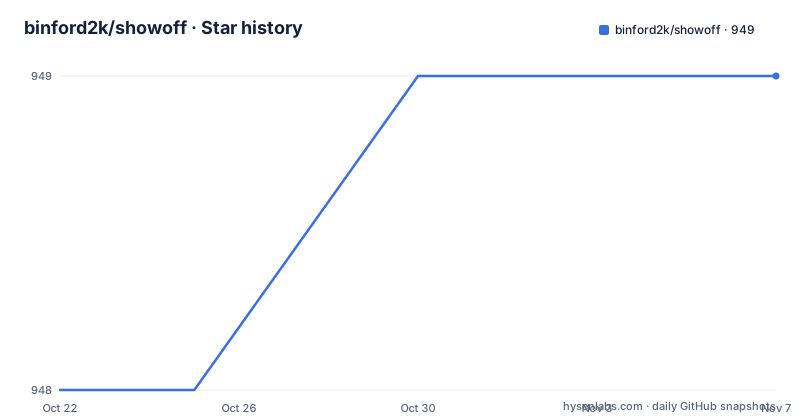
- binford2k/showoff949 ★ · +1
| Repository | 2026-10-22 | 2026-11-07 |
|---|---|---|
| binford2k/showoff | 948 | 949 |
1 Stars in the last 16 days, measured from the daily GitHub snapshot. Compare with other projects
Editorial analysis
A deck that is a web app, not a document
Showoff is a slideshow presentation tool with a twist, and the twist is where nearly every design decision follows from: it runs as a web application. Slides live as Markdown text in a directory, but what the tool serves is a site. The presenter's browser is one client of that site and the audience's browsers are others, which is what makes audience interaction possible at all.
The audience can follow along in their own browsers, download supplemental files, take part in quizzes or polls, and post questions for the presenter. By default their slideshows stay synchronized with the presenter's. They can also switch to self-navigation mode and move through the deck on their own, going back to a slide or pushing ahead to catch up. That second mode is the one worth thinking about, because it trades strict ordering for the ability to skip things you already know.
For a reader deciding whether to adopt this, the practical question is what kind of event you are running. A recorded talk with no audience device in the room gets nothing from any of this. A talk where people are asked to vote, ask questions, or download code samples gets a lot.
The presenter view carries the tooling the audience never sees
The presenter view is where Showoff concentrates features that a conventional slide tool does not attempt. It displays notes, a tree representation of the presentation, and a set of other tools, all on one screen. Alongside that it can execute code live in many languages, Javascript, Ruby, Python, Puppet and others, and display the results on the current slide. That means a live demo of a script can run in front of the room instead of being screenshotted in advance.
The presenter view also carries the pacing tools: a pre-show slideshow to run while you wait for the session to start, a countdown timer to keep you on pace, and synchronized hidden notes that can be displayed on another browser such as a phone.
Some of these features reach past the slide itself. The current slide can be opened in a Markdown editor, or in an online editor such as the repository editor on Github, so a correction can be made in front of the audience rather than afterwards. Buttons for one-click issue reporting let the room report a problem with what they are looking at.
None of this is documented in detail in the README beyond the feature list. The user manual on the project homepage is the documented route for the specifics, so treat the list as a menu of what exists rather than as a spec.
Audience sync, pace feedback, and the one thing that needs a host
The audience side of Showoff is not a mirror of the presenter screen. The audience pulls up the presentation on their own browsers, and the deck stays synchronized to track the presenter. From there, a menu of sections and slides can be called up at any time to navigate directly, and independent navigation lets people go back or catch up as you talk. They can send pace feedback and questions to the presenter, and they can send content feedback on what they are being shown.
That feedback loop is the clearest differentiator from a plain Markdown renderer, and it is also the feature with the largest infrastructure requirement. For the audience to reach the presentation, the application has to be reachable from their devices, which means a host they can point a browser at. The README describes generating a Heroku app to serve a presentation from, and generating a static form of the presentation to upload to Github Pages, but it does not explain how a live session with working audience interaction is hosted in practice.
There is a second layer of access control worth noting. Showoff can password protect any URL path, which is how you keep control over different views of the same content, for instance separating what the room sees from what is available for download. The example directory in the repository contains a `showoff.json`, and that file is where the title and any password protection are configured, so it is the first place to look if a view is exposed that you did not intend to open.
Markdown slides with a configuration file that matters as much
Authoring is deliberately plain. You write slides in Markdown and organise them with a `showoff.json` file, which also holds metadata about the presentation such as the title and any password protection. The `example` directory in the repository shows the pattern in practice, with several separate decks alongside a single `showoff.json`, a `simple.tpl` template and a `something.css` file.
That layout is the argument for the tool. Because the source is plain text, you can version control it, move sections between presentations, and rearrange or remove sections easily. Teams that maintain several decks can reuse a section without copying formatting, and a change to a deck is a diff rather than a binary edit.
The cost of plain text is that the structure lives outside the slides. The `showoff.json` file is a second artefact that must be edited correctly, and its schema is not described in the README beyond the two metadata examples. Read the `example/showoff.json` file rather than guessing at key names. The repository also ships `example/embedding`, `example/one` through `example/four`, and directories such as `example/highlights` and `example/bigtext`, which look like they cover the features the README lists only in bullet form.
Installing the gem and serving your first deck
Showoff is distributed as a RubyGem and installs like any other gem. The README states it will run out of the box on OS X and most Linux distributions, and that on Windows you need both Ruby and the Ruby DevKit for compiling native extensions.
gem install showoffWith the gem installed, the serving command runs from the directory that holds the deck:
showoff serveYou then open a browser window. The presenter view is where the notes, tree and timers appear, and the audience opens the same application on their own devices. The audience URL is not spelled out in the README, so expect to find it in the user manual or in the output of the serve command before the talk starts.
For documentation, the README points at the user manual on the project homepage, and also offers a way to generate a local copy from a clone of the repository:
rake docThat command writes the generated HTML into the `docs` directory. Running it needs a clone of the repository and the dependencies its `Gemfile` and `Rakefile` describe, so it is a contributor task rather than a user task.
Downloads, handouts, and the content you did not mean to publish
Showoff treats the audience copy as something you can hand out. Audience members can download slides, code samples or other supplemental files, supplemental files can be generated based on slide tags, and printed versions of the presentation can be produced including handout notes. A table of contents is generated automatically.
This is a genuinely different ending to a talk than sending a file by email. If your slides contain a code sample that only the first half of the room should get, or if you want people to leave with the notes, the download and print paths are the reason to pick this tool.
It is also the main operational risk, because the same machinery that produces a handout also produces a URL. Password protection on any URL path is the control the README offers, and it works per path, so different views of the same content can be locked separately. The failure mode to guard against is forgetting what the tags and paths in your `showoff.json` actually expose. The repository does not document a way to preview exactly which paths a given audience member can reach, so checking that by hand before a live session is the sensible move.
The tracking features belong here too, since they describe the same audience copy: Showoff can track how much time audience members spend on specific slides.
Versioned slides, a MIT licence, and no release history
Two maintenance facts are worth stating plainly. The repository has no GitHub releases, so there is no tagged version list to consult and no upgrade path spelled out in release notes. The last push was on 2026-04-27. Read that date as the most recent recorded change rather than as a promise about what comes next.
The licence field on the repository says MIT, which is permissive and covers commercial use, modification and redistribution. That is the straightforward reading of the identifier, not legal advice, and it applies to the code rather than to slides or handouts you author with it.
The upgrade question for a Showoff user is therefore a source question rather than a package question. Because a deck is plain text and Markdown, the risk of a tool change is lowest in the slides themselves and highest in the `showoff.json` schema, the templates and the server behaviour. Before upgrading the gem, copy the `showoff.json` file from a working deck and check it against the file in the `example` directory in the new version. The `CHANGELOG.txt` file at the top level of the repository is the place to look for what changed between releases, since there are no GitHub release notes to read.
Editorial conclusion
Showoff fits conference speakers, meetup presenters and internal reviewers who want a live, two-sided slide session rather than a file handed out afterwards. It does not fit people who need a self-contained deck, an offline export, or a PowerPoint file, and it does not fit teams without a Ruby environment or a public host for the audience to reach. Before adopting it, open the `showoff.json` in the `example` directory and confirm that its password protection and tag settings match what you intend to publish, then serve the `example` directory locally with `showoff serve` and click through the presenter and audience views to see whether the live tools are worth the extra moving parts.
Frequently asked questions
What is Showoff and who is it for?
Showoff is a slideshow presentation tool that runs as a web application, so the audience can follow along in their own browsers, download supplemental files, take part in quizzes and polls, and post questions. It is aimed at presenters who want a live, interactive session rather than a static slide file.
How do I install Showoff and run a presentation?
Showoff is distributed as a RubyGem, so install it with `gem install showoff`, then run `showoff serve` in the directory that contains your Markdown slides and `showoff.json` file, and open a browser window. On Windows the README says you need both Ruby and the Ruby DevKit for compiling native extensions.
Can the audience control their own slides during a talk?
Yes. By default audience slideshows stay synchronized with the presenter's, but they can switch to self-navigation mode to go back or catch up, and they can call up a menu of sections and slides to jump directly to a slide.
How do I share slides or handouts with the audience?
Showoff lets audience members download slides, code samples or other supplemental files, and it can generate supplemental files based on slide tags as well as printed versions including handout notes. You can also password protect any URL path to keep control over different views of the content.
Does Showoff let me run code live during a presentation?
Yes. The presenter view can execute code live in many languages, including Javascript, Ruby, Python and Puppet, and display the results on the slide, alongside notes, a tree of the presentation and a countdown timer.
Official sources
Add this badge to your README
If you maintain this project, the badge below links readers to this analysis and shows its maintenance status from the daily GitHub snapshot. Paste the markdown into your README; add ?metric=license or ?metric=stars to the image URL for a different field.

[](https://hysenlabs.com/projects/binford2k-showoff)Star history chart for your README
[](https://hysenlabs.com/projects/binford2k-showoff)Was this useful?