clang-uml: UML diagrams generated from what Clang actually parses
Customizable automatic UML diagram generator for C++ based on Clang.
At a glance
- What is it?
- clang-uml turns a C++ code base into class, sequence, package and include diagrams by driving the Clang front end from a compile_commands.json and a YAML configuration file. It supports C++20 modules, concepts and coroutines alongside plain C and Objective-C, and outputs PlantUML, MermaidJS, GraphML or JSON, so it suits teams whose hand-drawn diagrams have drifted out of date.
- Who is it for?
- Adopt clang-uml when your documentation diagrams are maintained by hand and have drifted, when your build system can emit a compile_commands.json, and when you want diagrams that reflect the C++ standard you actually compile against.
- Can I use it commercially?
- Yes. Apache-2.0 is a permissive licence: you can use, modify and sell software built on it, as long as you keep its copyright and licence notices.
- Is it still maintained?
- Yes. The repository last received commits 33 days ago.
- What is it written in?
- Mainly C++, according to GitHub's language statistics.
Answers come from the project's GitHub data, last synced on November 7, 2026, and from our analysis. They are not legal advice.
Star history
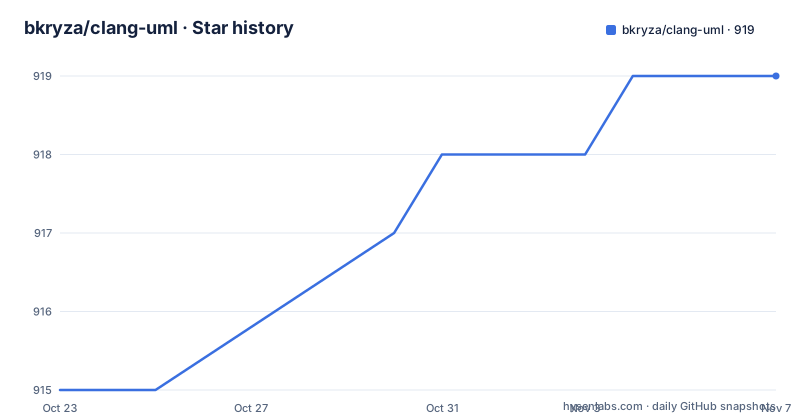
- bkryza/clang-uml919 ★ · +4
| Repository | 2026-10-23 | 2026-11-07 |
|---|---|---|
| bkryza/clang-uml | 915 | 919 |
4 Stars in the last 15 days, measured from the daily GitHub snapshot. Compare with other projects
Editorial analysis
The diagram comes from the compiler, not from a parser approximation
clang-uml is an automatic UML diagram generator for C++ based on Clang. The important word is based on. The tool drives the Clang front end, so what appears in a diagram is what the compiler understands: template instantiations, overload resolution, deduced contexts and inherited members are all resolved rather than guessed.
That is the difference from tools that scrape declarations out of source text, and it is the reason the feature list can include things like template specialisation based on deduced context and relationship inference from C++ containers and smart pointers. A parser that reads text sees a member variable of type std::shared_ptr<Foo>. A front end sees a relationship to Foo.
The cost of that accuracy is a hard input requirement. clang-uml requires an up-to-date compile_commands.json containing the list of commands used for compiling the source code, or alternatively a file called compile_flags.txt with a list of compilation flags. Both are standard Clang artefacts, and any build system that can emit them will do, with the project pointing at a gallery of ways to generate the JSON in its blog.
The stated purpose is to easily maintain up-to-date diagrams within a code base or to document legacy code, and the configuration file or files define the types and contents of each generated diagram.
Four diagram kinds and four output formats
Four kinds of diagram are generated, and the pairing between the diagram kind and the output format is not uniform, which matters when you pick a renderer.
The kinds are class diagrams, sequence diagrams, package diagrams and an include graph diagram that shows the include graph for selected files.
The formats are PlantUML, MermaidJS, GraphML and JSON. The JSON output is the interesting one for tooling, since it means the diagram can be post-processed by something else rather than being locked to one renderer. GraphML is the interchange format for graph tools, and PlantUML and MermaidJS are the two text-based renderers most people actually look at.
One gap is stated three times in the feature list. Optional package generation from namespaces is not supported in MermaidJS, and the same applies to package generation from subdirectories and from C++20 modules. So if your plan is Mermaid output with packages, that combination is out, and the project says so plainly rather than leaving you to discover it.
The class diagram content is described in detail, with members and their access scope, class inheritance, and other relationships including associations, aggregations, dependencies and friendship. There is also diagram content filtering based on namespaces, elements and relationships, which is how you keep a diagram readable when the code base is large.
Modern C++ features are first class, not afterthoughts
The feature list reads like a checklist of what a modern C++ compiler can express, and it is worth reading as a statement about what the tool understands.
There is explicit support for C++20 concept constraints and for C++20 coroutines, in both class and sequence diagrams, plus diagram content filtering based on C++20 modules and package generation from C++20 modules. Template instantiation relationships are covered, including template specialisation and instantiation based on deduced context, and handling of template code including constexpr conditionals appears in the sequence diagram section.
Two non-C++ languages are supported at the same level. There is support for plain C99 and C11 code, with structs, unions and their relationships, and there are Objective-C class diagrams, Objective-C sequence diagrams and Objective-C package diagrams based on subdirectories.
The remaining feature that shows how the tool thinks is the interactive links to online code or docs for classes, methods and class fields in SVG diagrams, with the same idea applied to sequence diagrams and packages. The generated file is not a dead image, it links back to the source. That is what makes the output usable in documentation that people actually read, rather than an artefact that goes stale the moment it is committed.
Sequence diagrams follow control flow, including the awkward parts
Sequence diagram generation starts from a specific method or function, which is the model that makes it usable: you point at the function you care about and get the calls it makes.
Within that, the list of supported constructs is where the engineering shows. There is generation of loop and conditional statements, of switch statements, and of try/catch blocks. Template code is handled including constexpr conditionals, and lambda expressions are handled as well, which are two of the constructs that most call graph tools flatten into something unreadable.
Two more extensions are worth noting. There is support for CUDA kernel and CUDA device function calls, which is the kind of feature that only appears when someone has actually needed it, and interactive links to online code for classes and call expressions, so a sequence diagram can be a navigation surface.
The relationship between this and the class diagram is worth understanding. The class diagram describes structure, and it is regenerated wholesale. The sequence diagram is scoped to one entry point, which means it is generated per function and therefore tends to be committed alongside the code it describes rather than in a separate documentation tree.
Packages can come from namespaces, directories or modules
Package diagrams have three sources, and the choice is a configuration decision rather than something the tool guesses.
A package diagram can be generated based on C++ namespaces, based on subdirectories, or based on C++20 modules. Each gives a different picture of the same code base. Namespaces are what C++ programmers say the architecture is, subdirectories are what the file layout says it is, and modules are the newer standard's answer. For a code base mid-migration between these conventions, generating all three is a reasonable way to see where they disagree.
The diagram also carries dependencies between packages based on symbols used in the code, so the edges are inferred from what the code actually references rather than from a declared architecture document. There are interactive links to online code for packages, and an Objective-C package diagram based on subdirectories.
The include graph diagram is the fourth kind and the simplest: show the include graph for selected files. It is not a UML diagram in the strict sense, it is a dependency view, and it is the one to reach for when the question is why a header takes a minute to compile.
All of this is driven from the YAML configuration, which defines the types and contents of each generated diagram, so the number and shape of the diagrams is a reviewable file in the repository rather than a set of command lines.
One command, one configuration file, and a required compilation database
The invocation is short. By default clang-uml assumes that the configuration file .clang-uml and the compilation database compile_commands.json are in the current directory, so if they are at the top level of a project you simply run the tool.
clang-umlThe output path for the diagrams, as well as an alternative location for the compilation database, can be specified in the .clang-uml configuration file or through command line parameters, and everything else is behind the help output.
clang-uml --helpThe project keeps its own .clang-uml file at the root of the repository, which is a nice detail, because it means the tool documents itself by using itself.
Installation instructions for Linux, macOS and Windows are in a separate file, docs/installation.md, and the full documentation is hosted at clang-uml.github.io, generated with Doxygen. The repository also holds the generated diagrams for the unit test cases in docs/test_cases.md, a separate clang-uml-examples repository, and a blog post by the author about generating UML diagrams from modern C++ with Clang.
The last push was on 2026-10-06 and the most recent release is 0.6.3 from 2026-07-06, after 0.6.2 in June 2025 and 0.6.1 in March 2025. The licence is Apache 2.0, in LICENSE.md.
Editorial conclusion
Adopt clang-uml when your documentation diagrams are maintained by hand and have drifted, when your build system can emit a compile_commands.json, and when you want diagrams that reflect the C++ standard you actually compile against. Do not adopt it if you need diagrams of code that does not compile, because the tool works from the compiler's own view of the translation unit, and check the feature gaps before committing, since package generation is not available in MermaidJS output. Before the first run, generate an up-to-date compile_commands.json for every configuration you care about, write a .clang-uml file that names the diagrams and their contents, and pin the LLVM version you build against, since the badge shows support for LLVM 12 through 23 and the tool binds to the Clang libraries of the version you choose.
Frequently asked questions
What does clang-uml need to generate diagrams?
It needs an up-to-date compile_commands.json containing the commands used to compile the source code, or alternatively a compile_flags.txt file with compilation flags. It then reads the .clang-uml configuration file from the current directory by default.
Which languages and C++ versions does clang-uml support?
It supports C++ up to version 20, plain C99 and C11, and Objective-C, with explicit support for C++20 concept constraints, coroutines and modules, plus CUDA kernel and device function calls in sequence diagrams.
Which output formats can clang-uml produce?
PlantUML, MermaidJS, GraphML and JSON. One limitation is stated in the feature list: package generation from namespaces, from subdirectories or from C++20 modules is not supported in MermaidJS output.
How do I run clang-uml on a project?
Place the .clang-uml configuration file and compile_commands.json in the directory you run from, then run clang-uml. The output path and an alternative location for the compilation database can be set in the configuration file or through command line parameters, and clang-uml --help lists the remaining options.
How is clang-uml built and which LLVM versions are supported?
The project is built with CMake, with a Makefile wrapper and a build.ps1 script for Windows, plus docker and Nix packaging directories. The version badge shows support for LLVM 12 through 23, and the Makefile exposes variables such as LLVM_VERSION, LLVM_CONFIG_PATH and a builder image for containerised builds.
Official sources
Add this badge to your README
If you maintain this project, the badge below links readers to this analysis and shows its maintenance status from the daily GitHub snapshot. Paste the markdown into your README; add ?metric=license or ?metric=stars to the image URL for a different field.

[](https://hysenlabs.com/projects/bkryza-clang-uml)Star history chart for your README
[](https://hysenlabs.com/projects/bkryza-clang-uml)Was this useful?