FastLLM: a C++ inference engine with no PyTorch underneath
fastllm is a dependency-free, high-performance LLM inference library. It supports tensor-parallel inference for dense models and hybrid-mode inference for MoE models, and can run full-scale DeepSeek on any GPU with 10GB+ VRAM. On dual 9004/9005 servers with a single GPU, the full-precision original DeepSeek model reaches 20 tps at single concurrency; the INT4 quantized model reaches 30 tps single-concurrency and 60+ tps with multiple concurrent requests.
At a glance
- What is it?
- An Apache licensed inference engine that reads Hugging Face weights directly, spreads dense and MoE layers across GPU, CPU, NUMA and disk, and serves OpenAI and Anthropic compatible endpoints.
- Who is it for?
- The case for FastLLM is narrow and clear: a machine with more host memory or SSD than VRAM, running a mixture of expert models where you need to choose precisely which layers live where. What the repository does not settle is how fast your specific model, hardware and quantization combination will run; the README says measured speed depends on them and points to `docs/benchmark.md`.
- Can I use it commercially?
- Yes. Apache-2.0 is a permissive licence: you can use, modify and sell software built on it, as long as you keep its copyright and licence notices.
- Is it still maintained?
- Yes. The repository received new commits within the last day.
- What is it written in?
- Mainly C++, according to GitHub's language statistics.
Answers come from the project's GitHub data, last synced on November 22, 2026, and from our analysis. They are not legal advice.
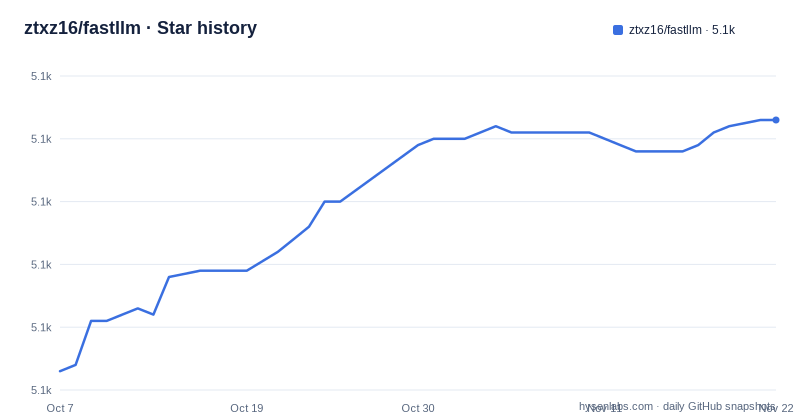
Star history
- ztxz16/fastllm5,133 ★ · +40
| Repository | 2026-10-07 | 2026-11-22 |
|---|---|---|
| ztxz16/fastllm | 5.1k | 5.1k |
40 Stars in the last 46 days, measured from the daily GitHub snapshot. Compare with other projects
Editorial analysis
No PyTorch between the weights and the GPU
The repository description makes a precise claim: a high-performance large model inference library with no backend dependency, supporting tensor-parallel inference for dense models and MoE inference for mixture models, capable of running a full DeepSeek on any GPU above 10 GB, and citing 20 tokens per second at single concurrency for a full precision DeepSeek on dual 9004 or 9005 servers, 30 for INT4, and 60 or more at higher concurrency.
Those numbers are the author's own claims and they are specific enough to be useful or to be wrong, and the README links `docs/benchmark.md`, noting that measured speed depends on hardware, requests and quantization format. The latest GitHub release is v1.9.0 from 2026-10-25.
The architectural claim is easier to verify and more interesting. The README states that the core runtime is implemented in C++ and does not depend on PyTorch, supports dense and MoE models, and offers CUDA, ROCm, CPU, NUMA and disk-hybrid inference plus multi-card tensor parallelism. GitHub reports the language as C++, the license as Apache-2.0, and the default branch as `master`. The tree backs the claim up: `main.cpp`, `src/`, `include/`, `CMakeLists.txt`, `third_party/` and `pyfastllm/`.
Layer placement is the feature, not a footnote
The README describes GPU/CPU/NUMA/disk hybrid inference for dense and MoE models plus multi-card deployment, and the repository description says it can run full-scale DeepSeek on any GPU with 10GB+ VRAM. The `--auto` option plans devices, memory, expert cache and context, and you can still override common parameters; the README notes that `--auto` currently applies to supported models on Linux NVIDIA CUDA, with manual deployment documented in `docs/deployment.md` for other platforms or unadapted models.
On formats, the README lists Safetensors, the FastLLM format, AWQ and adapted GGUF, with the exact scope given in the model guides. Settings for VRAM and memory budgets, expert cache, chunking, speculative decoding and fast prefill are covered in the `--auto` tuning guide at `docs/auto.md`.
One line deserves to be read twice: measured speed depends on hardware, requests and quantization format, and the README sends you to `docs/benchmark.md` for numbers.
Which models the current mainline covers
The README has dropped earlier models from the front page and now lists what the development mainline focuses on, in a table of deployment guides: Qwen4-Exp and Qwen3.8-Flash-Next; Qwen3.5, Qwen3.6 and Qwen3.8; DeepSeek-V4 and V4-Flash; DeepSeek-V4.1-Flash 1017; Clover-35B-A3B-Preview; Kimi-K3; GLM-5 and GLM-5.3-Flash; Dots3-Note and Laguna; HY-Nomas; LingBot World 2.0 1.3B; and MiniMax-H3 (T2VA).
Older model compatibility is explicitly not deleted but relocated: the README says it can still be looked up in the supported models list under `docs/models.md`, with the stable release log at `docs/version.md`. A reader evaluating this engine should go to that version log rather than assume the table is exhaustive, because for a project moving this quickly it is a moving target.
Five commands cover nearly everything
Installation on Linux or Windows with an NVIDIA GPU is a single pip line:
python -m pip install -U ftllmWindows with NVIDIA uses the same command, and the README gives a separate dependency wheel for the first install on Windows. Linux with an AMD GPU goes through the ROCm installation instructions in `docs/rocm.md`. CPU-only, unusual architectures and other accelerators build from source with CMake.
The README's examples use a small model, Qwen3-0.6B:
ftllm server Qwen/Qwen3-0.6B
ftllm run Qwen/Qwen3-0.6B
ftllm webui --api_base http://127.0.0.1:8080/v1
The API server listens on `0.0.0.0:8080` by default, the WebUI listens on `127.0.0.1:1616` and connects to a server you already started, and running `ftllm` on its own starts the browser deployment launcher. The terminal deployment wizard is `ftllm tui` and the benchmark tool is `ftllm bench`.
Serving OpenAI, Anthropic and everything above them
The API server is the part most teams will actually use, and it accepts a local path as readily as a repository ID:
ftllm server /path/to/model --autoA named local model with an API key looks like this:
ftllm server /path/to/model --auto --model_name local-model --api_key local-keyCalling it is a standard OpenAI Chat Completions request, which means existing clients and SDKs need no modification:
curl http://127.0.0.1:8080/v1/chat/completions \
  -H "Authorization: Bearer local-key" \
  -H "Content-Type: application/json" \
  -d '{
    "model": "local-model",
    "messages": [{"role": "user", "content": "你好,请介绍一下 FastLLM。"}],
    "stream": false
  }'
The server also provides the OpenAI Responses API and the Anthropic Messages API. Thinking, tool calling and multimodal capabilities depend on the model.
The launcher, the studio and a directory agent with real permissions
Running `ftllm` on its own starts the browser deployment launcher. The README describes it as a place to download models, save configurations and view logs, and to chat directly in the studio or use an Agent. The flow is to choose a model, let it configure automatically, then save and start; you expand "resource limits" or "model parameters" only when you need to adjust something and leave the rest to automatic planning.
Detailed steps are in `docs/launcher.md`, and Agent integration is documented in `docs/launcher-agents.md`.
Two repositories in one: the modern CLI and an older webui build
There is a genuine tension inside this repository that a reader should resolve before deploying. The README documents a current generation of entry points: `ftllm run`, `ftllm server`, `ftllm webui`, `ftllm tui`, `ftllm bench`, `ftllm deploy` and a bare `ftllm` for the browser launcher, with the server on 8080 and the WebUI on 1616. The `Dockerfile` and `docker-compose.yaml` in the tree belong to an earlier generation. They build a single binary and run it as the container's main command:
command: /fastllm/build/webui -p /models/chatglm2-6b-int8.flm -w ./example/webui/webwith port 8081 inside the container mapped to 11234, a model mounted from `./models/`, a CUDA 12.1 devel base image and a build step compiling for architectures 80, 86, 89 and 90. The README's current text also states the opposite architecture: the WebUI does not load a model in its own process and requires a running OpenAI compatible API Server first, which is a different design from a single binary doing both.
So there are two facts, and neither cancels the other. The pip package and the README describe a multi-process, OpenAI compatible design. The container files describe a self-contained webui binary from an earlier layout. The practical rule is to trust whichever path you actually installed: if you installed from PyPI, follow the README commands and use `ftllm server`; if you built the container, expect the compose file's port mapping and single command, and check `docs/` for whether that layout is still maintained.
GitHub reports the last push on 2026-11-02, 5130 stars, 505 forks and 360 open issues, and the repository is not archived. There is an `AGENTS.md`, a `ToolCall-SGLang-PLAN.md`, a `desktop/` directory and an `README_EN.md`, which together suggest a project actively reorganising its own tooling as much as its inference paths.
Editorial conclusion
The case for FastLLM is narrow and clear: a machine with more host memory or SSD than VRAM, running a mixture of expert models where you need to choose precisely which layers live where. What the repository does not settle is how fast your specific model, hardware and quantization combination will run; the README says measured speed depends on them and points to `docs/benchmark.md`. Install into a clean virtual environment, smoke test with the small Qwen model the README uses, and read the deployment guide for your model in `docs/` before committing a production configuration.
Frequently asked questions
Does FastLLM require PyTorch?
No. The README states the core runtime is implemented in C++ and does not depend on PyTorch, and GitHub lists the repository language as C++.
Which models does FastLLM support?
The README's deployment guides cover Qwen4-Exp and Qwen3.8-Flash-Next, Qwen3.5, 3.6 and 3.8, DeepSeek-V4, V4-Flash and V4.1-Flash 1017, Clover-35B-A3B-Preview, Kimi-K3, GLM-5 and GLM-5.3-Flash, Dots3-Note, Laguna, HY-Nomas, LingBot World 2.0 1.3B and MiniMax-H3. Earlier models are listed in the supported models file under docs.
Can FastLLM run a model that does not fit in VRAM?
That is the design centre of the project. The README describes GPU/CPU/NUMA/disk hybrid inference for dense and MoE models, and the repository description says it can run full-scale DeepSeek on any GPU with 10GB+ VRAM.
What API does the FastLLM server expose?
It exposes OpenAI Chat Completions, the OpenAI Responses API and Anthropic Messages, so existing clients work without changes. Thinking, tool calling and multimodal capabilities depend on the model.
How do I install FastLLM?
On Linux or Windows with an NVIDIA GPU, use python -m pip install -U ftllm. On Windows the README gives a separate dependency wheel for the first install. AMD GPUs follow the ROCm build instructions, and CPU-only or other architectures build from source with CMake.
Is the directory agent in the launcher safe to enable?
The README says the browser launcher lets you chat in the studio or use an Agent, and documents Agent integration in docs/launcher-agents.md; read that guide before enabling it.
Official sources
Add this badge to your README
If you maintain this project, the badge below links readers to this analysis and shows its maintenance status from the daily GitHub snapshot. Paste the markdown into your README; add ?metric=license or ?metric=stars to the image URL for a different field.

[](https://hysenlabs.com/projects/ztxz16-fastllm)Star history chart for your README
[](https://hysenlabs.com/projects/ztxz16-fastllm)Was this useful?