NSPanel_HA_Blueprint replaces Nextion firmware work with a Blueprint import
This allows you to configure your complete NSPanel via Blueprint with UI and without changing anything in the code
At a glance
- What is it?
- Blackymas/NSPanel_HA_Blueprint rebuilds the Sonoff NSPanel user interface as an ESPHome project plus a Home Assistant Blueprint, so the display is configured from a UI instead of edited as Nextion code. The result is a four page panel with 32 buttons and full local control, at the cost of a large generated YAML file and an unknown licence.
- Who is it for?
- Home Assistant users with a Sonoff NSPanel who want a finished interface without writing Nextion code should import nspanel_blueprint.yaml and then adapt the generated ESPHome configuration, which is the workflow the project is built around. Users who want to ship this in a product should review the missing licence terms first.
- Can I use it commercially?
- Not without permission. GitHub finds no licence file in the repository, and without a licence all rights are reserved by default: you may read the code but not reuse it. Check the README, or ask the authors, before using it.
- Is it still maintained?
- Yes. The repository last received commits 126 days ago.
- What is it written in?
- Mainly C++, according to GitHub's language statistics.
Answers come from the project's GitHub data, last synced on November 6, 2026, and from our analysis. They are not legal advice.
Star history
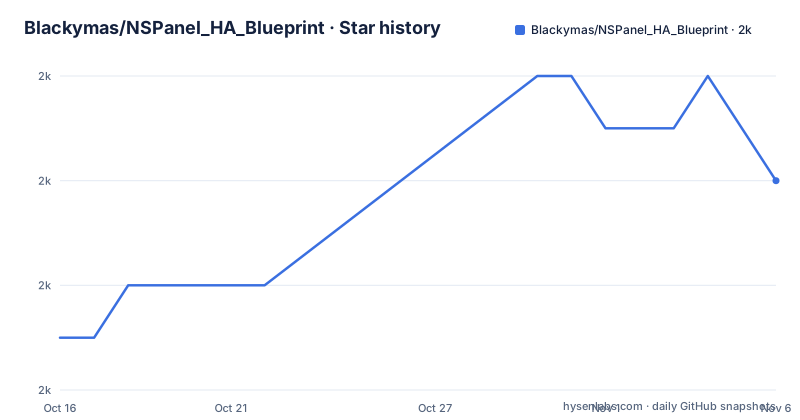
- Blackymas/NSPanel_HA_Blueprint1,962 ★ · +3
| Repository | 2026-10-16 | 2026-11-06 |
|---|---|---|
| Blackymas/NSPanel_HA_Blueprint | 2k | 2k |
3 Stars in the last 21 days, measured from the daily GitHub snapshot. Compare with other projects
Editorial analysis
What the Blueprint actually replaces
This project removes that step. Its stated goal is code-free customization, achieved through an ESPHome project driven by a Home Assistant Blueprint.
Two files carry most of the weight, and both sit at the repository root. `nspanel_blueprint.yaml` is the Home Assistant side, the thing you import into your instance through the blueprint import dialog. `nspanel_esphome.yaml` is the firmware side, the ESPHome configuration flashed to the panel. Alongside them sit three add-on files for climate control: `nspanel_esphome_addon_climate_cool.yaml`, `nspanel_esphome_addon_climate_dual.yaml` and `nspanel_esphome_addon_climate_heat.yaml`, corresponding to the documentation page on relay control for floor heating.
The directory layout makes the same split visible. `esphome/` holds the firmware sources, `hmi/` holds the interface, `components/` holds custom ESPHome components, `prebuilt/` holds prepared builds, `docs/` holds the setup guide and the images used in the README, and there are working directories for development and tests in `.dev/` and `.test/`.
The ESP-IDF switch and what it costs existing users
The most consequential line in the README is a framework notice. As of v4.3.22, the project uses the ESP-IDF framework only. New users need no action because the project defaults to ESP-IDF automatically. Existing users who configured the Arduino framework are pointed to a migration guide anchored at the frameworks section of `docs/customization.md`.
The topic tags name the stack the project is built on: blueprint, esphome, home-assistant, homeassistant, nextion, nextion-display, nspanel, nspanel-pro, nspanelpro and sonoff. That is an accurate description of the dependency surface, and it also tells you what breaks if ESPHome changes how blueprints are imported.
Four button pages, eight slots each, and what fills a button
The interface is organised as a small fixed set of pages with a fixed capacity. The Buttons Pages section is explicit: up to 8 buttons per page, across 4 different pages, totalling 32 buttons. The Entities Pages mirror that structure, up to 8 entities per page across 4 pages, also 32.
What makes a button useful is that its appearance is derived from the entity you assign rather than drawn by hand. Button design is generated automatically based on the selected entity, icons and labels are either set in the Blueprint or detected per entity, and values can be aligned as you prefer. Buttons also carry state inside themselves: current brightness for lights and cover position for covers are shown on the button, and a blue line on the home page indicates whether the entity is `on` or `off`.
The long press is the main interaction pattern. Long press on a light opens the light settings page with brightness slider, RGB colour wheel and colour temperature slider; long press on a cover opens open, close and position controls plus the battery value when available; long press on a climate entity opens the thermostat page. Automatic detection covers light, cover, fan, media player, alarm and climate entities, and the submenu is chosen for you. Navigation is by swipe between pages, with swipe up and down for quick access to specific pages.
Local control depends on which hardware your panel has
The project advertises full local control with no cloud dependency, and the mechanism is spelled out in the climate documentation. The thermostat page can be used for local control, even when Wi-Fi is unavailable, when your panel's relays are used to control your cooler or heater. That is a hardware-dependent claim: the Sonoff NSPanel has two physical relays behind its two switches, and if you are driving a floor heating circuit or a cooler through them, the control path never leaves the panel.
So local control is a per installation decision, not a property of the Blueprint.
The home page exposes the physical switches for free assignment with an optional label, and the two switches have an optional fallback mode. The top menu carries 10 icons for specific states. The settings page covers display brightness, display dim brightness, sleep mode and a reboot control for the panel itself.
Also on the home page: current weather with a button through to the forecast page, outside temperature, room temperature, room humidity, and up to 3 user selectable entities. The forecast page shows 5 days by swipe with minimum and maximum outside temperatures and the date, and the README says it supports most used weather integrations.
Release naming tracks Home Assistant versions, not the panel
The release list explains the versioning scheme. v2026030 is titled as a fix for the colour temperature service call for Home Assistant 2026.3.0 compatibility, and v2026031 bundles a light temperature fix, timezone removal and CI updates. Both land in March 2026, on 2026-03-04 and 2026-03-16. The numbers track the Home Assistant release they target.
That is useful information for an adopter. When Home Assistant moves, this project has to move with it, and the changelog is where you find out whether a release you depend on still works against your version. The README does not state a supported range of Home Assistant versions, so you have to read the release titles.
There is also a stray artifact in the release list: a `latest` entry tagged v1.0.1 Blueprint dated 2022-10-04, alongside the 2026 tags. Treat tag dates as unreliable and read the release notes.
The last push to the repository was on 2026-07-04, and the repository is not archived. Upcoming work is tracked in GitHub milestones sorted by due date.
One administrative detail stands out: the repository declares no licence. The README's contribution sections describe donation requests and community support but no licence grant, and the top level listing has no LICENSE file. That is a real constraint for anyone who intends to redistribute or derive from it.
Where this is the wrong choice
The clearest case against is a Nextion user who wants to keep their existing screen. This project is a replacement, not an enhancement. Importing the Blueprint means adopting a different firmware stack with a different toolchain, and the interface you get is the one the maintainers designed, with a fixed page budget of 8 slots per page.
The page budget is a genuine limit rather than a preference. Thirty two buttons is enough for a hallway panel and not enough for a workshop. When you run out, there is no documented way to add a fifth page; the feature list says more buttons are also possible without saying how.
The design is also not meant to be hand-tuned in a text editor. The README points at Adobe Express, including a free design template, as the route for changing the look, which tells you the interface is treated as a graphic asset rather than as layout code. Anyone who wants pixel control over the HMI will find that workflow slower than Nextion's.
Finally, the alarm page supports arming and disarming with a numeric pin. That is a security control running on a device whose security properties the repository does not discuss, and the pin is configured through the same Blueprint as everything else. Treat it as a convenience control rather than as a security boundary.
Editorial conclusion
Home Assistant users with a Sonoff NSPanel who want a finished interface without writing Nextion code should import nspanel_blueprint.yaml and then adapt the generated ESPHome configuration, which is the workflow the project is built around. Users who want to ship this in a product should review the missing licence terms first. Before adopting, check whether your panel already runs ESPHome, since existing Arduino framework users are pointed to a migration guide, and read the milestone list to see which Home Assistant versions the recent service-call fixes target.
Frequently asked questions
Does NSPanel_HA_Blueprint need Nextion code editing?
No. The project rebuilds the panel as an ESPHome project with a Home Assistant Blueprint, so configuration happens through the blueprint import UI rather than in the Nextion IDE.
Which framework does NSPanel_HA_Blueprint use now?
ESP-IDF only, as of v4.3.22. New users get ESP-IDF by default, and users who previously configured Arduino are directed to the migration guide in the frameworks section of docs/customization.md.
How many buttons can the NSPanel blueprint show?
Up to 8 buttons per page across 4 pages, which is 32 buttons. The Entities pages use the same layout, 8 entities on each of 4 pages.
Can the thermostat work without Wi-Fi?
Yes, when your panel's relays are used to control the cooler or heater. The README states the thermostat page can then be used for local control even when Wi-Fi is unavailable.
What licence does NSPanel_HA_Blueprint use?
The repository declares no licence, and there is no licence file at the top level of the tree. Users planning to redistribute or build on it should seek appropriate legal guidance.
Official sources
Add this badge to your README
If you maintain this project, the badge below links readers to this analysis and shows its maintenance status from the daily GitHub snapshot. Paste the markdown into your README; add ?metric=license or ?metric=stars to the image URL for a different field.

[](https://hysenlabs.com/projects/blackymas-nspanel-ha-blueprint)Star history chart for your README
[](https://hysenlabs.com/projects/blackymas-nspanel-ha-blueprint)Was this useful?