blendi-remade/sprite-sheet-creator: one image model call per animation, sliders for the seams
Create your own playable 2D characters and maps, powered by fal.ai
At a glance
- What is it?
- This Next.js app generates 2D pixel art characters, sprite sheets, parallax backgrounds and isometric maps through image models hosted on fal.ai, then hands you sliders to correct the alignment that separate generations cannot guarantee. It is a good pipeline for a prototype and a poor substitute for an artist, and the repository itself says so by being a private 0.1.0 package with no licence file.
- Who is it for?
- Use this app when the goal is a playable prototype this week rather than art for a shipped game, because its value is turning one image model call into a walk, jump, attack and idle set plus three parallax layers, which is work that would otherwise be a dozen manual generations and a lot of pixel editing. Do not adopt it as a production art pipeline, and the reasons are visible in the repository rather than inferred.
- Can I use it commercially?
- Not without permission. GitHub finds no licence file in the repository, and without a licence all rights are reserved by default: you may read the code but not reuse it. Check the README, or ask the authors, before using it.
- Is it still maintained?
- Yes. The repository last received commits 129 days ago.
- What is it written in?
- Mainly TypeScript, according to GitHub's language statistics.
Answers come from the project's GitHub data, last synced on November 7, 2026, and from our analysis. They are not legal advice.
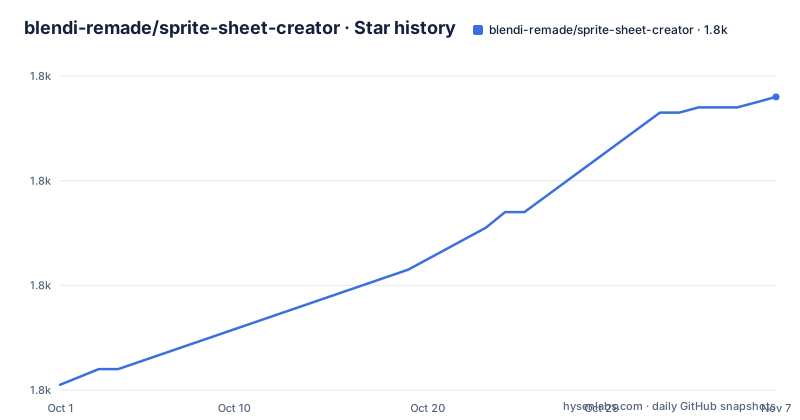
Star history
- blendi-remade/sprite-sheet-creator1,816 ★ · +55
| Repository | 2026-10-01 | 2026-11-07 |
|---|---|---|
| blendi-remade/sprite-sheet-creator | 1.8k | 1.8k |
55 Stars in the last 37 days, measured from the daily GitHub snapshot. Compare with other projects
Editorial analysis
What the flow produces: 2x2 sprite sheets, three parallax layers, one map
The output format is the first decision and it is fixed. Sprite sheets are rendered as two by two grids per animation, so each animation is a single image containing four frames, and the README states that character identity is kept consistent across those frames. That consistency claim is the hard part of the whole problem, since generating four frames as four separate images produces four different characters, and generating them in one call is what makes a walk cycle possible at all. The side-scroller mode produces walk, jump, attack and idle sheets, plus an optional three layer parallax background. The isometric mode is a different shape of output: walk sheets for three directions, down, up and side, matching attack sheets for the same three directions, an idle sheet, and a full top down world map to explore. So the two modes are not the same feature with a different camera angle; one is a platformer character and a scrolling scene, the other is a tile oriented character and a map, and the isometric mode roughly triples the number of directional sheets you have to generate. Character generation accepts either a text prompt or an uploaded image that is converted into pixel art, which is the path for turning an existing drawing or a photograph into a starting point.
Every layer is generated alone, which is why the sliders exist
This is the structural fact that explains most of the editing features. The three parallax layers, sky, midground and foreground, are separate generations. The isometric map is a separate generation from the character. Each of the three isometric directions is a separate sheet. Nothing is generated in one pass that could not be aligned in the same pass, and the alignment is therefore not guaranteed, and the app responds with a set of controls that are really a repair kit. There are layer position sliders for side-scroller backgrounds, described as a way to nudge each layer vertically when alignment is slightly off. There is a map size slider for the isometric map, so the world can be rescaled relative to the character rather than the character being rescaled to fit a map that was drawn at a different scale. There are per sprite size sliders in the sandbox to correct scale without regenerating. And there is per layer regeneration, so one of the three parallax layers can be retried without redoing the others, which is as much a cost control as a convenience. The last two are worth reading together. Correcting size with a slider instead of a regeneration is a cost decision, and so is retrying one layer instead of three. Read the other way, the app is honest that generation is per layer and alignment is manual, and the sliders are the admission price.
Three image models with paired endpoints, and a fourth vendor for cutouts
Image generation is delegated entirely, and the choice of model is made once at the top of the first step and then applies to every generation in the flow, which is the right place for it if you want a coherent set rather than a mixture. Three models are offered, and each is listed with two endpoints, a base one and an edit one: Nano Banana Pro under the fal-ai prefix with a matching edit path, Nano Banana Lite under a google prefix with its own edit path, and GPT Image 2 under an openai prefix with its edit path. The pairing lines up with the two ways you can start, a text prompt or an uploaded image, since converting an existing image into pixel art is an edit rather than a generation, so one model choice covers both entry points. On top of the image models there is a fourth dependency from a different vendor entirely. Background removal is handled by Bria, and it is applied to sprite sheets and to the parallax midground and foreground layers. Notice which layer is absent from that list. The sky is not cut out, which fits, since a sky has no subject to remove and is meant to fill the frame, and the other two are the layers that have a character in front of them. It does mean an extra vendor relationship, with its own failure modes, sitting between the app and the model you chose.
Getting it running: npm install, an API key in .env.local, port 3000
There is no published package and nothing to install from a registry, so getting started means running it locally. The two commands are in the manifest, a dev script that starts the development server and a build script alongside it:
npm install
npm run dev
The one piece of configuration is a fal.ai key, and the README asks you to create a file named .env.local holding it, which is the file Next.js reads on the server rather than bundling into the browser, so the key stays out of client code:
FAL_KEY=your_api_key_hereThe key comes from the dashboard page the README links, and the repository ships an example file rather than the real one, so the convention is right even though the README describes creating the file by hand instead of copying the example. With the key in place the development server starts and the app is on port 3000, which the README states as a URL to open. The manifest adds a few details worth knowing. Dependencies are Next 14 with React 18, the official fal.ai client, and a WebGL renderer for 2D, while the tech stack section of the README lists HTML Canvas instead, which is a discrepancy worth resolving before you assume which one the sandboxes use. There is a lock file and no other package manager, so the project is npm only, and the TypeScript configuration, the ESLint setup and the Next config are all present, with no formatter configured.
The sandboxes, the keyboard schemes, and what a preview can settle
The preview surfaces are the part that turns generated images into a decision. The animation preview sits at the last step and takes an adjustable frames per second value, so you can slow an attack down or speed a walk up without regenerating a frame. Two sandboxes then let you move the character against the generated art. The side-scroller sandbox uses the letter keys or the arrow keys to walk left and right, W or the up arrow to jump, and J to attack, with Space stopping in the preview. The isometric sandbox maps the same four directions to up, down, left and right, again with J for attack. That is the real test of a generated set, and it is the step most people skip. A walk cycle where the character drifts, a jump where the arc does not clear the foreground layer, or an attack that plays against a sprite facing the wrong way are all invisible in a still image and obvious in motion. The isometric case has an additional failure that the map size slider exists to address, since the character and the world are drawn independently and their sense of scale has to be reconciled by hand. What the preview cannot settle is frame quality, alignment inside the two by two grid, and whether a layer edge will show once the scene scrolls, which is why the frame extraction step with adjustable grid dividers is there for the first and manual editing is still needed for the rest.
A private 0.1.0 package, no licence, no tests, and no releases
The repository is small and its shape tells you what stage it is at. The manifest declares the package private at version 0.1.0, which means it was never intended for a registry, and the project publishes no GitHub releases, so distribution is by cloning. The version number is the honest summary of the codebase rather than a marketing one. Licensing is the item to settle before you build anything on it, because no licence is identified for the repository and the top-level file list contains a gitignore, a README, an example environment file and the build configuration, with no licence file among them. Without one there is no grant to rely on, whatever the repository is public, so treat the code as read only unless the author says otherwise in writing. Engineering signals are mixed in a way worth naming. There is TypeScript, there is ESLint with the Next configuration, and the dependency versions are current rather than abandoned. There is also no test script, no test directory and no workflow directory, so nothing in the repository checks that a change to the generation flow still produces frames that line up. The last push was on 2026-07-01, which is recent enough that the code is not abandoned and old enough that the flow described in the README may have moved on, and for a project whose output depends on third party image models, that gap is a question about behaviour as much as about code.
Editorial conclusion
Use this app when the goal is a playable prototype this week rather than art for a shipped game, because its value is turning one image model call into a walk, jump, attack and idle set plus three parallax layers, which is work that would otherwise be a dozen manual generations and a lot of pixel editing. Do not adopt it as a production art pipeline, and the reasons are visible in the repository rather than inferred. There is no licence file, so no grant text applies to the code, the package is marked private with no published releases, and there is no test script and no workflow directory, so nothing verifies that a change to the flow still produces aligned output. The two capabilities to check before anything else are the fixed 2 by 2 grid, which gives four frames per animation with no documented way to ask for more, and the cost of the flow, since each layer, each direction and each retry is a separate billable call, which is why the per layer regeneration and the per sprite size sliders exist at all.
Frequently asked questions
How do I run the sprite sheet creator locally?
Clone the repository, run npm install and npm run dev, and open port 3000. The one configuration step is creating a .env.local file containing your fal.ai key as FAL_KEY, taken from the fal.ai dashboard, which Next.js reads on the server so it is not bundled into the browser.
How many frames does one generated sprite sheet contain?
Four. Sprite sheets are rendered as two by two grids per animation, so a walk, jump, attack or idle sheet is a single image holding four frames. The grid size is not described as configurable; what is adjustable is the frame extraction divider used to re-slice a sheet afterwards.
Which image models can I choose from?
Three, selected once at the top of the first step and then used for every generation in the flow: Nano Banana Pro, Nano Banana Lite and GPT Image 2. Each is listed with a base endpoint and an edit endpoint, which covers both starting from a text prompt and starting from an uploaded image. Background removal is handled separately by Bria.
Why do the parallax layers and the isometric map need sliders?
Because each layer and the map are separate generations, so their alignment is not guaranteed. The app responds with layer position sliders to nudge layers vertically, a map size slider to rescale the world relative to the character, per sprite size sliders to correct scale without regenerating, and per layer regeneration to retry one layer without redoing the others.
Can I use this code in my own project?
That is not something the repository settles. No licence is identified for it and there is no licence file at the top level, so there is no grant text to rely on. The manifest also marks the package private at version 0.1.0 and the project publishes no releases.
Official sources
Add this badge to your README
If you maintain this project, the badge below links readers to this analysis and shows its maintenance status from the daily GitHub snapshot. Paste the markdown into your README; add ?metric=license or ?metric=stars to the image URL for a different field.

[](https://hysenlabs.com/projects/blendi-remade-sprite-sheet-creator)Star history chart for your README
[](https://hysenlabs.com/projects/blendi-remade-sprite-sheet-creator)Was this useful?