blueman: a GTK Bluetooth manager built on the BlueZ API
Blueman is a GTK+ Bluetooth Manager
At a glance
- What is it?
- Blueman is a Python and GTK+ application that wraps the BlueZ API so that pairing, audio devices, input devices, OBEX transfers and Bluetooth network connections can be handled from a desktop. It ships with both autotools and meson build systems, and its last tagged release is 2.4.6 from 2025-07-01 while the repository itself keeps moving.
- Who is it for?
- Adopt blueman if you are on a BlueZ Linux desktop and want a graphical way to pair devices, manage audio and input devices, send files over OBEX and set up Bluetooth network connections without learning the stack's command line. Do not adopt it for a headless server, for a non-Linux or non-BlueZ platform, or if your requirement is scripting rather than clicking, because the same API it wraps can be driven directly.
- Can I use it commercially?
- Yes, with conditions. GPL-3.0 is a copyleft licence: if you distribute software that includes it, you must release that software's source code under the same licence. Running it internally without distributing it does not trigger that obligation.
- Is it still maintained?
- Yes. The repository last received commits 2 days ago.
- What is it written in?
- Mainly Python, according to GitHub's language statistics.
Answers come from the project's GitHub data, last synced on October 23, 2026, and from our analysis. They are not legal advice.
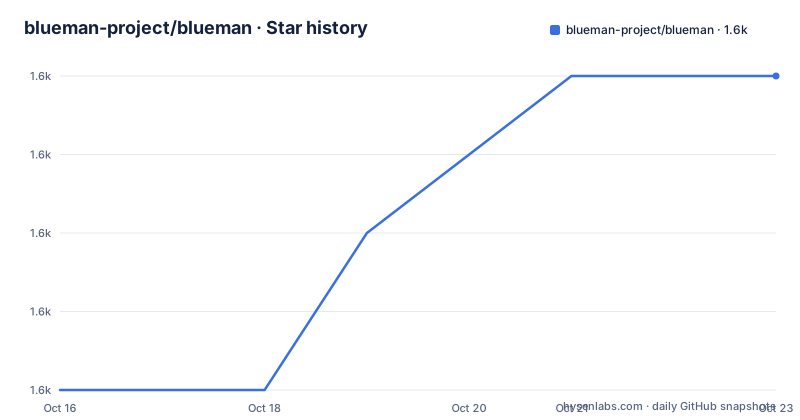
Star history
- blueman-project/blueman1,583 ★ · +4
| Repository | 2026-10-16 | 2026-10-23 |
|---|---|---|
| blueman-project/blueman | 1.6k | 1.6k |
4 Stars in the last 7 days, measured from the daily GitHub snapshot. Compare with other projects
Editorial analysis
A desktop front end for the BlueZ stack
Blueman is described in one line as a GTK+ Bluetooth Manager, and its purpose is stated plainly: to provide a simple yet effective means for controlling the BlueZ API and simplifying Bluetooth tasks.
The list of tasks in the README is the feature set, and it is a practical one. Connecting to dial-up networks, connecting to or creating Bluetooth networks, connecting to input devices, connecting to audio devices, sending and receiving files via OBEX, and pairing. Each of those is something the Bluetooth specification supports and something a generic settings panel handles poorly, because the settings panel in a desktop is a one size fits all surface while a dedicated manager can present a device list and act on the selected item.
The implementation choices are stated too: it is lightweight, easy to use, Python based, and GPL licensed. The Python part is what shapes the rest of the repository, since the core lives in a blueman/ package with a module/ directory holding the BlueZ facing code and an apps/ directory holding the graphical entry points.
The audience is a Linux desktop user on a distribution that runs BlueZ, and specifically a user who finds the stock panel too limited. Blueman is not a Bluetooth stack and does not replace the kernel level drivers, it is a way to drive the stack that is already there.
Two build systems live in the same tree
The repository layout shows two parallel build systems, which is unusual and worth understanding before you build anything.
The autotools path is the older one and is complete: configure.ac, acinclude.m4, Makefile.am, autogen.sh and a make_release.sh script. The meson path is present as well, with meson.build and meson_options.txt at the root. Both describe the same project.
That means a packager has a choice, and the choice is not neutral. The autotools route needs a configure script, which is either shipped in a release tarball or generated with autogen.sh, and the meson route configures a build directory directly. For a distribution that already has a packaging recipe for one of them, using the other means writing that recipe yourself.
Alongside the build files the tree carries the pieces a real application needs: a data/ directory for icons and desktop files, po/ for translations, a stubs/ directory, a test/ directory, a .flake8 configuration for the Python code, a .sonarcloud.properties file for static analysis, a CHANGELOG.md and a FAQ file.
Installing a packaged release with configure and make
The README gives two installation routes, and it is the second that catches people out.
For a packaged release, meaning a source tarball that already contains a configure script, the sequence is the familiar one:
./configure && make && make installFor a checkout of the repository, there is no configure script until you generate one:
./autogen.shThe README also says to see Dependencies.md for the list of build and runtime dependencies, which is a separate file at the repository root rather than a section of the README. That separation is convenient, because the dependency set for a desktop Bluetooth manager is long and changes with the BlueZ version in the distribution.
For a quick orientation, the Repology badge in the README points at the packaging status of blueman across distributions, which tells you which distributions already carry it and therefore which packaging recipe is the one you are most likely to be able to reuse.
The GSettings schemas step that packagers must not skip
There is one instruction in the README that is easy to skim past and expensive to get wrong. It is aimed at packagers: if you are packaging blueman for your distribution, pass --disable-schemas-compile and run the schema compiler as part of your install and uninstall phase.
glib-compile-schemas /datadir/glib-2.0/schemasThe reason for the split is the two phase installation that GLib settings require. GSettings schemas are XML files that must be compiled into a binary cache before they can be used, and that compilation has to happen after the files are in their final location. A build system that compiles schemas at build time compiles them against the source tree, which is not where the application will look for them at run time, so the compiled output has to be regenerated in the install phase and removed again on uninstall.
The --disable-schemas-compile flag exists to stop the build doing the wrong thing. Without it, a distribution package can end up with either no compiled schema, in which case the application falls back to default values and quietly ignores the user's preferences, or a stale compiled schema left behind after removal, in which case the uninstall leaves rubbish in the schema directory.
This is the kind of detail that separates a package that works from a package that installs and then behaves oddly, and it is the reason the README puts it in bold.
How the code is laid out around BlueZ
The directory structure shows the separation between the parts that talk to BlueZ and the parts that present them.
The blueman/ directory holds the application package, module/ holds the BlueZ facing code, apps/ holds the graphical programs, and sendto/ holds the file transfer integration, which is the piece that connects the OBEX sending and receiving listed among the supported tasks to the desktop's send-to mechanism rather than confining it to the application window. There is also a stubs/ directory, which is the convention for type stubs so that editors and type checkers can see the shape of the BlueZ bindings without the real library present.
The interface to the stack is a D-Bus API, because that is how BlueZ itself exposes control to other processes. Everything the user can do in the interface is therefore a call into a service on the system bus, and the Python code in module/ is a wrapper over that surface.
That design is what makes the alternative worth considering. If your need is a script that turns a headset on, or a provisioning script for a kiosk, you do not need a window manager style application at all. You need a client for the same API, and the shape of the problem is a script rather than a GUI.
Releases lag the commits
Two dates describe the maintenance state, and they point in different directions.
The repository is not archived and the last push was on 2026-10-12, so work is landing. The published releases are 2.4.4 from 2025-02-03, 2.4.5 from 2025-07-01 at 11:37 UTC and 2.4.6 from 2025-07-01 at 19:20 UTC, two patch releases on the same day. A CHANGELOG.md at the root records the history between those tags, and the make_release.sh script in the tree is the release automation.
So the code you build from a checkout is newer than the code in the last tag, by more than a year of commits. For most users this is invisible, because distributions package their own builds from a chosen tag or from their own branch. For anyone considering whether the project is still alive, the answer is that the commits are recent and the release tags are not, and the CHANGELOG is where the gap between them is recorded.
On licensing, the licence field in the repository's own metadata records GPL-3.0 and the README puts it more precisely: all parts of the software are licensed under GPLv3 or GPLv2, and allow redistribution under any later version. In practice the copyleft terms apply to the application code, and the dependencies listed in Dependencies.md carry their own licences, which is a separate check for a distribution that has to ship the whole stack.
Driving BlueZ directly as the alternative
The real alternative to Blueman is not another Bluetooth manager, it is the BlueZ API itself, used without a graphical layer.
The difference in approach is direct. Blueman discovers devices, presents them, translates a click into a method call on the system bus, and handles the desktop integration such as the send-to hook for OBEX transfers. A script talks to the same service and does one thing, so there is no interface to build, no user session required and no window to draw. For automation, provisioning, or a headless machine with a Bluetooth radio, that is a smaller and more predictable system.
What you give up is everything the interface contributes: browsing nearby devices, pairing through a dialog, remembering a device, and the file transfer integration that the sendto/ directory provides.
The choice is therefore about the shape of the job. A person at a desktop, or a technician pairing several devices in a room, gets more from a graphical manager. A scheduled task that toggles one device gets more from a script, and adding the application in between is overhead.
The README describes a lightweight Python application on top of an existing stack, points debugging questions at a troubleshooting wiki page for environment details, and leaves the dependency list in a separate file. That is the profile of a component you either adopt as a whole for your users, or bypass.
Editorial conclusion
Adopt blueman if you are on a BlueZ Linux desktop and want a graphical way to pair devices, manage audio and input devices, send files over OBEX and set up Bluetooth network connections without learning the stack's command line. Do not adopt it for a headless server, for a non-Linux or non-BlueZ platform, or if your requirement is scripting rather than clicking, because the same API it wraps can be driven directly. Verify first that the dependencies listed in Dependencies.md are present, that your distribution's BlueZ version exposes the interfaces Blueman expects, and that you build from the meson or autotools path that your distribution packaging already uses.
Frequently asked questions
How do I install blueman from source?
For a packaged release, run ./configure && make && make install. For a repository checkout, run ./autogen.sh first to generate and run the configure script. The list of build and runtime dependencies is kept in Dependencies.md at the root of the repository.
Why do I need to compile GSettings schemas when packaging blueman?
The README asks packagers to pass --disable-schemas-compile and to run glib-compile-schemas /datadir/glib-2.0/schemas as part of the install and uninstall phase, because the schemas have to be compiled after they are in their final location rather than at build time.
What can blueman actually do with Bluetooth devices?
The README lists connecting to dial-up networks, connecting to or creating Bluetooth networks, connecting to input devices, connecting to audio devices, sending and receiving files via OBEX, and pairing.
Is blueman still being worked on?
The repository is not archived and the last push was on 2026-10-12. The published releases are 2.4.4 from 2025-02-03 and 2.4.5 and 2.4.6, both from 2025-07-01, and the CHANGELOG.md at the root records what changed between tags.
Official sources
Add this badge to your README
If you maintain this project, the badge below links readers to this analysis and shows its maintenance status from the daily GitHub snapshot. Paste the markdown into your README; add ?metric=license or ?metric=stars to the image URL for a different field.

[](https://hysenlabs.com/projects/blueman-project-blueman)Star history chart for your README
[](https://hysenlabs.com/projects/blueman-project-blueman)Was this useful?