LeetCUDA Deep Analysis: Reading the Benchmark Claims Behind the Kernels
Open sources book with Modern CUDA Learn Notes for Beginners, includes FP16/BF16, FP8, HGEMM, FlashAttention, CuTe, etc.
At a glance
- What is it?
- LeetCUDA is an open-source book of CUDA learning notes bundled with 200 plus kernels, HGEMM and FlashAttention implementations, and published benchmark tables. This walkthrough checks what the numbers actually measure, what the quick start does to your machine to produce them, and where the results stop applying.
- Who is it for?
- LeetCUDA earns a place on the desk of someone learning CUDA kernel engineering from the inside, since it pairs a 600 page text with working code across graded difficulty tiers (Easy through Hard++) and a Triton and CUTLASS section.
- Can I use it commercially?
- Yes, with conditions. GPL-3.0 is a copyleft licence: if you distribute software that includes it, you must release that software's source code under the same licence. Running it internally without distributing it does not trigger that obligation.
- Is it still maintained?
- Yes. The repository last received commits 1 day ago.
- What is it written in?
- Mainly Cuda, according to GitHub's language statistics.
Answers come from the project's GitHub data, last synced on November 13, 2026, and from our analysis. They are not legal advice.
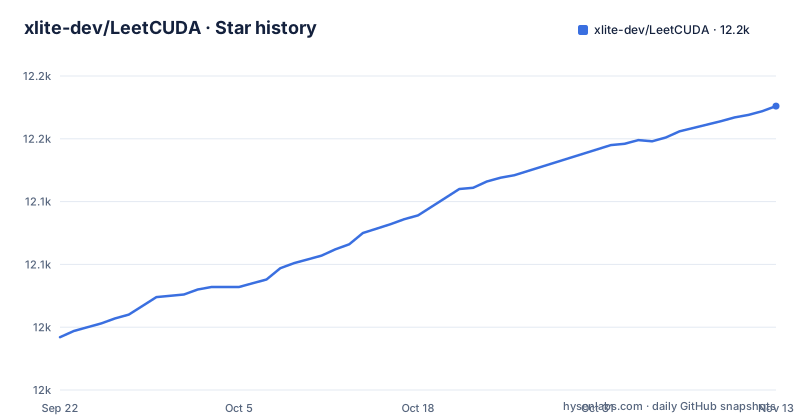
Star history
- xlite-dev/LeetCUDA12,176 ★ · +184
| Repository | 2026-09-22 | 2026-11-13 |
|---|---|---|
| xlite-dev/LeetCUDA | 12k | 12.2k |
184 Stars in the last 52 days, measured from the daily GitHub snapshot. Compare with other projects
Editorial analysis
The quick start removes the system cuBLAS and cuDNN before benchmarking
Getting the reference numbers requires changing what is already installed. After the clone and the recursive submodule update, the next block deletes packages and puts new ones back:
# Install the latest cuBLAS & cuDNN for bench (remove the old version)
apt remove -y libcublas-cuda-13 libcudnn9-cuda-13 libcudnn9-dev-cuda-13
apt install -y cublas-cuda-13 cudnn9-cuda-13 && apt install -y ccache
Those libraries are shared with everything else on the machine. Removing libcudnn9-cuda-13 and libcudnn9-dev-cuda-13 changes what your other frameworks load, and the reinstall pulls the current cuda-13 line rather than whatever version you had pinned. The block also assumes root and apt, so on a managed laptop, a shared build server or a cloud image you do not control, it does not apply. Treat the benchmark setup as a prepared machine rather than one you already had, and check library versions before comparing your numbers with the README's.
The architecture string appears twice, in the flag and in the binary name
The build step takes one flag, and the same token reappears in the command you run afterwards:
# Blackwell (e.g., RTX 5090, PRO 5000/6000, recommended: CUDA>=13.2)
./build.sh --arch sm_120a && ./bin/leetcuda_bench_sm120a.bin --bench
Because the setup moved into kernels/interview before this, build.sh sits in that subdirectory and the output lands in a bin/ directory beside it. The architecture is therefore written twice, once as the value of --arch and once inside leetcuda_bench_sm120a.bin, and the two have to agree. That duplication is where a first run goes wrong, since a mismatch surfaces as a missing file rather than as a wrong measurement. The single worked example targets Blackwell cards, naming the RTX 5090 and the PRO 5000 and 6000, and recommends CUDA 13.2 or newer. No second architecture string is offered, so on an older card you need to know your own sm_ target and infer the matching binary name from it.
HGEMM is measured against cuBLAS default Tensor Cores on three named cards
Three cards carry the matrix multiply result: the L20, the RTX 4090 and the RTX 3080 Laptop. Against cuBLAS with its default Tensor Cores algorithm, the WMMA, MMA and CuTe implementations in the repository are reported at 98% to 100% of that performance. The feature table beside the claim matters as much as the number, because it shows the machinery rather than the verdict. It lists Tensor Core use with a loop over K, blocking by BM and BK, an 8 by 8 thread tile, WMMA at m16n16k16 and MMA at m16n8k16, 128 bit packed loads and stores, shared memory padding, copy async, two to four pipeline stages, register double buffering, block swizzle, warp swizzle, shared memory swizzle, a collective store through shuffles, NN and TN layouts, and SGEMM in FP32 and TF32. One caveat follows for a reader: the page names no matrix dimensions, no batch and no data layout for the comparison, so the percentage cannot be recomputed from what is written down here.
Split Q wins because it stops partitioning the KV tensors
Six attention variants are laid out as an ascending series: Split KV from FlashAttention-1, then Split Q from FlashAttention-2, then Split Q with shared KV, with shared QKV, with QK tiling, and with QKV tiling. The distinction driving the result is how work is handed to the MMA warps. Split KV splits all of Q, K and V across the warps, so each warp owns a slice of the key and value data. Split Q splits only Q and keeps KV reachable by every warp, and the page states plainly that Split KV is the slower of the two. The winning direction is therefore the one that stops partitioning KV, and the mechanism available for that is to hold more of it in shared memory, which is what the Fully Shared QKV SMEM entry describes alongside prefetch Q to register, prefetch K and V to shared memory, and fine-grained QKV tiling. The cost of the fast path is memory capacity rather than arithmetic, so the best variant depends on how much shared memory a card offers and how much each thread then holds.
The attention result is scoped to small shapes, and the page admits the rest
The scope is stated before the table and it is narrow: for small-scale attention, with B at or below 4, H at or below 48, sequence length at or below 8192 and head dimension 64 or below, these implementations can run faster than FA2 or SDPA on some devices. Then comes the sentence that matters most for planning, which is that for large-scale attention a performance gap remains. The numbers follow the same shape. At batch one, eight heads, sequence 8192 and dimension 64, the share-qkv plus stage2 variant reports 55 TFLOPS on the RTX 3080 Laptop against 37 for FlashAttention-2, and 221 on the RTX 4090 against 145. At batch one, 48 heads and dimension 512, SDPA falls to 16 on the 3080 Laptop and 85 on the 4090 while the separate ffpa-attn library reports 39 and 200. The final row is the one to read before trusting any of it: precision errors against FA2 and SDPA are stated as under about 1e-3 at the maximum on one card and under about 1e-5 at the mean on another. The win is real inside the stated window and the accuracy claim is a range rather than a guarantee.
The book is distributed as a release asset pinned to a version tag
LeetCUDA ships as a book first and a repository second. The text is a PDF of more than 600 pages, and the link reused throughout the README is not a live document but an asset attached to a tagged release:
https://github.com/xlite-dev/LeetCUDA/releases/download/v4.0.7/leetcuda-20260929.pdfEvery PDF link in the README points at that address, so the PDF a reader opens is frozen at v4.1.6 while the repository keeps moving; the README also links online docs at leetcuda.io (zh, en). The repository layout supports that arrangement, with docs/, slides/, kernels/, others/ and third-party/ beside CONTRIBUTE.md, a .pre-commit-config.yaml and a .clang-format-ignore, and with the kernel tree populated through submodules, so a plain clone gives you a frame rather than the full content. Two entry points also compete inside the contents: a graded kernel path running Easy, Medium, Hard, Hard+ and Hard++ before Triton and CUTLASS, and a separate list of more than 100 LLM and CUDA blog links that is neither graded nor sequenced against it.
The agent skill lives inside the submodule tree it depends on
Part of the repository is packaged for coding agents rather than for compilers. A skill directory sits at kernels/interview/book/skills/leetcuda-cpp-kernel/ and reuses the knowledge and examples from the book and the repository, and installing it is one GitHub CLI command per agent, with gh 2.101.0 or newer recommended:
gh skill install xlite-dev/LeetCUDA leetcuda-cpp-kernel --agent opencode
gh skill install xlite-dev/LeetCUDA leetcuda-cpp-kernel --agent claude-code
gh skill install xlite-dev/LeetCUDA leetcuda-cpp-kernel --agent github-copilot
Three consequences follow for anyone building on this. The skill lives under kernels/interview, the same directory the quick start enters after git submodule update --init --recursive --force. A team split across GitHub Copilot, Claude Code and Open Code runs three installs, since the target is chosen per agent and there is no single command covering all three. And because the skill reuses the book's knowledge and examples, whatever the text abbreviates or omits is also missing from the instructions an agent will follow, which makes the PDF rather than the skill the authority to check a claim against.
Editorial conclusion
LeetCUDA earns a place on the desk of someone learning CUDA kernel engineering from the inside, since it pairs a 600 page text with working code across graded difficulty tiers (Easy through Hard++) and a Triton and CUTLASS section. Use it as a study sequence rather than as a library, and pick the attention kernels only when your shapes match the stated small-scale window of B at or below 4 and head dimension at or below 64, because the page concedes a gap for large-scale attention. Before running the benchmark yourself, check two things: that you can remove and reinstall the cuda-13 cuBLAS and cuDNN packages on your machine, and that your card's sm_ target has a documented build invocation, since the quick start spells out only the Blackwell case. Releases arrive in bursts, with v4.1.4 on 2026-10-27, v4.1.5 on 2026-10-29 and v4.1.6 on 2026-11-02, and the last push to main is dated 2026-11-02.
Frequently asked questions
What is CUDA and why do we use it? LeetCUDA explains it chapter by chapter
LeetCUDA is an open-source book of modern CUDA learning notes for beginners, more than 600 pages, aimed at readers moving from CUDA and Tensor Cores into implementations such as HGEMM, FP8 and FP4 GEMM, and FlashAttention written with pure MMA PTX instructions.
What happens when you run a CUDA kernel? LeetCUDA shows it in code
The repository answers with code rather than prose: 200 plus CUDA kernels grouped as Easy, Medium, Hard, Hard+ and Hard++, plus Triton and CUTLASS sections, with separate subdirectories for the HGEMM and flash-attn work under kernels/.
Is LeetGPU free? LeetCUDA states its own license instead
LeetCUDA is released under GPL-3.0, with the license text at the root of the repository, and the book PDF is attached to the tagged release assets.
Does LeetCUDA explain how LeetGPU works?
LeetCUDA covers CUDA and Tensor Cores, HGEMM, FP8 and FP4 GEMM, FlashAttention, Triton and CUTLASS, and points to a separate ffpa-attn kernel library for exact attention.
Official sources
Add this badge to your README
If you maintain this project, the badge below links readers to this analysis and shows its maintenance status from the daily GitHub snapshot. Paste the markdown into your README; add ?metric=license or ?metric=stars to the image URL for a different field.

[](https://hysenlabs.com/projects/xlite-dev-leetcuda)Star history chart for your README
[](https://hysenlabs.com/projects/xlite-dev-leetcuda)Was this useful?