Intelephense is free for PHP intellisense and paid for the features above it
PHP intellisense for Visual Studio Code
At a glance
- What is it?
- vscode-intelephense is the MIT licensed VS Code client for the proprietary Intelephense PHP language server, and the split is drawn feature by feature: completion, signature help, definition and references are free, while rename, code lens, inlay hints and `@mixin` support require a licence key. It is the pragmatic choice for PHP in VS Code, provided you accept a closed analysis engine.
- Who is it for?
- Use Intelephense if you write PHP in VS Code and want fast completion, go to definition, find all references and PSR-12 formatting without configuring a PHP runtime, and skip it if your requirement is an auditable analysis engine or a fully open toolchain, because the language server itself is proprietary even though the client is MIT.
- Can I use it commercially?
- Check first. The repository uses a licence we do not classify automatically, so read its LICENSE file before any commercial use.
- Is it still maintained?
- Yes. The repository last received commits 140 days ago.
- What is it written in?
- Mainly TypeScript, according to GitHub's language statistics.
Answers come from the project's GitHub data, last synced on November 7, 2026, and from our analysis. They are not legal advice.
Star history
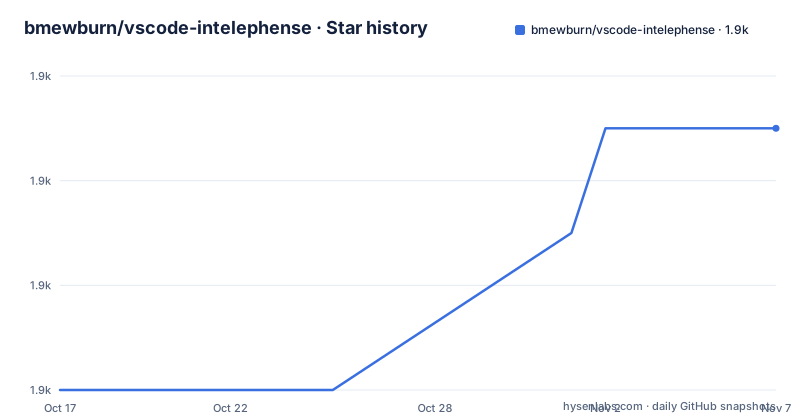
- bmewburn/vscode-intelephense1,865 ★ · +5
| Repository | 2026-10-17 | 2026-11-07 |
|---|---|---|
| bmewburn/vscode-intelephense | 1.9k | 1.9k |
5 Stars in the last 21 days, measured from the daily GitHub snapshot. Compare with other projects
Editorial analysis
Two repositories, one open and one closed
The most important thing to understand about Intelephense is that the repository you are reading is not the whole product. The README states it plainly: the language server client, `vscode-intelephense`, is open source under the MIT licence, while the language server, `intelephense`, is proprietary, with details in a section of the LICENSE.txt file.
That division explains a structural detail visible in `package.json`. The package is named `vscode-intelephense-client`, its entry point is `./lib/extension`, and the bundled `files` list includes `/lib`, `/images`, `CHANGELOG.md`, `README.md`, `LICENSE.txt` and `package.json`. The client is what runs inside VS Code; the analysis engine it talks to over the language server protocol is a separate artefact with its own licence. The repository topics list `language-server` and `language-server-protocol`, and the acknowledgements list `vscode-languageserver-node` as the transport library.
The other visible consequence is the `license` field, which reads `SEE LICENSE IN LICENSE.txt` rather than naming an SPDX identifier. GitHub classifies the repository licence as Other for the same reason.
If your evaluation criterion is open source in the ordinary sense, then this fails it. If your criterion is a fast, working PHP experience in VS Code, the split is a reasonable trade and you should read the PREMIUM list below before deciding what a licence buys you.
What is free and what the licence key actually unlocks
The README marks each listed capability individually as either free or PREMIUM.
Free and stated to stay free: camel or underscore case completion for document, workspace and built-in symbols and keywords, with automatic addition of use declarations; signature help for constructors, methods and functions; workspace wide go to definition and find all references; workspace symbol search; document symbol search with breadcrumbs and outline; diagnostics for open files through an error tolerant parser and a static analysis engine; lossless PSR-12 document and range formatting that also handles combined HTML, PHP, JS and CSS files; embedded HTML, JS and CSS code intelligence; hover with links to official PHP documentation; smart highlighting of references and keywords; a PHPDoc type system supporting templates and callable signatures; reading of PHPStorm metadata for better type analysis; and an inline values provider that enhances the official xdebug extension.
Behind PREMIUM: rename of symbols with automatic file and folder renaming, accurate code folding of definitions, blocks, use declarations, heredoc, comments and custom regions, find all implementations of interfaces and abstract classes, go to type definition, go to declaration for interface implementations, auto PHPDoc creation that infers return types and thrown exceptions, syntax tree driven smart select, code actions to import symbols and implement all abstract methods, a type hierarchy view, document links for include and require files, code lens for references and overrides, inlay hints for parameter names and return types, and `@mixin` support.
The licence terms are specific. A licence key grants a single user access to all current and future premium features on multiple devices forever, and it must be activated automatically over https before use. So a team cannot hand the same key to a whole group of people, and network-restricted environments will not activate.
Quick start: two conflicting PHP extensions must be disabled first
The project recommends the following setup to avoid overlapping language features. Open Extensions, search for `@builtin php`, and disable `PHP Language Features`. The README is specific about what to keep: leave `PHP Language Basics` enabled so syntax highlighting still works. Without disabling the built-in server, you have two PHP language servers competing for the same files, and the guidance is blunt that other third party PHP extensions offering similar functionality should also be disabled for the best results.
Step two handles projects that do not use the `.php` extension. Add glob patterns to the `files.associations` setting, for example:
"files.associations": { "*.module": "php" }Step three is optional and only relevant if you bought a licence: open the command palette with `ctrl + shift + p` and run `Enter licence key`.
Further options live in the `intelephense` section of settings, and the two you are most likely to touch are named in `package.json` as `intelephense.runtime` and `intelephense.maxMemory`. Those same two settings are the ones restricted in untrusted workspaces.
That restriction is worth understanding before you open a repository you do not trust. The extension declares `untrustedWorkspaces.supported` as `limited`, with the explanation that an alternate Node.js runtime or a maximum memory value cannot be supplied from workspace settings in an untrusted workspace. In effect, a cloned repository cannot silently repoint the runtime that parses your code.
Activation on a PHP file, and the dependency floor that implies
The extension declares a single activation event, `onLanguage:php`, and an engine requirement of `^1.91.0` for VS Code. That means it does nothing at startup and loads the first time a PHP file is opened, which is the right trade for a language server with an index to build.
It also declares `extensionKind` as `workspace`, which has a consequence people run into with remote setups: the extension runs on the remote side, alongside the code, rather than on the local machine. For SSH, WSL and container workspaces that is the behaviour you want, since the workspace files are not on the local disk.
The category list gives it away about what this extension does at heart: `Programming Languages`, `Linters` and `Formatters`. It is a static analyser with a formatter attached, not a debugger, and the only debugger integration mentioned is that it enhances the official xdebug extension with an inline values provider.
The bundled third party list is also worth a glance, because it tells you what the analysis and formatting are actually built from: `phpstorm-stubs` for built-in symbol knowledge, `js-beautify` for formatting, `protobufjs`, `micromatch` and `fast-glob` for matching and file discovery, `lru-cache` for caching, `turndown` and `node-html-to-text` for documentation handling, `semver` for version comparison, and `applicationinsights` for telemetry. The repository root contains `webpack.config.js`, `tsconfig.json` and `src/`, with `examples/` directories for diagnostics, keybinding snippets and PHPDoc, so the client itself is ordinary TypeScript.
PHPStorm metadata is the quiet reason types resolve better here
Several free features only make sense together. The README lists PHPStorm metadata support and a PHPDoc type system with templates. These can improve type analysis, but they do not guarantee identical results to PHPStorm for every symbol or project. Hover information links to the official PHP documentation, so the documentation you get is the PHP project's, not the extension author's.
Formatting is described as lossless and PSR-12 compatible, which is a specific claim. Lossless means the formatter is expected to preserve everything it does not intend to change, and the document and range scope means you can format one selection rather than the whole file. The same formatter handles mixed HTML, PHP, JS and CSS documents, which is the common shape of a legacy PHP template.
The diagnostics side is where the parser choice shows. Rather than refusing to parse a file that has a syntax error, it is error tolerant, which means a half-written class still yields completion for everything already valid. That is a genuine advantage when editing large legacy files, and it is the sort of behaviour that you would not infer from the phrase static analysis engine.
The one capability that depends on something you install separately is inline values. The README describes enhancing the official xdebug extension, so with xdebug absent you lose that feature and everything else keeps working.
Where the free tier ends and who should pay
The sharpest boundary is refactoring. Rename is the single feature most developers reach for first, and it is not in the free tier. The same goes for find all implementations, go to type definition, and the code actions that implement all abstract methods, which is exactly what you want when integrating an interface from a library you do not control.
The inlay hints are a smaller loss but more visible day to day, since parameter names and return types on every call site are what you notice missing once you have seen them elsewhere. Code lens is the other one that changes the reading experience rather than the editing speed.
For a solo developer on a single project, the free tier covers the loop that matters most: you write code, you navigate, you find references, you format, you see errors. Rename is the gap, and you can live without it or use the refactoring support in your editor of record.
For a team, the licensing terms need reading carefully rather than assuming. A key grants access to a single user across multiple devices, permanently, including features released later, but it has to activate over https. Group seats are a separate purchase, and an offline or air-gapped environment has no documented activation path. That last point is the one to verify before you commit a build agent or an isolated environment to this extension.
Editorial conclusion
Use Intelephense if you write PHP in VS Code and want fast completion, go to definition, find all references and PSR-12 formatting without configuring a PHP runtime, and skip it if your requirement is an auditable analysis engine or a fully open toolchain, because the language server itself is proprietary even though the client is MIT. Before you commit, disable VS Code's built-in PHP Language Features as the quick start instructs, keep `PHP Language Basics` enabled for syntax highlighting, and check which of the features you actually need are behind PREMIUM: rename, find all implementations, go to type definition, code lens, inlay hints and `@mixin` support all sit on the paid side, and a licence key must be activated over https before it works.
Frequently asked questions
How do I set up PHP Intelephense in VS Code?
Disable the built-in `PHP Language Features` extension found by searching `@builtin php` in the Extensions view, keeping `PHP Language Basics` enabled for syntax highlighting, then add any non standard extensions to `files.associations`, for example `"*.module": "php"`. Other third party PHP extensions with overlapping features should be disabled too.
Which Intelephense features are free and which need a licence?
Completion, signature help, go to definition, find all references, symbol search, diagnostics, PSR-12 formatting, embedded HTML/JS/CSS intelligence, hover with documentation links and PHPStorm metadata reading are free and stated to stay free. Rename, find all implementations, go to type definition, code actions, type hierarchy, code lens, inlay hints, code folding details and `@mixin` support are marked PREMIUM.
Is vscode-intelephense open source?
The client is open source under the MIT licence, but the language server it connects to is proprietary, and the repository's package.json points at LICENSE.txt rather than naming an SPDX identifier. GitHub classifies the repository licence as Other.
How does the Intelephense licence key work?
You enter it through the command palette with `ctrl + shift + p` and `Enter licence key`. A key grants a single user access to all current and future premium features on multiple devices permanently, and it must be activated automatically over https before use.
Why does Intelephense limit settings in untrusted workspaces?
The extension declares untrusted workspace support as limited and restricts the `intelephense.runtime` and `intelephense.maxMemory` settings, because an alternate Node.js runtime or a maximum memory value cannot be supplied through workspace settings in an untrusted workspace.
Official sources
Add this badge to your README
If you maintain this project, the badge below links readers to this analysis and shows its maintenance status from the daily GitHub snapshot. Paste the markdown into your README; add ?metric=license or ?metric=stars to the image URL for a different field.

[](https://hysenlabs.com/projects/bmewburn-vscode-intelephense)Star history chart for your README
[](https://hysenlabs.com/projects/bmewburn-vscode-intelephense)Was this useful?