boost-ext/ut: C++20 Unit Testing with One Header
C++20 μ(micro)/Unit Testing framework
At a glance
- What is it?
- boost-ext/ut is a single-header, C++20 unit testing framework built around named tests, suites, expressions, and replaceable components. It suits C++ developers who want test registration and BDD-style syntax without a mandatory macro API.
- Who is it for?
- Adopt boost-ext/ut when the codebase already uses C++20 and values a single-header dependency with expressive named tests and replaceable reporting components. Do not choose it solely for its small source footprint if the organization requires conventions or capabilities that the README and examples do not establish.
- Can I use it commercially?
- Yes. BSL-1.0 is a permissive licence: you can use, modify and sell software built on it, as long as you keep its copyright and licence notices.
- Is it still maintained?
- Yes. The repository last received commits 15 days ago.
- What is it written in?
- Mainly C++, according to GitHub's language statistics.
Answers come from the project's GitHub data, last synced on November 7, 2026, and from our analysis. They are not legal advice.
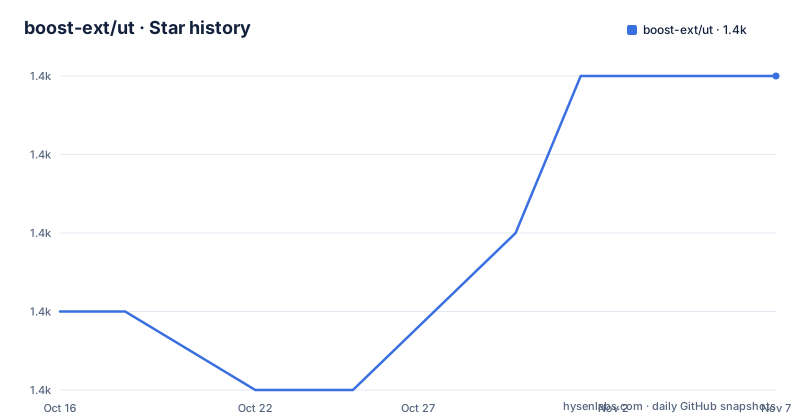
Star history
- boost-ext/ut1,448 ★ · +3
| Repository | 2026-10-16 | 2026-11-07 |
|---|---|---|
| boost-ext/ut | 1.4k | 1.4k |
3 Stars in the last 22 days, measured from the daily GitHub snapshot. Compare with other projects
Editorial analysis
Why boost-ext/ut targets C++20 test suites
boost-ext/ut addresses a specific gap in C++: the language does not include a complete unit testing facility in its standard library. The project is aimed at developers working in C++20 who need named tests, automatic registration, assertions, suites, and an execution report without adopting a conventional collection of test macros. It also presents BDD and specification-style expressions as native C++ syntax rather than as prose outside the implementation.
The central design choice is a macro-free interface. A test is assigned to a string literal with the `_test` operator, and its body is a lambda containing `expect` expressions. C++20 facilities, including abbreviated function templates and user-defined literals, carry much of the API. The README also mentions optional macros, but macros are not required for the basic testing model.
That approach changes what a test looks like in a codebase. The expression `"sum"_test = [] { ... };` creates a named unit whose purpose remains visible near its assertions. This differs from placing anonymous `assert` calls inside unnamed scopes, the pattern the README uses to motivate the project. The framework also supports sections, parameterized tests, multiple suites, filtering, exceptions, custom logging, custom runners, and reporters according to the repository examples. Its intended users are therefore developers who want a compact framework but may need more than a few equality checks.
UT should not be confused with a coverage tool or CI service. Its documented role is to register and run tests and report their outcomes. The repository also contains a separate `benchmark/` directory, but the testing framework itself handles test organization and execution.
How UT turns C++ expressions into test reports
The basic execution flow begins when a test declaration is constructed from a string literal, `_test`, and a lambda. The framework associates the literal name with the executable test body. Assertions inside the lambda are evaluated when the runner executes that body. A failed expression records the failing condition, and the runner prints a summary containing the test count, assertion count, passed assertions, and failed assertions, as shown in the README example.
The API centers on `test`, `suite`, operators, literals, and `expect`. Compound expressions can use C++ alternatives such as `and`, while integer literals created with `_i` participate directly in comparisons. In the README example, `41_i == sum(40, 2)` places the expected and actual values in one expression. The displayed failure includes the expanded condition, which is intended to make a failed assertion easier to interpret than an opaque `assert` failure.
UT offers more than the basic expectation example. The README identifies `runner`, `reporter`, and `printer` as customizable parts and says that most other unit testing frameworks can be implemented over its primitives. The repository includes examples for CLI behavior, filtering, logs, custom runs, reports, matchers, attributes, fatal failures, exceptions, suites, BDD, Gherkin, and parameterized tests. These file names establish that the project supports several testing modes, although the README excerpt does not document every associated option.
Automatic registration removes the need for a separate list of test functions, while suite objects group related tests. This structure is useful when a project needs selection and organization. The README does not explain process isolation, concurrency defaults, failure recovery rules, or exact filtering semantics. Projects with requirements in those areas should inspect the corresponding examples and implementation before depending on them.
Installing boost-ext/ut and running the sum test
The README does not provide an installation command. It says to obtain either `boost/ut.hpp`, described as the single-header form, or `boost.cppm`, described as a module-plus-header distribution, and then integrate that file into the project. The repository includes `CMakeLists.txt`, `meson.build`, `BUILD.bazel`, and `MODULE.bazel`, but the README excerpt does not show the configuration needed for each build system, so a specific build command would require guessing.
After integrating the header, the first real use is the README's `sum` example. It includes the header, defines a variadic `sum` function, and registers one named test.
#include <boost/ut.hpp>

constexpr auto sum(auto... values) { return (values + ...); }

int main() {
  using namespace boost::ut;
  "sum"_test = [] {
    expect(sum(0) == 0_i);
    expect(sum(1, 2) == 3_i);
    expect(sum(1, 2) > 0_i and 41_i == sum(40, 2));
  };
}
This code requires a C++20 build and access to the integrated `boost/ut.hpp`. The project lists GCC 9+, Clang 9.0+, Apple Clang 11.0.0+, MSVC 2019+, and Clang-cl 9.0+ as tested compilers, with an asterisk attached to MSVC in the overview. The README excerpt does not explain that marker, so its precise qualification should be checked in the complete project documentation or CI configuration.
A successful run prints a `UT starts` banner, executes the named test, and finishes with a summary. If one comparison fails, the report identifies the source line and prints the failed condition. The README does not document an exact executable invocation, so the executable name and runner flags depend on the project's build integration.
BDD, parameterized tests, and UT reporting layers
UT is not restricted to its basic expectation syntax. Repository files contain dedicated examples for `BDD.cpp`, `gherkin.cpp`, `parameterized.cpp`, `run.cpp`, `run_report.cpp`, `filter.cpp`, and `log.cpp`. The README also lists sections, specification-style tests, custom runners, reporters, and printers among its features. This makes UT relevant to teams that want one test engine behind several expression styles and output paths.
Parameterized testing is especially relevant to modern C++ because the project describes it as using C++ features rather than macro-generated test tables. BDD has a dedicated example, while Gherkin includes both a `.cpp` example and a `.feature` file. The README excerpt does not reproduce their APIs, so their exact syntax cannot be established here. Their presence confirms those supported directions, not every behavior a user may expect from a larger framework.
Customization happens at several layers. `runner` controls execution, `reporter` controls how events and summaries are presented, and `printer` controls value rendering. That separation can help a project tailor output to CI requirements or another target. Custom components also create an integration surface that the adopting team must understand. A custom reporter that handles only common assertion paths could leave uncovered cases when exceptions, fatal failures, or filtered tests are enabled.
The examples named `abort.cpp`, `exception.cpp`, and `fatal.cpp` indicate distinct failure scenarios. The README excerpt does not state whether each failure unwinds normally, terminates the test process, or appears differently in custom reporters. This is a concrete verification point for codebases with specific error-handling requirements.
UT's single-header trade-offs and framework alternatives
UT is one alternative among Boost.Test, GoogleTest, and Catch2, all of which the README explicitly names. The documented difference in UT's approach is its packaging and primitive model: one header or module, optional macros, modern C++ expressions, and customizable runner, reporter, and printer components. The README excerpt does not document the APIs or execution models of those alternatives, so a wider feature comparison would go beyond what it establishes.
The single-header form can simplify acquisition for a small project. Including `boost/ut.hpp` exposes the framework without requiring a collection of installed libraries or a separate executable generator. This is attractive when test code must remain easy to add to an existing build. The module-plus-header option gives teams another packaging path while retaining the project's C++20 orientation.
The trade-off is that UT cannot support every C++ toolchain independently of its language requirements. Its core design uses modern C++ syntax and user-defined facilities, so codebases limited to an earlier language standard fall outside the documented target. The listed compiler floor reaches back to GCC 9 and Clang 9.0, but the README does not enumerate every compiler flag, standard-library behavior, or build environment required in practice.
Replaceable low-level components can also be a burden for a team that only wants a preset output format. A conventional higher-level framework may present more obvious defaults, but the README excerpt provides no evidence about those alternatives' defaults or maintenance. Adopting UT means accepting a compact core and taking responsibility for understanding how its runner and reporting components fit the project.
boost-ext/ut maintenance, upgrades, and license implications
The repository is not archived. Its last push was on 2026-10-15, so the project has a recent recorded repository change. The release history lists v2.3.1 on 2025-04-02, v2.3.0 on 2025-02-04, and v2.1.1 on 2024-11-10. These dates show releases across 2024 and 2025, while the later push indicates repository activity beyond the newest listed release. The repository data does not establish what changed in that push or whether it belongs to an unreleased version.
The README does not document a migration guide, a compatibility matrix between releases, or a policy for changes to custom runner, reporter, and printer interfaces. Because these components are intended to be customized, an adopting project should inspect whether its own extensions use APIs that are expected to remain stable across upgrades. Vendoring `boost/ut.hpp` may also create a deliberate upgrade responsibility because the single header can be copied directly into a build tree.
The repository identifies `BSL-1.0` as its license and includes `LICENSE.md`. BSL-1.0 is a permissive, source-available license with redistribution and modification conditions, but its exact obligations must be assessed from the license text for the intended distribution model. This article does not provide legal advice. Teams that copy the single header into proprietary or distributed code should verify which notices and files must accompany it.
No upgrade command is shown in the README excerpt. A team selecting the project should therefore base its dependency process on the documented acquisition route and its own build-system policies rather than assume a package-manager workflow that the project does not state.
Editorial conclusion
Adopt boost-ext/ut when the codebase already uses C++20 and values a single-header dependency with expressive named tests and replaceable reporting components. Do not choose it solely for its small source footprint if the organization requires conventions or capabilities that the README and examples do not establish. Verify compiler compatibility, build-system integration, failure behavior, reporting requirements, and `BSL-1.0` compliance first. For boost-ext/ut, the decisive boundary is its reliance on modern C++ and its small configurable core rather than a conventional macro-based testing interface.
Frequently asked questions
Does boost-ext/ut require a separate testing library installation?
The project provides a single header at `include/boost/ut.hpp` and also offers a module-plus-header form at `include/boost.cppm`. The README says to integrate the chosen form into the project, but it does not give a package-manager installation command.
Which C++ standard and compilers does boost-ext/ut support?
UT targets C++20. Its overview lists GCC 9+, Clang 9.0+, Apple Clang 11.0.0+, MSVC 2019+, and Clang-cl 9.0+ as tested compilers.
Can boost-ext/ut use macros for test registration?
The basic interface is macro-free and uses expressions such as `"sum"_test` and `expect`. The README states that macros are optional rather than compulsory, and the repository includes `example/macro.cpp`.
Official sources
Add this badge to your README
If you maintain this project, the badge below links readers to this analysis and shows its maintenance status from the daily GitHub snapshot. Paste the markdown into your README; add ?metric=license or ?metric=stars to the image URL for a different field.

[](https://hysenlabs.com/projects/boost-ext-ut)Star history chart for your README
[](https://hysenlabs.com/projects/boost-ext-ut)Was this useful?