nlohmann/json: A Single-Header JSON Library That Puts Developer Speed First
JSON for Modern C++ is a header-only library that makes JSON feel like a first-class data type in C++, with STL-like access plus support for CBOR, BSON, and MessagePack.
At a glance
- What is it?
- nlohmann/json delivers JSON for Modern C++ as a single header with an intuitive, STL-like API. It prioritizes ease of integration and expressive syntax over raw speed and memory efficiency, making it a strong default choice for many C++ projects.
- Who is it for?
- Adopt nlohmann/json if you value fast development and a clean, Python-like JSON syntax in C++, and if your project can tolerate its memory overhead and moderate parse speed. Skip it if you need maximum performance or minimal memory footprint; consider a faster, more specialized parser such as simdjson or RapidJSON instead.
- Can I use it commercially?
- Yes. MIT is a permissive licence: you can use, modify and sell software built on it, as long as you keep its copyright and licence notices.
- Is it still maintained?
- Yes. The repository received new commits within the last day.
- What is it written in?
- Mainly C++, according to GitHub's language statistics.
Answers come from the project's GitHub data, last synced on November 13, 2026, and from our analysis. They are not legal advice.
Star history
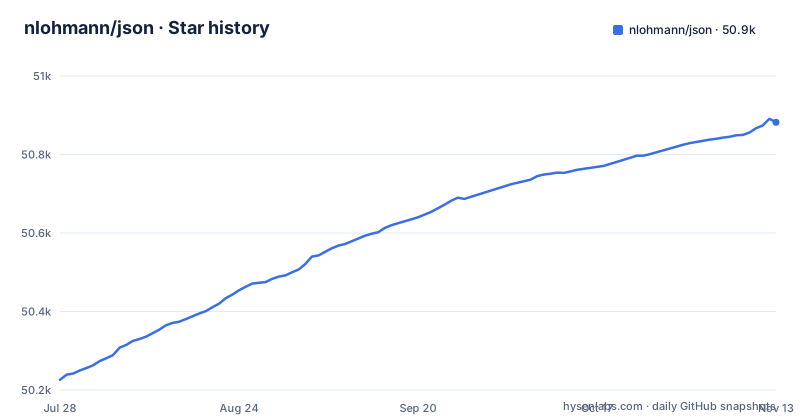
- nlohmann/json50,882 ★ · +656
| Repository | 2026-07-28 | 2026-11-13 |
|---|---|---|
| nlohmann/json | 50.2k | 50.9k |
656 Stars in the last 108 days, measured from the daily GitHub snapshot. Compare with other projects
Editorial analysis
What Problem It Solves and Who It Is For
nlohmann/json solves a common pain for C++ developers: JSON handling that feels as natural as in Python. The README states the design goal of 'intuitive syntax' and 'trivial integration.' It targets developers who want to add JSON support without learning a complex API or wiring up a build system. The library is a single header file, json.hpp, with no dependencies and no subproject. It is written in vanilla C++11, so it works in projects that have not moved to newer standards. This makes it ideal for prototyping, tools, and applications where JSON is a convenience rather than a performance bottleneck. It is less suited for high-throughput services or memory-constrained systems, as the README openly admits that speed and memory efficiency were not the primary goals.
How It Works: A Single Header with STL-Like Semantics
The core of the library is the basic_json class template, which defaults to a concrete json type. Internally, it uses std::string for strings, int64_t, uint64_t or double for numbers, std::map for objects, and std::vector for arrays. Each JSON value carries a one-byte type tag and a union, giving an overhead of one pointer plus one byte per object. The API mimics STL containers, so you can iterate, access, and modify JSON values using familiar operations like operator[] and .at(). The README shows that you can read a JSON file directly into a json object and then treat it as a first-class data type. The library also supports implicit conversions from C++ types and to arbitrary user-defined types via specialization. This design trades memory and speed for developer productivity, as the README explicitly notes that there are faster JSON libraries available.
Getting It Running: Installation and Basic Usage
Integration is deliberately simple. You download or fetch the single header file from the single_include/nlohmann/json.hpp path and include it in your source. No linking is required because it is header-only. For CMake projects, the README mentions that the library is available through package managers and provides a CMake integration; its Integration section has pages for CMake, package managers and pkg-config. The README's Examples section covers reading JSON from a file, creating json objects from JSON literals, STL-like access, and serialization / deserialization. The library also supports JSON Pointer and JSON Patch, which are useful for targeted updates. The README includes examples for these, and the full documentation is at json.nlohmann.me.
The Real Trade-Off: Speed and Memory Are Not the Point
The README is refreshingly honest about the library's priorities. It lists 'memory efficiency' and 'speed' as aspects that were 'not so important' compared to intuitive syntax and trivial integration. The default use of std::map for objects means logarithmic lookups and a higher memory footprint than a hash map or a flat array. The union-based storage does keep per-value overhead low, but the overall memory usage is still higher than a specialized parser that reuses buffers. For parsing, the README points to the nativejson-benchmark as evidence that faster libraries exist. This is not a flaw if you know what you are getting: a developer-friendly library that gets the job done for most applications. But if your system parses gigabytes of JSON per second or runs on a microcontroller, this is the wrong tool. The library also uses exceptions for error handling, which can be a problem in environments where exceptions are disabled or undesirable.
Beyond JSON: Binary Formats and Patches
The library is not limited to JSON text. It supports binary formats: BSON, CBOR, MessagePack, UBJSON, BJData, and BON8. This is a significant feature because it allows the same json object to be serialized to a compact binary form for network transmission or storage. The README lists these formats in the examples section. This makes the library a flexible data interchange tool, not just a JSON parser. It also supports JSON Merge Patch, which is a simpler alternative to JSON Patch for partial updates. These features expand the library's applicability to systems that need to interoperate with other languages or protocols.
A Real Alternative: simdjson
If performance is your primary concern, simdjson is a direct alternative. It uses SIMD instructions to parse JSON at gigabytes per second. The approach is fundamentally different: simdjson parses JSON directly into a read-only DOM with zero-copy access, whereas nlohmann/json constructs a mutable tree of std::map and std::vector objects. This means simdjson has a much lower memory footprint and is designed for high-throughput workloads. However, simdjson has a steeper learning curve and a less intuitive API; you work with a parser and a document object, not a first-class data type. In contrast, nlohmann/json is written in vanilla C++11 and is easier to integrate into existing code. The choice depends on whether you need raw speed or developer convenience.
Maintenance, License, and Upgrade Cost
The project is actively maintained, with the latest release v3.12.0 pushed on 2025-04-11. The README mentions continuous integration on AppVeyor and GitHub Actions for Ubuntu, macOS, and Windows, and it is integrated with Google OSS-Fuzz for fuzzing. This suggests a high level of quality assurance. The license is MIT, which is permissive and allows commercial use without copyleft obligations. The library is a single header, so upgrading is as simple as replacing the file, but you should check the release notes for breaking changes. The README states that the library is included in all popular package managers, which simplifies dependency management. However, because it is header-only, you are responsible for recompiling your code when you update the header. Overall, the maintenance cost is low, but you should verify that your compiler is still supported after an upgrade, as the README has a Supported compilers section.
Editorial conclusion
Adopt nlohmann/json if you value fast development and a clean, Python-like JSON syntax in C++, and if your project can tolerate its memory overhead and moderate parse speed. Skip it if you need maximum performance or minimal memory footprint; consider a faster, more specialized parser such as simdjson or RapidJSON instead. Before adopting, verify that your target compilers are supported (the library requires C++11 and lists specific compiler versions) and check the current release notes for any breaking changes. The library is mature and actively maintained, but its default data structures (std::map and std::vector) are not designed for embedded or high-frequency parsing scenarios.
Frequently asked questions
What is the fastest C++ JSON library?
This project does not claim that title. Its design goals put speed in the list of aspects that were not important, state that there are certainly faster JSON libraries out there, and link a parsing benchmark so you can compare. The argument offered instead is that a single header gets you JSON support with the least development effort.
How do I link the nlohmann json package to my project?
The stated integration cost is one header file, json.hpp, with no library, no subproject, no dependencies and no complex build system, written in vanilla C++11 and requiring no compiler flag changes. The integration section also links separate pages for CMake, for package managers and for pkg-config, and the repository ships meson.build, BUILD.bazel, MODULE.bazel and Package.swift.
How do I install nlohmann json?
The page says the library is included in all popular package managers, and its integration section links a package manager page listing them. The other route is the single header, which you can add to your project without any build system change at all, since the whole library is one file with no dependencies.
How do I use nlohmann json in C++?
The design goal is that JSON feels like a first-class data type in your C++ code, using the operator facilities of modern C++ rather than an accessor API. Documentation for this sits in the README examples, a code examples directory in the repository, the API reference at json.nlohmann.me, and the FAQ for common questions.
How do I use the nlohmann json.hpp header?
json.hpp is the amalgamated single header, generated from the sources under include/nlohmann by an amalgamation target in the Makefile. A forward-declaration companion, json_fwd.hpp, is generated the same way, and a check-amalgamation target verifies that the committed headers match the sources and that the Bazel BUILD file is current.
Official sources
Add this badge to your README
If you maintain this project, the badge below links readers to this analysis and shows its maintenance status from the daily GitHub snapshot. Paste the markdown into your README; add ?metric=license or ?metric=stars to the image URL for a different field.

[](https://hysenlabs.com/projects/nlohmann-json)Star history chart for your README
[](https://hysenlabs.com/projects/nlohmann-json)Was this useful?