node_passport_login: a seven-route Express and Passport template, and what it leaves to you
Node.js login, registration and access control using Express and Passport
At a glance
- What is it?
- node_passport_login is Brad Traversy's teaching starter for local authentication in Node.js, wiring Express 5, Passport 0.7, Mongoose and bcryptjs behind seven routes and a protected dashboard. It is a reference implementation to read and copy from, not a framework to install into production, since sessions are stored in the default in-memory store and the repository carries no license file.
- Who is it for?
- node_passport_login earns adoption as a readable reference for how Express, Passport local strategy, express-session and connect-flash fit together, and it will serve a tutorial classroom well. It should not be the auth layer of a real application as written, because the session store is the default in-memory one from express-session and the repository ships no license file.
- Can I use it commercially?
- Not without permission. GitHub finds no licence file in the repository, and without a licence all rights are reserved by default: you may read the code but not reuse it. Check the README, or ask the authors, before using it.
- Is it still maintained?
- Yes. The repository last received commits 87 days ago.
- What is it written in?
- Mainly EJS, according to GitHub's language statistics.
Answers come from the project's GitHub data, last synced on October 23, 2026, and from our analysis. They are not legal advice.
Star history
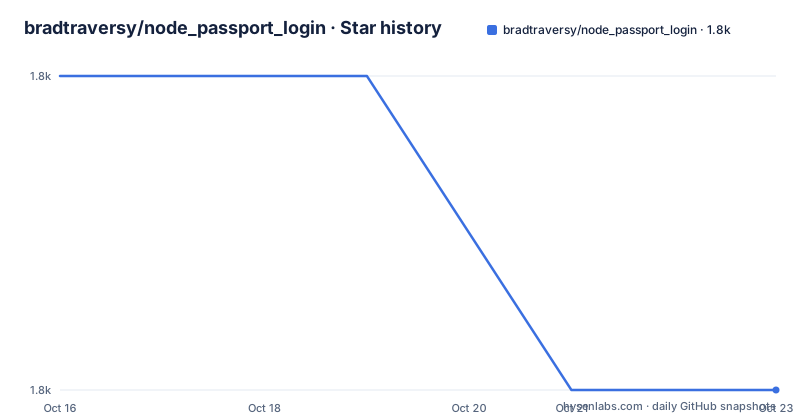
- bradtraversy/node_passport_login1,756 ★ · -1
| Repository | 2026-10-16 | 2026-10-23 |
|---|---|---|
| bradtraversy/node_passport_login | 1.8k | 1.8k |
-1 Stars in the last 7 days, measured from the daily GitHub snapshot. Compare with other projects
Editorial analysis
Seven routes, one of them protected
The application is small enough to read in one sitting, which is the point. The route table is the whole feature list:
- `GET /` welcome page - `GET /users/register` and `POST /users/register` - `GET /users/login` and `POST /users/login` - `GET /dashboard`, the protected page - `GET /users/logout`
Everything is server-rendered EJS with a Bootstrap-powered UI, and the entry point is app.js as declared by the `main` field in package.json. The repository layout is correspondingly plain: app.js at the root, plus config/, models/, routes/ and views/.
Two details are worth noticing as design choices rather than omissions. Logout is a `GET`, not a `POST`, which keeps it linkable but also means a third party can trigger it for a signed-in user. And the dashboard is protected by middleware, which is the single piece of access control the template demonstrates.
Local strategy, bcryptjs, and where the password actually lives
Authentication is local only: passport 0.7 with passport-local, so username and password, no OAuth or OIDC provider in the dependency list. Passwords are hashed with bcryptjs, which the README lists among the demonstrated features and which appears in package.json at ^3.0.3.
Persistence is Mongoose against MongoDB, version 9 in the dependency list, with the user model living in models/. The connection string does not come from an environment variable. The README instructs you to open config/keys.js and replace a placeholder URI, and gives the local form:
const dbPassword = 'mongodb://127.0.0.1:27017/node_passport_login';

module.exports = {
  mongoURI: dbPassword
};
For a hosted database you paste the connection string from the Atlas dashboard and get the username, password and network access list right yourself. The README states the rule plainly: do not commit real database credentials to GitHub. That is a warning about this file's design. Because the credential lives in a tracked JavaScript module rather than in the environment, the default workflow invites exactly the mistake the warning describes, and the only thing standing between a learner and a leaked Atlas cluster is remembering to edit the file before the first push.
Running it locally takes two commands
Install dependencies from the project root:
npm installThen start the app:
npm startThat runs `node app.js` through the `start` script. For development the second script uses nodemon, which is also the only devDependency:
npm run devOnce it is up, the README points you at:
http://localhost:5000So port 5000 is the app's fixed local address, and there is no PORT environment variable mentioned anywhere in the repository. On a host that assigns ports dynamically you would have to edit the source rather than configure it, which is a small but real constraint if you plan to deploy this directly.
Requirements are Node.js 22 or newer recommended, npm, and either MongoDB Atlas or a local MongoDB database. The word recommended on the Node version is doing quiet work here: package.json does not declare an `engines` block, so npm will not stop you on an older runtime and you will find out through behavior instead.
Flash messages and layouts are the two extras beyond auth
Beyond authentication itself, two pieces of plumbing are wired in and worth knowing because they are the parts people forget when assembling this from scratch. connect-flash at ^0.1.1 carries one-shot messages across a redirect, which is how validation errors and auth feedback reach the user after a POST. express-ejs-layouts at ^2.5.1 wraps each view in a layout, which is how a single header and navigation frame the pages without repeating markup in every template.
express-session at ^1.19.0 handles the session cookie. Nothing in package.json configures a session store, and none is listed as a dependency, so sessions live in express-session's default in-memory store. That store leaks memory over a long-running process and does not survive a restart, which means every deploy logs everyone out. It is fine for a tutorial running on your laptop and wrong for anything with a real user population.
The dependency list is also short on purpose. No helmet, no rate limiter, no CSRF token library, no cookie hardening configuration. That is a reasonable teaching choice and a poor production posture.
Where this template is the wrong tool
The gap between this and production auth is not a matter of adding a few lines, and it is worth being concrete about the missing pieces rather than vague.
Session storage is the first. The default in-memory store is single-process, so if you ever run two instances behind a load balancer, a user's requests alternate between processes that do not share session state and authentication appears to fail at random. Second, there is no CSRF protection on the registration and login POST routes. Third, there is no rate limiting or lockout on login, so the endpoint is open to credential stuffing. Fourth, password reset, email verification and multi-factor authentication are simply not present, because local username and password is the whole model.
The licensing picture is another boundary worth naming. package.json declares ISC in its license field, but the repository listing shows no LICENSE file at the root and the repository metadata reports the license as unknown. The top-level entries are .gitignore, README.md, app.js, config/, models/, package-lock.json, package.json, routes/ and views/. So the ISC string in the metadata is the only license statement available, and if you plan to ship derived work you should resolve that rather than assume the string settles it.
Finally, the last push was on 2026-07-28 and there are no GitHub releases, so version 2.0.0 as stated in the README and in package.json is the only release marker that exists.
Against rolling your own, and against a real auth service
The tradeoff is that a tutorial also teaches the flash-message and layout patterns that people routinely rediscover the hard way.
The other alternative is to stop building local auth at all. An OAuth or OpenID Connect provider, or a hosted identity product, moves password storage, verification and lockout policy off your server entirely. For most real applications that is the better trade than hardening this template, because the failure modes above are exactly the failures those providers are built to absorb. node_passport_login remains useful in the middle case: teaching, a local prototype, or an application that genuinely must own its credentials.
Editorial conclusion
node_passport_login earns adoption as a readable reference for how Express, Passport local strategy, express-session and connect-flash fit together, and it will serve a tutorial classroom well. It should not be the auth layer of a real application as written, because the session store is the default in-memory one from express-session and the repository ships no license file. If you start from it, replace the session store before launch, add CSRF protection to the POST routes, and confirm the ISC license string in package.json against any LICENSE file you intend to ship.
Frequently asked questions
How do I install and run node_passport_login?
Run `npm install` in the project root, then `npm start` for a normal run or `npm run dev` to use nodemon for automatic restarts, and open http://localhost:5000. Node.js 22 or newer is recommended, along with npm and a local or Atlas MongoDB database.
Where do I set the MongoDB connection string in node_passport_login?
Open config/keys.js and replace the placeholder URI with your own local or Atlas connection string, exported as `mongoURI`. The README warns not to commit real database credentials to GitHub.
How are passwords stored in node_passport_login?
Passwords are hashed with bcryptjs, listed at version ^3.0.3 in package.json, and users are persisted through Mongoose 9 against MongoDB. The model file lives under models/.
What packages does node_passport_login use?
The dependencies are bcryptjs, connect-flash, ejs, express, express-ejs-layouts, express-session, mongoose, passport and passport-local, with nodemon as the sole devDependency. The README describes these as Express 5, EJS 5, Mongoose 9, Passport 0.7 and Bootstrap 5.
Official sources
Add this badge to your README
If you maintain this project, the badge below links readers to this analysis and shows its maintenance status from the daily GitHub snapshot. Paste the markdown into your README; add ?metric=license or ?metric=stars to the image URL for a different field.

[](https://hysenlabs.com/projects/bradtraversy-node-passport-login)Star history chart for your README
[](https://hysenlabs.com/projects/bradtraversy-node-passport-login)Was this useful?