yor rewrites your Terraform files with traceable tags
Extensible auto-tagger for your IaC files. The ultimate way to link entities in the cloud back to the codified resource which created it.
At a glance
- What is it?
- yor is a Go tool from Bridgecrew that applies tags and labels to infrastructure as code files, so that a running cloud resource can be traced back to the block that created it. It works on Terraform, CloudFormation and Serverless files, and it runs as a CLI, a Docker image, a pre-commit hook or a GitHub Action.
- Who is it for?
- yor is worth adopting for teams that own their Terraform or CloudFormation files and need consistent tags plus a link back to the resource block, and it fits existing pipelines through the CLI or the bridgecrewio/yor-action GitHub Action. It is the wrong tool for a repository that only wants a tag set, or for one that would rather tag at the cloud provider layer than rewrite source files.
- Can I use it commercially?
- Yes. Apache-2.0 is a permissive licence: you can use, modify and sell software built on it, as long as you keep its copyright and licence notices.
- Is it still maintained?
- Yes. The repository last received commits 5 days ago.
- What is it written in?
- Mainly Go, according to GitHub's language statistics.
Answers come from the project's GitHub data, last synced on November 7, 2026, and from our analysis. They are not legal advice.
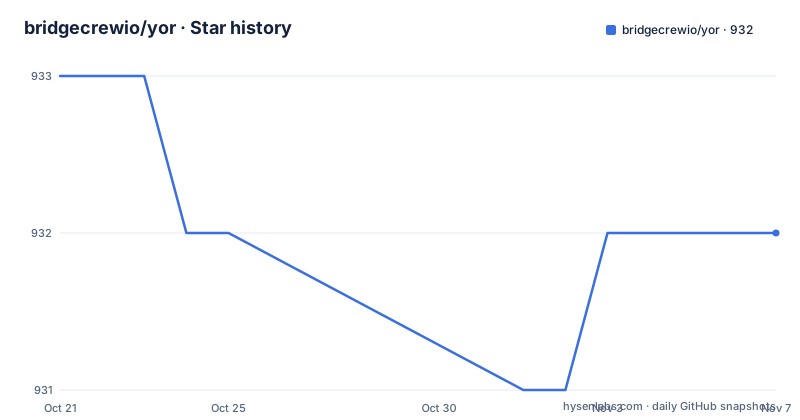
Star history
- bridgecrewio/yor932 ★ · -1
| Repository | 2026-10-21 | 2026-11-07 |
|---|---|---|
| bridgecrewio/yor | 933 | 932 |
-1 Stars in the last 17 days, measured from the daily GitHub snapshot. Compare with other projects
Editorial analysis
yor edits the IaC source, not the live cloud resource
The problem yor addresses is not a missing tag. It is that infrastructure as code drifts: teams write blocks by hand, tags differ between directories, and once a resource is running in the cloud there is no cheap way to say which file created it. yor is a Go program that reads IaC files, works out which tags should apply, and writes those tags back into the files.
That is the whole concept in one sentence, and the consequences follow from it. A tag applied by yor is visible in a code review, because the tag is literally in the diff of the file. It also means yor never touches a running resource directly. There is no cloud credential in the picture and no API call in the tagging path, which is exactly why the tool is usable as a pre-commit hook on a laptop with no access to an account. The cost is that a resource tagged by hand, or by a different tool, will not converge with what yor produces unless someone reruns it.
Tag groups decide what lands in the file: git, simple and custom
Tags are selected by group rather than one flag at a time. The git group carries change management data, the simple group carries key-value pairs you supply yourself, and custom taggers cover logic you define yourself. The README states that custom taggers are user-defined tagging logic that can be added to run using yor, with the details in CUSTOMIZE.md.
The selection flags are granular to the point of being hard to remember. You can ask for two specific tags, exclude tags by pattern, ask for a whole group, or restrict the run to one framework.
# Apply only the specified tags git_file and git_org
yor tag --directory terraform/ --tags git_file,git_org

# Apply all the tags in yor except the tags starting with git and yor_trace
yor tag --directory terraform/ --skip-tags git*,yor_trace

# Apply only the tags under the git tag group
yor tag --tag-groups git --directory terraform/

# Apply key-value tags on a specific directory
export YOR_SIMPLE_TAGS='{ "Environment" : "Dev" }'
yor tag --tag-groups simple --directory terraform/dev/

# Perform a dry run to get a preview in the CLI output of all of the tags that will be added using Yor without applying any changes to your IaC files.
yor tag -d . --dry-run
The simple group is driven by the YOR_SIMPLE_TAGS environment variable, which holds a JSON object of key and value pairs. Setting it for one shell gives you Environment Dev for one directory. A tag prefix can also be applied with --tag-prefix, and resource names can be excluded with --skip-resources.
The yor_trace tag and the git tag group do different jobs
Two tag families carry most of the value, and they are worth separating. The git group is change management: according to the README, git-based tags automatically add organisation, repository, commit and modifier details on every resource block. Those tags change with every commit, so they record who changed what and when.
The yor_trace tag does something narrower. The README describes it as enabling simple attribution between an IaC resource block and a running cloud resource. The point is that the identifier is written into the source, so a lookup from a running resource back to code becomes possible once the same identifier has been applied on the cloud side.
That distinction has a practical consequence. A git tag is self-contained inside the repository. A trace tag only pays off if the identifier reaches the resource, and yor itself does not push tags to a cloud API. If your pipeline expects yor to label running resources, that expectation will not be met by the tag command alone. The related metadata comes from git history, and the dependency list in go.mod includes go-git for that reason.
Getting yor onto a machine: brew, Docker or a pre-commit hook
Homebrew is the shortest path on macOS and Linux, and the Docker image avoids installing anything locally.
brew tap bridgecrewio/tap
brew install bridgecrewio/tap/yordocker pull bridgecrew/yor
docker run --tty --volume /local/path/to/tf:/tf bridgecrew/yor tag --directory /tfThe Docker invocation mounts your Terraform directory at /tf inside the container and points yor at that path, so the edits land in your working copy through the volume rather than in a throwaway container filesystem.
The third option ties yor into git itself, so tagging happens before a commit is created rather than as a separate sweep. The hook is defined in .pre-commit-hooks.yaml in this repository, and the pre-commit configuration in the README looks like this.
  - repo: https://github.com/bridgecrewio/yor
    rev: 0.1.143
    hooks:
      - id: yor
        name: yor
        entry: yor tag -d
        args: ["."]
        language: golang
        types: [terraform]
        pass_filenames: false
Note the rev. It pins the hook to 0.1.143, a version behind the newest published release, and pass_filenames is false because the hook takes a directory rather than the changed files it is handed. The entry runs yor tag -d on the current directory, which means the hook tags the whole tree at commit time.
Pointing --config-file inside your repo can write CI secrets into IaC
There is a security note in the README's own usage examples, and it is specific enough to be worth reading before you wire yor into CI. The config file option accepts an external path for a custom tag group configuration, and that configuration supports ${env:NAME} expansion. If the config file lives inside the repository and the run auto-commits, someone who can edit a repo-resident config can push values from the CI environment into your IaC files.
The README is explicit that --config-file must not point at a path inside the directory passed to -d in an auto-committing run such as the bridgecrewio/yor-action GitHub Action.
# Use an external tag group configuration file path.
# SECURITY: do not point --config-file at a path inside the directory passed
# to -d when the run will auto-commit (e.g. via the bridgecrewio/yor-action
# GitHub Action). The config file supports ${env:NAME} expansion, so an
# attacker who can edit a repo-resident config can exfiltrate CI secrets
# into your IaC files. See docs/3.Custom Taggers/Custom_tagger_YAML.md
# ("Security considerations for --config-file") for the full guidance.
yor tag -d . --config-file /path/to/conf/file/
This is the failure mode to plan around. An auto-committing tagger runs with your CI credentials, and a config file that can read environment variables is an exfiltration channel into files that people then merge. Keep the config outside the tagged tree, and treat edits to any config inside the repository as privileged.
Skips and --non-recursive are how you keep yor out of the way
A tool that rewrites files needs ways to stay out of the way, and yor has several. Inline annotations let developers exclude paths that should not be tagged, according to the feature list. On the command line you can stop the recursion with --non-recursive so a subdirectory is left alone, skip whole resource types with --skip-resource-types, skip individual resources by name with --skip-resources, and restrict the run to particular frameworks with --parsers Terraform,CloudFormation.
The framework list is the hard boundary. The README states that yor can add tags to Terraform, CloudFormation and Serverless Frameworks. The go.mod dependency list backs that up: it requires github.com/awslabs/goformation/v5 for CloudFormation structures, github.com/bridgecrewio/goformation/v5, hashicorp/hcl/v2 and hashicorp/terraform-config-inspect for Terraform, and github.com/hashicorp/go-getter for remote sources. If your infrastructure is described in another language, yor will not read it.
That makes yor the wrong tool for a repository that already has a tagging scheme enforced elsewhere, or for one that only wants a fixed tag set applied at deploy time by the cloud provider. yor is built for teams that want tags written into source, reviewed in pull requests, and versioned with the code.
The CLI in your terminal versus the action in your pipeline
The same tagging logic is available in two shapes, and they suit different moments. The CLI is for a developer who wants to see the diff before committing, and --dry-run makes the preview explicit: it prints the tags that would be added and changes nothing in the IaC files. The GitHub Action is for the pipeline that runs after a merge, where the tags are applied and committed back for you. The README names the action repository bridgecrewio/yor-action, and the example workflow triggers on push and pull request events against the main branch, checks out the code with fetch-depth 0 so that git history is available, and then runs the action.
Both routes end with the same constraint. The action commits on your behalf, so a config file inside the tagged directory is dangerous there in a way it is not for a local dry run.
On maintenance, the last push to the repository was on 2026-10-21, and the newest published release is 0.1.200 from 2025-02-25, ahead of 0.1.199 from 2024-08-04. The code targets Go 1.26.0 with toolchain go1.26.4, and the Makefile offers build, install and update targets, where update runs go get -u followed by go mod tidy. The project is licensed under Apache-2.0, which permits use and modification of the software subject to conditions such as retaining the licence and copyright notices, and it places no obligations on your own infrastructure code.
Editorial conclusion
yor is worth adopting for teams that own their Terraform or CloudFormation files and need consistent tags plus a link back to the resource block, and it fits existing pipelines through the CLI or the bridgecrewio/yor-action GitHub Action. It is the wrong tool for a repository that only wants a tag set, or for one that would rather tag at the cloud provider layer than rewrite source files. Verify first that your CI does not pass a --config-file path inside the tagged directory, because that path can carry ${env:NAME} expansion and write CI secrets into your IaC files.
Frequently asked questions
How do I install yor on macOS or Linux?
The README documents a Homebrew tap: run brew tap bridgecrewio/tap and then brew install bridgecrewio/tap/yor. You can also pull the Docker image bridgecrew/yor and run the tag command against a mounted directory, or install the Chocolatey package on Windows.
Which infrastructure as code frameworks does yor support?
The README states that yor can automatically add tags to Terraform, CloudFormation and Serverless Frameworks. You can also narrow a run with --parsers Terraform,CloudFormation so only the listed parsers are applied.
Can yor tag resources that are already running in the cloud?
No. yor modifies the IaC files on disk, and the yor_trace tag is described as enabling simple attribution between a resource block and a running cloud resource. Applying that identifier to the live resource is a separate step outside the tag command.
Is it safe to use yor --config-file inside a repository with CI auto-commit?
The README warns against it. The config file supports ${env:NAME} expansion, so a config that an attacker can edit inside the repository can write CI environment values into your IaC files when the run commits automatically. Keep the config file outside the directory passed to -d.
How do I preview yor changes before applying them?
Use the dry run flag, for example yor tag -d . --dry-run, which prints a preview of all the tags that will be added without applying any changes to your IaC files.
Official sources
Add this badge to your README
If you maintain this project, the badge below links readers to this analysis and shows its maintenance status from the daily GitHub snapshot. Paste the markdown into your README; add ?metric=license or ?metric=stars to the image URL for a different field.

[](https://hysenlabs.com/projects/bridgecrewio-yor)Star history chart for your README
[](https://hysenlabs.com/projects/bridgecrewio-yor)Was this useful?