step-ca: the maintainers publish the list of what it cannot do
🛡️ A private certificate authority (X.509 & SSH) & ACME server for secure automated certificate management, so you can use TLS everywhere & SSO for SSH.
At a glance
- What is it?
- A Go certificate authority and ACME server for DevOps, where certificates can be issued in exchange for ACME challenges, OIDC tokens, cloud instance identity documents or configuration management tokens, revocation is passive rather than active, and the front page carries an itemised list of needs for which the maintainers point you to their commercial CA instead.
- Who is it for?
- step-ca suits a team that wants short-lived certificates issued automatically for internal services, machines and SSH logins, and that can operate without revocation infrastructure. It does not suit a deployment needing active revocation, several certificate authorities, hardware-bound keys, a web administration interface or validated FIPS software, because the project says so itself.
- Can I use it commercially?
- Yes. Apache-2.0 is a permissive licence: you can use, modify and sell software built on it, as long as you keep its copyright and licence notices.
- Is it still maintained?
- Yes. The repository last received commits 4 days ago.
- What is it written in?
- Mainly Go, according to GitHub's language statistics.
Answers come from the project's GitHub data, last synced on November 14, 2026, and from our analysis. They are not legal advice.
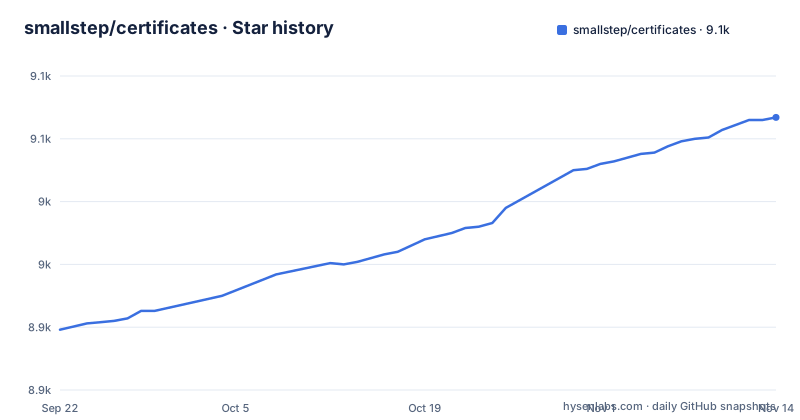
Star history
- smallstep/certificates9,067 ★ · +169
| Repository | 2026-09-22 | 2026-11-14 |
|---|---|---|
| smallstep/certificates | 8.9k | 9.1k |
169 Stars in the last 53 days, measured from the daily GitHub snapshot. Compare with other projects
Editorial analysis
The project publishes an itemised list of its own gaps
The most useful section of the front page is the comparison with the vendor's commercial product, because it is written as things to consider that product for, and the list is long. It includes multiple certificate authorities, active revocation through certificate revocation lists and online certificate status protocol, a turnkey high-volume high-availability authority, an API for managing the PKI as infrastructure, integrated support for SCEP and NDES when migrating from legacy Active Directory Certificate Services, device identity with cross-platform inventory and attestation using the Secure Enclave and TPM 2.0, a web admin interface with history, issuance and metrics, ACME External Account Binding, deep integration with an identity provider, fine-grained role-based access control, FIPS-compliant software, and private keys bound to a hardware security module. For anyone evaluating this, that list is worth more than the feature section, because the gaps are enumerated by the maintainers rather than discovered in production.
Revocation here is passive, and the commercial answer is active
One pair of items across the two sections describes the central design trade. The open-source feature list offers short-lived certificates with automated enrollment, renewal and passive revocation. The comparison section names active revocation, delivered through certificate revocation lists and the online certificate status protocol, as something to look at the commercial product for. That is not a wording difference, it is a different security model. With passive revocation, a certificate is trusted until it expires and nothing checks a list at connection time; safety comes from the lifetime being short enough that the window of exposure after a compromise is small. With active revocation, a checker can be told not to trust a specific certificate immediately. Choosing the open-source path therefore makes correct renewal the thing your security depends on, and it makes clock accuracy across your fleet matter more than it otherwise would.
Every way in is a provisioner, which is why the dependency list is so wide
There are several ways to authorize a request with the authority and establish a chain of trust that fits your flow, and the list is really a list of provisioners. A certificate can be issued for an ACME challenge response from any ACMEv2 client, for an OAuth single sign-on token such as an ID token from Okta, GSuite, Azure AD or Auth0, or from an OIDC service you host such as Keycloak or Dex. It can be issued for a cloud instance identity document, for virtual machines on AWS, GCP and Azure. It can be issued against a single-use short-lived JWK token issued by a configuration management tool such as Puppet, Chef, Ansible or Terraform. And there are more specialised provisioners: a trusted X.509 certificate, a host certificate from a Nebula network, a SCEP challenge, and one for SSH host certificates needing renewal. The module's dependencies include Nebula and OIDC libraries, which line up with those identity sources.
Three ACME challenges, and the one you pick decides your prerequisites
ACME is the protocol used by the public Let's Encrypt service to automate HTTPS issuance, and it is described as very easy to issue certificates to from here with any ACMEv2 client. The supported challenge types are the popular ones, and each one proves control of a different thing. The http-01 challenge asks you to place a token at a well-known URL, proving control of the web server. The dns-01 challenge asks you to add a TXT record, proving control of the DNS record set. The tls-alpn-01 challenge asks you to respond at the TLS layer, the way Caddy does, proving control of the web server again but without touching HTTP. The practical consequence is that challenge selection is an infrastructure decision, not a client decision: dns-01 needs API access to your zone, and the other two need the service to be reachable on a known port from the CA.
Browser-grade certificates cost more than internal TLS does
The first bullet in the list of things you can do is issuing HTTPS server and client certificates that work in browsers, and the compliance references are named explicitly, the IETF's RFC 5280 and the CA/Browser Forum's baseline requirements. That is a higher bar than the second bullet, which covers TLS certificates for DevOps targets such as virtual machines, containers, APIs, database connections and Kubernetes pods. The compliance references describe the certificates themselves; step-ca is still a private CA, and the browser bullet links to a post about valid HTTPS certificates for development and pre-production. The third bullet is a different shape again: SSH certificates, issued for people in exchange for single sign-on identity tokens and for hosts in exchange for cloud instance identity documents.
Four database backends, from an embedded file to a server
The persistence options are listed together and they span a real range. Badger, BoltDB, Postgres and MySQL are all supported as database backends. Two of those are embedded key-value stores that need no separate server, which is what makes it practical to stand up a certificate authority on a laptop for evaluation before committing to infrastructure. The rest are conventional relational databases for production use. Two other configuration choices sit alongside them. You choose key types among RSA, ECDSA and EdDSA and choose lifetimes to suit your needs, so the cryptography is a deployment decision rather than a build flag. And the authority can operate as an online intermediate under a root CA you already have, which is how you adopt this without replacing the anchor your fleet already trusts.
Releases are cosign signed, and a release candidate is a tag containing rc
The build file is worth reading because it explains how releases are recognised and what surrounds them. It installs its own tooling through a pattern rule, fetching the linter installer and then adding a vulnerability scanner, a test output summariser, the release tool and the signing tool at their latest versions. The top of the file declares what it builds and what the default pipeline is:
PKG?=github.com/smallstep/certificates/cmd/step-ca
BINNAME?=step-caall: lint test buildci: testcgo buildA vulnerability scanner in the bootstrap step is notable for a security project, as is the presence of a signing public key at the repository root. Version handling branches on whether the build is running in CI: there the version comes from the tag with its refs prefix stripped, and the push type is set to release-candidate when the tag contains a release-candidate marker, to release otherwise, and to branch for a local build, with a committed version file holding a slug for source archives. The recent release titles carry their date in the name, with v0.30.0, v0.30.1 and v0.30.2 published between 18 and 23 March 2026, and the last push is 2 November 2026.
Editorial conclusion
step-ca suits a team that wants short-lived certificates issued automatically for internal services, machines and SSH logins, and that can operate without revocation infrastructure. It does not suit a deployment needing active revocation, several certificate authorities, hardware-bound keys, a web administration interface or validated FIPS software, because the project says so itself. Before choosing it, read the commercial comparison section first, decide which provisioner matches the identity source you already have, and settle which database backend you will run.
Frequently asked questions
How do you use certificates with step-ca?
You run step-ca as an online certificate authority and issue certificates in exchange for something it trusts: an ACME challenge response, an OAuth single sign-on token, a cloud instance identity document, a short-lived JWK token from a configuration management tool, or one of the more specialised provisioners. A separate step CLI tool is the client for working with the resulting certificates and keys.
How do certificates work in step-ca?
A request is authorized against a provisioner, which is how the authority decides to trust the requester. Provisioners include ACME, OAuth OIDC single sign-on, cloud instance identity, JWK tokens issued by tools like Puppet or Ansible, a trusted X.509 certificate, a Nebula host certificate, SCEP, and one for SSH host certificates needing renewal. It can also run as an online intermediate under an existing root CA.
How do you manage user certificates in step-ca?
For people, step-ca issues SSH certificates in exchange for single sign-on identity tokens, and HTTPS certificates in exchange for OAuth OIDC tokens such as those from Okta, Azure AD, Auth0 or a self-hosted provider like Keycloak or Dex. The design leans on short lifetimes with automated enrollment and renewal rather than on individually managed certificates.
Where can I get a certificate for free?
step-ca is free, open source software, so running your own authority costs nothing but the machines. For certificates from someone else, the README notes that ACME is the protocol Let's Encrypt uses, and step-ca implements ACME so any ACMEv2 client can be pointed at it instead.
Official sources
Add this badge to your README
If you maintain this project, the badge below links readers to this analysis and shows its maintenance status from the daily GitHub snapshot. Paste the markdown into your README; add ?metric=license or ?metric=stars to the image URL for a different field.

[](https://hysenlabs.com/projects/smallstep-certificates)Star history chart for your README
[](https://hysenlabs.com/projects/smallstep-certificates)Was this useful?