Browserbase Skills: Claude Code plugins for browser automation via the browse CLI
Browserbase's official collection of agent skills to access the web.
At a glance
- What is it?
- Browserbase's skills repository ships eighteen Claude Code skills that wrap the official browse CLI, from CAPTCHA-solving sessions to OpenAPI spec generation. Here is what each skill does, how to install the plugin, and where the approach breaks down.
- Who is it for?
- Adopt Browserbase Skills if you already run Claude Code and want browser automation, tracing, or web search available as slash-command plugins without writing glue code. Skip it if you need a standalone automation library in your own application, if you cannot install Chrome locally, or if you depend on a documented licence before shipping.
- Can I use it commercially?
- Not without permission. GitHub finds no licence file in the repository, and without a licence all rights are reserved by default: you may read the code but not reuse it. Check the README, or ask the authors, before using it.
- Is it still maintained?
- Yes. The repository last received commits 18 days ago.
- What is it written in?
- Mainly JavaScript, according to GitHub's language statistics.
Answers come from the project's GitHub data, last synced on November 14, 2026, and from our analysis. They are not legal advice.
Star history
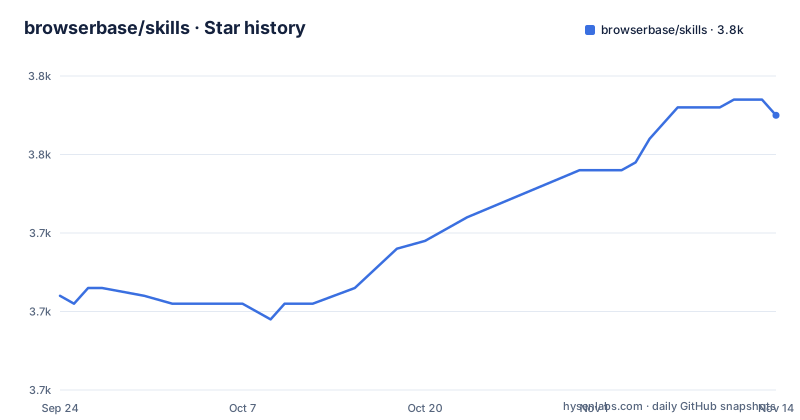
- browserbase/skills3,755 ★ · +23
| Repository | 2026-09-24 | 2026-11-14 |
|---|---|---|
| browserbase/skills | 3.7k | 3.8k |
23 Stars in the last 51 days, measured from the daily GitHub snapshot. Compare with other projects
Editorial analysis
What problem Browserbase Skills solves for Claude Code users
Claude Code can write code, but it cannot open a browser, click through a login flow, or capture what a page actually did without a tool. Browserbase Skills fills that gap by packaging eighteen skills as a Claude Code plugin. Each skill is a directory under skills/ with a SKILL.md that tells the agent how to perform one class of task: driving a browser session, deploying a serverless function, capturing a DevTools-protocol trace, generating an OpenAPI spec from observed traffic, or searching the web without a browser at all.
The audience is narrow and specific. You need Claude Code installed, you need the browse CLI, and for most skills you need Chrome on the machine. The README's usage examples assume a working local environment: "QA test http://localhost:3000 and fix any bugs you encounter" only works if the agent can reach localhost and launch a browser. Teams that want browser automation inside an existing Node or Python service will not find a library here. This is an agent-facing plugin collection, not an SDK.
How the browse CLI and the skills directory fit together
The repository has two layers. The skills/ directory holds the agent instructions, one folder per skill. The package.json declares a single binary named browser pointing at ./dist/src/cli.js, built by tsc through the build script, with a postinstall hook that runs the build automatically. The package is ESM ("type": "module") and pins [email protected] as its package manager.
The data flow is agent to CLI to Browserbase. When you ask Claude to browse, the skill loads its SKILL.md instructions, the agent emits browse commands, and the CLI executes them either against a remote Browserbase session or against a local Chrome instance. Skills that need more than navigation layer on top of that: browser-trace captures a CDP firehose plus screenshots and DOM dumps, then bisects the stream into per-page searchable buckets. browser-to-api consumes a browser-trace capture and produces a best-effort OpenAPI 3.1 spec. autobrowse closes the loop by running a task, reading the trace, and revising the navigation skill until it passes reliably.
That layering is the interesting design choice. Rather than one monolithic browser tool, the repository splits capture, analysis, and generation into separate skills that pass artifacts between them. The cost is that you need to understand which skill produces which artifact before the pipeline makes sense.
Installing the plugin and running a first local browser task
The README gives two installation paths. For popular coding agents, the generic installer is a single npx command:
npx skills add browserbase/skillsOn Claude Code specifically, you add the marketplace and then install the plugin. The README notes that you must restart Claude Code afterwards for the changes to take effect.
/plugin marketplace add browserbase/skills
/plugin install browse@browserbase
There is also a manual path through the /plugin menu: select option 3, enter browserbase/skills as the marketplace source, pick the browse plugin, confirm Install now, and restart. If Chrome is missing, the troubleshooting section points macOS and Windows users at the standard Chrome download and Linux users at apt:
sudo apt install google-chrome-stableFor a first real task, the README recommends passing --local on the first browser command when working against localhost, which starts a clean isolated browser rather than attaching to your existing profile:
browse open http://localhost:3000 --localUse --auto-connect instead when the agent should reuse your existing local Chrome session, cookies, or login state. That distinction matters: --local gives you a clean slate, --auto-connect gives you your logged-in identity, and picking the wrong one produces confusing failures on authenticated pages.
Where the skills approach gets in the way
The most concrete limitation is the Chrome dependency. The troubleshooting section exists because skills fail when Chrome is not installed, and the fix is a manual platform-specific install. There is no bundled browser, so a CI container or a locked-down workstation needs Chrome provisioned before any browser skill works.
Cookie handling is the second rough edge. To refresh cookies from your main Chrome profile, the README tells you to delete the profile directory outright:
rm -rf .chrome-profileThat is a destructive command with no documented backup step, and the README does not describe what state you lose beyond cookies. If you rely on a persistent authenticated context, plan for that reset.
Third, the collection is broad but shallow per skill. Eighteen skills span browser automation, serverless deployment, tracing, spec generation, prompt optimization, UI testing, prospecting, and competitor analysis. Each SKILL.md is an instruction document, not a tested library with a stable API. When a skill's instructions drift from what the browse CLI actually does, the agent follows the stale document. The README does not document versioning per skill, and the repository has no published releases, so there is no changelog to check before upgrading. The repository's last push was on 2026-09-09, and nothing in the README states a support policy or compatibility matrix for Claude Code versions.
browser-use-to-stagehand and the migration path it assumes
The clearest alternative framing comes from inside the repository. The browser-use-to-stagehand skill exists to move browser-use (Python) automation onto Stagehand v3 (TypeScript) running on Browserbase, mapping features and choosing a determinism level per step. That tells you the intended comparison point: if you already have browser-use scripts, this repository offers a migration route rather than a drop-in replacement.
The difference in approach is where the automation logic lives. browser-use is a Python library you import and control from your own code. Browserbase Skills puts the logic in SKILL.md documents that an agent reads and acts on through the browse CLI. You trade programmatic control for agent-driven execution. If you need deterministic, testable automation in a Python service, the library model fits better. If you want an agent to figure out the steps from a natural-language request, the skills model is the point.
A second alternative sits in the same table: the fetch and search skills deliberately avoid a browser session entirely. For static pages and structured search results, the README positions these as the lighter option. Reaching for a full browser session when fetch would do adds latency and a Chrome dependency for no gain.
Maintenance, licence, and what to check before upgrading
The repository is not archived, and the last push was on 2026-09-09, roughly two weeks before this writing. That is recent enough to suggest the collection is still being touched, but the repository carries no release history, so there is nothing to read between versions. The package version in package.json is 0.0.1, which signals early-stage rather than stable.
The licence field is unknown in the repository metadata. That is a real gap, not a formality. Before adopting these skills in a commercial setting, check the repository for a LICENSE file, because the metadata does not confirm one exists and the top-level entries listed do not include it. Without a stated licence, you cannot assume redistribution or modification rights, and the postinstall build hook means installing the package runs tsc on your machine.
Upgrade cost is low in one sense and opaque in another. There are no pinned skill versions, so pulling the latest changes updates every SKILL.md at once. If a skill's instructions change behaviour, you find out when an agent task fails rather than from a changelog.
Editorial conclusion
Adopt Browserbase Skills if you already run Claude Code and want browser automation, tracing, or web search available as slash-command plugins without writing glue code. Skip it if you need a standalone automation library in your own application, if you cannot install Chrome locally, or if you depend on a documented licence before shipping. Verify first that the browse plugin installs cleanly in your Claude Code version, that Chrome is present at the path the skills expect, and that the skills you want actually exist under skills/ rather than only in the README table.
Frequently asked questions
How do I install Browserbase Skills in Claude Code?
Run /plugin marketplace add browserbase/skills, then /plugin install browse@browserbase, and restart Claude Code for the changes to take effect. The README also documents a manual path through the /plugin menu where you select option 3 and enter browserbase/skills as the marketplace source.
How do I use Browserbase Skills in Claude Code?
After installing the browse plugin, you ask Claude in natural language, for example to summarize Hacker News comments or QA test a localhost URL. The README states that Claude will handle the rest, with the skills supplying the underlying browse CLI commands.
How do I install skills from GitHub into Claude Code?
For Browserbase Skills the README gives npx skills add browserbase/skills as the generic installer for popular coding agents, alongside the Claude Code marketplace commands. The repository source is browserbase/skills on the main branch.
How do I use skills in Claude?
Skills are loaded by the agent when a task matches them. In Browserbase Skills, each skill is a folder under skills/ with a SKILL.md, and the README shows usage as plain requests such as asking Claude to browse a site or run browse commands.
How do I install skills in Claude?
The README's Claude Code instructions are to add the marketplace with /plugin marketplace add browserbase/skills and then install the browse plugin with /plugin install browse@browserbase. Restarting Claude Code is required for the changes to take effect.
Official sources
Add this badge to your README
If you maintain this project, the badge below links readers to this analysis and shows its maintenance status from the daily GitHub snapshot. Paste the markdown into your README; add ?metric=license or ?metric=stars to the image URL for a different field.

[](https://hysenlabs.com/projects/browserbase-skills)Star history chart for your README
[](https://hysenlabs.com/projects/browserbase-skills)Was this useful?