Glide 5.0.9: An Android Image Loader Built for List Scrolling, Not Just Loading
An image loading and caching library for Android focused on smooth scrolling
At a glance
- What is it?
- Glide is an open source Android media management library that bundles decoding, disk and memory caching, and resource pooling behind a simple API. Its primary focus is smooth list scrolling, and the README lists specific constraints you should check before adopting.
- Who is it for?
- Adopt Glide 5.0.9 if you build Android apps that display remote images in lists, grids, or pagers and you want a library that already handles memory and disk caching, GIFs, and video stills. Do not use it if you must support API levels below 14 or need built-in zoom and pan for huge images.
- Can I use it commercially?
- Check first. The repository uses a licence we do not classify automatically, so read its LICENSE file before any commercial use.
- Is it still maintained?
- Yes. The repository received new commits within the last day.
- What is it written in?
- Mainly Java, according to GitHub's language statistics.
Answers come from the project's GitHub data, last synced on November 15, 2026, and from our analysis. They are not legal advice.
Star history
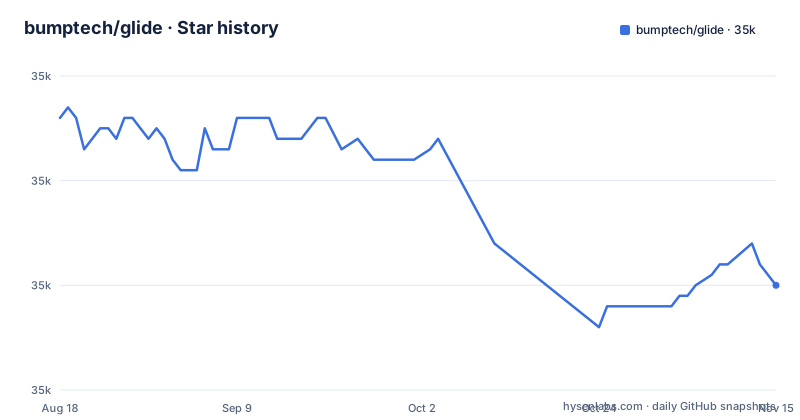
- bumptech/glide35,010 ★ · -16
| Repository | 2026-08-18 | 2026-11-15 |
|---|---|---|
| bumptech/glide | 35k | 35k |
-16 Stars in the last 89 days, measured from the daily GitHub snapshot. Compare with other projects
Editorial analysis
The Problem Glide Solves: Smooth Scrolling in Image-Heavy Lists
Loading images directly into an ImageView inside a ListView or RecyclerView is a recipe for jank. Each scroll triggers network fetches, bitmap decoding, and allocations that compete with the UI thread. Glide addresses this by wrapping media decoding, memory and disk caching, and resource pooling into a single interface. The README states that Glide's primary focus is making scrolling any kind of list of images as smooth and fast as possible. It also handles video stills and animated GIFs, which are common in social feeds and media apps. The target audience is Android developers who need a reliable way to display remote images without hand-rolling a cache or a decode pipeline. The API is deliberately small: a typical call is Glide.with(this).load(url).into(imageView). That brevity hides a lot of machinery, which is the point.
How Glide Works: Decoding, Caching, and Resource Pooling
The README describes Glide as a framework that wraps media decoding, memory and disk caching, and resource pooling. Glide fetches bytes from a network stack, decodes them into bitmaps or GIF frames, and then caches the results. The disk cache is based on Jake Wharton's DiskLruCache implementation, and the GIF decoder is based on a gist by Dave Smith. Resource pooling means recycled bitmaps are reused, which reduces garbage collection pressure during scrolls. The API allows callers to plug in almost any network stack. By default, Glide uses a custom HttpURLConnection based stack, but it ships utility libraries for Google's Volley and Square's OkHttp. That modularity is a strength: you can keep Glide's caching and decoding while swapping the network layer. The trade-off is that you must add an integration dependency and configure it, which is an extra step beyond the core artifact.
Getting Glide Running: Gradle, Maven, and the Build Process
The README gives concrete installation steps. For Gradle, add google() and mavenCentral() to your repositories, then add implementation 'com.github.bumptech.glide:glide:5.0.9' to dependencies. Maven users get the same artifact with groupId com.github.bumptech.glide, artifactId glide, and version 5.0.9. The library bundles its R8 and ProGuard rules inside the AAR, so R8 can interpret them automatically. That saves you from copying rules manually, but you should confirm your build actually applies them. For building Glide from source, the README shows git clone, cd glide, and ./gradlew jar. You need the Android Support Repository installed and either $ANDROID_HOME set or a local.properties file with sdk.dir. The samples are run with commands like ./gradlew :samples:flickr:run and :samples:giphy:run. These commands give you a working reference if you want to see Glide in action before integrating it.
Compatibility Constraints: API Levels and Optional Integrations
Glide v4 requires a minimum Android API level of 14 and a compile SDK of API 26 or later. The README notes that if you need to support older versions, Glide v3 works on API 10 but is not actively maintained. That is a hard boundary: you cannot use v4 on a minSdk below 14. For network stacks, the core artifact uses HttpURLConnection, but you can add okhttp3-integration or volley-integration as optional dependencies. The README points to docs pages for each. If you use OkHttp 3.x, there is an optional okhttp3-integration dependency.
Known Failure Modes: Circle Images, Huge Images, and GIFs
The README documents specific cases where Glide does not behave as expected. CircleImageView, CircularImageView, and RoundedImageView have known issues with TransitionDrawable, specifically when you use .crossFade() together with .thumbnail() or .placeholder(), and with animated GIFs. The suggested workarounds are to use a BitmapTransformation such as .circleCrop() (available in v4) or .dontAnimate(). That is a real limitation if your app relies on rounded image views with fade-in effects. Another limitation is huge images like maps or comic strips. Glide can load them by downsampling, but it does not support zooming and panning ImageViews because those require tiling to avoid OutOfMemoryError. If your use case is a map viewer, Glide is the wrong tool for the display part.
Alternatives: Picasso and Fresco Take Different Approaches
The Android image loading space has two well-known alternatives with different designs. Square's Picasso uses a similar simple API and also handles caching. Glide, by contrast, supports video stills and animated GIFs per its README. Facebook's Fresco takes a different architectural route: it manages images in native memory and uses a custom pipeline that can be more efficient for very large images, but it requires a larger dependency and a different integration model. Fresco is better suited for apps that need extreme memory control or progressive JPEGs. Glide's advantage is its smaller API surface and its explicit focus on list scrolling, which the README states as its primary goal. If you only need simple image loading and already use OkHttp, Glide with the okhttp3-integration is a low-friction choice. If you need native memory management or tiled zoom, Fresco is worth evaluating.
Maintenance, Licensing, and Upgrade Path
The repository shows a recent push on 2026-11-02, and the latest release is v5.0.9 (2026-07-11), so the project is actively maintained. The README states that version 4 is stable and updates are released periodically. The version numbering is confusing: the latest release is v5.0.9, but the compatibility section still refers to v4 requirements. That suggests the README may lag behind the code. The license is marked as NOASSERTION in the repository metadata, but the README says the license is BSD, part MIT and Apache 2.0, and points to the LICENSE file. You should read that file before distributing your app, especially if you plan to modify Glide's source. The build process uses Gradle and requires the Android Support Repository. The README points to a separate wiki for Glide v3. The bundled ProGuard rules reduce one maintenance burden, but you still need to verify your R8 configuration does not strip Glide's classes. The sample projects give you a way to test a new version before committing to it.
Editorial conclusion
Adopt Glide 5.0.9 if you build Android apps that display remote images in lists, grids, or pagers and you want a library that already handles memory and disk caching, GIFs, and video stills. Do not use it if you must support API levels below 14 or need built-in zoom and pan for huge images. Before integrating, verify that your compile SDK is at least API 26, confirm that your R8 or ProGuard setup consumes the bundled rules, and test the interaction between crossFade, placeholders, and animated GIFs with your custom view classes. Glide is not an official Google product, and the license mixes BSD, MIT, and Apache 2.0, so review the LICENSE file for your distribution model.
Frequently asked questions
what is glide
Glide is an open source media management and image loading framework for Android, written in Java. It wraps media decoding, memory and disk caching, and resource pooling, and it fetches, decodes and displays video stills, images and animated GIFs. Its primary focus is making scrolling a list of images smooth.
is glide free
The page describes Glide as an open source project and states the license as BSD, part MIT and Apache 2.0, with details in the LICENSE file. It also states that Glide is not an official Google product.
how to install glide client
Glide is a library rather than a client, so it is added as a dependency rather than installed. You declare com.github.bumptech.glide:glide:5.0.9 in Gradle or the matching groupId, artifactId and version in Maven, or download a jar from the releases page.
what is glide app
There is no application here. The repository contains an Android library, its samples, and a benchmark module, and the page adds that Glide is not an official Google product. The sample projects are run from a checkout with gradle commands such as ./gradlew :samples:flickr:run.
Official sources
Add this badge to your README
If you maintain this project, the badge below links readers to this analysis and shows its maintenance status from the daily GitHub snapshot. Paste the markdown into your README; add ?metric=license or ?metric=stars to the image URL for a different field.

[](https://hysenlabs.com/projects/bumptech-glide)Star history chart for your README
[](https://hysenlabs.com/projects/bumptech-glide)Was this useful?