How cargo-bundle packages Rust applications for each desktop OS
Wrap rust executables in OS-specific app bundles
At a glance
- What is it?
- cargo-bundle turns Cargo-built executables into native application packages for macOS, Linux, and Windows. It suits GUI application developers who need platform metadata and packaging without writing each packaging workflow separately, but its iOS and Windows support remains experimental.
- Who is it for?
- Adopt cargo-bundle if a Cargo project produces a GUI executable and the team wants macOS, Debian, Linux AppImage, or Windows packaging driven by one manifest. Do not choose it if Android or RPM output is mandatory, if iOS or Windows production packaging requires stability the project cannot yet claim, or if an already-built executable cannot satisfy the platform's packaging needs.
- Can I use it commercially?
- Check first. The repository uses a licence we do not classify automatically, so read its LICENSE file before any commercial use.
- Is it still maintained?
- Yes. The repository last received commits 48 days ago.
- What is it written in?
- Mainly Rust, according to GitHub's language statistics.
Answers come from the project's GitHub data, last synced on November 7, 2026, and from our analysis. They are not legal advice.
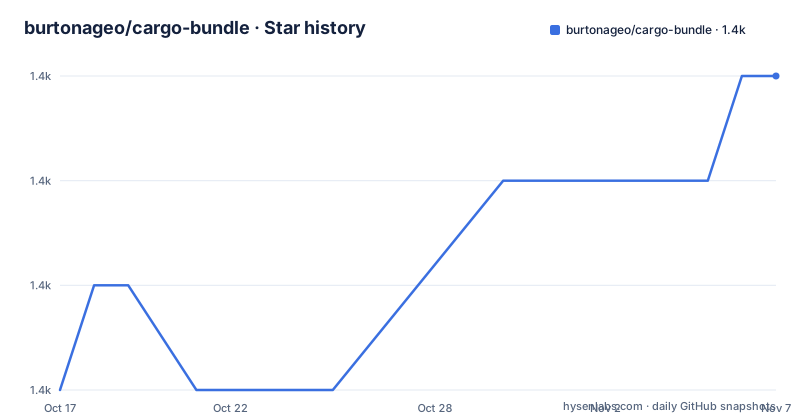
Star history
- burtonageo/cargo-bundle1,379 ★ · +3
| Repository | 2026-10-17 | 2026-11-07 |
|---|---|---|
| burtonageo/cargo-bundle | 1.4k | 1.4k |
3 Stars in the last 21 days, measured from the daily GitHub snapshot. Compare with other projects
Editorial analysis
cargo-bundle targets the packaging gap after cargo build
cargo-bundle addresses the stage between producing a Cargo executable and distributing it as a desktop application. A command-line program can often be shipped as a standalone executable, but GUI applications normally need an icon, application identity, metadata, resources, and an OS-specific package layout. The README describes support for `.app` bundles on macOS and iOS, `.deb` packages and `.AppImage` bundles on Linux, and `.msi` installers on Windows.
The intended users are Rust developers building GUI executables through Cargo. Configuration lives in the application's `Cargo.toml`, so packaging attributes remain close to the package and binary declarations rather than living in a separate description. The same manifest can describe names, icons, descriptions, copyright information, resources, categories, and platform-specific settings.
Support is uneven. The README labels iOS and Windows support experimental. It also lists `.rpm` and `.apk` generation as pending even though `rpm` appears among the command's possible format values. That distinction matters: the presence of a format name in the flag list should not be treated as proof that every listed output is available or suitable for release. Android packaging is outside the current documented capability, and there are no GitHub releases through which the repository provides a separate release history beyond the published crate installation path.
Cargo metadata drives cargo-bundle package generation
The central design choice is reuse of Cargo metadata. The README instructs users to add a `[package.metadata.bundle]` section to `Cargo.toml`. `cargo-bundle` reads that manifest when packaging and can derive values from the selected Cargo binary or example. For example, the application name falls back to the selected `bin` target's `name`, while the version can come from the package's `version` when the bundle manifest omits it.
An `identifier` is required. It must use reverse-DNS form, such as `com.example.appname` or `io.github.username.project`. On macOS and iOS, that value becomes the bundle's `CFBundleIdentifier`. On Windows, it is hashed to create an application GUID. This makes the field part of both packaging and platform identity, so choosing an arbitrary display name would not replace the required identifier.
Icons are declared as file paths or globs. The README lists SVG for Linux, ICNS, ICO, PNG, and formats accepted by the `image` crate. `cargo-bundle` converts between formats as required. A high-resolution icon can use `@2x` immediately before its extension. Resources can also use files, directories, and globs, allowing non-code assets to enter the platform's resources section.
The `script` field creates an expectation that is not implemented. The README explicitly describes it as reserved and says it is not currently used. Consequently, a manifest containing a script does not provide a documented way to download data, compress content, encrypt assets, or run preparation commands during packaging.
Installing cargo-bundle and configuring a first Cargo package
The documented installation path is `cargo install cargo-bundle`. This installs the most recent version published on crates.io as a subcommand for the default Cargo installation. The command is:
cargo install cargo-bundleAfter installation, add bundle metadata to the Rust project's `Cargo.toml`. This example uses identifiers and paths present in the repository's `examples/goodbye` configuration:
[package.metadata.bundle.example.goodbye]
name = "Goodbye"
identifier = "io.github.burtonageo.cargo-bundle.goodbye"
icon = ["examples/goodbye/icon32x32.png", "examples/goodbye/icon128x128.png"]
category = "Developer Tool"
short_description = "An example CLI application showing PNG icon bundling"
appimage_metainfo_path = "examples/goodbye/goodbye.metainfo.xml"
The exact manifest shape can differ for a normal application package. The key requirement confirmed by the README is the `[package.metadata.bundle]` section and a reverse-DNS `identifier`. Run the packaging command from the directory containing `Cargo.toml`:
cargo bundleFor release output, the README specifically requires `--release`:
cargo bundle --releaseThe expected result is an OS-specific bundle for the current operating system. A format can be selected with `--format`, whose documented values are `deb`, `ios`, `msi`, `wxsmsi`, `osx`, `rpm`, and `appimage`. However, the README separately says `.rpm` and `.apk` support is pending, so the command list should be checked against the feature status and the output actually produced before release use.
Selecting binaries, targets, features, and prebuilt executables
cargo-bundle exposes the Cargo selection options that affect which artifact is packaged. `--bin` selects a named binary, while `--example` selects an example. `--package` selects a package when the Cargo workspace does not resolve to the intended one. Features can be controlled with `--features`, `--all-features`, and `--no-default-features`.
Targeting follows Cargo's `--target` model. On macOS, the flag may be repeated to build several architectures and combine them with `lipo`. The README gives this exact command for a universal bundle:
cargo bundle -t aarch64-apple-darwin -t x86_64-apple-darwinThis repeated-target behavior is documented as macOS-only. It should not be carried over as a general cross-compilation rule.
The `--binary-path` option separates compilation from packaging. According to the README, `cargo-bundle` copies the referenced regular file into the generated bundle without running `cargo build` or modifying the input. Cargo metadata is still read for the bundle manifest and selected `--bin` or `--example`. Release mode, profile, and target selection still affect the output directory and target metadata.
That split is useful when CI performs the build separately, or when another build system already created the executable. The documented sequence is:
cargo build --release --bin my-app
cargo bundle --release --bin my-app --binary-path target/release/my-app
The path must refer to a regular file. This is packaging, not process supervision: the option does not establish that the referenced executable was compiled from the current source tree, targets the requested platform, includes the expected features, or contains the right license information. Those checks remain separate.
Platform formats expose different packaging constraints
The documented output formats are not interchangeable containers. macOS `.app` bundles use application metadata including `CFBundleIdentifier` and can be combined across Apple architectures. Linux support includes `.deb` and `.AppImage`, with separate handling for distribution metadata and bundle layout. Windows output is `.msi`, and the README warns that Windows support remains experimental. The command also lists `wxsmsi`, but the README excerpt does not explain its distinction from `msi`.
The target table gives platform constraints for several triples. Examples include Linux builds requiring glibc 2.17 or later, 32-bit MinGW and MSVC targets marked for Windows 7 or later, and `x86_64-apple-darwin` marked for macOS 10.12 or later. It does not list every modern Apple or Windows target, so a target triple's absence from this table is a documentation boundary.
The tool does not claim to remove native packaging prerequisites from a release pipeline. It invokes Cargo or accepts a prebuilt binary, reads metadata, and generates platform bundles. The README does not claim that signing, notarization, code signing, installer signing, update delivery, or automated installation testing is handled. Those requirements must be verified separately for each destination platform.
Linux localization is at least partially represented in the repository manifest. The `examples/goodbye` entry includes French and German metadata for Linux. This shows that the manifest can carry localized `Name` and `Comment` values, but the README excerpt does not document every accepted platform-specific field.
License, maintenance, and upgrade exposure
The repository metadata labels the license as `Other` because GitHub cannot classify it, while `Cargo.toml` declares `MIT OR Apache-2.0`. The top-level files include `License_Apache.md` and `License_MIT.md`. That discrepancy needs direct review by the adopting project. It does not justify assuming that every generated binary or bundle carries identical notices, so the distribution process should confirm which license texts and notices are required for the packaged artifacts. This is a licensing review, not legal advice.
The repository is not archived, and its last push was on 2026-09-20. There are no GitHub releases. Installation is instead tied to the most recent crate published on crates.io, which means the installed version and the repository's current `Cargo.toml` version can represent different release channels. The repository's `Cargo.toml` declares version `0.12.0`, but the README does not explain the project's release or compatibility policy.
Upgrading cargo-bundle may affect command availability, supported formats, manifest behavior, or target handling. The README gives no migration guide, release notes, support window, or compatibility table. Projects with packaging automation should therefore keep bundle metadata under review when changing cargo-bundle versions and inspect output for each supported target platform.
Why a manual cargo-bundle workflow has a lower maintenance cost
A real alternative is to keep separate, hand-written packaging commands for each operating system. That approach does not use cargo-bundle or consume its Cargo subcommand. Instead, each platform pipeline can call its native packaging tools, copy the executable into the required directory layout, and supply that platform's metadata and resources directly. The repository does not name specific competing tools or native packaging command lines, so naming one here would go beyond the README.
The practical difference is ownership. cargo-bundle centralizes much of the bundle manifest and offers one command with Cargo-aware binary, example, feature, profile, release, and target selection. A manual workflow can provide finer control over each native format, but it requires the project to maintain separate layout and metadata logic for macOS, Linux, and Windows. That control may be necessary when a distribution requires signing or an installer layout outside cargo-bundle's documented model.
cargo-bundle is therefore a reasonable fit for a Cargo GUI project seeking a common declaration, especially where `.app`, `.deb`, and `.AppImage` are priorities. It is the wrong choice where Android `.apk` or Linux `.rpm` generation is mandatory, where unsupported metadata must be synthesized through the reserved `script` field, or where experimental iOS and Windows packaging is insufficient for a production release.
Editorial conclusion
Adopt cargo-bundle if a Cargo project produces a GUI executable and the team wants macOS, Debian, Linux AppImage, or Windows packaging driven by one manifest. Do not choose it if Android or RPM output is mandatory, if iOS or Windows production packaging requires stability the project cannot yet claim, or if an already-built executable cannot satisfy the platform's packaging needs. Before adoption, verify the generated package on each target OS, inspect the bundled executable and resources, and confirm that the custom MIT OR Apache-2.0 licensing arrangement is appropriate for the distribution.
Frequently asked questions
How do I install cargo-bundle?
Run `cargo install cargo-bundle`. The README says this installs the most recent version published on crates.io as a Cargo subcommand for the default Cargo installation.
Which bundle formats does cargo-bundle support?
The README documents `.app` bundles for macOS and iOS, `.deb` and `.AppImage` for Linux, and `.msi` for Windows. It labels iOS and Windows support experimental, while `.rpm` and `.apk` support remains pending.
Can cargo-bundle package an executable that was already built?
Yes. The `--binary-path <PATH>` option packages a regular file without running `cargo build` again or modifying that file. Cargo metadata is still read for the bundle manifest and binary or example selection.
Official sources
Add this badge to your README
If you maintain this project, the badge below links readers to this analysis and shows its maintenance status from the daily GitHub snapshot. Paste the markdown into your README; add ?metric=license or ?metric=stars to the image URL for a different field.

[](https://hysenlabs.com/projects/burtonageo-cargo-bundle)Star history chart for your README
[](https://hysenlabs.com/projects/burtonageo-cargo-bundle)Was this useful?