Caffe 1.0: A Lasting Framework for Fast Vision Models
Caffe: a fast open framework for deep learning.
At a glance
- What is it?
- Caffe is a BSD-licensed deep learning framework from Berkeley AI Research, focused on speed and modularity for convolutional networks. Its last release is 1.0 from 2017, so adopters must weigh its stability against a stale codebase.
- Who is it for?
- Caffe is for teams that need a proven, fast path to deploy convolutional networks in production, especially with custom CPU or OpenCL backends. Do not use it if you require modern training features like dynamic graphs or eager execution, or if you need active maintenance.
- Can I use it commercially?
- Check first. The repository uses a licence we do not classify automatically, so read its LICENSE file before any commercial use.
- Is it still maintained?
- Probably not. The repository last received commits 28 months ago, on July 31, 2024.
- What is it written in?
- Mainly C++, according to GitHub's language statistics.
Answers come from the project's GitHub data, last synced on November 23, 2026, and from our analysis. They are not legal advice.
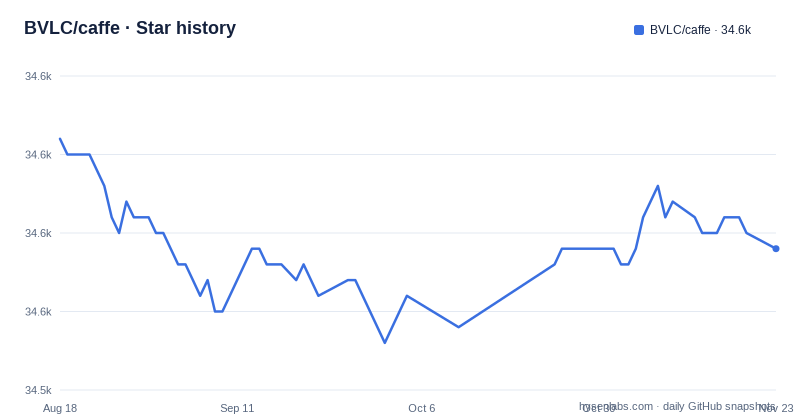
Star history
- BVLC/caffe34,554 ★ · -7
| Repository | 2026-08-18 | 2026-11-23 |
|---|---|---|
| BVLC/caffe | 34.6k | 34.6k |
-7 Stars in the last 97 days, measured from the daily GitHub snapshot. Compare with other projects
Editorial analysis
What Caffe Solves and Who It Serves
Caffe is a deep learning framework built for expression, speed, and modularity, as the README states. It targets researchers and engineers who need to train and deploy convolutional neural networks, particularly for vision tasks like image classification and object detection. The framework was developed by Berkeley AI Research and the Berkeley Vision and Learning Center, so it carries academic credibility. Its primary audience is teams that value a declarative model definition and a fast C++ runtime over the flexibility of dynamic computation graphs. Caffe is not a general-purpose deep learning toolkit; it is strongest when your problem fits the feed-forward convolutional patterns it was designed for. The project site lists tutorials and a model zoo, which suggests a community around reproducible vision models. For a team today, Caffe is a legacy choice, but it still solves the problem of running a known architecture with low overhead.
Architecture: Layers, Nets, and the C++ Core
Caffe's design centers on layers and nets, a structure visible in the repository's code and documentation. A net is a directed acyclic graph of layers, each performing a specific operation like convolution or pooling. This modularity lets users compose new architectures by stacking layers, and the C++ core handles the actual computation. The README emphasizes speed and modularity, and the layer-based design supports both. Data flows forward from input to output during inference, and backward during training for gradient computation. The framework stores models as protobuf definitions, which are separate from the C++ implementation, allowing model files to be shared without recompiling. This separation is a key reason Caffe became popular: a model is a text file, not a script. However, this also means that custom layers require writing C++ code, which raises the barrier for experimentation compared to Python-only frameworks. The architecture is clean but rigid, and that rigidity is a trade-off you accept for performance.
Installation and Getting Started
The README points to official installation instructions at caffe.berkeleyvision.org/installation.html. Based on the repository layout, you would typically clone the repo, install dependencies like CUDA and BLAS, and build with CMake or Make. The project has custom branches for different hardware: the intel branch optimizes for CPU with multi-node support, the opencl branch supports AMD or Intel devices, and the windows branch targets Windows. The README mentions these as 'Custom distributions', so a standard install is not the only path. There is no pip install or conda package mentioned, so you should expect a manual build. The tutorial documentation is linked but not included in the README, so you must consult the external site for step-by-step examples.
Limitations: A Frozen Codebase and Narrow Scope
Caffe's main limitation is its age. The last push to the master branch was July 31, 2024, and the latest release is 1.0 from April 18, 2017. There has been no push for over two years and no release since 2017, so you cannot expect bug fixes, security patches, or support for new hardware. The framework is written in C++, which makes it fast but also hard to extend without deep knowledge of the codebase. The README's emphasis on 'expression, speed, and modularity' is accurate, but expression is limited to a fixed set of layers; anything novel requires C++ work. Another limitation is the lack of dynamic computation graphs. Caffe defines a static net, so models with variable-length input or data-dependent control flow are difficult to implement. This makes Caffe the wrong tool for modern research on transformers or reinforcement learning. The license is listed as BSD 2-Clause, which is permissive, but the repository metadata says 'NOASSERTION', so you should verify the license file before legal use. In practice, the frozen state means that any integration with modern deep learning stacks will require significant effort.
Maintenance and Upgrade Costs
Upgrading Caffe is not a real option because the newest release is still 1.0 from 2017, and the project is effectively in maintenance mode, though not archived. This means you must maintain the code yourself if you depend on it. The cost of keeping Caffe running on current systems is non-trivial: you may have to deal with older dependencies and patch the source for newer toolchains. The README lists custom distributions like Intel Caffe and OpenCL Caffe, which are branches that may have separate maintenance. If you adopt Caffe, you are committing to a static dependency that you cannot upgrade. The upside is that the codebase is stable and well-documented, so you are unlikely to encounter new bugs, but you will encounter compatibility issues with new hardware. The model zoo provides pre-trained models, which can reduce the need to train from scratch, but those models are also dated. For a production system that must run for years without changes, Caffe can be a low-risk choice, but only if your environment is frozen as well.
Alternatives: PyTorch and TensorFlow for Modern Workflows
The most direct alternative to Caffe is PyTorch, which offers dynamic computation graphs and a Python-first interface. Where Caffe uses static protobuf definitions, PyTorch builds nets on the fly, making it easier to experiment with new architectures. TensorFlow is another alternative, with a larger ecosystem and more active development. The key difference is approach: Caffe's speed comes from a compiled C++ core and a fixed graph, while PyTorch and TensorFlow prioritize flexibility and ease of use, often at the cost of some runtime overhead. For vision tasks, Caffe was once the standard, but PyTorch now has a richer set of pre-trained models and tools. The Intel Caffe branch is a specialized alternative for CPU use, but it is not a general replacement. If you need to run a specific legacy model that only exists in Caffe's format, Caffe is your only choice. Otherwise, the active frameworks offer better long-term support. The choice depends on whether you value a proven, fast inference path or the ability to adapt to new research quickly.
Conclusion: Who Should Use Caffe Today
Caffe is suitable for teams that need to deploy a known convolutional network with minimal runtime overhead and have the ability to manage a legacy C++ build. It is also a good fit for researchers who want to reproduce results from the BAIR model zoo. Teams that require modern features like automatic differentiation with dynamic graphs, or that need to integrate with current deep learning libraries, should not choose Caffe. Before adopting, verify that your target hardware is supported by this older code, check the license file to confirm the BSD terms, and consider the intel branch if you target CPUs. The framework is stable but frozen, so plan for a long-term commitment to the code as-is. Caffe's strength is its speed and modularity, but those qualities are only useful if your problem matches its static graph design. If you have a legacy model in Caffe format, it is a practical choice; otherwise, the cost of maintenance outweighs the benefits.
Editorial conclusion
Caffe is for teams that need a proven, fast path to deploy convolutional networks in production, especially with custom CPU or OpenCL backends. Do not use it if you require modern training features like dynamic graphs or eager execution, or if you need active maintenance. Before adopting, verify that your hardware and CUDA version match this older codebase, check the model zoo for a pre-trained network that fits your task, and test the CPU path if you cannot use a GPU. Caffe's last push was in July 2024 and its last release dates from 2017, so treat it as a mature but frozen dependency, not a future-proof platform.
Frequently asked questions
How do I install Caffe?
The README sends you to the installation instructions at caffe.berkeleyvision.org/installation.html, and the repository ships INSTALL.md, CMakeLists.txt and Makefile.config.example. The build stops with an error until Makefile.config exists, so producing that file from the example is the first step on the Makefile route.
What licence is Caffe released under?
The README says BSD 2-Clause and links the LICENSE file in the repository root. It states separately that the BAIR and BVLC reference models are released for unrestricted use, so the models and the framework do not carry the same grant.
Is Caffe still being developed?
The repository is not archived and the last push was 2024-07-31, but the most recent release tag is 1.0 from 2017-04-18, after rc5 on 2017-02-21 and rc4 on 2017-01-20. The README states no support window and no roadmap.
Where are the Caffe models, tutorials and worked examples?
The README links BAIR reference models and a community model zoo wiki, plus tutorial documentation at caffe.berkeleyvision.org/tutorial/ and a slide deck titled DIY Deep Learning for Vision with Caffe. Runnable examples live in the repository itself as Jupyter notebooks and directories under examples/, including cifar10, mnist, imagenet, siamese and pycaffe.
Does Caffe have Intel, OpenCL or Windows builds?
Yes, as branches of this repository rather than separate projects. Intel Caffe on the intel branch is described as optimized for CPU with support for multi-node on Intel Xeon processors, OpenCL Caffe on opencl targets AMD or Intel devices, and Windows Caffe sits on the windows branch.
Official sources
Add this badge to your README
If you maintain this project, the badge below links readers to this analysis and shows its maintenance status from the daily GitHub snapshot. Paste the markdown into your README; add ?metric=license or ?metric=stars to the image URL for a different field.

[](https://hysenlabs.com/projects/bvlc-caffe)Star history chart for your README
[](https://hysenlabs.com/projects/bvlc-caffe)Was this useful?