expo-monorepo-example: a pnpm and Turborepo workspace for one Expo app
Fast pnpm monorepo for cross-platform apps built with Expo / React Native.
At a glance
- What is it?
- byCedric/expo-monorepo-example is a small reference monorepo that wires pnpm workspaces, Turborepo caching, EAS Hosting and shared React Native packages into one layout. It is worth studying as a CI and caching blueprint, not as a project to fork blindly.
- Who is it for?
- Adopt this layout if you already ship with Expo and your pain is slow installs and slow CI, and copy the caching layout rather than the code. Do not adopt it as a fresh product foundation, because it ships no auth, no data layer and no versioned releases.
- Can I use it commercially?
- Yes. MIT is a permissive licence: you can use, modify and sell software built on it, as long as you keep its copyright and licence notices.
- Is it still maintained?
- Yes. The repository last received commits 149 days ago.
- What is it written in?
- Mainly TypeScript, according to GitHub's language statistics.
Answers come from the project's GitHub data, last synced on November 7, 2026, and from our analysis. They are not legal advice.
Star history
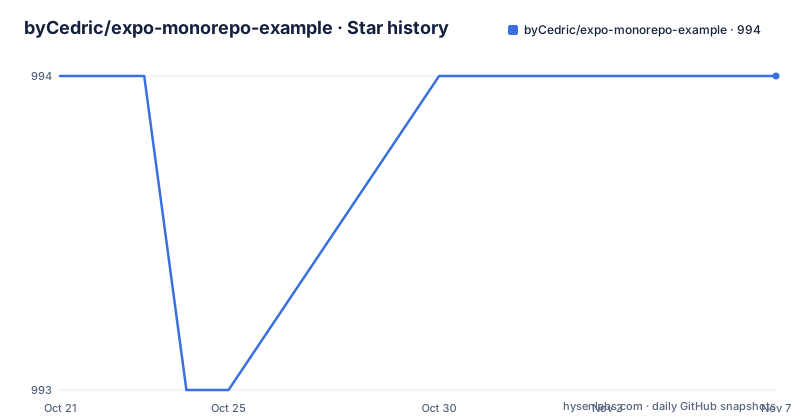
- byCedric/expo-monorepo-example994 ★ · +0
| Repository | 2026-10-21 | 2026-11-07 |
|---|---|---|
| byCedric/expo-monorepo-example | 994 | 994 |
0 Stars in the last 17 days, measured from the daily GitHub snapshot. Compare with other projects
Editorial analysis
One app, three packages, and a dependency graph worth copying
The repository is a reference layout rather than a shipped product, and its value is the shape of the tree rather than the amount of code in it. The root splits two kinds of code. Under apps live applications that only use packages and are not aware of other apps. Under packages live modules that may depend on external packages or on other packages inside the same workspace.
Concretely, apps/example is the only app and it consumes packages/eslint-config and packages/feature-home. feature-home is the only package carrying shared domain logic for React Native, and it itself sits on packages/ui for shared UI components and packages/eslint-config for the lint setup. So the graph is three packages deep at most: ui and eslint-config feed feature-home, and feature-home plus eslint-config feed the app. Anyone adopting this structure is really adopting that one convention, namely that shared logic lives in packages and apps stay unaware of each other.
The stated audience is teams that already build cross-platform apps with Expo and want most of the codebase shared with web, plus engineers who care about fast local feedback. The project itself suggests that someone starting from zero might be better served by a template that carries more assumptions, since those assumptions remove decisions this layout leaves open.
Turborepo scripts do the filtering so you never cd into a workspace
Nothing about the workspace is set up manually. The root package.json is private, is named @acme/monorepo, and maps every task to a Turborepo command. Those scripts are the entire developer interface:
  "scripts": {
    "dev": "turbo dev",
    "dev:example": "turbo dev --filter=\"{./apps/example}...\"",
    "lint": "turbo lint",
    "test": "turbo test",
    "build": "turbo build",
    "build:example": "turbo build --filter=\"...{./apps/example}\""
  },
The interesting part is the two filtered variants. Building every app when you only want to ship one wastes a lot of time, so the project uses a simple naming convention of dev:<app-name> and build:<app-name> on top of Turborepo workspace filtering. Note that the two filters are not mirror images: the dev filter places the ellipsis after the app path and the build filter places it before. The project does not spell out that difference in prose, so treat the exact filter strings in package.json as the source of truth rather than assuming the two commands select identical task sets.
The root also pins only two dev dependencies, turbo and typescript, and carries a Prettier configuration with a print width of 100 and single quotes. A small root means a short mental model: four global commands, two per-app commands, and one filter syntax to learn.
The Metro cache is filled by a build script, not by the dev server
Expo apps bundle with Metro, and Metro is slow to warm up. This repository treats that cost as a caching problem rather than a developer patience problem. In apps/example there is a build script whose job is to export React Native bundles, and exporting those bundles populates the Metro cache. Turborepo then restores that cache when the same input is reused, or invalidates it when the code changes.
The payoff shows up in the automated workflows rather than on a laptop. The resulting cache is reused when publishing previews and when deploying the app with EAS Hosting, so a preview build does not pay the full bundling cost again. On top of that, the GitHub Actions side caches the pnpm store and the Turborepo cache through the built-in Actions cache, so a CI runner starts with warm dependency state instead of resolving the entire tree from scratch.
That gives three cache layers to reason about: the pnpm global store, the Turborepo task cache, and the Metro bundle cache. They are separate things with separate invalidation rules, and the first real work for a team adopting this layout is deciding which of them a given change is allowed to invalidate. The repository demonstrates the wiring, but it does not explain a cache debugging procedure for when a stale bundle slips through.
Changing package managers means deleting the pnpm workspace files
The layout is not locked to pnpm. The project explains that any package manager can be used with Expo, and it gives an explicit migration checklist for bun, yarn or npm.
Remove .npmrc, pnpm-lock.yaml and pnpm-workspace.yaml. Remove the pnpm property from the root package.json. Add a workspaces property to the root package.json instead. Then update the workflows to use the new package manager.
That is a real migration with real consequences, not a one-line switch. The pnpm-workspace.yaml file is what defines the workspace globs, and the .npmrc file carries pnpm specific settings, so both have to be replaced rather than merely renamed. The lockfile also has to be regenerated, which means a dependency resolution pass and a review of any pinning that the old lockfile enforced implicitly.
There is one extra wrinkle for npm specifically. npm does not support the workspace protocol, so every internal reference of this shape has to change:
"<package>": "workspace:*"The replacement is the plain star range. Note what that costs: the workspace protocol lets a package declare that it wants the exact local build of a sibling, while a star range can resolve to a registry version once published. For an unpublished monorepo the difference is invisible, and for a published one it is the kind of detail that decides whether a release ships the right code.
The caveat section opens with a React Native version limit
The most important sentence in this project is in the caveats, not in the features. React Native is a complex library split over several packages, and it supports only a single version per monorepo. That single sentence is a hard architectural constraint, and it reaches further than it first appears.
In a layout where shared packages hold domain logic and UI, every package in the graph is compiled against the same React Native version. Two apps in the same workspace cannot pull in different React Native releases, and a package that wants a different one is not merely a dependency bump, it is a monorepo split. The dependency graph described earlier, with feature-home sitting on ui and both feeding the app, only works because all of them agree on one version.
Teams with more than one app on a different React Native version should treat that as the first thing to verify, before adopting the shared package pattern, and not as a detail to solve later.
EAS workflows need one secret, and the repository has no release history
Four GitHub Actions workflows cover the lifecycle. build starts EAS builds for apps/example using the given profile. deploy publishes apps to a preview URL or a production URL using EAS Hosting. preview publishes to a pull-request specific release channel and attaches a QR code to that pull request. test checks that apps and packages are healthy across multiple operating systems. A reusable composite action, setup-monorepo, prepares the monorepo inside GitHub Actions.
Building with EAS requires credentials before any of that works. The project states that you need an Expo access token and should set it as an EXPO_TOKEN GitHub Actions secret. A fresh clone therefore has no working build path until that secret exists in the repository settings, and the local install and dev commands do not cover that need.
On maintenance, the picture is plain. The repository is not archived, it has no GitHub releases, and the last push was on 2026-06-11. There is no version history to consult and no changelog to read, so the only signal about the state of the code is the content of the working tree itself and the date of that last commit. If you pin anything from this project, pin the commit, since a tag is not available.
What the reference stack leaves out on purpose
This is a deliberately bare stack, and the omissions are as instructive as the code. There is no authentication layer, no database, no API layer and no versioned publishing of the shared packages, even though the root script description for build mentions producing packages for npm. The lint configuration is a workspace package of its own, which tells you the authors consider lint rules shared infrastructure, but the rest of the platform decisions are left to the adopter.
The README points at a different project, create-t3-turbo, as a template worth considering when a project assumes more, and it lists that template's stack, which includes Next.js, NextAuth.js, Prisma and tRPC. That is a pointer to a heavier starting point, not a second dependency of this repository. The distinction matters because the two approaches solve different problems: this one optimizes for feedback speed and a small number of decisions, the other optimizes for a working full stack you can extend.
The author states the intent directly, that the code is kept as vanilla as possible so the project demonstrates what is possible with Expo. Read that as a teaching artifact. It shows the wiring of caching, filtering and deployment, and it deliberately declines to model product architecture.
Where a monorepo template wins and where this one wins
The honest comparison is not between two tools but between two starting costs. A template that ships auth, a database and a typed API removes weeks of wiring, and for a product team that changes what gets built and what gets maintained. What it also does is make its assumptions part of your codebase, and those assumptions are hard to see from the outside.
expo-monorepo-example takes the opposite position. It gives you a pnpm workspace, four Turborepo commands, two filtered commands, three shared packages, a Metro cache strategy, and four workflows that deploy a preview and a production build. What it does not give you is any of the layers above the UI components. You can also swap the package manager, which changes your dependency resolution semantics and your CI setup, and that is a lever this layout exposes and a heavier template usually does not.
So the decision turns on one question. If the bottleneck is a slow inner loop and a slow pipeline, take the caching and filtering patterns from this repository and bring your own domain packages. If the bottleneck is that nothing works yet, read a fuller template instead and accept its assumptions.
Editorial conclusion
Adopt this layout if you already ship with Expo and your pain is slow installs and slow CI, and copy the caching layout rather than the code. Do not adopt it as a fresh product foundation, because it ships no auth, no data layer and no versioned releases. Before anything else, verify the EXPO_TOKEN setup, the single-version React Native constraint that the caveats section opens with, and the fact that the last push was on 2026-06-11, which is the only change history this repository offers.
Frequently asked questions
How do I run the expo-monorepo-example project locally?
Run `$ pnpm install` to install the Node libraries with pnpm, then `$ pnpm dev` to start the development servers for all apps. Turborepo handles the rest, and no additional setup commands are required.
Do I need an Expo account to build apps in expo-monorepo-example?
For EAS builds you need an Expo access token, set as the EXPO_TOKEN GitHub Actions secret. The local install and dev commands do not mention that secret.
Can I use npm or yarn instead of pnpm in expo-monorepo-example?
Yes. Remove .npmrc, pnpm-lock.yaml and pnpm-workspace.yaml, remove the pnpm property from the root package.json, add a workspaces property, and update the workflows. With npm you also have to change workspace:* references to plain * because npm does not support the workspace protocol.
Why does expo-monorepo-example keep apps and packages in separate folders?
Apps only use packages and are not aware of other apps, while packages may use external packages or other monorepo packages. The example app uses eslint-config and feature-home, and feature-home in turn uses ui and eslint-config.
Can expo-monorepo-example run two React Native versions at once?
No. The caveats section states that React Native only supports a single version per monorepo, which is why shared packages such as feature-home and ui are shared across the workspace.
Official sources
Add this badge to your README
If you maintain this project, the badge below links readers to this analysis and shows its maintenance status from the daily GitHub snapshot. Paste the markdown into your README; add ?metric=license or ?metric=stars to the image URL for a different field.

[](https://hysenlabs.com/projects/bycedric-expo-monorepo-example)Star history chart for your README
[](https://hysenlabs.com/projects/bycedric-expo-monorepo-example)Was this useful?