mermaid-live-editor: a self-hostable editor for Mermaid diagrams
Edit, preview and share mermaid charts/diagrams. New implementation of the live editor.
At a glance
- What is it?
- The mermaid-live-editor is a SvelteKit app that renders Mermaid charts in the browser and can be run from a published Docker image or built from source. It is a good fit for teams that want diagram editing on their own infrastructure, and a poor fit for anyone expecting offline rendering or a stable public API.
- Who is it for?
- Adopt mermaid-live-editor if you want the mermaid.live editing experience on your own host and can accept that PNG, SVG and Kroki links point at external services unless you rebuild the image with your own MERMAID_RENDERER_URL and MERMAID_KROKI_RENDERER_URL. Do not adopt it if you need offline rendering, a documented HTTP API, or a hosted service with user accounts; none of those are described in the README.
- Can I use it commercially?
- Yes. MIT is a permissive licence: you can use, modify and sell software built on it, as long as you keep its copyright and licence notices.
- Is it still maintained?
- Yes. The repository last received commits 1 day ago.
- What is it written in?
- Mainly TypeScript, according to GitHub's language statistics.
Answers come from the project's GitHub data, last synced on November 13, 2026, and from our analysis. They are not legal advice.
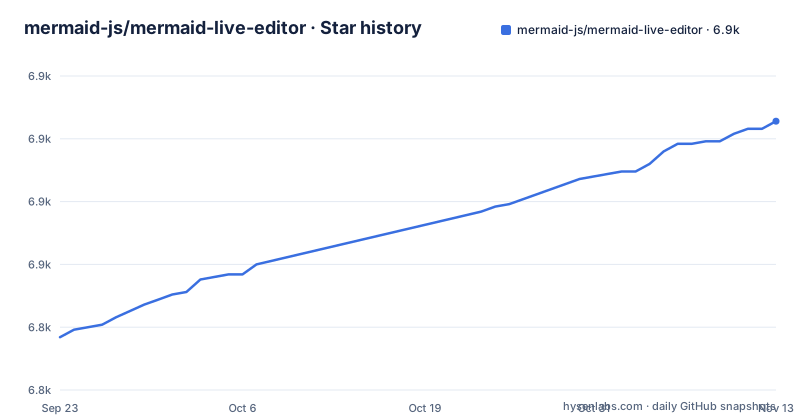
Star history
- mermaid-js/mermaid-live-editor6,907 ★ · +86
| Repository | 2026-09-23 | 2026-11-13 |
|---|---|---|
| mermaid-js/mermaid-live-editor | 6.8k | 6.9k |
86 Stars in the last 51 days, measured from the daily GitHub snapshot. Compare with other projects
Editorial analysis
What mermaid-live-editor is for
Mermaid is a text syntax for diagrams, and the mermaid-live-editor is the browser surface for writing that text and seeing the result. The README lists the core loop plainly: edit and preview flowcharts, sequence diagrams and gantt diagrams in real time, save the result as an SVG, get a link to a viewer of the diagram, and get a separate link to edit it so someone else can tweak the diagram and send a new link back. That last pair of links is the part that distinguishes the project from a plain preview pane.
The intended audience is anyone who writes Mermaid regularly and wants either the public instance at mermaid.live or a private copy. Because the whole thing is a static SvelteKit build served by nginx in the production image, a self-hosted copy is a single container with no database to operate. Teams that keep architecture diagrams in a repository next to the code are the natural users: the diagram source stays as text, and the editor is just a convenient place to iterate on it.
How the editor renders and shares a diagram
The application is built with SvelteKit and compiled to static assets. The production Dockerfile ends in an nginx stage, copies nginx.conf into the container and serves the build output from /usr/share/nginx/html on port 8080. There is no application server in that image, so the editing and preview work happens in the browser.
Export and link features are not purely local. The README describes build arguments for external services: MERMAID_RENDERER_URL points at a rendering service and defaults to https://mermaid.ink, while MERMAID_KROKI_RENDERER_URL points at a Kroki instance and defaults to https://kroki.io. Setting either to an empty string disables the corresponding links under the Actions menu. Analytics follow the same pattern: MERMAID_ANALYTICS_URL takes a Plausible instance and MERMAID_DOMAIN takes your domain, with analytics disabled when the value is empty. A fifth argument, MERMAID_IS_ENABLED_MERMAID_CHART_LINKS, defaults to empty and controls the button that saves to Mermaid Chart plus a promotional banner.
That design has a consequence worth stating directly: the default configuration sends diagram content to third-party hosts when a user clicks a PNG, SVG or Kroki link. The README notes that the security modal shown in the app assumes analytics, renderer, Kroki and Mermaid Chart are all enabled, and that you should modify Privacy.svelte if that assumption does not match your build. This is a build-time decision, not a runtime toggle.
Running the published image with Docker
The fastest path is the image published to GitHub Container Registry. The README gives this command, which maps container port 8080 to host port 8000:
docker run --platform linux/amd64 --publish 8000:8080 ghcr.io/mermaid-js/mermaid-live-editorAfter it starts, open http://localhost:8000 in a browser and the editor should load. Note the README's warning about this image: it is built with the default environment variables and you cannot override them at run time. If you need a different renderer, Kroki instance, analytics endpoint or the Mermaid Chart links turned on, you have to build the image yourself.
For local development the repository ships a compose file that builds the mermaid-dev target, mounts ./src into the container and exposes ports 3000 and 24678:
services:
  mermaid:
    build:
      context: .
      target: mermaid-dev
    volumes:
      - ./src:/app/src
    ports:
      - 3000:3000
      - 24678:24678
Run docker compose up --build and open http://localhost:3000, which is the port the README names for development.
Building from source with pnpm
The README lists Node.js current LTS and pnpm as requirements, and gives corepack enable pnpm as the install method for the package manager. A local checkout then needs two commands:
pnpm install
pnpm dev -- --open
The first install runs a postinstall hook that installs husky, runs svelte-kit sync and configures git to ignore the revisions listed in .git-blame-ignore-revs. The second starts the Vite dev server and opens a browser. The dev script is not just vite dev: package.json defines it as pnpm build:embed && vite dev, so the embed bundle is rebuilt before the server starts. There is also a dev:force variant that sets MERMAID_LOCAL=true and runs pnpm dev --force.
For a production build the relevant script is pnpm build, again preceded by the embed build. The Dockerfile passes the renderer arguments as build arguments before that step, which is the only place they take effect. If you want to customize a self-hosted instance, the build command is where the configuration lives, not a .env file at run time.
Where mermaid-live-editor is the wrong tool
The biggest limitation is the coupling to external rendering services. If your users are on an isolated network, the default build's PNG, SVG and Kroki actions will fail because they call mermaid.ink and kroki.io. You can set the renderer arguments to an empty string to remove those links, but the README does not describe a bundled local renderer that replaces them, so disabling the links removes the export path rather than relocating it.
The second limitation is the absence of a documented API. The README describes sharing through viewer and edit links, not an HTTP endpoint you can call to render a diagram server-side. Anyone looking for a rendering service should be looking at mermaid.ink or Kroki directly, since those are the services this editor already delegates to.
The third is operational. The README does not document rollback, version pinning, database backups or a migration path between releases, and the repository has no published releases, so there is no changelog to consult before an upgrade. The published image carries no tag in the command shown, which means a redeploy can silently pick up a newer build. Pin a digest or build your own image if that matters to you.
Finally, the security modal in the app assumes the services above are enabled. If you disable some of them, the text your users read about data handling will not match your deployment until someone edits Privacy.svelte. That is a small file change, but it is a manual one.
Alternatives and how they differ
The most direct alternative is a Mermaid preview extension for your code editor. The difference is placement rather than features: the extension renders inside the editor you already have open, so the diagram source and the preview sit in the same window and no browser tab or container is involved. What you give up is the shareable link model, since a VS Code extension has no URL to hand to a colleague who does not use VS Code.
A second option is to skip the editor entirely and call a rendering service from your own pipeline. mermaid.ink and Kroki are the two services this project already uses for its export links, and both accept diagram source and return an image. That approach fits documentation builds, where diagrams are generated from files during CI. It does not give you an interactive pane for iterating on a diagram, which is the whole point of an editor.
The honest comparison is that mermaid-live-editor occupies the middle ground: more interactive than a render service, more shareable than an IDE extension, and more work to host than either. If you only need diagrams in a document build, the render services are less machinery. If you only need to preview while typing, the extension is less machinery.
Licence, maintenance and upgrade cost
The repository is MIT licensed, and package.json repeats that licence field. MIT permits commercial use, modification and redistribution provided the copyright notice and permission notice are kept. If you modify Privacy.svelte or the build arguments, those changes are yours to maintain; the licence does not oblige you to publish them. This is a description of the licence text, not legal advice.
Maintenance looks active: the repository is not archived, and the last push was on 2026-11-02. Note that the default branch is develop, while the README says a pull request targeting master is built and deployed by Netlify and released automatically once merged. That split is worth understanding before you base a fork on the wrong branch.
Upgrade cost is dominated by the build step. Because renderer, Kroki, analytics and Mermaid Chart settings are build arguments rather than run-time configuration, every change to them means a rebuild and redeploy, and the published image cannot be reconfigured at all. The repository also carries renovate.json, so dependency updates arrive as pull requests; someone has to review them. The toolchain is not small: SvelteKit, Vite, Tailwind, Playwright, Vitest, ESLint and Prettier all appear in package.json, and the check, lint, test:unit and test:e2e scripts are the gates a fork has to keep passing.
Editorial conclusion
Adopt mermaid-live-editor if you want the mermaid.live editing experience on your own host and can accept that PNG, SVG and Kroki links point at external services unless you rebuild the image with your own MERMAID_RENDERER_URL and MERMAID_KROKI_RENDERER_URL. Do not adopt it if you need offline rendering, a documented HTTP API, or a hosted service with user accounts; none of those are described in the README. Before rolling it out, verify the rendering path your users will actually hit by building the image yourself and opening the Actions menu, and check Privacy.svelte against the services you enable.
Frequently asked questions
Is the Mermaid live editor free?
Yes. The project is MIT licensed and the README points to a live version at https://mermaid.live that you can try. You can also run your own copy from the published Docker image or by building from source.
How do I edit a diagram in the Mermaid live editor?
You type Mermaid syntax into the editor pane and the preview updates in real time, covering flowcharts, sequence diagrams and gantt diagrams according to the README. From there you can save the result as an SVG or generate a link to view or edit the diagram.
What is the Mermaid live editor used for?
It is used to edit, preview and share Mermaid charts and diagrams in a browser. The README lists real-time preview, SVG export, a viewer link for sharing and a separate edit link so someone else can change the diagram and send a new link back.
Is there an online editor for Mermaid code?
Yes, the live version at https://mermaid.live is exactly that. The same application can be self-hosted as a container, in which case the editing still happens in the browser.
How do I use the Mermaid live editor?
Open the editor, type Mermaid syntax into the editing pane, and watch the preview update. The README describes exporting the result as an SVG and generating links to view or edit the diagram.
Is the Mermaid live editor safe to use?
The README does not document a security model for the hosted instance. It does note that the app's security modal assumes analytics, renderer, Kroki and Mermaid Chart are enabled, and that you can modify Privacy.svelte if your build differs.
Official sources
Add this badge to your README
If you maintain this project, the badge below links readers to this analysis and shows its maintenance status from the daily GitHub snapshot. Paste the markdown into your README; add ?metric=license or ?metric=stars to the image URL for a different field.

[](https://hysenlabs.com/projects/mermaid-js-mermaid-live-editor)Star history chart for your README
[](https://hysenlabs.com/projects/mermaid-js-mermaid-live-editor)Was this useful?