emacs.dz is a curated index of Emacs configurations, not a configuration
Awesome emacs config files
At a glance
- What is it?
- The caisah/emacs.dz repository holds a single README.org file that points at other people's Emacs setups, first as starter packs and then as a table of personal configurations with columns for key bindings, packaging style and supported Emacs version. It is a reading list, and the interesting part is what those columns let you narrow down.
- Who is it for?
- Treat emacs.dz as a shortlist to read rather than a configuration to install: the repository contains one README.org file and no code, so it can only point you at other people's setups. It is worth your time if you are choosing between a large starter pack and a small personal config, because the table records the axes that decide that, such as key binding style, whether the setup is literate, and which Emacs version it targets.
- Can I use it commercially?
- Not without permission. GitHub finds no licence file in the repository, and without a licence all rights are reserved by default: you may read the code but not reuse it. Check the README, or ask the authors, before using it.
- Is it still maintained?
- Yes. The repository last received commits 61 days ago.
- What is it written in?
- GitHub does not report a main language for this repository.
Answers come from the project's GitHub data, last synced on November 7, 2026, and from our analysis. They are not legal advice.
Star history
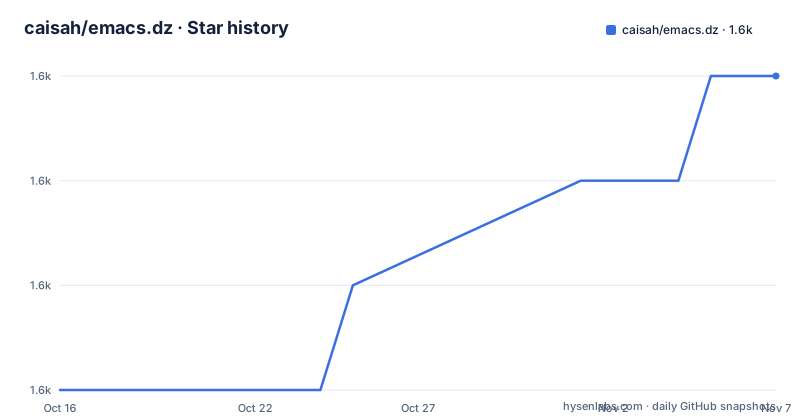
- caisah/emacs.dz1,560 ★ · +3
| Repository | 2026-10-16 | 2026-11-07 |
|---|---|---|
| caisah/emacs.dz | 1.6k | 1.6k |
3 Stars in the last 22 days, measured from the daily GitHub snapshot. Compare with other projects
Editorial analysis
One file, no code, nothing to install
The repository contains exactly one entry at the top level, README.org, and no source directories, no build system and no package manifest. That is the whole design. The project description calls it a list of awesome Emacs config files, and the topics tag it as a list, a dotfile and an emacs-configuration index. There is no install step to document, because there is nothing to install: you read the file, follow a link, and clone whichever configuration appeals to you. The consequence for a reader is that the quality of the resource is the quality of the curation, and a curated list ages in a way that a piece of software does not. A link can rot, a config can be rewritten under you, and an Emacs version column can quietly stop being true.
Starter packs come first, personal configs second
The list is split into two groups, and the ordering is the editorial judgement. The first group is a set of whole distributions of Emacs configuration, presented as a list of names with links: Spacemacs, Doom Emacs, Prelude, Crafted Emacs, Emacs Live, Centaur Emacs, Scimax, Better Defaults, Frontmacs, Nano Emacs, MinEmacs, JCS-Emacs, minimal-emacs.d, Emacs Kick, Emacs Solo, Corgi Emacs and Emacs Bedrock. The second group is explicitly framed as a list of people with nice Emacs config files, and it is a table rather than a bullet list. That structure tells you how the author expects the file to be read: first you decide whether you want a full-featured distribution, and only then do you start comparing individual setups. A list that mixed the two would be harder to use, because the decision between them is not really a matter of taste but of how much of Emacs you want handed to you.
The table records eight axes, and the version column is the one to read first
The personal config table has columns for Name, config, Key Bindings, Literate, Package, Emacs version, Clonable and Highlights. The Highlights column is free text and therefore tells you the least, but the middle columns are structured exactly because they are the ones you can filter on. The Emacs version column is the most consequential, and the entries in the visible part of the table range from 24+ and 24.3.1+ up through 24.4+ and 25+. The Package column records how each setup installs its dependencies, and it uses several different words, including `package`, `use-package`, `borg + use-package` and `quelpa`, so a reader who is deciding on a package manager can use the column directly rather than opening each repository. The Clonable column is a simple yes or no, which tells you whether the author considered the configuration ready to be copied wholesale.
Literate programming is tracked as its own column
The Literate column is a checkbox that marks configurations written in literate style. It is a small detail with real consequences, because literate Emacs configurations are usually plain text files with embedded source blocks, so you read them in a different way and you need the literate tooling to edit them. Making it a column means the author is signalling that literate setups are a legitimate and common choice among the people in the table, rather than a curiosity. The key bindings column is split the same way, with values such as classic, classic plus evi, evil, and non-standard, so a reader with a preference for Vim-style modal editing can filter for `evil` before opening anything. Both columns exist to let you eliminate most of the list before you start reading.
Key binding style is the fastest way to narrow the list
Looking across the visible rows, the overwhelming majority use classic bindings, and only a handful advertise `evil`, which is the modal editing layer. The `non-standard` entry stands out as the only one that rejects the categories entirely. That distribution is itself a finding, and it cuts against the usual assumption that people who publish Emacs configurations are mostly displaced Vim users. A reader arriving from Vim has a small but real set of rows to check, while a reader who wants to keep Emacs's own muscle memory has almost everything available. The same kind of information appears in the Highlights column, where individual rows mention things like eshell, helm, exwm, feed, multi mail accounts with carddav and caldav, a password store, Hammerspoon, org and latex.
One row already points at an archive instead of a live page
The table includes a Dennis Ogbe entry whose config link is not a repository but a web archive snapshot of a page, and the Highlights column for that row mentions an org blog, matlab, latex and email. The rest of the entries link to GitHub repositories, some of them dotfiles directories such as `.emacs.d` and some named after their owners. The archived link is the honest signal about the nature of a curated list: a person can stop maintaining a site, move a config, or abandon a workflow, and the index keeps pointing somewhere. The file also has no update log and no version column of its own, so the freshness of any individual row is something the reader has to judge by opening the link, not by reading the list. The last push to the master branch was on 2026-09-08, which tells you when the index itself was touched, not when any of the listed configurations were.
What this index cannot tell you
There is no licence attached to the repository, and the list covers configurations with their own licences, some of which will constrain what you can do with the code once you have copied it. Read that from the linked project, not from here. The list also says nothing about how any of these setups perform, how much they slow startup, or how well they are documented, and a Highlights column written in the author's own words is not a measurement. A configuration that is beautiful on the author's machine, with their font, their mail client and their org habits wired in, is a starting point rather than an answer. Treat the table as the first filter, then read the two or three candidates that survived it in full.
Editorial conclusion
Treat emacs.dz as a shortlist to read rather than a configuration to install: the repository contains one README.org file and no code, so it can only point you at other people's setups. It is worth your time if you are choosing between a large starter pack and a small personal config, because the table records the axes that decide that, such as key binding style, whether the setup is literate, and which Emacs version it targets. Before you adopt any entry, check that the linked repository is still alive, since one row in the list already points at a web archive snapshot rather than a live page, and check the Emacs version column against the version you actually run.
Frequently asked questions
What is caisah/emacs.dz?
It is a curated list of Emacs configuration files, held in a single README.org file at the root of the repository. The list starts with whole starter distributions and continues with a table of individual people's configurations, recording key bindings, literate style, package manager, Emacs version and clonability.
How do I install emacs.dz?
There is nothing to install. The repository contains one README.org file and no code, so you read the list and clone whichever linked configuration you decide to use.
Which Emacs configurations does emacs.dz list as starter packs?
The first group names Spacemacs, Doom Emacs, Prelude, Crafted Emacs, Emacs Live, Centaur Emacs, Scimax, Better Defaults, Frontmacs, Nano Emacs, MinEmacs, JCS-Emacs, minimal-emacs.d, Emacs Kick, Emacs Solo, Corgi Emacs and Emacs Bedrock.
What do the columns in the emacs.dz table mean?
The table records the person's name, a link to the config, the key binding style, whether the setup is literate, the package mechanism used, the Emacs version supported, whether it is clonable, and free text highlights.
What licence does emacs.dz use?
The repository carries no licence identifier, so there is no stated licence to rely on for the list itself. The configurations it links to carry their own terms, which you would need to read in the linked project.
Official sources
Add this badge to your README
If you maintain this project, the badge below links readers to this analysis and shows its maintenance status from the daily GitHub snapshot. Paste the markdown into your README; add ?metric=license or ?metric=stars to the image URL for a different field.

[](https://hysenlabs.com/projects/caisah-emacs-dz)Star history chart for your README
[](https://hysenlabs.com/projects/caisah-emacs-dz)Was this useful?