OpenRGB: One Tool to Replace Every Vendor's RGB App
Open source RGB lighting control that doesn't depend on manufacturer software. Supports Windows, Linux, MacOS. Mirror of https://gitlab.com/CalcProgrammer1/OpenRGB. Releases can be found on GitLab.
At a glance
- What is it?
- OpenRGB is a cross-platform, open source RGB controller that speaks directly to hardware via reverse engineered protocols, removing the need for manufacturer software. It is powerful, but it carries real risk and demands careful setup.
- Who is it for?
- Adopt OpenRGB if you are a Linux or macOS user stuck with Windows-only RGB apps, or if you want to sync lighting across multiple PCs and control it from your own scripts. Avoid it if you cannot accept the risk of hardware damage from reverse engineered protocols, or if you need guaranteed support for every device you own.
- Can I use it commercially?
- Yes, with conditions. GPL-2.0 is a copyleft licence: if you distribute software that includes it, you must release that software's source code under the same licence. Running it internally without distributing it does not trigger that obligation.
- Is it still maintained?
- Yes. The repository last received commits 2 days ago.
- What is it written in?
- Mainly C++, according to GitHub's language statistics.
Answers come from the project's GitHub data, last synced on October 21, 2026, and from our analysis. They are not legal advice.
Star history
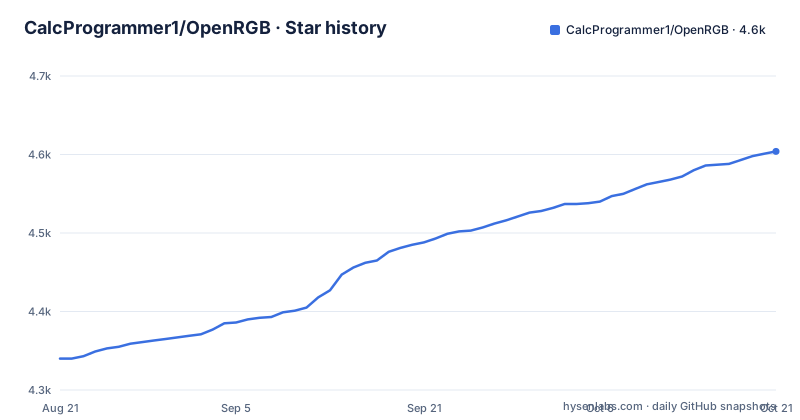
- CalcProgrammer1/OpenRGB4,604 ★ · +264
| Repository | 2026-08-21 | 2026-10-21 |
|---|---|---|
| CalcProgrammer1/OpenRGB | 4.3k | 4.6k |
264 Stars in the last 61 days, measured from the daily GitHub snapshot. Compare with other projects
Editorial analysis
The Problem: A Mess of Proprietary RGB Apps
RGB lighting is everywhere in PC hardware, and every manufacturer ships its own control software. These apps are proprietary, often Windows-only, and some demand online accounts. If you have a motherboard, a GPU, RAM, and a fan hub from different brands, you end up running several conflicting apps that all fight for background resources. OpenRGB attacks this directly: it is a single application that controls RGB devices from many vendors, on Windows, Linux, and macOS, with no manufacturer software required. The README puts it plainly: one app to rule them all. The target user is anyone who mixes hardware brands, runs Linux or macOS, or simply wants to reduce the number of RGB utilities installed.
How OpenRGB Works: Reverse Engineered Protocols and Direct Hardware Access
OpenRGB does not talk to vendor software. It talks to the hardware itself using reverse engineered protocols. The project sends data directly to devices over SMBus and USB, which is why setup requires specific access permissions. The README warns that this approach carries risk: sending data to hardware that the developers do not fully understand can damage or brick devices. There have been past incidents, and the project has disabled or fixed the offending code, but the warning states it cannot guarantee it will not happen again. This is the core trade-off of OpenRGB. You get independence from vendor apps, but you take on the risk that the vendor never accepted. The architecture includes a graphical view of individual LEDs for creating custom patterns, and it can operate standalone or as a client/server setup with a headless server.
Getting It Running: Binaries, Dependencies, and Device Access
Pre-built binaries are available for Windows, Linux (AppImage, .deb, .rpm), and macOS. Releases are on OpenRGB.org and GitLab. Windows users need the Microsoft Visual C++ 2019 runtime installed. Linux users have several options: official packages for Alpine, Fedora, and Arch, plus a Flatpak on Flathub. Arch users can install from the Extra repository or the AUR for the pipeline version. If you use the AppImage or Flatpak, you must install the latest udev rules, documented in Documentation/UdevRules.md. After installation, you need to set up device access. The README points to two guides: SMBus Access and USB Access. These are not optional steps. Without proper permissions, OpenRGB cannot see your devices. The setup is more involved than installing a vendor app, but it is the price of hardware-level control.
The SDK and Multi-PC Sync: Where OpenRGB Goes Beyond a GUI
OpenRGB is not just a graphical tool. It exposes a network SDK that lets third-party software control your lighting. The README lists client libraries in Python, Node.js, C#, Java, C++, and Rust. There is also a D-Bus connector for Linux. This means you can write your own scripts to react to game events, music, or system metrics. The SDK protocol is documented in Documentation/OpenRGBSDK.md. Additionally, you can run multiple instances of OpenRGB and synchronize lighting across multiple PCs. This is a feature that vendor apps rarely offer. If you have a multi-PC setup, OpenRGB can make them behave as one lighting system. The SDK also enables projects like Keyboard Visualizer and Aurora to drive effects, which turns OpenRGB into a backend for a broader ecosystem.
Limitations and the Wrong Tool for the Job
The biggest limitation is device coverage. OpenRGB supports a wide range of hardware, but not everything. The README directs you to the Supported Devices page to check compatibility. If your device is not listed, you are out of luck unless you contribute reverse engineering work. The project is a continuation of OpenAuraSDK, and new devices require reverse engineering, which is slow and depends on community effort. Another limitation is that OpenRGB only controls the lighting effects built into the hardware. The README states this explicitly: OpenRGB itself only provides control over the lighting effects built into hardware. It does not synthesize complex software-driven effects on its own, except through the SDK. If you want ambient lighting that reacts to your screen, you need a separate application like Keyboard Visualizer. Finally, the hardware risk is a genuine reason to avoid OpenRGB. If you have expensive or rare hardware and cannot afford a brick, vendor software is the safer choice.
Alternatives: Vendor Apps and Aurora
The obvious alternative is to stick with the manufacturer's software. For a single-vendor setup, that is often the easiest path. Vendor apps are guaranteed to work with that vendor's hardware, and they come with support and updates. But they are proprietary, and on Linux or macOS they often do not exist at all. A different open source alternative is Aurora, which is listed in the README as an application that supports the OpenRGB SDK. Aurora is a lighting synchronization tool that can drive effects across devices, but it relies on OpenRGB for device control. The difference in approach is clear: OpenRGB is the hardware abstraction layer, while Aurora is the effect engine. If you only need basic color setting and profiles, OpenRGB alone is enough. If you want reactive or animated effects, you need both. This separation of concerns is a strength, but it also means more moving parts.
Maintenance, Licensing, and Upgrade Costs
OpenRGB is licensed under GPL-2.0. That means if you distribute modified versions, you must release the source code under the same license. This is a standard open source license, but it is worth knowing if you plan to embed OpenRGB in a commercial product. The project is actively maintained. The latest release is release_candidate_1.0rc3.1, dated 2026-08-23, with a previous release candidate from June 2026. The project has a pipeline version for experimental builds, which suggests a continuous development flow. Upgrading is straightforward: you download a new binary or package. But the maintenance cost is not zero. The README warns that the project is always changing, and device support can be added or removed. When you upgrade, a device that worked before might behave differently. You should check the release notes and the supported devices page after each update. The udev rules on Linux may also need updating, especially if you use the AppImage or Flatpak. The project's history shows it has been through several iterations, so you should expect ongoing changes.
Editorial conclusion
Adopt OpenRGB if you are a Linux or macOS user stuck with Windows-only RGB apps, or if you want to sync lighting across multiple PCs and control it from your own scripts. Avoid it if you cannot accept the risk of hardware damage from reverse engineered protocols, or if you need guaranteed support for every device you own. Before using it, verify your devices are on the supported devices list, read the SMBus and USB access guides, and install the latest udev rules on Linux. The project is actively maintained with a recent release candidate, but the hardware risk is real and permanent.
Frequently asked questions
What does OpenRGB do?
It is open source RGB lighting control that does not depend on manufacturer software, supporting Windows, Linux and macOS. It sets colours and selects effect modes for a wide variety of RGB hardware, saves and loads profiles, offers a command line interface, a graphical view of device LEDs for custom patterns, and can run standalone or as a client with a headless server.
how to install openrgb udev rules
If you are using the AppImage or Flatpak versions, the README says to ensure you install the latest udev rules, with instructions in a UdevRules.md document under the Documentation directory. Device access setup for SMBus and USB is documented separately on the SMBus Access and USB Access pages.
Is OpenRGB completely free?
It is open source under the GPL-2.0 license, and the author states the goal is not to make money off the project. Donation links are provided through PayPal, Patreon and Bitcoin, with the Patreon tier carrying no exclusive content, and donations are described as being used to buy more RGB hardware to reverse engineer.
Is OpenRGB trustworthy with my hardware?
The README carries an explicit warning instead. It interacts directly with hardware using reverse engineered protocols, there is always some risk in sending data to hardware whose exact behaviour is not understood, certain hardware has been damaged or bricked in the past with the offending code disabled or fixed, and the project cannot guarantee it will not happen again. Installing and using it means accepting that risk.
how to use openrgb
Install it, then follow the SMBus Access or USB Access documentation for device permissions, and on Linux install the current udev rules if you used the AppImage or Flatpak build. It offers a command line interface, can run as a headless server that other software talks to over the OpenRGB SDK, and lets you paint custom patterns on a graphical view of the device LEDs.
Official sources
Add this badge to your README
If you maintain this project, the badge below links readers to this analysis and shows its maintenance status from the daily GitHub snapshot. Paste the markdown into your README; add ?metric=license or ?metric=stars to the image URL for a different field.

[](https://hysenlabs.com/projects/calcprogrammer1-openrgb)Star history chart for your README
[](https://hysenlabs.com/projects/calcprogrammer1-openrgb)