wireguard-docs: one author's unofficial WireGuard reference
📖 Unofficial WireGuard Documentation: Setup, Usage, Configuration, and full example setups for VPNs supporting both servers & roaming clients.
At a glance
- What is it?
- wireguard-docs is a solo, unofficial WireGuard reference kept in a single README plus six example directories. It publishes no releases, its default branch is master, and its last push was on 2026-03-21, so it reads as a hand-written companion to the official pages rather than a specification.
- Who is it for?
- wireguard-docs is worth reading as one author's map of WireGuard configuration, especially the glossary and the two-block config reference, and worth keeping next to the manpages rather than instead of them. It is not a specification, it publishes no releases, and its last push was on 2026-03-21, so treat its statements about kernel behaviour as dated.
- Can I use it commercially?
- Yes. MIT is a permissive licence: you can use, modify and sell software built on it, as long as you keep its copyright and licence notices.
- Is it still maintained?
- Activity is slowing. The repository last received commits 7 months ago.
- What is it written in?
- Mainly Shell, according to GitHub's language statistics.
Answers come from the project's GitHub data, last synced on November 14, 2026, and from our analysis. They are not legal advice.
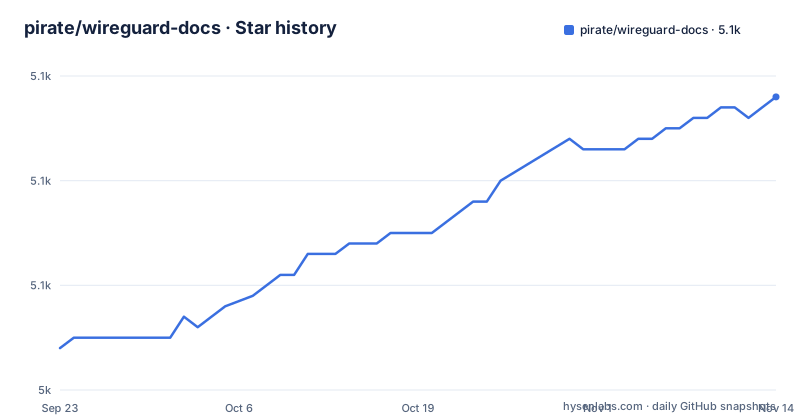
Star history
- pirate/wireguard-docs5,068 ★ · +24
| Repository | 2026-09-23 | 2026-11-14 |
|---|---|---|
| pirate/wireguard-docs | 5k | 5.1k |
24 Stars in the last 52 days, measured from the daily GitHub snapshot. Compare with other projects
Editorial analysis
Everything lives in one README.md beside six example directories
There is no build, no package, and no install step here. The top level is `.github/`, `LICENSE`, `README.md`, and six example directories, on the `master` branch, under the MIT license. Those six directories are the only structured artifacts beyond the prose:
example-full/
example-internet-browsing-vpn/
example-iptables/
example-lan-briding/
example-simple-client-to-server/
example-simple-server-to-server/
The names carry the scope: a full setup, a setup that routes internet browsing through a VPN, one that involves iptables, one that bridges two LANs, and two minimal cases, a single client reaching a server and two servers talking to each other. For a reader, that list is the fastest way to pick a starting point, since the README is one long document rather than a set of pages. It is also why the repository points at a rendered copy of itself at docs.sweeting.me/s/wireguard, described as the nicer HTML version, and why the source, the example code, and the issue tracker all live in the same repository.
The LAN example directory is spelled example-lan-broading, not bridging
One directory name is wrong, and it is wrong in a way that costs you an afternoon if you script against it. The example covering the link between two LANs is `example-lan-briding`, not `example-lan-bridging`. Nothing else in the tree hints at the intended spelling, so a search for the correct word returns nothing while a search for the misspelling returns a directory. The same trap applies to any path you copy out of this documentation into a shell command, a sync script, or a bookmark: the names have to be reproduced exactly as they are spelled. It is a small defect in a repository whose real product is prose, and it is also a fair signal of how little the example directories are checked, since nothing in a documentation repository fails a build when a directory gets renamed. Check the name against the tree before you build a path around it.
The table of contents makes you learn its vocabulary before routing
The document declares its scope in a table of contents with three real parts under the contents heading: Intro, WireGuard Documentation, and Further Reading. WireGuard Documentation opens with a glossary, and the entries are the ones you need before anything else makes sense: Peer/Node/Device, Bounce Server, Subnet, CIDR Notation, NAT, Public Endpoint, Private key, Public key, DNS, and Example Strings. Two of those are local coinages in context. A Bounce Server and a Public Endpoint are glossary terms this document defines for itself, so when you later read a mailing list thread or an issue that uses different words for the same role, that mapping is yours to do. After the glossary, the mechanics run through six topics in a fixed order: how public relay servers work, how WireGuard routes packets, what WireGuard traffic looks like, performance, the security model, and how keys are managed. Keys come last, so the network is explained before the identity inside it.
Usage is a fixed sequence and the config reference has two blocks
The usage part is a pipeline rather than a menu: QuickStart, Setup, Config Creation, Key Generation, Start / Stop, Inspect, Testing. Every step assumes the one before it, so the document wants to be read in order on a first pass and consulted at a single step afterwards. The configuration reference that follows is divided into two sections only, `[Interface]` and `[Peer]`, which are the two bracketed names the reference uses to sort every option. That shape suits editing a file you already have and does not help when you arrive with one option in mind, because the table of contents offers no alphabetical index telling you which of the two blocks owns it. In practice that sends you back and forth between the reference and one of the example directories, which is the intended workflow of the repository: prose for the concepts, a directory for the concrete file.
Advanced topics promise IPv6, NAT-to-NAT, dynamic addresses, and containers
Nine advanced topics are promised, and this is where drift risk sits: IPv6, Forwarding All Traffic, NAT-to-NAT Connections, Dynamic IP Allocation, Platform Capture Technologies, Other WireGuard Implementations, WireGuard Setup Tools, Config Shortcuts, and Containerization. Three of them point outward rather than inward. Other WireGuard Implementations, WireGuard Setup Tools, and Config Shortcuts are explicitly about other people's tools and configuration shortcuts, so in those sections the repository's contribution is the selection and the surrounding explanation rather than the artifact itself. Platform Capture Technologies is the entry to watch, since packet capture differs by platform and no version or date is attached to any of these entries in the table of contents. With no releases published and the last push dated 2026-03-21, there is no tag to pin a capture description to, so read that section as a snapshot of one author's understanding on one date.
Unofficial and one author, with the official pages kept one click away
The credit line is explicit: the original software belongs to the WireGuard project, to zx2c4, and to the open source contributors, and this repository is one person's unofficial attempt at providing more documentation, API references, and examples. Unofficial is not a formality here. A separate block of official links points at the homepage, an install page, a quickstart, the `wg(8)` and `wg-quick(8)` manpages, the main git repository at git.zx2c4.com, a mirror, and the mailing list. Those are the places to check a configuration decision against, because this document is written as a companion rather than as a source of truth, and Further Reading collects external tutorials, papers, related projects, and discussions for the same reason. The currency marker inside the text is old: it says WireGuard was merged into version 5.6 of the Linux kernel as of 2020-01 and will ship with most Linux systems out of the box. Nothing in this repository tells you which sections were revisited after 2026-03-21.
Editorial conclusion
wireguard-docs is worth reading as one author's map of WireGuard configuration, especially the glossary and the two-block config reference, and worth keeping next to the manpages rather than instead of them. It is not a specification, it publishes no releases, and its last push was on 2026-03-21, so treat its statements about kernel behaviour as dated. Before acting on a configuration decision taken from here, check the same option against `wg(8)`, `wg-quick(8)`, and the official quickstart, and copy the example directory names exactly as they are spelled.
Frequently asked questions
Why do I have WireGuard on my computer?
If nobody installed it deliberately, the documentation offers one route to the answer: WireGuard was merged into version 5.6 of the Linux kernel as of 2020-01, so it ships with most Linux systems out of the box.
What is the purpose of WireGuard?
WireGuard is an open source VPN solution written in C by Jason Donenfeld and others, aimed at fixing many of the problems that have plagued other modern server-to-server VPN offerings such as IPSec/IKEv2, OpenVPN, or L2TP.
Is WireGuard safe to use?
The stated goals include strong modern security by default, and the overview claims modern encryption that is secure by default with forward secrecy and resilience to downgrade attacks. The table of contents also reserves a section for the security model.
What are the downsides of using WireGuard VPN?
The table of contents has no section listing downsides. What the repository does record is that it is unofficial, written by one person, publishes no releases, and had its last push on 2026-03-21, so pair it with the `wg(8)` and `wg-quick(8)` manpages.
Official sources
Add this badge to your README
If you maintain this project, the badge below links readers to this analysis and shows its maintenance status from the daily GitHub snapshot. Paste the markdown into your README; add ?metric=license or ?metric=stars to the image URL for a different field.

[](https://hysenlabs.com/projects/pirate-wireguard-docs)Star history chart for your README
[](https://hysenlabs.com/projects/pirate-wireguard-docs)Was this useful?