Jump.js: A Minimal Smooth Scroll Library That Stays Out of Your Way
GitHub describes it as A modern smooth scrolling library.. The repository metadata lists JavaScript as its primary language. The metadata lists the MIT license. This article stays within the project description and details documented in the GitHub repository README.
At a glance
- What is it?
- Jump.js is a small, dependency-free smooth scrolling library with a singleton API and a focus on modern JavaScript workflows. It works well for simple scroll-to-element or scroll-by-pixel needs, but its age and narrow scope mean it is not a fit for complex scroll choreography.
- Who is it for?
- Adopt Jump.js if you need a no-frills, dependency-free smooth scroll for a single-page site or a simple anchor navigation, and you already use a build system that can handle ES6 imports. Avoid it if you need scroll-driven animations, nested scroll containers, or support for browsers older than IE10 without polyfills.
- Can I use it commercially?
- Yes. MIT is a permissive licence: you can use, modify and sell software built on it, as long as you keep its copyright and licence notices.
- Is it still maintained?
- Yes. The repository last received commits 40 days ago.
- What is it written in?
- Mainly JavaScript, according to GitHub's language statistics.
Answers come from the project's GitHub data, last synced on October 22, 2026, and from our analysis. They are not legal advice.
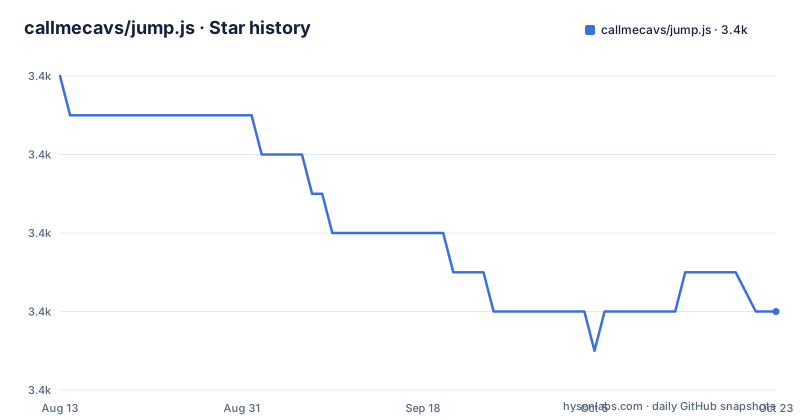
Star history
- callmecavs/jump.js3,422 ★ · -6
| Repository | 2026-08-13 | 2026-10-22 |
|---|---|---|
| callmecavs/jump.js | 3.4k | 3.4k |
-6 Stars in the last 70 days, measured from the daily GitHub snapshot. Compare with other projects
Editorial analysis
What Jump.js Solves and Who It Is For
Jump.js addresses a narrow problem: making the browser scroll smoothly to a target instead of jumping instantly. It is a library for developers who want that behavior without pulling in a large animation framework. The README describes it as "a modern smooth scrolling library," and the usage notes make clear it targets a modern JavaScript workflow with ES6 modules and a bundler. The intended user is someone building a site with a build system like outset, the boilerplate the author links to, and who wants a small, focused tool. It is not for someone who needs a full-featured scroll library with parallax or scroll-triggered effects. The library does one thing, and it does it with a minimal API: a single function call with a target and optional settings.
The Singleton API and Its Implications
Jump.js exports a singleton. You do not create an instance; you just import it and call it. The README states: "Jump exports a singleton, so there's no need to create an instance. Just call it, passing a target." It also notes that the singleton can make an infinite number of jumps. This design choice simplifies usage, but it means there is no way to configure a persistent instance with default options. Every call must pass the full options object if you want non-default behavior. That is fine for one-off jumps, but if you have a site with many scroll links, you will repeat the same options in each call. A factory function or a configurable instance would reduce repetition, but the author chose simplicity over convenience. For a library this small, that trade-off is defensible, but it is a real constraint.
How the Scroll Mechanism Works
The library depends on a single browser API: requestAnimationFrame. The README lists this as the only dependency, and it explains that browser support is tied to it: Chrome 24+, Firefox 23+, Safari 6.1+, Opera 15+, IE 10+, iOS Safari 7.1+, and Android Browser 4.4+. There are no polyfills included, and the README explicitly says there are no plans to add any "in the interest of file size." That means the scroll animation is driven by requestAnimationFrame, which is the standard way to create smooth frame-by-frame animations. The actual animation logic is not shown in the README, but the easing function is mentioned: the default is easeInOutQuad, credited to Robert Penner, and it is defined in src/easing.js. The library likely calculates a distance and applies the easing function over the duration, updating the scroll position each frame. The offset option adjusts the target position only when scrolling to an element, which is useful for fixed headers. The callback runs after the jump completes, and it is called with this bound to window, as the README notes.
Getting It Running: Install, Import, Call
Installation is straightforward. Run npm install jump.js --save to add it to your package.json. Then import it with ES6 syntax: import jump from 'jump.js'. The README recommends having a build system that can transpile ES6 and bundle modules, and it points to the outset boilerplate for that purpose. Calling the library is just jump('.target') for a CSS selector, jump(node) for a DOM node, or jump(100) to scroll by a pixel amount. The options object is optional, and all keys except target have defaults. For example, you can set a custom duration with jump('.target', { duration: 1000 }), or use a function that receives the distance in pixels: duration: distance => Math.abs(distance). The offset option takes a number, and the callback is a function. The easing option accepts a function, and the a11y option is a boolean. The README shows these examples clearly, so getting started is a matter of copying the pattern.
The a11y Option: A Hidden Trade-off
The a11y option is disabled by default, and the README explains why: it has visual implications. When enabled and scrolling to an element, the library adds a tabindex to the element and focuses it. Focusing triggers the :focus CSS state, which often shows an outline. That is a deliberate behavior for accessibility, but it can be surprising. If you enable it, you must be prepared to style the focus state or accept the default outline. The README warns about this, but it is easy to overlook. This is a genuine limitation for users who want accessibility without visual side effects. The library does not offer a way to focus without adding tabindex, or to suppress the outline. You would have to handle that with your own CSS. For a library that prides itself on being minimal, this is a reasonable trade-off, but it is a decision you need to make consciously.
Limitations and When It Is the Wrong Tool
Jump.js has several limitations that make it unsuitable for certain projects. First, it only supports vertical scrolling on the window; there is no support for scrolling inside a specific container or a nested scrollable element. The target can be a pixel number or an element, but the scroll always happens on the main document. If you need to scroll a div with overflow: auto, Jump.js will not help. Second, the library has not been updated since January 2017. The last release is v1.0.2, and the last push was on 2017-01-08. That means it has not been tested against newer browser changes or JavaScript standards. It still works because requestAnimationFrame is stable, but there is no active maintenance. Third, the README notes that there are no polyfills, so older browsers need external shims. Finally, the easing function is fixed; you can supply a custom one, but the library does not provide a variety of presets. For a simple smooth scroll, these are acceptable trade-offs, but for a complex site with multiple scroll contexts or a need for ongoing support, it is the wrong tool.
Alternatives: Comparing Approaches
The most obvious alternative is to write your own smooth scroll with requestAnimationFrame. That gives you full control over easing, duration, and container support, and it avoids a dependency. But it takes time and testing. Another alternative is a larger library like smooth-scroll by Chris Ferdinandi, which offers more options such as custom easing functions, support for same-page links, and a focus on accessibility out of the box. The key difference is that smooth-scroll is a more feature-complete library with a configurable instance, whereas Jump.js is a single-purpose singleton. If you need to handle multiple scroll containers or want a more opinionated accessibility setup, smooth-scroll is a better fit. If you want minimal code and are comfortable with the singleton pattern, Jump.js is lighter. The choice depends on whether you value control or convenience.
Maintenance, License, and Upgrade Cost
The project is licensed under MIT, which is permissive and allows commercial use, modification, and distribution, with attribution. The copyright is held by Michael Cavalea, as stated in the README. The maintenance situation is the biggest concern: the last release was in January 2017, and there has been no activity since. That means there is no upgrade path. If you adopt Jump.js, you are adopting a frozen library. The upside is that the code is small and stable, so the risk of breakage is low. The downside is that if you encounter a bug, you are on your own. You can fork it, but that adds your own maintenance burden. The upgrade cost is zero because there are no new versions to track, but the cost of switching away later is the effort of replacing the calls with another library or custom code. Given the simplicity of the API, that switch is not painful, but it is a consideration.
Editorial conclusion
Adopt Jump.js if you need a no-frills, dependency-free smooth scroll for a single-page site or a simple anchor navigation, and you already use a build system that can handle ES6 imports. Avoid it if you need scroll-driven animations, nested scroll containers, or support for browsers older than IE10 without polyfills. Before adopting, verify that the lack of maintenance since 2017 is acceptable, check that your target browsers support requestAnimationFrame natively, and test the a11y option carefully because it changes focus behavior by design.
Frequently asked questions
What is the use of jump?
This repository is a smooth scrolling library rather than anything to do with the word outside that context. It exports a singleton you call with a target, offering six options covering duration, pixel offset, a completion callback, an easing function and an accessibility mode, with the target itself being either a pixel delta or an element.
What does JS mean in coding?
Here JS means JavaScript, and the package is published under the name jump.js. It has no runtime dependencies and its browser support rests entirely on one animation-frame scheduling API, with the documented native list running from Chrome 24 and Firefox 23 through Safari 6.1, Opera 15 and Internet Explorer 10.
What are jump statements in JavaScript?
The language has no jump statement of that name and this library adds none. What it provides is a function that moves the scroll position, either by a pixel delta from the current position or to a specific element, optionally offset, and animated over a duration you can set as a constant or compute from the distance.
Are JS and HTML the same?
They are not, and this repository deals only with the first. The library is JavaScript that scrolls a page built out of HTML and CSS, and its accessibility option works by adding a tabindex attribute to the target element and focusing it, which is why the documentation warns that the setting is disabled by default.
Official sources
Add this badge to your README
If you maintain this project, the badge below links readers to this analysis and shows its maintenance status from the daily GitHub snapshot. Paste the markdown into your README; add ?metric=license or ?metric=stars to the image URL for a different field.

[](https://hysenlabs.com/projects/callmecavs-jump-js)Star history chart for your README
[](https://hysenlabs.com/projects/callmecavs-jump-js)